🚀 Supercharge your YouTube channel's growth with AI.
Try YTGrowAI FreeUse np.arctan2() for Coordinate Angles


The call np.arctan2(1, -1) returns 3π/4 radians. I find it striking that the ratio-only call returns -45 degrees for the same point.
Pass y before x to get the signed angle for the coordinate pair. Read the result in radians before converting it with np.degrees.
What np.arctan2 returns
NumPy’s np.arctan2(y, x) returns the signed angle from the positive x-axis to the point whose horizontal coordinate is x and vertical coordinate is y. Its output is radians in [−π, π], and NumPy expects y first and x second.
The NumPy reference documents this argument order and the angle range.
The negative x-axis sits at the two signed endpoints, −π and π. Signed zero in y can select either endpoint.

Prerequisites
Use a Python environment that can import NumPy. Keep the coordinate roles straight before calling the function, because the argument order is y first and x second.
| Requirement | What to have ready |
|---|---|
| Python | A working interpreter in the environment used for the example. |
| NumPy | Installed in that environment and imported as np. |
| Coordinate pair | y is vertical and x is horizontal. Pass y first. |
Step 1: Pass y before x to calculate one angle
Assign the vertical value to y and the horizontal value to x, then pass them in that order. The call returns one scalar angle in radians, and np.degrees converts it after the quadrant has been chosen.
np.arctan2 accepts non-complex coordinate values and returns a new scalar, leaving y and x unchanged. Replace either coordinate to calculate another direction, then call the function again.
import numpy as np

y = 1
x = -1
angle = np.arctan2(y, x)
ratio_angle = np.arctan(y / x)

print(f"arctan2 radians: {angle:.6f}")
print(f"arctan2 degrees: {np.degrees(angle):.1f}")
print(f"arctan of ratio degrees: {np.degrees(ratio_angle):.1f}")
The ratio-only call sees -1 and returns -45 degrees. Passing both signs lets np.arctan2 return 135 degrees for the same point.
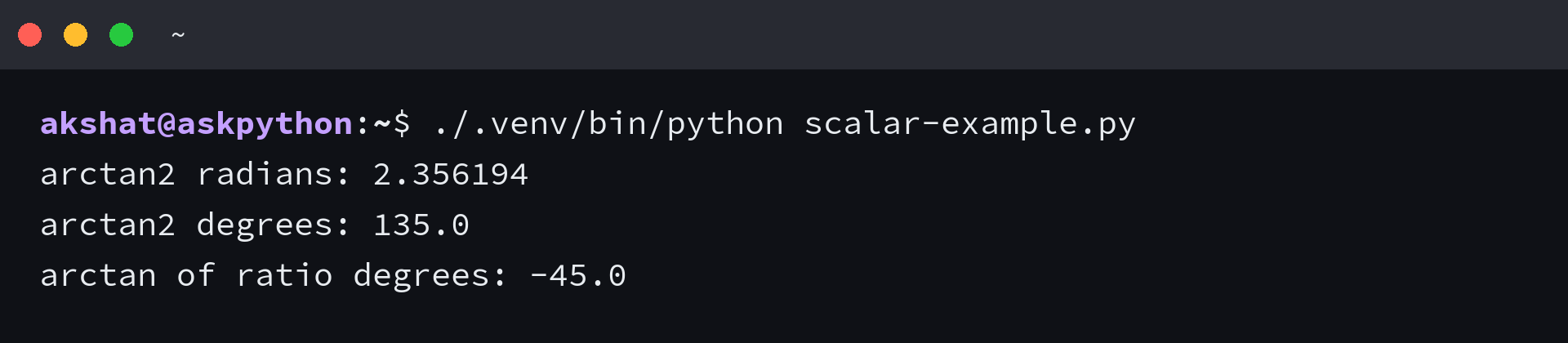
Run the file in the NumPy environment to print the scalar result and return to the shell.
./.venv/bin/python scalar-example.py
Step 2: Apply np.arctan2 to coordinate arrays
For arrays with compatible dimensions, np.arctan2 works element by element. Here y has shape (2, 1) and x has shape (2,), so the output has shape (2, 2).
The NumPy broadcasting guide explains the dimension rule, and NumPy’s reference describes how compatible shapes produce a common result shape.
| Input | Shape |
|---|---|
| y | (2, 1) |
| x | (2,) |
| result | (2, 2) |
import numpy as np

y = np.array([[1], [-1]])
x = np.array([1, -1])
angles = np.arctan2(y, x)

print(np.degrees(angles))
The function calculates one angle for each coordinate pair and returns a (2, 2) array without changing y or x. If the input shapes cannot broadcast, NumPy raises ValueError and produces no result.

Run the array file, read its matrix, and return to the shell.
./.venv/bin/python array-example.py
Handle zero coordinates and signed zero
An x value of 0 is valid, so a point on the vertical axis still has a defined angle. On the negative x-axis, signed zero in y selects one of the two endpoints, +π or −π.
import numpy as np

angle = np.arctan2(1.0, 0.0)
print(f"y=1.0, x=0.0 -> {np.degrees(angle):.1f} degrees")

for y in (0.0, -0.0):
    angle = np.arctan2(y, -0.0)
    print(f"y={y!r}, x=-0.0 -> {np.degrees(angle):+.1f} degrees")
The vertical-axis case returns 90 degrees. The loop prints +180 and -180 degrees for the two signs of y, then exits without changing the inputs.
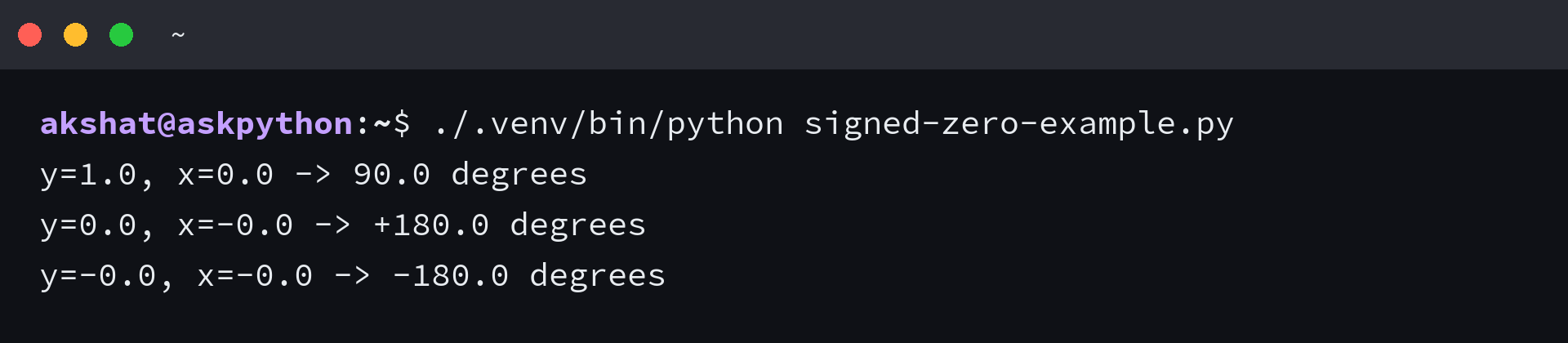
Run the file to print the vertical-axis result and both signed endpoints. It returns to the shell after the loop finishes.
./.venv/bin/python signed-zero-example.py
Choose np.arctan2 when the quadrant matters
I compared np.arctan(y / x) with np.arctan2(y, x) at (1,1) and (-1,-1). Both ratios equal 1, so np.arctan returns 45 degrees for both points and np.arctan2 returns 45 and -135 degrees because it receives both coordinate signs.
| Call | Input it receives | Principal output range |
|---|---|---|
| np.arctan(y / x) | One ratio | [−π/2, π/2] |
| np.arctan2(y, x) | Separate y and x coordinates | [−π, π] |
Choose np.arctan for a ratio whose principal angle fits, and choose np.arctan2 when direction depends on both signs, as the NumPy arctan explanation documents its single-input behavior.
Keep both coordinates attached to the angle
Carry the same y and x values into each direction calculation. Convert the returned angle only when the display needs degrees, after np.arctan2 has used both coordinate signs.
import numpy as np

y = np.array([1, -1])
x = np.array([-1, -1])
degrees = np.degrees(np.arctan2(y, x))
print(degrees)
The expression returns a degree value for each coordinate pair, so keep the coordinate order attached to the data as it moves into later calculations. It creates a result array and leaves y and x available for another operation.
NumPy arctan2 questions
An arctan2 value depends on both inputs. Each answer below names the coordinate pair when a numeric angle is involved.
What is the value of arctan2 in terms of pi?
There is no single value without y and x. For np.arctan2(1, -1), the result is 3π/4 radians, or 135 degrees.
How does np.arctan differ from np.arctan2?
np.arctan takes one value, such as y/x, and returns an angle in [−π/2, π/2]. np.arctan2 takes y and x separately and returns an angle in [−π, π].
Why does np.arctan2 take y before x?
NumPy uses the atan2(y, x) argument order, where y is the vertical coordinate and x is horizontal. Keeping each input separate lets the function select the quadrant.