🚀 Supercharge your YouTube channel's growth with AI.
Try YTGrowAI FreeHow to Get the Pythonpath in Shell?

Standard-library directories and site-packages still appear in the example’s sys.path with PYTHONPATH unset. For me, the sharper surprise is the blank entry: it represents the current working directory for this -c invocation.
Take an importable .py file as a concrete example of a module. Relate that file’s containing directory to what PYTHONPATH adds when Python starts.
What is PYTHONPATH in Python?
PYTHONPATH is an environment variable that adds locations to Python’s module search path when the interpreter starts. A module is an importable unit of Python code, such as a .py file, and a directory in PYTHONPATH lets Python look for modules inside that folder.
The module search path is available as sys.path, a list that also includes locations Python supplies itself. Your script’s directory and installed packages can be searchable even when PYTHONPATH has no value.
| Name | What it contains | What it answers |
|---|---|---|
| PYTHONPATH | Extra import locations supplied through the environment | Which additional directories should this Python process search? |
| sys.path | The interpreter’s effective import search list | Where can this running Python look for modules? |
| PATH | Directories the shell searches for executable commands | Which program runs when you type python3? |
PYTHONPATH in Python concerns imports, so adding a Python executable to PATH solves a different task. You do not need to copy Python’s standard-library or site-packages directories into PYTHONPATH.
Step 1: Read the shell’s PYTHONPATH
In Bash on Linux or macOS, print the variable with printf, keeping its value together through quoting and accepting an unset variable through parameter expansion.
printf '%s\n' "${PYTHONPATH-}"
A blank line means the value is empty or absent, not that Python has no import directories. These commands use python3 in the same terminal, and the examples ran with Bash 5.2.21 and Python 3.14.8 in a fresh virtual environment.
Python can read the environment inherited from its launching shell with os.getenv. The following command assigns an empty-string fallback to pythonpath but prints a separate lookup without that fallback, so an unset variable prints None.
python3 -c "import os;pythonpath = os.getenv('PYTHONPATH','');print(os.getenv('PYTHONPATH'))"

The screenshot uses python, while these Bash commands use python3 to select Python 3 explicitly. I got None with PYTHONPATH unset, while an explicitly empty value produced an empty string.
To read the value without the redundant assignment, use the shorter command below. Testing membership in os.environ distinguishes an absent variable from one that exists with an empty value.
python3 -c "import os; print(os.getenv('PYTHONPATH'))"
python3 -c "import os; print('PYTHONPATH' in os.environ)"
Step 2: Print Python’s full search path
Print sys.path when you want the locations used for imports rather than the extra directories supplied by the environment. The newline join prints each entry on its own line, which makes individual directories readable.
python3 -c "import sys; print('\n'.join(sys.path))"
With PYTHONPATH unset, my output still included the standard-library directories and the virtual environment’s site-packages directory. The initial blank line represents an empty-string entry, which means the current working directory for this -c invocation.
| Entry | Why it can appear |
|---|---|
| Empty first entry with -c | Python searches the current working directory unless startup options change that behavior |
| A library ZIP filename | Python can include the expected ZIP location even when that archive does not exist |
| Standard-library directories | Python determines them from its installation |
| site-packages | The site module adds applicable installed-package locations |
For a file launched as a script, the normal first entry is that script’s directory, rather than an empty string. PYTHONPATH supplements this initialization, so its text cannot reproduce the entire sys.path list.
If two terminals disagree, print sys.executable in each to identify the interpreter being launched. The Python installation-path guide separates that executable from its installation directories.
python3 -c "import sys; print(sys.executable)"
Step 3: Add a directory for one Python command
Use a directory containing your own module, rather than a path to the Python binary or the module file itself. Create a demo_modules folder inside your working directory. Save the following code as demo_modules/greeting.py.
MESSAGE = "loaded from demo_modules"
Start from the parent directory of demo_modules, then try importing greeting with PYTHONPATH removed. This command establishes whether the default search path can already find the module.
env -u PYTHONPATH python3 -c "import greeting"
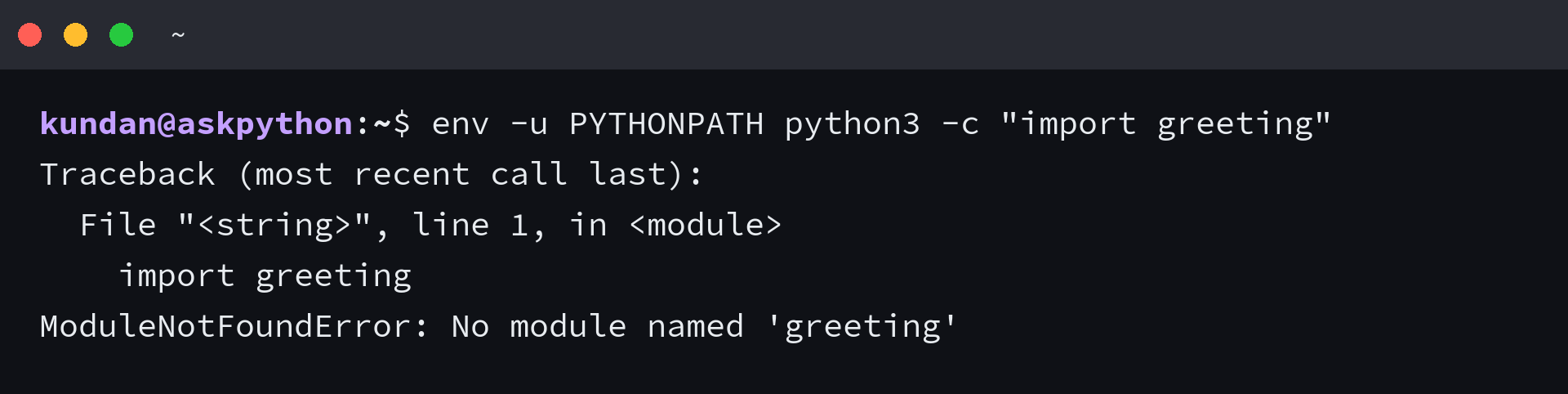
The import failed with ModuleNotFoundError because greeting.py was inside demo_modules, so add that containing directory for the next Python command.
PYTHONPATH="$PWD/demo_modules" python3 -c "import greeting; print(greeting.MESSAGE)"

Python printed loaded from demo_modules, so the same import succeeded with the extra directory available at startup. The assignment before python3 applies to that command and leaves the parent shell’s PYTHONPATH unchanged.
For a package directory, add its parent directory, then import the package by name. The guide to importing other Python files explains how module names relate to file locations.
Separate multiple directories with a colon on Linux or macOS, and use a semicolon on Windows. Python exposes the platform’s separator through os.pathsep, so this Bash example reports the delimiter and the number of configured entries.
PYTHONPATH="$PWD/demo_modules:$PWD/extra_modules" python3 -c "import os; print(os.pathsep); print(len(os.environ['PYTHONPATH'].split(os.pathsep)))"
The output was a colon followed by 2 on the next line, counting both example locations without attempting an import from extra_modules.
When the environment value does not change imports
Python reads PYTHONPATH while initializing sys.path. Changing os.environ later does not rebuild the running interpreter’s search list. I assigned the demo directory to os.environ and got False when I tested whether that directory had appeared in sys.path.
The following example then inserts the same directory into sys.path before importing greeting. Run it from the directory containing demo_modules, with PYTHONPATH unset at startup, to observe the difference between an environment change and a search-list change.
import os
import sys
from pathlib import Path

folder = str(Path("demo_modules").resolve())
os.environ["PYTHONPATH"] = folder
print(folder in sys.path)

sys.path.insert(0, folder)
import greeting
print(greeting.MESSAGE)
The example prints False, then loaded from demo_modules. Inserting at index zero gives this folder priority. Add only a directory whose files you trust, avoiding module names that collide with installed packages.
Changing os.environ can affect a subsequently launched child process that inherits the environment. It cannot alter the parent shell, and the existing interpreter retains its initialized sys.path until your code changes that list.
| Symptom | What to inspect | Action |
|---|---|---|
| PYTHONPATH looks empty, but imports work | The effective sys.path list | Leave the variable unset if the required module is already importable |
| The directory is set, but the import fails | Directory containing the module and the active executable | Point at the containing folder and launch the intended interpreter |
| The variable is visible, but Python ignores its import locations | Flags such as -E or -I, or an embedded distribution’s ._pth file | Use the launcher’s documented path settings rather than assuming environment variables are honored |
| A virtual environment imports code from another project | Inherited PYTHONPATH | Remove the shared override before launching the project |
The Python command-line documentation specifies that -E ignores PYTHON environment variables and -I enables isolated mode. Both options prevented the demo import even when its folder was present in PYTHONPATH.
Keep shell settings within their intended scope
Export the variable when several commands in the current Bash session should inherit the same directory. The conditional expansion below adds the separator only when an existing value is nonempty, avoiding a trailing empty component.
export PYTHONPATH="$PWD/demo_modules${PYTHONPATH:+:$PYTHONPATH}"
python3 -c "import greeting; print(greeting.MESSAGE)"
The import still prints loaded from demo_modules, but future child processes of this shell now inherit the setting too. An export does not save a setting for later terminal sessions.
- Use a per-command assignment for one invocation that needs the local module folder.
- Use export for subsequent commands launched from the current shell.
- Use a shell startup file only if new sessions genuinely need the same trusted directory.
For an interactive non-login Bash session, a saved export belongs in ~/.bashrc. A login Bash session reads the first available user login file, starting with ~/.bash_profile, and only reads ~/.bashrc if its startup configuration sources that file.
A startup file should use the intended absolute module directory instead of $PWD, because a new shell can start in a different location. A setting there can reach multiple Python environments, so I would keep a project-specific directory out of a shared shell profile.
To stop exporting the override in the current shell, unset the variable. Already-running Python processes keep their own search lists, so launch a new Python process to observe the changed environment.
unset PYTHONPATH
Try the import without a path override
After your project installs its package into the intended environment, try its import with PYTHONPATH removed for that command. If it succeeds, you can stop depending on a separate shell setting to locate the package.
env -u PYTHONPATH python3 -c "import greeting; print(greeting.MESSAGE)"
For the uninstalled greeting module in this example, that command still raises ModuleNotFoundError. An installed project should resolve from its environment’s package locations, so test the import you need before deleting a persistent setting.
PYTHONPATH questions
How do I add PYTHONPATH inside a Python script?
Changing os.environ[“PYTHONPATH”] changes the process environment and can affect child processes started afterwards. For an import in the running interpreter, add the intended directory to sys.path before importing, or install the package into that interpreter’s environment.
How do I set multiple directories in PYTHONPATH?
Join directory paths with the operating system’s separator. It is a colon on Linux and macOS and a semicolon on Windows, and os.pathsep reports the appropriate character.
Does a virtual environment ignore PYTHONPATH?
A virtual environment can inherit PYTHONPATH from the shell that launches it. That extra search location can expose code outside the environment, so remove unintended overrides when diagnosing imports.
Is PYTHONPATH required to import installed packages?
Python adds applicable package locations through its normal initialization. If an installed package cannot be imported, identify the active interpreter before adding extra paths.