🚀 Supercharge your YouTube channel's growth with AI.
Try YTGrowAI FreeNumPy mean(): Calculate array averages with np.mean()

Averaging 8 and 9 gives the first column’s 8.5 through np.mean(scores, axis=0). The useful twist for me is that the axis names the dimension you remove rather than the one you keep.
You’ll work with an average that gives every included value equal influence. You’ll make sense of that np.mean result as the included values’ sum divided by their count.
What np.mean computes
NumPy mean is an arithmetic average, the sum of the included values divided by their count. The np.mean function can reduce an entire array to one number or calculate separate averages along an axis. An axis is a numbered dimension of the array.
For a two-dimensional array, axis=0 identifies the row dimension and axis=1 identifies the column dimension. Reducing the row dimension leaves a mean for each column, so the axis names what disappears rather than what you keep.
| Parameter | Decision it controls |
|---|---|
| axis | Which dimension to reduce, or None for all values |
| keepdims | Whether reduced dimensions remain with size one |
| where | Which values contribute to the sum and count |
| dtype | The numeric type used for accumulation and the result |
The NumPy mean reference also accepts array-like input, so you can pass a numeric Python list without first converting it yourself. Use np.average when you need unequal weights, because np.mean gives each included value equal influence.
Prerequisites for running the NumPy examples
You need Python and NumPy in the same environment, plus enough Python syntax to create a list and call a function. I ran these examples on Linux with Python 3.14.7 and NumPy 2.5.3 in a fresh virtual environment.
Install NumPy through the Python interpreter that will execute your examples. The commands create an isolated environment and install the available release without a version constraint.
python3 -m venv .venv
.venv/bin/python -m pip install numpy
Run the Python blocks in order in one interpreter session, since the later blocks reuse scores and the np import. The matrix represents two rows of three numeric scores, and its unequal dimensions make a wrong axis visible.
Step 1: Calculate whole-array and axis means
Start with one overall average, then compare it with an average for each column and each row. The np alias comes from import numpy as np, and np.array turns the nested lists into a rectangular array.
import numpy as np

scores = np.array([[8, 6, 7], [9, 5, 8]])
daily = np.array([8, 6, 7])
print("1D mean:", np.mean(daily))
print("scores:", scores, sep="\n")
print("shape:", scores.shape)
print("overall:", np.mean(scores))
print("columns:", np.mean(scores, axis=0))
print("column result shape:", np.mean(scores, axis=0).shape)
print("rows:", np.mean(scores, axis=1))
print("row result shape:", np.mean(scores, axis=1).shape)
The overall mean is 7.166666666666667, because the sum of 43 is divided by six entries. With axis=0, the pairs 8 and 9 contribute to the first column mean of 8.5, and the result contains three means.
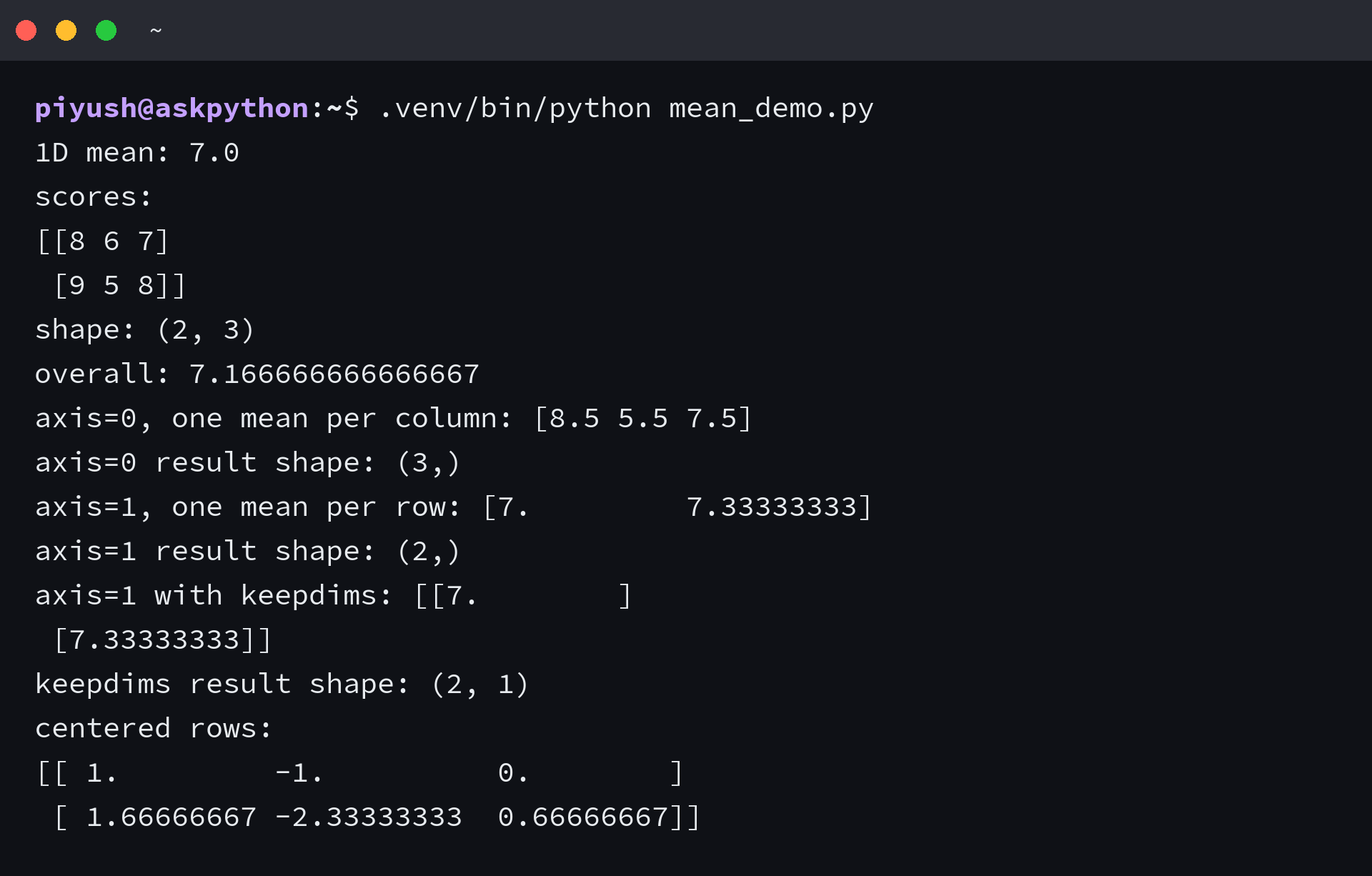
Using axis=1 gives row means of 7.0 and 7.33333333, with the latter rounded in the printed array. Each row contributes three entries to its own mean, so the output retains the two-row dimension.
If your input is a list of separate arrays, combine equally shaped rows into one rectangular array before reducing the row dimension. Averaging each row inside a Python loop produces row means, even if that inner one-dimensional call uses axis=0.
Step 2: Keep the reduced dimension for subtraction
Subtracting each row’s mean centers that row around zero, but the shapes must align first. Broadcasting is NumPy’s rule for combining arrays of different shapes, comparing dimensions from the right and accepting equal sizes or a size of one.
The row mean has shape (2,), whose trailing size cannot align with the three columns in scores. Set keepdims=True to retain a column dimension of size one, allowing one row mean to apply across that row.
row_means = np.mean(scores, axis=1, keepdims=True)
centered = scores - row_means
print("row means:", row_means, sep="\n")
print("retained shape:", row_means.shape)
print("centered rows:", centered, sep="\n")
I got row_means.shape equal to (2, 1), and the first centered row was [1, -1, 0]. The subtraction leaves scores unchanged because it creates a separate result array.
| Array | Shape | How it aligns |
|---|---|---|
| scores | (2, 3) | Two rows with three columns |
| Row means without keepdims | (2,) | Trailing size two conflicts with three columns |
| Row means with keepdims | (2, 1) | Trailing size one expands across each row |
NumPy’s broadcasting rules explain why the extra dimension changes the subtraction. For column-wise centering, change the axis to 0 and retain its dimension in the same way.
Step 3: Choose which values contribute to the average
NaN means “not a number.” An ordinary mean containing NaN returns NaN, while np.nanmean excludes it from both the sum and the count. Use that exclusion when NaN marks a missing measurement, rather than replacing the measurement with zero.
Zero is different because it is a numeric value and contributes to np.mean by default. Exclude it with a where mask only if your data defines zero as missing, since discarding a measured zero changes the average.
measurements = np.array([2.0, np.nan, 4.0])
print("ordinary mean with NaN:", np.mean(measurements))
print("NaN-aware mean:", np.nanmean(measurements))

counts = np.array([0.0, 2.0, 4.0])
print("mean including zero:", np.mean(counts))
print("mean excluding zero with where:", np.mean(counts, where=counts != 0))

values = np.array([1.0, 4.0, 9.0])
weights = np.array([1.0, 2.0, 1.0])
print("ordinary mean:", np.mean(values))
print("weighted mean:", np.average(values, weights=weights))

float_values = np.array([1.2, 1.3], dtype=np.float32)
print("integer input mean dtype:", np.mean(scores).dtype)
print("float32 input mean dtype:", np.mean(float_values).dtype)
print("float64 accumulation dtype:", np.mean(float_values, dtype=np.float64).dtype)
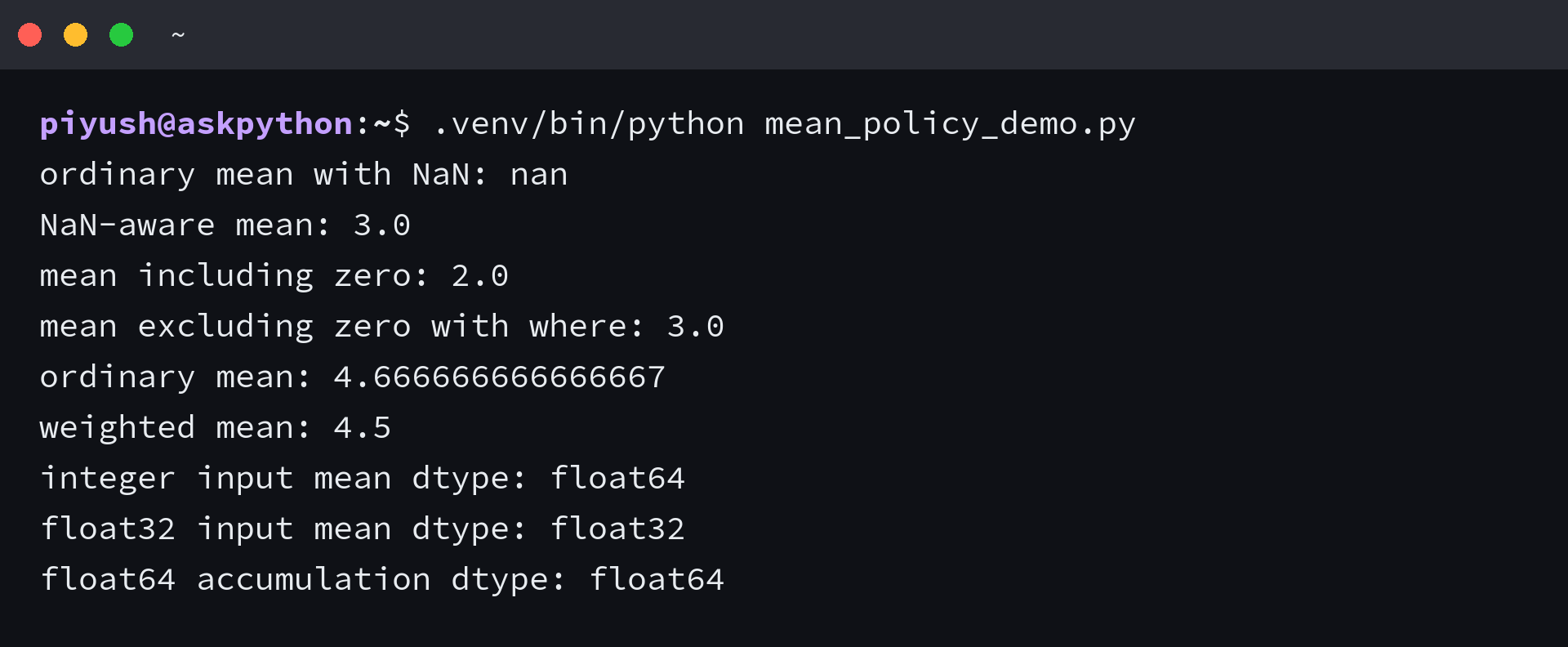
The NaN-aware mean is 3.0 because only 2.0 and 4.0 contribute. The zero mask also returns 3.0 for its own input, replacing a sum divided by three entries with a sum divided by two included entries.
The where argument of np.mean is a Boolean inclusion mask, meaning an array of True or False decisions. The separate np.where function selects values or finds positions, so calling it does not itself calculate a mean.
With weights [1, 2, 1], the value 4 contributes twice, giving a weighted sum of 18 divided by a total weight of 4. I got 4.5 from np.average and 4.666666666666667 from np.mean for the same values.
Choose np.average with weights for unequal contributions, with compatible weight shapes and a nonzero sum, because zero total weight raises ZeroDivisionError.
Handle empty selections and floating-point precision
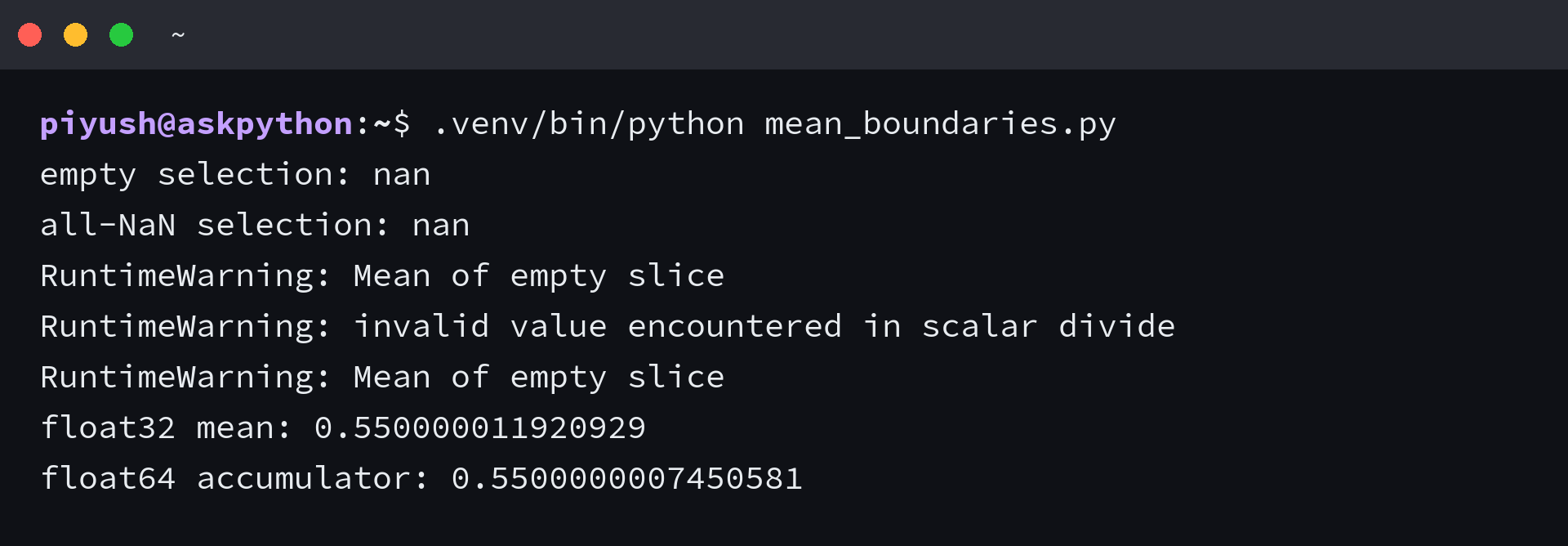
An average needs at least one contributing value, so an empty selection has no defined arithmetic mean. I excluded every entry with where and got NaN with RuntimeWarning, which means a mask needs a no-data branch as well as a numeric result branch.
The nanmean reference documents the same no-data boundary for an all-NaN slice. You can expose those warnings in a small diagnostic before deciding whether your application should skip that slice or flag it for missing data.
import warnings

with warnings.catch_warnings(record=True) as seen:
    warnings.simplefilter("always", RuntimeWarning)
    empty_mean = np.mean(counts, where=np.zeros(counts.shape, dtype=bool))
    missing_mean = np.nanmean(np.array([np.nan, np.nan]))
print("empty selection:", empty_mean)
print("all-NaN selection:", missing_mean)
for warning in seen:
    print(type(warning.message).__name__ + ":", warning.message)

signal = np.zeros((2, 512 * 512), dtype=np.float32)
signal[0, :] = 1.0
signal[1, :] = 0.1
print("float32 mean:", float(np.mean(signal)))
print("float64 accumulator:", float(np.mean(signal, dtype=np.float64)))
The precision example stores the same number of 1.0 and 0.1 values in float32, a floating-point type with limited precision. A float64 accumulator reduces rounding during summation, but cannot recover precision already lost when the input was stored.
| Input type | Default mean behavior | When to change it |
|---|---|---|
| Integer | float64 accumulation and result | Keep the default for fractional averages |
| float32 | float32 accumulation and result | Use dtype=np.float64 when accumulation accuracy warrants it |
| float16 | float32 intermediates with a float16 result | Set dtype explicitly if the result needs wider precision |
Changing dtype does not give an empty selection any contributing values, so its mean remains undefined even with a wider accumulator.
Verify centered rows against a zero mean
After subtracting the retained row means, calculate the row averages again and compare them with zero using a tolerance. Floating-point subtraction can leave a tiny remainder, so exact equality would test a stricter condition than centering requires.
centered_means = np.mean(centered, axis=1)
print("centered means:", centered_means)
assert row_means.shape == (scores.shape[0], 1)
assert np.allclose(centered_means, 0.0, atol=1e-12)
print("row centering passed")
The assertion checks both the reduction shape and the resulting row averages. If you switch to column centering, switch the verification axis too, otherwise you would be checking a different set of averages.
NumPy mean questions
The same mean operation works with array-like input or the method on an existing NumPy array. Keep the array’s dimension count in mind when choosing the axis, since a one-dimensional input has no axis=1.
Can I pass a Python list directly to np.mean?
Yes. NumPy accepts array-like numeric input and attempts to convert it to an array before calculating the mean.
Can I use scores.mean() instead of np.mean(scores)?
Yes. The ndarray mean method calculates the same reduction and accepts axis and keepdims arguments.
Why does axis=1 fail on a one-dimensional array?
A one-dimensional array has only axis=0. Use the default mean for one average, or build a two-dimensional array before requesting row-wise means.