
The difference between a DOM and a SAX parser is that a DOM parser loads the whole XML document into memory as a tree of nodes that we can read and change in any order, whereas a SAX parser reads the document once from top to bottom and calls our handler for every tag, keeping nothing in memory. Java also ships a third parser, StAX, which streams like SAX but lets our code pull each event instead of receiving it.
The DOM vs SAX parser choice comes up in every XML task, from reading a 2 KB configuration file to importing a 2 GB partner feed. DOM suits small documents that we query or modify, and SAX or StAX suit large files that we read once.
The following example counts the <book> elements of the same books.xml file with DOM and with SAX on Java 25. Both factories reject DOCTYPE declarations, which blocks XML external entity (XXE) attacks.
DocumentBuilderFactory domFactory = DocumentBuilderFactory.newInstance();
domFactory.setFeature("http://apache.org/xml/features/disallow-doctype-decl", true);
Document doc = domFactory.newDocumentBuilder().parse(Path.of("books.xml").toFile());
int domCount = doc.getElementsByTagName("book").getLength();     // 3, the whole tree is in memory

SAXParserFactory saxFactory = SAXParserFactory.newInstance();
saxFactory.setFeature("http://apache.org/xml/features/disallow-doctype-decl", true);
AtomicInteger books = new AtomicInteger();
saxFactory.newSAXParser().parse(Path.of("books.xml").toFile(), new DefaultHandler() {
    @Override
    public void startElement(String uri, String localName, String qName, Attributes attributes) {
        if (qName.equals("book")) {
            books.incrementAndGet();
        }
    }
});
int saxCount = books.get();                                      // 3, counted one event at a time
We can see that DOM gives us a Document to ask questions afterward, while SAX gives us nothing back unless the handler collects it. We look at each parser with code, compare all three in one table, pick the right one for real cases, combine streaming with DOM, and set up each parser safely.
The examples read this books.xml file.
<?xml version="1.0" encoding="UTF-8"?>
<library>
  <book id="1" year="2008">
    <title>Java Basics</title>
    <author>Asha</author>
  </book>
  <book id="2" year="2019">
    <title>Spring in Steps</title>
    <author>Ben</author>
  </book>
  <book id="3" year="2001">
    <title>XML for Teams</title>
    <author>Asha</author>
  </book>
</library>
1. DOM Parser and the In-Memory Tree
DOM (Document Object Model) is a W3C standard that represents an XML document as a tree. The parser reads the full input, builds one node object for every element, attribute and text, and returns the root as an org.w3c.dom.Document. After that, the file is no longer needed, and we can walk the tree in any direction, search it, change it and write it back.
| Interface | Represents | Common methods |
|---|---|---|
| Document | The whole document | getDocumentElement(), getElementsByTagName(), createElement() |
| Element | One element | getAttribute(), setAttribute(), getTextContent(), appendChild() |
| Node | Any node, including text and comments | getNodeType(), getChildNodes(), getParentNode() |
| NodeList | An ordered list of nodes | getLength(), item(i) |
| Attr | One attribute | getName(), getValue() |
The following example reads the title of each book, adds a status attribute to the books published before 2010 and searches the changed tree with XPath. Every step works on the same Document in memory.
DocumentBuilderFactory factory = DocumentBuilderFactory.newInstance();
factory.setFeature("http://apache.org/xml/features/disallow-doctype-decl", true);
Document doc = factory.newDocumentBuilder().parse(Path.of("books.xml").toFile());

NodeList list = doc.getElementsByTagName("book");
List<String> titles = new ArrayList<>();
for (int i = 0; i < list.getLength(); i++) {
    Element book = (Element) list.item(i);
    titles.add(book.getElementsByTagName("title").item(0).getTextContent());
    if (Integer.parseInt(book.getAttribute("year")) < 2010) {
        book.setAttribute("status", "classic");
    }
}
String allTitles = String.join(", ", titles);    // "Java Basics, Spring in Steps, XML for Teams"

XPath xpath = XPathFactory.newInstance().newXPath();
String classics = xpath.evaluate("count(//book[@status='classic'])", doc);   // "2"
The price of that freedom is memory. In a test on Java 25, a 21 MB file with 200,000 small <book> elements took about 250 MB of heap as a fully read DOM tree, more than ten times the file size, because every node is a separate Java object. The DOM parser tutorial and the XPath tutorial cover reading and querying the tree in detail.
2. SAX Parser and Its Event Handler
SAX (Simple API for XML) has no tree. The parser reads the input in order and calls the methods of a handler for each event, such as a start tag, a text chunk or an end tag. The handler sees each piece of the document once, while it is being read, and must store whatever it needs, because the parser does not keep it.
A SAX handler can implement four interfaces, and DefaultHandler implements all of them with empty methods.
- The ContentHandler interface receives the document events, such as startElement(), characters() and endElement().
- The ErrorHandler interface receives warnings, validation errors and fatal errors.
- The DTDHandler interface receives notation and unparsed entity declarations from a DTD.
- The EntityResolver interface decides where external entities are loaded from.
The following handler collects the titles of the books published after 2005. The year comes from an attribute in startElement(), and the title text is buffered in characters() and read in endElement(), because a text value can arrive in several chunks.
class RecentTitles extends DefaultHandler {
    final List<String> titles = new ArrayList<>();
    private final StringBuilder text = new StringBuilder();
    private boolean recent;

    @Override
    public void startElement(String uri, String localName, String qName, Attributes attributes) {
        text.setLength(0);
        if (qName.equals("book")) {
            recent = Integer.parseInt(attributes.getValue("year")) > 2005;
        }
    }

    @Override
    public void characters(char[] ch, int start, int length) {
        text.append(ch, start, length);
    }

    @Override
    public void endElement(String uri, String localName, String qName) {
        if (qName.equals("title") && recent) {
            titles.add(text.toString());
        }
    }
}
SAXParserFactory factory = SAXParserFactory.newInstance();
factory.setFeature("http://apache.org/xml/features/disallow-doctype-decl", true);
RecentTitles handler = new RecentTitles();
factory.newSAXParser().parse(Path.of("books.xml").toFile(), handler);
List<String> recent = handler.titles; // [Java Basics, Spring in Steps]SAX memory use stays flat, whatever the file size, which is why libraries such as Apache POI use it to read large spreadsheets. The handler code is longer than the DOM version, and SAX cannot modify or write XML. The SAX parser tutorial covers handlers, validation and error handling.
3. StAX, the Streaming Parser We Pull
StAX (Streaming API for XML) streams the document like SAX, but our code drives the loop. We call next() to move to the next event and read data from the reader, so we can stop with return as soon as we have what we need. StAX can also write XML with XMLStreamWriter.
XMLInputFactory factory = XMLInputFactory.newInstance();
factory.setProperty(XMLInputFactory.SUPPORT_DTD, false);
String firstByAsha = null;
try (InputStream in = Files.newInputStream(Path.of("books.xml"))) {
    XMLStreamReader reader = factory.createXMLStreamReader(in);
    String title = null;
    while (reader.hasNext() && firstByAsha == null) {
        if (reader.next() == XMLStreamConstants.START_ELEMENT) {
            if (reader.getLocalName().equals("title")) {
                title = reader.getElementText();
            } else if (reader.getLocalName().equals("author") && reader.getElementText().equals("Asha")) {
                firstByAsha = title;
            }
        }
    }
    reader.close();
}
String found = firstByAsha;                   // "Java Basics"
The loop stops after the first book, and the parser never reads the other two. The StAX parser tutorial explains the cursor and iterator APIs.
4. DOM vs SAX vs StAX Comparison Table
The three parsers differ mainly in who holds the data and who drives the parsing loop, and the rest of the table follows from that.
| Feature | DOM | SAX | StAX |
|---|---|---|---|
| Model | Tree in memory | Push, the parser calls our handler | Pull, our loop asks for events |
| Main JDK types | DocumentBuilder, Document | SAXParser, DefaultHandler | XMLStreamReader, XMLEventReader |
| Memory | Grows with the document, several times the file size | Small and constant | Small and constant |
| Navigation | Any direction, any number of times | Forward only, once | Forward only, once |
| XPath | Yes | No | No |
| Modify the document | Yes | No | No, but can copy events to a writer |
| Write XML | Yes, with a Transformer | No | Yes, with XMLStreamWriter |
| Stop before the end | Not applicable | Throw an exception from the handler | return or break |
| Schema validation | Yes | Yes | Yes, through a Validator and StAXSource |
| Code needed | Least | Most, state kept in the handler | Medium |
Speed is rarely the deciding factor; memory and the way our code wants to use the data are. SAX and StAX read a file in one pass without allocating a tree, so they are faster than DOM for big files, while for a file of a few kilobytes the difference is too small to matter.
5. Choosing a Parser for Real Cases
The choice follows from two questions. Does the whole document fit comfortably in memory, and do we need random access or changes?
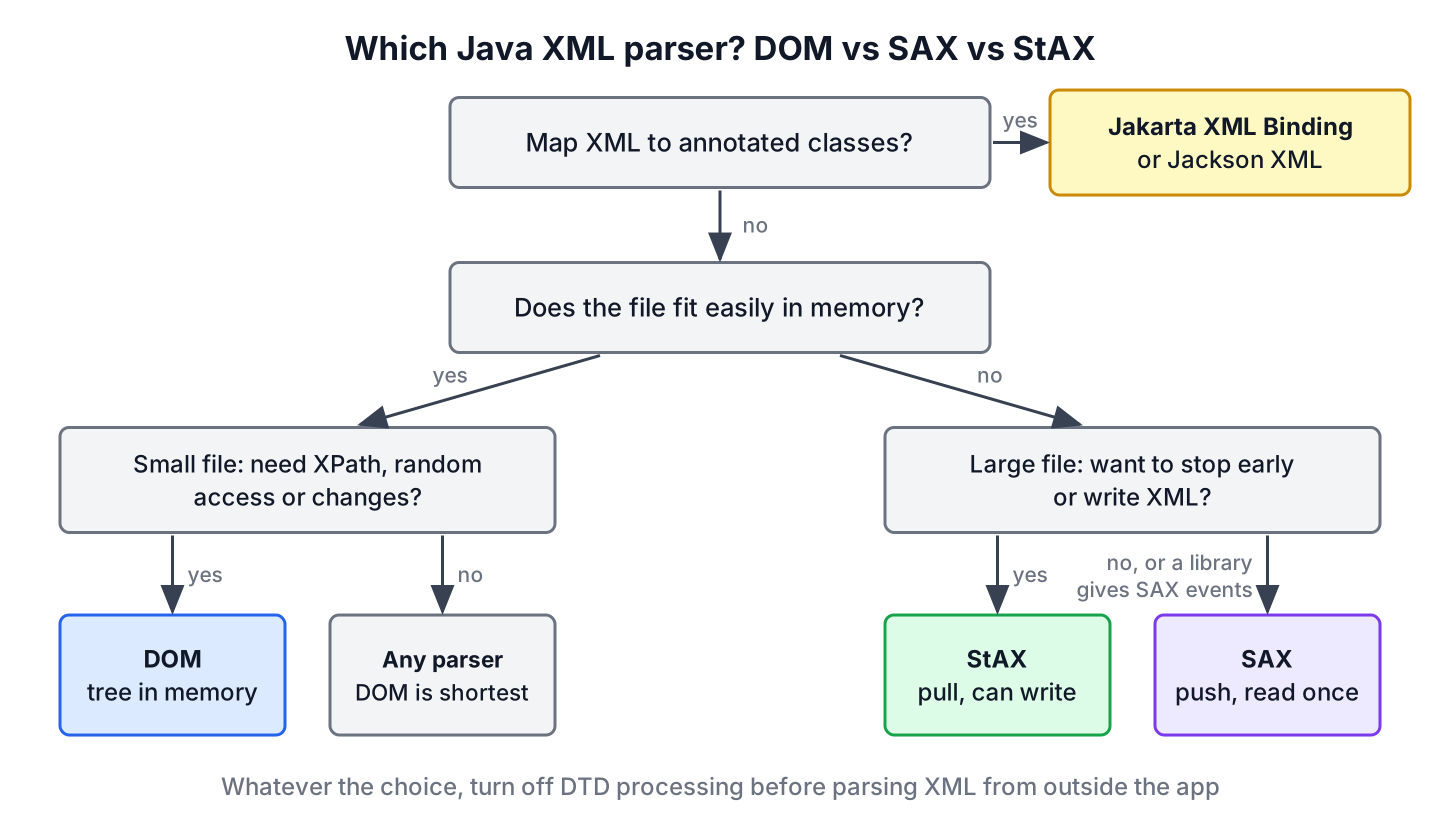
- A desktop app reads a 4 KB settings.xml at startup and looks up five values. DOM with XPath is the shortest code, and the memory does not matter.
- A shop imports a 3 GB product feed every night. A DOM tree would need many gigabytes of heap, so the import job uses StAX or SAX and saves products in batches.
- A service removes the <price> element from every product in a large file before sending it to a partner. StAX reads events with XMLEventReader and writes the ones it keeps with XMLEventWriter.
- An app maps XML to Java classes with annotations. Neither parser is the right level, and Jakarta XML Binding (JAXB) or Jackson’s XML module does the mapping, as shown in reading XML into Java objects with JAXB. Since Java 11, JAXB is a separate dependency.
6. Using a Streaming Parser and DOM Together
The parsers are independent, so one app can use DOM for its configuration and SAX for its imports. They can also work on the same file. A large file often consists of many small, independent records, and we can stream through the file with StAX and build a small DOM tree for one record at a time.
The following example moves a StAX reader to each <book> start tag and passes it to a Transformer through a StAXSource. The transformer copies only that element into a DOMResult, so we get a tiny Document per book that supports DOM methods and XPath, while the heap holds one book at a time.
XMLInputFactory factory = XMLInputFactory.newInstance();
factory.setProperty(XMLInputFactory.SUPPORT_DTD, false);
TransformerFactory tf = TransformerFactory.newInstance();
tf.setFeature(XMLConstants.FEATURE_SECURE_PROCESSING, true);
Transformer copier = tf.newTransformer();

List<String> ids = new ArrayList<>();
try (InputStream in = Files.newInputStream(Path.of("books.xml"))) {
    XMLStreamReader reader = factory.createXMLStreamReader(in);
    while (reader.hasNext()) {
        if (reader.getEventType() == XMLStreamConstants.START_ELEMENT && reader.getLocalName().equals("book")) {
            DOMResult result = new DOMResult();
            copier.transform(new StAXSource(reader), result);     // reads one <book> subtree
            Element book = ((Document) result.getNode()).getDocumentElement();
            ids.add(book.getAttribute("id"));
        } else {
            reader.next();
        }
    }
    reader.close();
}
String bookIds = String.join(",", ids);         // "1,2,3"
The loop calls next() only when it does not transform, because the transformer itself moves the reader past the end of the <book> element.
7. Secure Settings for Each Parser
All three JDK parsers resolve DTDs and external entities by default, even in Java 25. A document from a user or a partner can therefore declare an entity that reads a file from our server, which is the XXE attack. Each factory has its own switch.
| Parser | Setting | Effect |
|---|---|---|
| DOM | dbf.setFeature(“http://apache.org/xml/features/disallow-doctype-decl”, true) | Rejects any document with a DOCTYPE |
| SAX | spf.setFeature(“http://apache.org/xml/features/disallow-doctype-decl”, true) | Rejects any document with a DOCTYPE |
| StAX | xif.setProperty(XMLInputFactory.SUPPORT_DTD, false) | Ignores the DTD, so declared entities do not exist |
| All, JVM-wide | -Djdk.xml.dtd.support=deny | Rejects DOCTYPE in every JDK parser, including those created inside libraries |
The JVM-wide jdk.xml.dtd.support property exists since Java 22, and the JDK ships a stricter configuration template, conf/jaxp-strict.properties.template, that we can test with -Djava.xml.config.file. The OWASP XXE prevention cheat sheet lists the settings for other parsers and libraries.
8. DOM vs SAX FAQs
Teams that pick an XML parser ask about speed and memory first, and about changing a document second.
8.1. Which is faster, DOM or SAX?
SAX, for large documents. It reads the file in one pass and creates no tree, so it does less work and puts no pressure on the garbage collector. For small files the difference is too small to notice, and the shorter DOM code is the better trade.
8.2. Which XML parser uses the least memory?
SAX and StAX. Both keep only the current event in memory, so their memory use does not grow with the file size. A DOM tree takes several times the size of the file, as the test in section 1 shows.
8.3. Can a SAX parser modify an XML file?
No. SAX only reads. To change a document with streaming, we read events with StAX and write a new file with XMLStreamWriter or XMLEventWriter. To change a small document, we load it with DOM, change the nodes and write it with a Transformer.
8.4. Is StAX better than SAX?
For new code that reads XML by hand, StAX is easier to write, because the loop is ours and we can stop or delegate to helper methods. SAX remains the right choice when a library hands us SAX events or expects a ContentHandler, as Apache POI and many XML tools do.
8.5. Is a DOM Document thread-safe?
No. The DOM interfaces make no thread-safety guarantee, and even reading a JDK Document from several threads can fail, because some getters update internal caches. We give each thread its own copy, made with cloneNode(true), or guard access with a lock.
9. Conclusion
DOM loads the whole document into a tree, so it is the easiest parser to use and the only one with XPath and in-place changes, but its memory grows with the file. SAX pushes events to a handler and StAX lets us pull them, and both read files of any size with constant memory.
We use DOM for small documents that we query or modify, a streaming parser for large files, and a mix of both when a big file contains small records. Whichever parser we pick, we turn off DTD processing before it reads XML from outside the app.
10. References
- Why StAX? (Oracle JAXP tutorial)
- java.xml module summary (Java 25)
- DocumentBuilderFactory Javadoc (Java 25)
- StAXSource Javadoc (Java 25)
- OWASP XML External Entity Prevention Cheat Sheet
Happy Learning !!
