

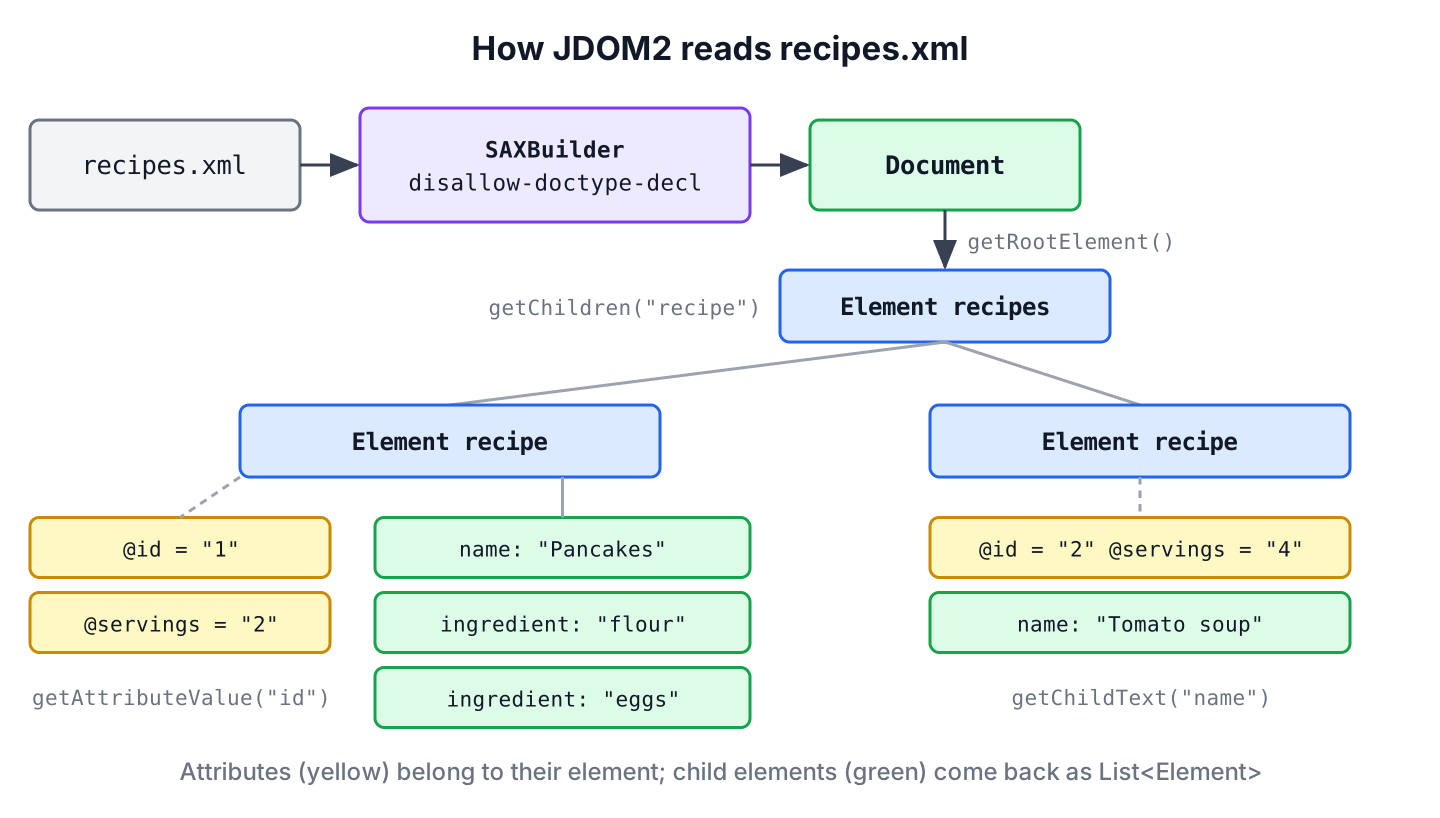
JDOM2 is an open-source Java library that parses an XML file into a tree of Document, Element and Attribute objects with plain Java collections, so we read XML with calls such as getRootElement(), getChildren(“recipe”) and getAttributeValue(“id”). Its SAXBuilder class reads the file, and the result stays in memory for reading, querying with XPath, changing and writing back.
We use JDOM2 to read XML files in Java when the JDK’s DOM API feels too verbose, for example for config files, data exports and test fixtures. Compared with DOM, JDOM2 returns List<Element> instead of NodeList, has typed attribute getters, and treats text as text rather than as child nodes we have to filter out.
The following example reads a small recipe file, recipes.xml.
<?xml version="1.0" encoding="UTF-8"?>
<recipes>
  <recipe id="1" servings="2">
    <name>Pancakes</name>
    <ingredient qty="200" unit="g">flour</ingredient>
    <ingredient qty="2">eggs</ingredient>
  </recipe>
  <recipe id="2" servings="4">
    <name>Tomato soup</name>
    <ingredient qty="6">tomatoes</ingredient>
  </recipe>
</recipes>
SAXBuilder builder = new SAXBuilder();
builder.setFeature("http://apache.org/xml/features/disallow-doctype-decl", true);
Document doc = builder.build(new File("recipes.xml"));
Element root = doc.getRootElement();
String rootName = root.getName(); // "recipes"
int recipes = root.getChildren("recipe").size(); // 2
String firstName = root.getChildren("recipe").get(0).getChildText("name"); // "Pancakes"
String servings = root.getChild("recipe").getAttributeValue("servings"); // "2"The builder turns on disallow-doctype-decl because a default SAXBuilder resolves external entities. We cover the Maven setup and the library’s status, safe parsing, elements, text and attributes, namespaces, XPath with Jaxen, writing the file back and how JDOM2 compares with the JDK APIs.
1. Adding JDOM2 and Jaxen to the Project
JDOM2 is a single JAR with no required dependencies. Jaxen is optional, and we add it only for XPath, because JDOM2 uses it as its XPath engine. Without Jaxen on the classpath, the first compile() call fails with NoClassDefFoundError: org/jaxen/NamespaceContext.
<dependency>
    <groupId>org.jdom</groupId>
    <artifactId>jdom2</artifactId>
    <version>2.0.6.1</version>
</dependency>
<dependency>
    <groupId>jaxen</groupId>
    <artifactId>jaxen</artifactId>
    <version>2.0.6</version>
</dependency>
Before choosing JDOM2 for new code, it helps to know its status. The latest release, 2.0.6.1 from December 2021, fixed an XXE issue (CVE-2021-33813), and Maven Central shows no newer version as of October 2026. Jaxen had its 2.0.6 release in June 2026. The JDOM2 JAR declares the automatic module name org.jdom2, and all examples here run on Java 25. JDOM2 is stable but not actively developed, so for new projects we weigh it against the JDK APIs in section 8.
2. Parsing XML Safely With SAXBuilder
The class SAXBuilder runs a SAX parser from the JDK and builds the JDOM2 tree from its events. It reads from a File, a Path through an InputStream, a Reader, a URL or a String with a system id. By default, it expands entities and follows DOCTYPE references, so an untrusted file can make it read local files into the document.
A small helper turns on two settings. The feature disallow-doctype-decl rejects any DOCTYPE, and setExpandEntities(false) keeps entity references unexpanded as a second line of defense.
static Document readXml(Path file) throws JDOMException, IOException {
    SAXBuilder builder = new SAXBuilder();
    builder.setFeature("http://apache.org/xml/features/disallow-doctype-decl", true);
    builder.setExpandEntities(false);
    try (InputStream in = Files.newInputStream(file)) {
        return builder.build(in);
    }
}
SAXBuilder builder = new SAXBuilder();
builder.setFeature("http://apache.org/xml/features/disallow-doctype-decl", true);
String withDoctype = "<!DOCTYPE recipes [<!ENTITY n \"Pancakes\">]><recipes>&n;</recipes>";
Document blocked = builder.build(new StringReader(withDoctype)); // JDOMParseException: DOCTYPE is disallowedSay a meal-planning app lets users import recipe collections exported from other apps. Every upload is untrusted, and a crafted DOCTYPE could pull a server file into the imported recipe text, and the app shows that text back to the user. We create every SAXBuilder that reads files from outside the app with disallow-doctype-decl set to true. The OWASP XXE cheat sheet lists the same setting for JDOM.
JDOM2 also builds documents from other sources. The table lists the builders, which all return the same org.jdom2.Document.
| Builder | Input | Use when |
|---|---|---|
| SAXBuilder | File, stream, reader, URL | Reading XML files, the default choice |
| DOMBuilder | An existing org.w3c.dom.Document | Another API already produced a DOM tree |
| StAXEventBuilder | A StAX XMLEventReader | The XML comes from a StAX pipeline |
| StAXStreamBuilder | A StAX XMLStreamReader | The same, with the cursor API |
3. Reading XML Elements and Text With JDOM2
Every Element knows its children. The method getChildren(name) returns a List<Element> of direct children with that name, getChild(name) returns the first one or null, and getChildText(name) returns its text in one call.
Document doc = readXml(Path.of("recipes.xml"));
Element pancakes = doc.getRootElement().getChildren("recipe").get(0);

String name = pancakes.getChildText("name");                          // "Pancakes"
int ingredients = pancakes.getChildren("ingredient").size();           // 2
String missing = pancakes.getChildText("notes");                       // null
List<String> items = pancakes.getChildren("ingredient").stream().map(Element::getText).toList();   // [flour, eggs]
For text, JDOM2 has three getters. The method getText() returns the text content of the element as written, getTextTrim() also trims it and collapses inner whitespace, and getValue() concatenates the text of all descendants, which is useful for elements with mixed content.
Document doc = readXml(Path.of("recipes.xml"));
Element soup = doc.getRootElement().getChildren("recipe").get(1);

String whole = soup.getValue().strip().replaceAll("\\s+", " ");   // "Tomato soup tomatoes"
String raw = soup.getText().isBlank() ? "only whitespace" : soup.getText();   // "only whitespace"
The list from getChildren() is live, so removing an element from it removes the element from the document. That is handy for editing, as section 7 shows, but a loop that removes elements while iterating needs an explicit Iterator to avoid a ConcurrentModificationException.
4. Reading Attribute Values
The method getAttributeValue(name) returns the value as a String, or null when the attribute is missing, which is different from the JDK’s getAttribute() that returns an empty string. An overload takes a default value. For numbers, getAttribute(name) returns an Attribute object with typed getters such as getIntValue().
Document doc = readXml(Path.of("recipes.xml"));
Element eggs = doc.getRootElement().getChild("recipe").getChildren("ingredient").get(1);

String qty = eggs.getAttributeValue("qty");                    // "2"
String unit = eggs.getAttributeValue("unit");                  // null
String unitOrPieces = eggs.getAttributeValue("unit", "pcs");   // "pcs"
int qtyNumber = eggs.getAttribute("qty").getIntValue();        // 2
The typed getters throw a checked DataConversionException for a value that is not a number, so we see bad data at the point where we read it. Putting the pieces together, the next example maps the file to Java records, which is what the rest of an app works with.
record Ingredient(String item, int qty, String unit) {}
record Recipe(int id, String name, int servings, List<Ingredient> ingredients) {}
static Recipe toRecipe(Element e) throws DataConversionException {
List<Ingredient> ingredients = new ArrayList<>();
for (Element i : e.getChildren("ingredient")) {
ingredients.add(new Ingredient(i.getText(), i.getAttribute("qty").getIntValue(), i.getAttributeValue("unit", "pcs")));
}
return new Recipe(e.getAttribute("id").getIntValue(), e.getChildText("name"),
e.getAttribute("servings").getIntValue(), ingredients);
}Document doc = readXml(Path.of("recipes.xml"));
List<Recipe> recipes = new ArrayList<>();
for (Element e : doc.getRootElement().getChildren("recipe")) {
recipes.add(toRecipe(e));
}
Recipe soup = recipes.get(1); // Recipe[id=2, name=Tomato soup, servings=4, ingredients=[Ingredient[item=tomatoes, qty=6, unit=pcs]]]5. Reading Namespaced XML
When elements are in a namespace, the plain getChild(name) finds nothing, because it looks for elements in no namespace. We create a Namespace object for the URI and pass it to getChild(), getChildren() and getChildText(). The prefix in the file does not matter, only the URI does.
String xml = """
        <r:recipes xmlns:r="https://example.com/recipes">
          <r:recipe id="3"><r:name>Lemonade</r:name></r:recipe>
        </r:recipes>""";
SAXBuilder builder = new SAXBuilder();
builder.setFeature("http://apache.org/xml/features/disallow-doctype-decl", true);
Element root = builder.build(new StringReader(xml)).getRootElement();
Namespace ns = Namespace.getNamespace("https://example.com/recipes");

Element plain = root.getChild("recipe");                          // null
String name = root.getChild("recipe", ns).getChildText("name", ns);   // "Lemonade"
String id = root.getChild("recipe", ns).getAttributeValue("id");      // "3"
The unprefixed id attribute is in no namespace, so it needs no Namespace argument. The same rule applies in the JDK’s XPath API, as the article on XPath namespace resolution explains.
6. Querying JDOM2 With XPath
For elements deep in a document, an XPath expression replaces several nested getChild() calls. XPathFactory.instance().compile() takes the expression and a filter, such as Filters.element() or Filters.attribute(), which fixes the result type, so evaluate() returns a typed List without casts.
Document doc = readXml(Path.of("recipes.xml"));
XPathFactory xpf = XPathFactory.instance();

XPathExpression<Attribute> idsExpr = xpf.compile("//recipe/@id", Filters.attribute());
List<String> ids = idsExpr.evaluate(doc).stream().map(Attribute::getValue).toList();   // [1, 2]

XPathExpression<Element> withUnit = xpf.compile("//ingredient[@unit]", Filters.element());
String measured = withUnit.evaluateFirst(doc).getText();                                // "flour"
When part of the expression comes from user input, such as a recipe name from a search box, we pass it as an XPath variable rather than gluing it into the string. JDOM2 accepts a map of variables in compile(), and setVariable() changes the value for the next evaluation.
Document doc = readXml(Path.of("recipes.xml"));
Map<String, Object> variables = Map.of("name", "");
XPathExpression<Element> byName = XPathFactory.instance().compile("//recipe[name=$name]", Filters.element(), variables);

byName.setVariable("name", "Tomato soup");
String soupId = byName.evaluateFirst(doc).getAttributeValue("id");     // "2"
byName.setVariable("name", "x' or '1'='1");
Element injected = byName.evaluateFirst(doc);                          // null
XPath syntax itself, such as predicates and axes, is the same as in the JDK, and the Java XPath tutorial covers it. JDOM2 uses XPath 1.0 through Jaxen, so functions from XPath 2.0, such as ends-with(), are not available.
7. Changing the Document and Writing It Back
JDOM2 elements are ordinary mutable objects. We add children with addContent(), change attributes with setAttribute() and remove elements with removeChild() or through the live list. XMLOutputter writes the result, and Format.getPrettyFormat() indents it.
Document doc = readXml(Path.of("recipes.xml"));
Element soup = doc.getRootElement().getChildren("recipe").get(1);
soup.setAttribute("servings", "6");
soup.addContent(new Element("ingredient").setAttribute("qty", "1").setText("onion"));

XMLOutputter outputter = new XMLOutputter(Format.getPrettyFormat());
String xml = outputter.outputString(doc);
boolean updated = xml.contains("<recipe id=\"2\" servings=\"6\">");     // true
boolean added = xml.contains("<ingredient qty=\"1\">onion</ingredient>");   // true
long blankLines = xml.lines().filter(String::isBlank).count();                 // 0

Path out = Files.createTempFile("recipes", ".xml");
try (OutputStream stream = Files.newOutputStream(out)) {
    outputter.output(doc, stream);
}
String declaration = Files.readAllLines(out).get(0);     // "<?xml version="1.0" encoding="UTF-8"?>"
Unlike the JDK Transformer, the pretty format of XMLOutputter trims existing whitespace before indenting, so a parsed and indented file comes out without blank lines. The article on converting an XML Document to a String shows the JDK side of serialization.
8. JDOM2 Compared With DOM, StAX and Jackson
JDOM2 was written to make the DOM model pleasant in Java, and it still is. Since the JDK API has not changed much, the choice depends on what the code does with the XML.
| API | Model | Strengths | Weak spots |
|---|---|---|---|
| JDOM2 | Tree in memory, Java collections | Short code, typed attribute getters, built-in XPath with Jaxen | Extra dependency, no release since 2021 |
| DOM (JDK) | Tree in memory, W3C interfaces | No dependency, JDK XPath and Transformer support | Verbose, NodeList and whitespace nodes |
| StAX (JDK) | Stream of events | Low memory for large files | No random access, more code |
| Jackson XML | Data binding to POJOs and records | No tree code at all | Needs classes that match the XML |
For a new project that only maps XML to objects, data binding is less code than any tree API. For editing documents of unknown shape, JDOM2 remains the most readable option, and for apps that must avoid dependencies, DOM with a helper method or two gets close.
9. JDOM2 FAQs
Before adding JDOM2 to a build or moving old JDOM code to it, developers check four points.
9.1. Is JDOM Still Maintained?
JDOM2 is in maintenance mode. The last release, 2.0.6.1, came out in December 2021 as a security fix, and no release has followed on Maven Central or in the GitHub repository. The library is complete and works on current Java versions, so existing code has no reason to move, but new code that needs long-term support can also use the JDK APIs.
9.2. What Is the Difference Between JDOM and JDOM2?
JDOM 1.x uses the package org.jdom and the artifact jdom:jdom, and it predates generics. JDOM2 uses org.jdom2, returns typed lists such as List<Element> and adds the filter-based XPath API. Migration is mostly a change of imports plus removing casts.
9.3. How Do I Convert a JDOM2 Document to a W3C DOM Document?
We use DOMOutputter, whose output(document) method returns an org.w3c.dom.Document. The other direction uses DOMBuilder from the table in section 2. Both are useful when one part of an app uses JDOM2 and a library expects DOM.
9.4. Is a JDOM2 Document Thread-Safe?
No. JDOM2 classes have no internal synchronization, so a document that one thread changes while another reads it needs external locking. The same goes for SAXBuilder, so each thread uses its own builder or the app guards a shared one.
10. Conclusion
Reading XML with JDOM2 takes a SAXBuilder and a handful of methods on Element, such as getChildren(), getChildText() and getAttributeValue(). Every builder that reads untrusted files gets disallow-doctype-decl, because the defaults still expand external entities in version 2.0.6.1.
Namespaces need a Namespace object, XPath needs Jaxen on the classpath and works with typed filters and variables, and XMLOutputter writes a changed document back. JDOM2 is stable and in maintenance mode, which makes it a fine choice for existing code and a matter of taste for new code.
11. References
- JDOM2 API documentation
- JDOM releases on GitHub
- Jaxen on GitHub
- OWASP XML External Entity Prevention Cheat Sheet
Happy Learning !!
