

Spring AI provides Java APIs for connecting Spring Boot applications to language models and related services. This tutorial series follows a practical path from a local chat endpoint to retrieval, tools, agents, testing, and provider integrations.
Start with the first stage if you are new to Spring AI. If you already have an application, use the stage descriptions to find the feature you need and check that article’s prerequisites.
Most examples extend OrderDesk, a demo store’s support assistant using Spring Boot 4.1, Spring AI 2.0.1, and Java 21. The Embabel example uses a separate project and Java version. Local chat and embedding examples run in Ollama without a hosted key; media and hosted-provider articles state where valid provider access is required and which results were recorded locally.
The minimal endpoint below adds a question to a ChatClient request and returns the completed response. Configure the model and client as shown in Getting Started before using it:
@RestController
class ChatController {

    private final ChatClient chatClient;

    ChatController(ChatClient.Builder builder) {
        this.chatClient = builder.build();
    }

    @GetMapping("/ask")
    String ask(@RequestParam String question) {
        return chatClient.prompt()
            .user(question)
            .call()
            .content();
    }
}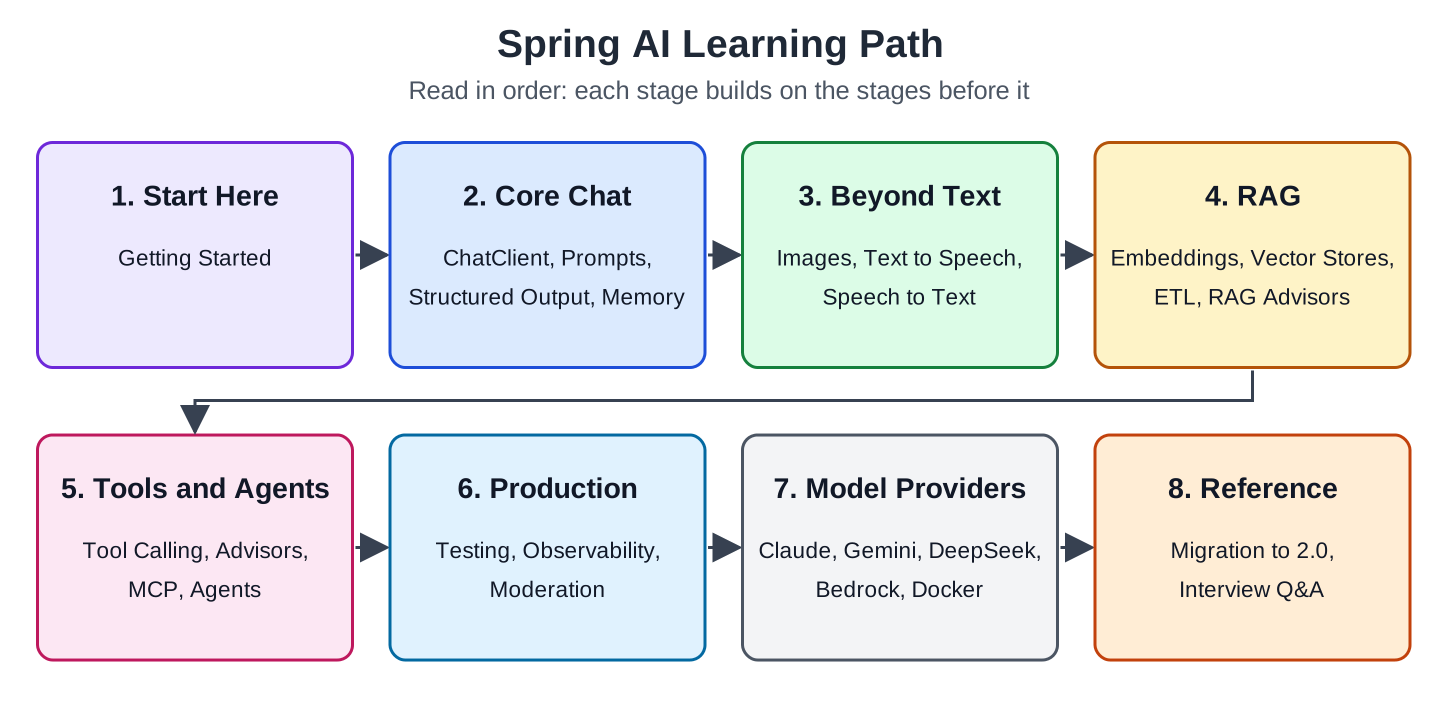
1. Start Here
After this stage, you have a Spring Boot app that sends a question to a local model and returns the answer.
- Getting Started with Spring AI: Your First App with Ollama: install Ollama, add the Spring AI Ollama starter (the dependency that connects the app to the model), write the first ChatClient endpoint, and fix the common startup errors.
2. Core Chat
After this stage, you can control what the model is told, get Java objects back instead of text, stream long answers, and keep a conversation going.
- Spring AI ChatClient API: Fluent Chat Examples: default system prompt, template parameters, token usage (how much text the model read and wrote), and two clients in one app.
- Spring AI Prompts: System Prompt, PromptTemplate and Few-Shot: keep prompts in files, fill them with PromptTemplate, and measure what few-shot examples (sample questions with their answers) change.
- Spring AI Structured Output: Records, Lists and Native JSON: turn an answer into a Java record with entity() and let Ollama enforce the JSON schema.
- Spring AI Streaming Responses with Server-Sent Events: deliver incremental text to a browser while preserving whitespace and handling completion.
- Spring AI Chat Memory: Keep Conversation History: remember each customer’s conversation and save it in a database.
3. Beyond Text
This stage covers image input, image generation, speech generation, and transcription. The local vision example uses Ollama. The hosted media examples show setup and captured requests, and identify their account-access and model-lifecycle limits.
- Spring AI Multimodality: Send Images to a Chat Model: ask a vision model about a photo of a damaged parcel.
- Spring AI ImageModel: Generate Images from Text with OpenAI: create a product banner from a text prompt.
- Spring AI Text to Speech: Generate Audio with OpenAI: turn an answer into an audio file and stream it.
- Spring AI Speech to Text: Transcribe Audio with OpenAI: turn a customer’s voice note into text and answer it.
4. RAG: Answer from Your Own Documents
RAG retrieves relevant document sections and includes them with the question. This gives the model evidence about the store’s policies, but retrieval can miss a section and the model can still apply the wrong rule. These articles cover both the pipeline and those failure modes.
- Spring AI EmbeddingModel: Vector Embedding Example: turn text into numbers and compare meanings.
- Spring AI VectorStore Example: SimpleVectorStore and ChromaDB: save documents and search them by meaning.
- Spring AI PgVector Store Example: PostgreSQL Vector Search: the same search in PostgreSQL.
- Spring AI Redis Vector Store Example with Redis Stack: the same search in Redis, with metadata filters.
- Spring AI Vector Stores Compared: PgVector, Chroma, Redis, Qdrant: one app on SimpleVectorStore and the four stores in the title, with timings and a rule for choosing.
- Spring AI ETL Pipeline Example for Data Ingestion: read Markdown and PDF files, split them, and load them without duplicates.
- Spring AI RAG Advisors: QuestionAnswer vs RetrievalAugmentation: add retrieval to a ChatClient and fix wrong or missing answers.
- Spring AI RAG Chatbot: Chat with Uploaded PDF Files: a project where users upload a PDF and ask questions about it.
- Query a Database with Natural Language using Spring AI: generate a proposed SELECT query, restrict execution, and compare the explanation with returned rows.
5. Tools and Agents
This stage connects model requests to Java operations and multi-step application flows. The application remains responsible for executing tools, authorizing access, and enforcing limits.
- Spring AI Tool Calling: Let the Model Call Java Methods: look up an order with a @Tool method.
- Spring AI Advisors Explained: Built-in and Custom Advisors: how the advisor chain works and how to write your own advisor.
- Spring AI MCP: Server and Client Example: share OrderDesk’s tools with other AI apps over the Model Context Protocol.
- Building AI Agents with Spring AI: 5 Workflow Patterns: chain, routing, parallel calls, orchestrator and workers, and evaluator and optimizer.
- Embabel Tutorial: Agents With Spring Boot and Ollama: Embabel is a separate agent framework, built on Spring AI, that plans the steps for us.
6. Production
These articles cover deterministic tests, real-model evaluation, metrics, traces, and moderation. They explain what each check measures and where model-based decisions still need validation.
- Testing Spring AI Apps: Mocks, Testcontainers and Evaluators: unit tests with a fake model, integration tests, and a model as a judge.
- Spring AI Observability: Track Tokens, Latency and Cost: metrics and traces with Micrometer.
- Spring AI Moderation with Ollama and OpenAI: classify incoming text before support generation and examine missed or incorrectly blocked messages.
7. Other Model Providers
Each integration article configures a second backend alongside Ollama. Hosted access requires provider credentials or an appropriate cloud identity; recorded answers use Ollama where account keys were unavailable. Docker Model Runner uses a local endpoint, with the example identifying its Ollama-backed recorded run.
- Spring AI with Claude: Setup and Extended Thinking
- Spring AI with Google Gemini: Setup and Thinking Budget
- Spring AI with DeepSeek: Setup and Thinking Mode
- Spring AI with Amazon Bedrock: Converse API Example
- Spring AI with Docker Model Runner: Local LLM Example
8. Reference
- Spring AI 1.x to 2.0 Migration Guide: upgrade a Spring AI 1.x app step by step.
- Spring AI Interview Questions and Answers: short answers to the questions asked most often.
Drop me your questions related to Spring AI in the comments.
Happy Learning !!

Good Start Lokesh. Its giving a good start for learner to AI world with Spring.