

iText is a library to read and write PDF in Java, and its current version, iText Core 9, builds documents from layout elements such as Paragraph, Table and Image. It is dual licensed, free under the AGPL for open source apps and paid for closed source ones, so the license decides whether it fits a project before the API does.
We use iText to generate invoices, tickets and reports from Java code, to extract text from uploaded PDFs, and to stamp or protect existing files. When the AGPL does not fit, OpenPDF, an LGPL/MPL fork of an old iText version, covers the common tasks with a similar API.
The following example writes a one-line PDF with iText 9.8.0 and reads the text back.
try (PdfDocument pdf = new PdfDocument(new PdfWriter("hello.pdf"));
     Document document = new Document(pdf)) {
    document.add(new Paragraph("Hello from the Corner Cafe"));
}
String text;
try (PdfDocument pdf = new PdfDocument(new PdfReader("hello.pdf"))) {
    text = PdfTextExtractor.getTextFromPage(pdf.getPage(1));
}
String content = text;                   // "Hello from the Corner Cafe"
Notice that writing uses two objects, a low-level PdfDocument and a high-level Document for layout, and that both close in try-with-resources. We look at the license first, followed by the core classes, text, metadata, images, tables, lists, fonts, passwords and permissions, reading and stamping existing files, streaming a PDF over HTTP, and OpenPDF.
1. iText Versions and License
iText has two lines that are not compatible with each other. iText 5 (com.itextpdf:itextpdf, packages com.itextpdf.text) is the API that most old tutorials show, and it is in maintenance mode with security releases only, the latest being 5.5.13.6 from July 2026. iText Core 7, 8 and 9 (com.itextpdf:kernel, layout and more) is the current API, and version 9.8.0 is the latest release.
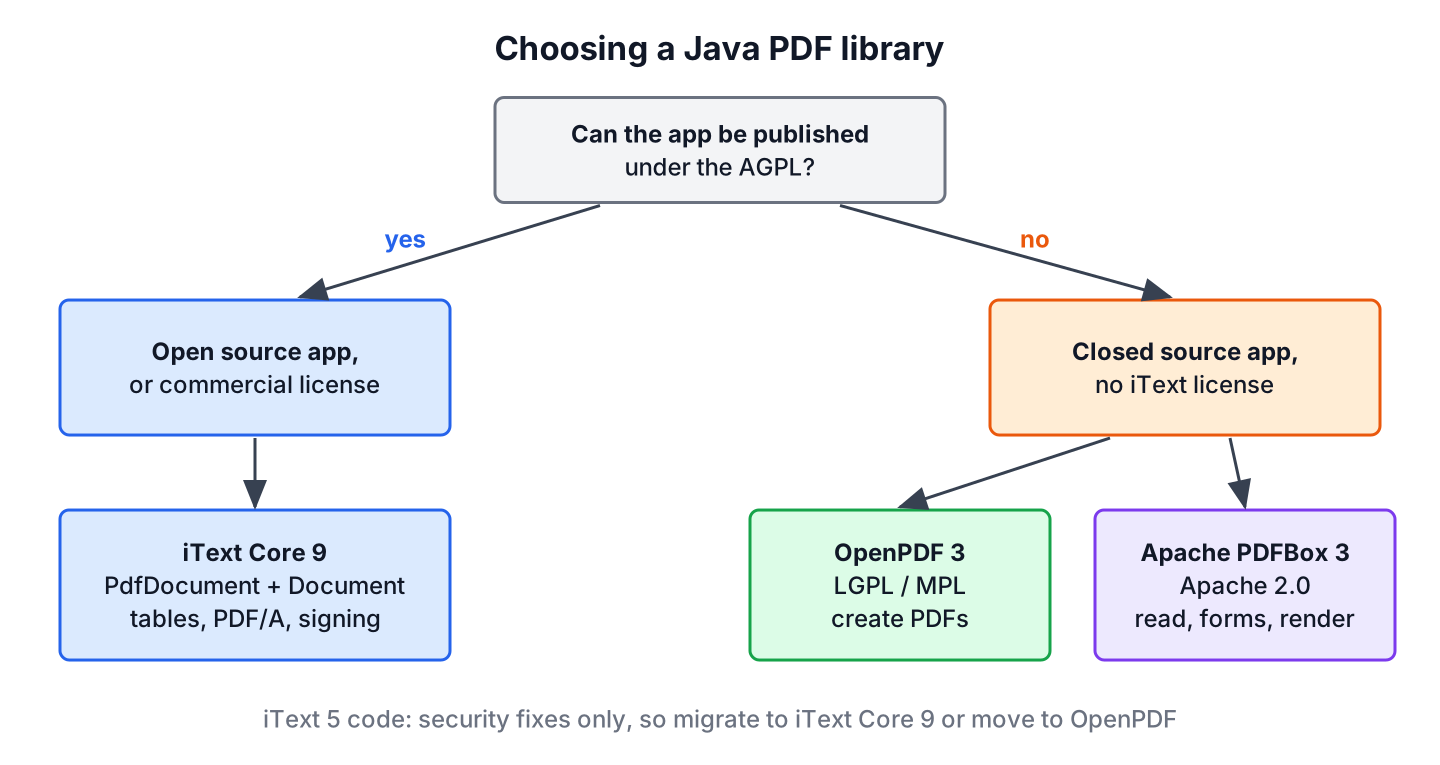
Both lines are licensed under the AGPL 3.0 or a commercial license. The AGPL requires that an app that uses iText, including a web app or a service that users reach over the network, publishes its own full source code under the AGPL. A company that does not want to publish its code buys a commercial license.
| Library | License | API style | Latest version | Good for |
|---|---|---|---|---|
| iText Core 9 | AGPL 3.0 or commercial | Layout elements on PdfDocument | 9.8.0 | Full feature set, PDF/A, signatures, HTML to PDF add-on |
| iText 5 | AGPL 3.0 or commercial | Document plus PdfWriter | 5.5.13.6, security fixes only | Existing code only |
| OpenPDF | LGPL 2.1 or MPL 2.0 | iText 4 style Document | 3.0.5 | Closed source apps that create PDFs |
| Apache PDFBox | Apache 2.0 | Low-level page content streams | 3.0.8 | Text extraction, forms, rendering pages to images |
Check the license before writing code, because moving from iText to OpenPDF or PDFBox later means rewriting every PDF class. Every PDF that the AGPL version of iText 9 writes also carries a producer line such as iText Core 9.8.0 (AGPL version), which the AGPL terms require us to keep.
2. Adding iText 9 to a Maven Project
iText Core is split into modules. For creating and reading documents, we need kernel and layout, which pull in io and commons. Password protection and digital signatures also need bouncy-castle-adapter.
<dependency>
    <groupId>com.itextpdf</groupId>
    <artifactId>kernel</artifactId>
    <version>9.8.0</version>
</dependency>
<dependency>
    <groupId>com.itextpdf</groupId>
    <artifactId>layout</artifactId>
    <version>9.8.0</version>
</dependency>
<dependency>
    <groupId>com.itextpdf</groupId>
    <artifactId>bouncy-castle-adapter</artifactId>
    <version>9.8.0</version>
</dependency>
The artifact com.itextpdf:itext-core is a POM that brings in all modules at once, which is convenient but adds many jars. iText 9 runs on Java 8 and later and works on Java 25.
3. Kernel and Layout Classes
iText Core separates the PDF file from the page layout. The kernel classes handle the file format, and the layout classes place text and images on pages and break them across pages.
| Class | Package | What it does |
|---|---|---|
| PdfWriter | com.itextpdf.kernel.pdf | Writes PDF bytes to a file or an OutputStream |
| PdfReader | com.itextpdf.kernel.pdf | Reads an existing PDF |
| PdfDocument | com.itextpdf.kernel.pdf | The PDF itself, with pages, metadata and encryption |
| Document | com.itextpdf.layout | Adds layout elements and flows them across pages |
| Paragraph, Table, Cell, Image, List | com.itextpdf.layout.element | The building blocks of the content |
| PdfTextExtractor | com.itextpdf.kernel.pdf.canvas.parser | Extracts the text of a page |
The iText 5 classes com.itextpdf.text.Document, PdfPTable, Chapter, Anchor and PdfStamper do not exist in iText Core. Code that uses them has to be rewritten, not only re-imported.
4. Writing a PDF
A PDF is built in three steps. We open a PdfWriter on the target, wrap it in a PdfDocument, and add elements to a Document. Closing the Document closes the whole chain and writes the file, so a missing close() leaves a broken file.
4.1. Hello World and File Attributes
Title, author and subject are stored in the document information of the PdfDocument. PDF viewers show them in the file properties, and search engines use the title for PDFs on a website.
String title;
try (PdfDocument pdf = new PdfDocument(new PdfWriter("receipt.pdf"));
     Document document = new Document(pdf)) {
    PdfDocumentInfo info = pdf.getDocumentInfo();
    info.setTitle("Receipt 1042");
    info.setAuthor("Corner Cafe");
    info.setSubject("Order receipt");
    document.add(new Paragraph("Thank you for your order!"));
    title = info.getTitle();
}
String savedTitle = title;               // "Receipt 1042"
4.2. Fonts, Colors and Alignment
The 14 standard PDF fonts, such as Helvetica and Times, are available without font files through StandardFonts. The setBold() and setItalic() methods of iText 7 and 8 are named simulateBold() and simulateItalic() in iText 9, and they only imitate the style, so real bold or italic text uses a bold or oblique font.
try (PdfDocument pdf = new PdfDocument(new PdfWriter("styled.pdf"));
     Document document = new Document(pdf)) {
    PdfFont bold = PdfFontFactory.createFont(StandardFonts.HELVETICA_BOLD);
    document.add(new Paragraph("Corner Cafe")
            .setFont(bold)
            .setFontSize(20)
            .setFontColor(ColorConstants.BLUE)
            .setTextAlignment(TextAlignment.CENTER));
    document.add(new Paragraph("Open daily from 7 to 19")
            .setFont(PdfFontFactory.createFont(StandardFonts.HELVETICA_OBLIQUE)));
}
The standard fonts cover only Western European characters. For names with accents outside Latin-1, Hindi, Arabic or Chinese, we embed a TrueType font with PdfFontFactory.createFont(“NotoSans-Regular.ttf”, PdfEncodings.IDENTITY_H), otherwise the characters are missing from the PDF.
4.3. Adding Images
The ImageDataFactory class loads PNG, JPEG, GIF, BMP, TIFF and more from a file, a URL or a byte array. The Image element scales and positions the picture.
try (PdfDocument pdf = new PdfDocument(new PdfWriter("logo.pdf"));
     Document document = new Document(pdf)) {
    Image logo = new Image(ImageDataFactory.create("logo.png"));
    logo.scaleToFit(100, 40);                       // keep aspect ratio
    document.add(logo);
    Image stamp = new Image(ImageDataFactory.create("logo.png"));
    stamp.setFixedPosition(400, 750);               // x, y from bottom left
    stamp.scaleAbsolute(80, 32);
    document.add(stamp);
}
PDF coordinates start at the bottom-left corner of the page and are measured in points, where 72 points make one inch. An A4 page, the default size, is 595 by 842 points.
4.4. Generating a Table
A Table takes relative column widths and fills cells row by row. Header cells added with addHeaderCell() repeat on every page when the table breaks across pages, which long invoices need.
static void writeInvoice(OutputStream out) throws IOException {
    try (PdfDocument pdf = new PdfDocument(new PdfWriter(out));
         Document document = new Document(pdf)) {
        Table table = new Table(UnitValue.createPercentArray(new float[]{3, 1, 1}))
                .useAllAvailableWidth();
        table.addHeaderCell("Item");
        table.addHeaderCell("Qty");
        table.addHeaderCell("Price");
        table.addCell("Latte");
        table.addCell("2");
        table.addCell(new Cell().add(new Paragraph("7.00")).setTextAlignment(TextAlignment.RIGHT));
        table.addCell(new Cell(1, 2).add(new Paragraph("Total")));   // spans 2 columns
        table.addCell(new Cell().add(new Paragraph("7.00")).setTextAlignment(TextAlignment.RIGHT));
        document.add(table);
    }
}
try (OutputStream out = Files.newOutputStream(Path.of("invoice.pdf"))) {
writeInvoice(out);
}
String invoiceText;
try (PdfDocument pdf = new PdfDocument(new PdfReader("invoice.pdf"))) {
invoiceText = PdfTextExtractor.getTextFromPage(pdf.getPage(1));
}
List<String> invoiceLines = invoiceText.lines().toList(); // [Item Qty Price, Latte 2 7.00, Total 7.00]4.5. Creating Lists
The layout List class has the same simple name as java.util.List, so in a class that uses both, we write the full name for one of them. A list can use numbers, letters, Roman numerals or any symbol.
try (PdfDocument pdf = new PdfDocument(new PdfWriter("lists.pdf"));
     Document document = new Document(pdf)) {
    com.itextpdf.layout.element.List perks = new com.itextpdf.layout.element.List()
            .setListSymbol("-")
            .setSymbolIndent(8);
    perks.add("Free Wi-Fi");
    perks.add("Oat milk at no extra cost");
    document.add(perks);
    com.itextpdf.layout.element.List steps = new com.itextpdf.layout.element.List(ListNumberingType.ROMAN_LOWER);
    steps.add(new ListItem("Order at the counter"));
    steps.add(new ListItem("Pick up at the bar"));
    document.add(steps);
}
5. Password-Protected PDF and Permissions
PDF encryption has two passwords. The user password is needed to open the file, and the owner password controls the permissions, such as printing or copying text. We set both through WriterProperties, and the bouncy-castle-adapter module must be on the classpath.
WriterProperties props = new WriterProperties().setStandardEncryption(
        "open-me".getBytes(StandardCharsets.UTF_8),          // user password
        "owner-secret".getBytes(StandardCharsets.UTF_8),     // owner password
        EncryptionConstants.ALLOW_PRINTING,                   // only printing allowed
        EncryptionConstants.ENCRYPTION_AES_256);
try (PdfDocument pdf = new PdfDocument(new PdfWriter("protected.pdf", props));
     Document document = new Document(pdf)) {
    document.add(new Paragraph("Payroll for October"));
}
PdfDocument noPassword = new PdfDocument(new PdfReader("protected.pdf"));   // BadPasswordException: Bad user password
String secret;
ReaderProperties withPassword = new ReaderProperties().setPassword("open-me".getBytes(StandardCharsets.UTF_8));
try (PdfDocument pdf = new PdfDocument(new PdfReader("protected.pdf", withPassword))) {
    secret = PdfTextExtractor.getTextFromPage(pdf.getPage(1));
}
String payroll = secret;                 // "Payroll for October"
To restrict permissions without asking for a password on opening, we pass an empty user password (new byte[0]) and combine permissions with |, for example ALLOW_PRINTING | ALLOW_COPY. PDF viewers respect these flags, but anybody with the right tool can remove them, so permissions are not a security boundary, whereas a user password with AES-256 is.
A payroll service is a typical case for a user password. The service emails each employee a monthly salary slip as a PDF, and the slip opens only with a password the employee set in the HR portal, so a forwarded email does not expose the salary.
6. Reading and Modifying an Existing PDF
A PdfReader alone opens a PDF for reading. A PdfReader together with a PdfWriter opens it for changes, and iText writes a new file with the original pages plus our additions. This replaces PdfStamper from iText 5.
6.1. Extracting Text
The PdfTextExtractor.getTextFromPage() method returns the text of one page in reading order. Scanned PDFs contain images instead of text, and they need OCR software, because no PDF library can extract text from them.
StringBuilder all = new StringBuilder();
int pages;
try (PdfDocument pdf = new PdfDocument(new PdfReader("invoice.pdf"))) {
    pages = pdf.getNumberOfPages();
    for (int i = 1; i <= pages; i++) {
        all.append(PdfTextExtractor.getTextFromPage(pdf.getPage(i))).append("\n");
    }
}
int pageCount = pages;                   // 1
boolean hasLatte = all.toString().contains("Latte 2 7.00");   // true
6.2. Stamping Text on Every Page
A coffee supplier marks invoices as paid after the payment arrives. Instead of regenerating the invoice, the app opens the original PDF and stamps a red PAID on each page, so the rest of the file stays as it was sent.
try (PdfDocument pdf = new PdfDocument(new PdfReader("invoice.pdf"), new PdfWriter("invoice-paid.pdf"));
     Document document = new Document(pdf)) {
    for (int i = 1; i <= pdf.getNumberOfPages(); i++) {
        document.showTextAligned(new Paragraph("PAID").setFontColor(ColorConstants.RED).setFontSize(48),
                300, 500, i, TextAlignment.CENTER, VerticalAlignment.MIDDLE, 0.5f);   // rotated 0.5 radians
    }
}
String stamped;
try (PdfDocument pdf = new PdfDocument(new PdfReader("invoice-paid.pdf"))) {
    stamped = PdfTextExtractor.getTextFromPage(pdf.getPage(1));
}
boolean paid = stamped.contains("PAID");   // true
Pages are numbered from 1 in iText, and the source file must differ from the target file, because iText reads the source while it writes the target.
7. Writing a PDF to an HTTP Response
The writeInvoice() method from section 4.4 takes any OutputStream. In a servlet or a Spring MVC controller, we pass the response stream, so the PDF goes to the browser without a temporary file.
@GetMapping("/invoices/{id}.pdf")
void download(@PathVariable long id, HttpServletResponse response) throws IOException {
    response.setContentType("application/pdf");
    response.setHeader("Content-Disposition", "inline; filename=invoice-" + id + ".pdf");
    writeInvoice(response.getOutputStream());
}
ByteArrayOutputStream body = new ByteArrayOutputStream();
writeInvoice(body);
String header = new String(body.toByteArray(), 0, 8, StandardCharsets.US_ASCII); // "%PDF-1.7"With inline, the browser shows the PDF in a tab. With attachment, it downloads the file. The status and headers must be set before the first byte goes to the response stream.
8. OpenPDF as an LGPL Alternative
OpenPDF is a fork of iText 4.2, the last iText version under the LGPL and MPL, and it is maintained by the LibrePDF community. Version 3.0.5 needs Java 21 or later and uses the package org.openpdf.text, whereas OpenPDF 1.x and 2.x used com.lowagie.text.
<dependency>
    <groupId>com.github.librepdf</groupId>
    <artifactId>openpdf</artifactId>
    <version>3.0.5</version>
</dependency>
The API follows the iText 5 style, with a Document, a PdfWriter attached to it, and PdfPTable for tables. The class names Document and Paragraph clash with the iText ones, so the following method uses the full names to compile next to the iText code of this article.
static void writeMenu(OutputStream out) throws IOException {
    try (org.openpdf.text.Document document = new org.openpdf.text.Document(org.openpdf.text.PageSize.A4)) {
        org.openpdf.text.pdf.PdfWriter.getInstance(document, out);
        document.addTitle("Daily menu");
        document.open();
        document.add(new org.openpdf.text.Paragraph("Daily menu",
                org.openpdf.text.FontFactory.getFont(org.openpdf.text.FontFactory.HELVETICA_BOLD, 18)));
        org.openpdf.text.pdf.PdfPTable table = new org.openpdf.text.pdf.PdfPTable(2);
        table.addCell("Latte");
        table.addCell("3.50");
        document.add(table);
    }
}
ByteArrayOutputStream menu = new ByteArrayOutputStream();
writeMenu(menu);
org.openpdf.text.pdf.PdfReader reader = new org.openpdf.text.pdf.PdfReader(menu.toByteArray());
String producer = reader.getInfo().get("Producer"); // "OpenPDF 3.0.5"
reader.close();Migrating iText 5 code to OpenPDF is mostly a change of imports, because both come from the same code base. OpenPDF lacks the newer iText features, such as PDF/UA, the layout engine of iText Core and the commercial add-ons.
9. Read and Write PDF in Java FAQs
License terms come up first when teams evaluate iText, and the practical questions follow from HTML conversion, old code and Java 25 warnings.
9.1. Is iText free for commercial use?
Only if the app complies with the AGPL, which means publishing the full source code of the app under the AGPL, including server apps that users reach over a network. Otherwise, iText requires a commercial license. OpenPDF (LGPL/MPL) and Apache PDFBox (Apache 2.0) can be used in closed source apps.
9.2. How do I convert HTML to PDF in Java?
iText offers the pdfHTML add-on (com.itextpdf:html2pdf) with HtmlConverter.convertToPdf(), under the same AGPL or commercial terms. Under the LGPL, the OpenHTMLtoPDF project renders HTML and CSS with PDFBox.
9.3. Can I upgrade iText 5 code by changing the version number?
No. iText Core 7, 8 and 9 use different packages and classes, for example com.itextpdf.layout.Document instead of com.itextpdf.text.Document, Table instead of PdfPTable, and PdfReader plus PdfWriter instead of PdfStamper. The code has to be rewritten class by class.
9.4. Why does iText print a sun.misc.Unsafe warning on Java 25?
iText 9.8.0 releases memory-mapped file buffers through sun.misc.Unsafe::invokeCleaner, and JDK 24 and later warn about that method. The warning is harmless today, and it goes away once iText switches to a supported API.
9.5. How do I read a PDF in Java without iText?
Apache PDFBox reads text with new PDFTextStripper().getText(Loader.loadPDF(file)) and is licensed under Apache 2.0. OpenPDF reads text with new PdfTextExtractor(reader).getTextFromPage(1).
10. Conclusion
iText Core 9 writes PDFs with a PdfWriter, a PdfDocument and a layout Document, and reads them with a PdfReader and PdfTextExtractor. Tables, images, lists, fonts, encryption and stamping existing files each take a few lines, and any OutputStream works as a target, including an HTTP response.
Old tutorials still show the iText 5 API, which gets only security fixes. Whatever the version, the AGPL license applies, so closed source apps either buy an iText license or switch to OpenPDF or Apache PDFBox.
11. References
- iText Core knowledge base
- iText Core 9.8.0 API documentation
- iText AGPL license terms
- iText 5.5.13.6 release notes
- OpenPDF on GitHub
Happy Learning !!

I want to generate a pdf,I have a react page , which has dynamic data from mysql
I wnt to print the page with additon information
React is on client side (browser) and iText is on server side. I am assuming you want to have a print button on UI that will generate some report/summary. How React is interfering or used in your case?
Hi, I started working with itext pdf, and I saw examples using
https://mvnrepository.com/artifact/com.itextpdf/itextpdf and https://mvnrepository.com/artifact/com.itextpdf/kernel, and I like to know which are the differences between those two dependencies I couldn’t find documentation about it, I saw some difference on the use of the PdfWriter and PdfDocument, but only that
Hi, the com.itextpdf/itextpdf dependency is the core library where the kernel module is used for low-level PDF processing such as working directly with PDF objects, such as pages, fonts, images, and annotations.
@RequestMapping(value=”/download”)
public String download(HttpServletResponse res)throws IOException
{
String mimeType=null;
File f=new File(“D:/files/merge/res.pdf”);
mimeType=getMimeType(f.getCanonicalPath());
res.setContentType(mimeType);
res.setHeader(“Content-Disposition”,”attachment;filename=\””+f.getName()+”\””);
res.setContentLength((int)f.length());
InputStream is=new FileInputStream(f);
ServletOutputStream out=res.getOutputStream();
IOUtils.copy(is, out);
is.close();
out.flush();
out.close();
return “index”;
}
private String getMimeType(String canonicalPath)
{
canonicalPath=canonicalPath.toLowerCase();
if(canonicalPath.endsWith(“.jpg”)||canonicalPath.endsWith(“.jpeg”))
return “image/jpeg”;
else
return “application/pdf”;
}
This code is for those who are facing problem in downloading there pdf file you can use mime type , ihad used here only jpg and pdf. Hope this will be helpful for you all.
My scenario is this I am using pdf file to log my execution history [ text] with screenshot
But the problem is that I am not able to append content after my existing current content and without creating multiple files I want to append all content in one pdf file.
How to do that, because I am getting “Invalid header error ”
can you please share code snippet for that
How can I make a view of database table as a receipt? Working on Java with Eclipse IDE. I want the view page will fetch data from the db table when I will click to generate the payment receipt.
Is there anyway to have a agree alert with message in this. Eg. Having Two elements, we need to show the hidden content only when user agree some terms and conditions.
Great tutorial. Very helpful.
How to download attachment from pdf with password(to open the pdf need to put password) protected
Document document = new Document();
try{
    response.setContentType("application/pdf");
    PdfWriter.getInstance(document, response.getOutputStream());
    document.open();
    document.add(new Paragraph("howtodoinjava.com"));
    document.add(new Paragraph(new Date().toString()));
    //Add more content here
}catch(Exception e){
    e.printStackTrace();
}
    document.close();
}
This is only for generating one pdf file.. But how to generate multiple pdf files ???
Hi Lokesh and other Commentors,
I wonder If anyone has tried embedding Video inside PDF, This is one of my business requirement and I am not getting to a proper conclusion.
Thanks for your answer, If any one has tried it please let me how we can achieve that.
Interesting. Anybody, any thoughts?
Here you have showed some examples by manually entering values that we want to print. What if we want certain fields of my HTML page to convert in a PDF dynamically? There is no where mentioned about it here. So, can you tell how to do or where can I look more for it.
This has truly saved a lot of work,
Thank you so much.
Can you please let me know how do I add rows to the table?
You’re a life saver. Thank you for posting these examples, they are much better than the website’s.
Hi,
I want to download pdf file for web application i.e on button click in page , it should download the content which has been passed.
Can you share js and java code for the same.
I am also having the same problem. Can you help me if you have got the solution to it.
I am also having the same problem. Can you help me if you have got the solution to it
Hi lokesh,
Can you please tell me how to extract table data from pdf and that data come in csv format or tabular format.
Thanks,
Rahul
hi..im ranga
i want creating multitable in pdf through mysql database…please send me any example link
hai guys ..im able to generate the pdf files but when i click on the save button its downloading automatically …how can i stop that…when i click on save button it should ask save as option…how to do that???
Hi,
I would like to export my xml layout(Where i have some reports) into pdf. How could I do that?
i need to read the title of a pdf file using java code..is it possible ..? if possible the how?
I am trying to make Encrupted pdf i have followed all step and also included those 3 extra jar file of bouncycastle but i am getting following exception.
Without setEncryption(); my code is generating pdf files are succesfully.
Please Help I am in Urgent Need
It’s version mismatch issue. Please find the matching jars version in downloaded code.
i have downloaded those files from your link only
use only BoucyCastle-lw jar
you can download it from
hii,
i used every thing to generate PDF ,but nothing worked..
Your code helped me a lot but it is for static data, i am getting data from query so how to save it in pdf same as it is coming and i want pop up which usually comes when we clicked to button that is for open and Save..
please help me with this…
Aditi
Hello Aditi
You can first save your Retrieve data from Database to some string than add that sting to Paragraph.
Hi aditi jain
Now i need conversions to pdf from jpg,doc,excel ,word .
if you have any code implementations please let me post.
Hi Lokesh,
I want to create pdf itext, but data to field which is from database. How i can do this?
Thanks
Dhanraj
Hi,
can we include these features in the itext ?
1. pagination
2. logo add on every page means to set header and footer in the each page
3. can dynamically add the data and in particular column we have 4 different values like status: done, partially done, not done, to be done and for that we can assign color text like for done its green for partially done its yellow…so on
if anyone knows please tell me…..
Hi Lokesh,
Thanks for the post its really very helpful, I have one question that in my code I want to show the PDF when I click on the PDF Generate button and also want a download option for PDF but what is happening when I click on Register button the PDF is downloaded at the desired path.In my code I’m trying to get data from my database so How can I resolve the issue. I think u r the right person who can resolve my issue.
I’ll share you my code.
FileOutputStream file = null; //FileOutputStream image; try { file = new FileOutputStream(new File("D:\\report\\Registration.pdf")); } catch (FileNotFoundException e1) { e1.printStackTrace(); } Document document = new Document(); PdfWriter.getInstance(document, file); document.open(); Image img = Image.getInstance("MT.png"); img.setAbsolutePosition(455f, 755f); //Scale to new height and new width of image img.scaleAbsolute(90, 90); document.add(img); Paragraph p = new Paragraph(); try { p.add("\n"); p.add(" Registration Form"); p.add("\n ============================================================="); p.add("\n Registration Number: " + reg.getRegistration_Number()); p.add("\n UHID: "+ reg.getUHID()); p.add("\n Legacy UHID: " + reg.getLegacy_UHID()); p.add("\n First Name : " + reg.getFirst_Name()); p.add("\n Middle Name : " + reg.getMiddle_Name()); p.add("\n Last Name : " + reg.getLast_Name()); p.add("\n DOB: " + reg.getDOB()); p.add("\n Gender: " + reg.getGender()); p.add("\n Blood Group: "+reg.getBlood_group()); p.add("\n Address Line1: " + reg.getAddress1()); p.add("\n Address Line2: " + reg.getAddress2()); p.add("\n Country: " + reg.getCountry()); p.add("\n State: " + reg.getState()); p.add("\n City: " + reg.getCity()); p.add("\n Pincode: " + reg.getPIN()); p.add("\n Location Code: " + reg.getLocation()); p.add("\n Language: " + reg.getLanguage()); p.add("\n Proficiency: " + reg.getProficiency()); p.add("\n Contact No: " + reg.getContact_No()); p.add("\n Attendant Address: " + reg.getAttendant_address()); p.add("\n Attendant Contact: " + reg.getAttendant_contactno()); p.add("\n Doctor: " + reg.getDoc_Name()); p.add("\n Speciality: " + reg.getSpecialty()); p.add("\n ============================================================="); document.add(p); document.close(); } catch (Exception e) { e.printStackTrace(); }There are two things. One – file should be generated and stored on some path – so that it can be downloaded later by clicking on generate PDF button. You approach is correct. Two – when PDF Generate button is clicked then file should be downloaded. Here you should create another servlet/MVC method as per your application design and write the PDF file into ServletOutputStream. An Example.
what type of return type we should expect from this ex,ple
how to delete a paragraph/chapter or something else from pdf after adding it to the document ?
Hi, i used your code but pdf file not created and also no ERROR shown.
Please tell me how to view the pdf.
Hi Lokesh
Can you help me to convert one file format (eg:- .docx, .txt ) etc into pdf form.And to save at a particular location….
Please help
Thank you
Hi Lokesh ,
have a requirement from client . requirement is some thing like bit tricky .
for example am going to create one PDF in local path , second time on wards when i open the same PDF,it will show duplicate .am trying to work on this but when open the first time only am getting second opening as duplicate ,after closing nothing is displayed .please suggest me .
Thanks in advance.
kalavathi.
Hi can you please tell me how could I add OUTLINE to my generated pdf?
Thanks in advance
Could you please try this example : https://kb.itextpdf.com/it5kb/examples#302-createoutlinetree.java
how can i add watermark while generating the PDF?
Have you tried it? https://stackoverflow.com/questions/25359024/how-to-create-watermark-in-pdf
Hai ..How can we add text at the end (append) of a pdf file..using itext 5.5.1 in java..
Hi Lokesh.
I do as You told in this Article, And it worked.
But when I generate another new file, the previous pdf file getting replaced/overwrited.
Here’s my code:
PdfWriter.getInstance(document, new FileOutputStream("D:/filefolder/LetterTest.pdf"));My question is, do you know the code to generate pdf file without overwriting the existing data (the previous data) within that file ?
~Thanks in advance
“Read/Modify an existing PDF” This section discuss exactly same thing.
How to generate PDF with image as watermark for web application in jsp, response.getOutputstream. creation of image watermark PDF when the user click the button, dynamic creation of pdf. [jsp] [pdf] [watermark] [image]
Hello,
I am creating a simple project where I am using itext to fill out an existing form but unfortunately I get this error operation cannot be completed since user mapped is not closed.
import java.io.FileOutputStream;
import java.io.IOException;
import com.itextpdf.text.DocumentException;
import com.itextpdf.text.pdf.AcroFields;
import com.itextpdf.text.pdf.PdfReader;
import com.itextpdf.text.pdf.PdfStamper;
public class ReformPdf
{
private static final String dest = “D:/Eclipse Java/HiltonForms2014_r.pdf”;
private static final String src= “D:/Eclipse Java/HiltonForms2014_r.pdf”;
public static void main(String[] args) throws IOException, DocumentException
{
PdfReader reader = new PdfReader(src);
PdfStamper stamper = new PdfStamper(reader,new FileOutputStream(dest));
AcroFields form = stamper.getAcroFields();
form.setField(“LASTNAME”, “GOWDA”);
form.regenerateField(“LASTNAME”);
stamper.close();
reader.close();
}
}
thanks in advance
Delete the file from file system and run the program again. Error says that outputstream writing to file has not been closed.
So first create an instance of FileOutputStream(dest), hold its reference, and close it too in last. I may work.
Use this example : https://kb.itextpdf.com/it5kb/examples#152-foobarfilmfestival.java
Hi Lokesh, Thanks for the article. Can you please compare this approach of generating a PDF with the method of using Jasper Report. I have worked in Jasper Reports and they feel much more easier than the approach that is being used here.
Hi Bharat, Thanks for putting your question here.
I also had some (little) experience of working on jasper reports and we were using that for generating reports using iReport. So, based on my previous experience, I can say that for creating report PDFs, Jasper reports is better than iText. But if you are planning to write some sort of document containing random information then iText is better. This comparison is totally based on my little experience with both approaches to generate PDF files.
Please feel free to put your own thoughts if you disagree.
Hi Lokesh,
I read that we need bouncy castle jars are required for password protected pdf. Can you please include that in the examples.
I had added these jars in sourcecode available to download already. As you suggested, I have added a note as well in that section of the post. Thanks for suggestion. I appreciate it.
I have imported the project and tried to run the encrypt PDF program. However it was showing the below error
java.lang.UnsupportedClassVersionError: com/howtodoinjava/examples/PasswordProtectedPdfExample : Unsupported major.minor version 51.0
at java.lang.ClassLoader.defineClass1(Native Method)
at java.lang.ClassLoader.defineClassCond(ClassLoader.java:631)
at java.lang.ClassLoader.defineClass(ClassLoader.java:615)
at java.security.SecureClassLoader.defineClass(SecureClassLoader.java:141)
at java.net.URLClassLoader.defineClass(URLClassLoader.java:283)
at java.net.URLClassLoader.access$000(URLClassLoader.java:58)
at java.net.URLClassLoader$1.run(URLClassLoader.java:197)
at java.security.AccessController.doPrivileged(Native Method)
at java.net.URLClassLoader.findClass(URLClassLoader.java:190)
at java.lang.ClassLoader.loadClass(ClassLoader.java:306)
at sun.misc.Launcher$AppClassLoader.loadClass(Launcher.java:301)
at java.lang.ClassLoader.loadClass(ClassLoader.java:247)
Exception in thread “main”
I added JRE System Library [jdk1.6.0_32] but I see you have added jdk1.7 in your project.
Please help me to resolve this issue. Does the JDK version mismatch makes issue?
Thanks for your help
Gopi
Yes, version mismatch create issues. Just delete all .class files in bin folder and generate them again.
Hi Lokesh, thanks for the quick help, Actually I could able to trace the root cause of the issue to some extent.
For encrypting the PDF generated I added the two JAR files (bcpkix-jdk15on-1.47.jar & bcprov-jdk15on-1.47), and we also need bouncycastle-java5-136-1.0.0.jar for some other purpose of the project . However, when the classes of bouncycastle-java5-136-1.0.0.jar is loaded before the classes of bcprov-jdk15on-1.47.jar, then the below security exception is thrown. If the class loading order is the other way, then the exception is not thrown.
Exception : java.lang.SecurityException: no manifiest section for signature file entry org/bouncycastle/asn1/ocsp/ResponderID.class
Exception in thread “main” java.lang.SecurityException: no manifiest section for signature file entry org/bouncycastle/asn1/ocsp/ResponderID.class
at sun.security.util.SignatureFileVerifier.verifySection(SignatureFileVerifier.java:380)
at sun.security.util.SignatureFileVerifier.processImpl(SignatureFileVerifier.java:231)
at sun.security.util.SignatureFileVerifier.process(SignatureFileVerifier.java:176)
at java.util.jar.JarVerifier.processEntry(JarVerifier.java:245)
at java.util.jar.JarVerifier.update(JarVerifier.java:199)
at java.util.jar.JarFile.initializeVerifier(JarFile.java:323)
at java.util.jar.JarFile.getInputStream(JarFile.java:388)
at sun.misc.URLClassPath$JarLoader$2.getInputStream(URLClassPath.java:692)
at sun.misc.Resource.cachedInputStream(Resource.java:61)
at sun.misc.Resource.getByteBuffer(Resource.java:144)
at java.net.URLClassLoader.defineClass(URLClassLoader.java:256)
at java.net.URLClassLoader.access$000(URLClassLoader.java:58)
at java.net.URLClassLoader$1.run(URLClassLoader.java:197)
at java.security.AccessController.doPrivileged(Native Method)
at java.net.URLClassLoader.findClass(URLClassLoader.java:190)
at java.lang.ClassLoader.loadClass(ClassLoader.java:306)
at sun.misc.Launcher$AppClassLoader.loadClass(Launcher.java:301)
at java.lang.ClassLoader.loadClass(ClassLoader.java:247)
at com.itextpdf.text.pdf.PdfEncryption.(PdfEncryption.java:147)
at com.itextpdf.text.pdf.PdfWriter.setEncryption(PdfWriter.java:2045)
at com.dbs.ecorner.util.PDFGenerator.generateOpenAccountPDF(PDFGenerator.java:31)
at com.dbs.ecorner.util.PDFGenerator.main(PDFGenerator.java:317)
Could you please throw some light on this?
Thanks!
Below are the manifest files for both jars.
I do not see any class file inside bouncycastle-java5-136.jar, rather it has pom.xml file which include “bcprov-jdk15” dependency. Can’t we remove bouncycastle-java5-136.jar all together.
Please consider above analysis just a probability. You need to do more research.
Really Awesome !