🚀 Supercharge your YouTube channel's growth with AI.
Try YTGrowAI FreePython Tempfile Module to Work with Temporary Files and Directories


An empty string from read() after write() makes me wonder where the greeting went. In read_tempfile.py, seek(0) exposes it again because writing moved the cursor to the end of the stored text.
Your script can use generated names for intermediate data without making that data permanent. You’ll match the next file operation to a tempfile constructor and its cleanup boundary.
What is Python tempfile?
Python tempfile is a standard-library module for creating temporary files and directories with generated names. You use it for intermediate data that needs file operations but does not belong in permanent storage.
A file object gives you read and write methods, while a pathname lets another file-opening function locate the data. Choose the constructor by which of those your next operation needs.
| Your next operation | Choose | Cleanup boundary |
|---|---|---|
| Read or write through one file object | TemporaryFile() | Closing the file |
| Pass a visible pathname to another operation | NamedTemporaryFile() | Close or context exit, depending on deletion options |
| Create several related files | TemporaryDirectory() | Context exit removes the directory tree |
| Keep a small stream in memory before spilling to disk | SpooledTemporaryFile() | Closing the stream |
The Python tempfile documentation distinguishes these high-level interfaces from mkstemp() and mkdtemp(), whose resources you must clean up yourself. Use a with block when you want a specific point at which temporary storage stops existing.
Prerequisites for the file examples
You need permission to create files in the current directory, but no third-party packages because all the examples use the standard library.
- Use Python 3.12 or newer for the named-file example because delete_on_close was added in Python 3.12. The examples here ran on Python 3.14.7 on Linux.
- Work in a writable project directory. Each example sets dir=”.” so its temporary storage stays there.
- Use a project virtual environment at .venv. The run commands use its Linux/macOS executable, .venv/bin/python, rather than a system interpreter.
- Know how to save and run a Python script. A with block controls resource cleanup, as explained in Python context managers.
On Windows, run the same Python code with .venv\Scripts\python.exe, the virtual-environment executable. Pathname sharing still follows Windows restrictions.
Step 1: Write and read a temporary file
For the greeting below, w+t enables reading and writing strings, with encoding=”utf-8″ selecting the text encoding. Choose TemporaryFile() when the next operation accepts a file object.
Writing moves the file cursor, which is the position where the next read starts. A read at the end returns an empty string, so seek(0) moves the cursor back before reading the greeting.
Save this as read_tempfile.py, which writes the greeting in text mode before trying the default binary mode in a separate block.
import tempfile

with tempfile.TemporaryFile(mode="w+t", encoding="utf-8", dir=".") as file:
    file.write("Hello from AskPython!")
    print("Read without rewind:", repr(file.read()))
    file.seek(0)
    print("Read after rewind:", file.read())

print("Closed after the block:", file.closed)

with tempfile.TemporaryFile(dir=".") as binary_file:
    binary_file.write(b"Hello from AskPython!")
    binary_file.seek(0)
    print("Binary read:", binary_file.read())
    print("Name attribute type:", type(binary_file.name).__name__)
.venv/bin/python read_tempfile.py
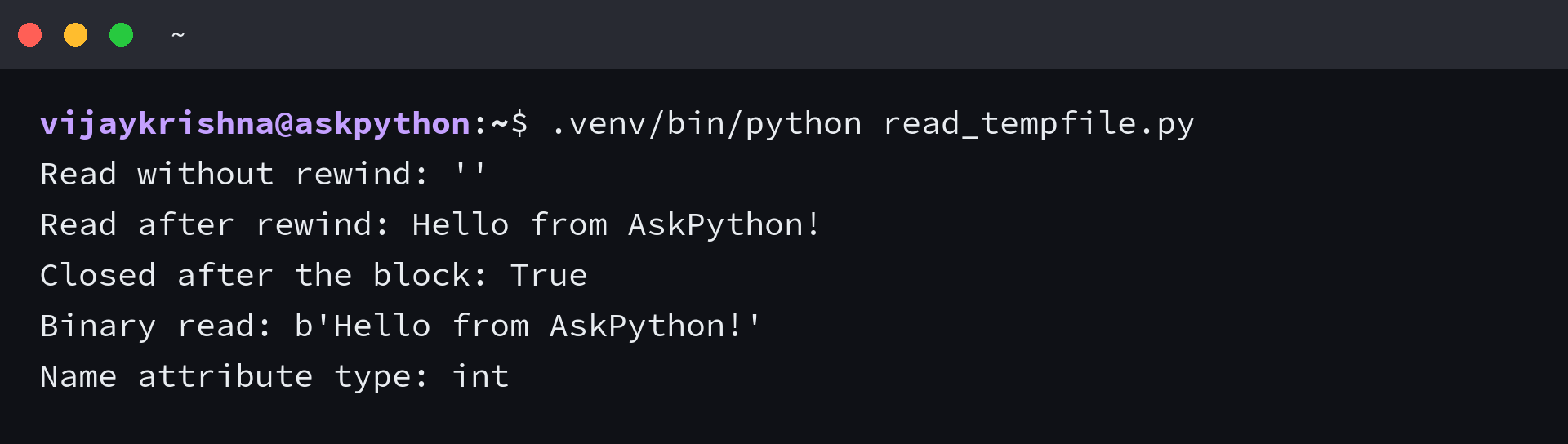
I found that the first read returned an empty string even though the write had succeeded. Rewinding exposed the greeting because read() starts at the current cursor, not automatically at the beginning.
After the first block, file.closed is True because exiting with closes its file object. The binary block accepts a byte string and returns bytes, so it needs no text encoding argument.
A descriptor identifies an open file in the process, which is why an integer name attribute on Linux cannot be passed around as a filename. The binary example prints int for that attribute.
Unix implementations can remove the directory entry immediately or avoid creating one, while other platforms behave differently. Use NamedTemporaryFile() when you need a visible path, rather than depending on TemporaryFile().name.
Step 2: Reopen a named temporary file
NamedTemporaryFile gives you a visible path through its name attribute, so another file-opening operation can access the generated filename.
With delete_on_close=False and the default delete=True, closing the writer leaves the file available until the outer with block ends. Closing also flushes buffered writes, so the reader can see the greeting without sharing the writer handle.
Save this as named_tempfile.py, keeping the nested reader inside the outer block so it closes before Windows cleanup needs to delete the file.
from pathlib import Path
import tempfile

with tempfile.NamedTemporaryFile(
    mode="w+t", encoding="utf-8", dir=".",
    prefix="askpython_", suffix=".txt", delete_on_close=False
) as file:
    path = Path(file.name)
    file.write("Hello from AskPython!")
    file.close()
    print("Exists after close:", path.exists())
    with path.open(encoding="utf-8") as reader:
        print("Reopened content:", reader.read())
    print("Suffix:", path.suffix)

print("Exists after context exit:", path.exists())
.venv/bin/python named_tempfile.py
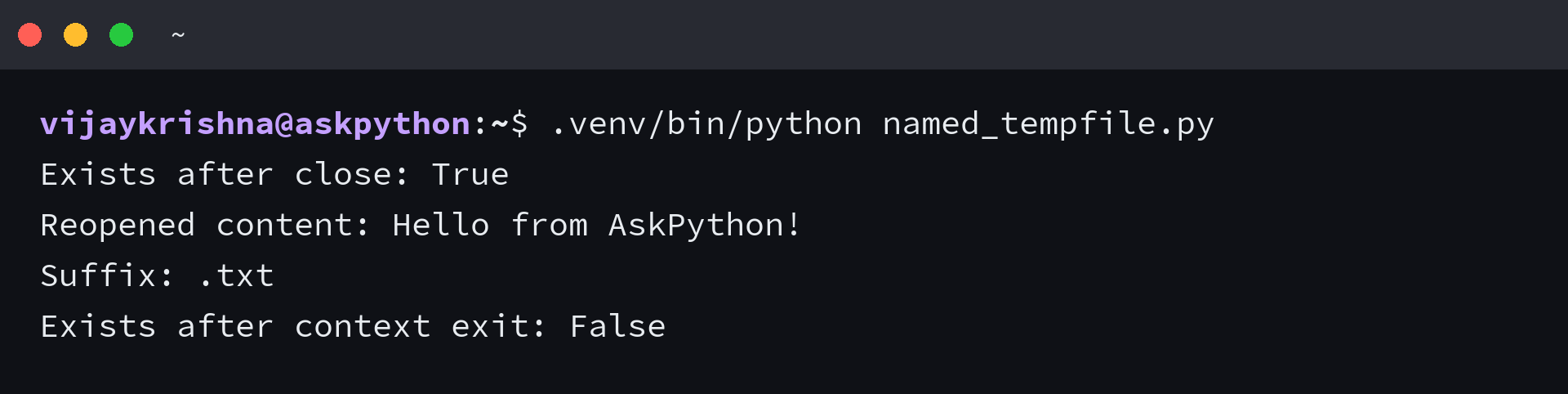
I opened the path after closing the writer and still read the greeting through path.open(). Deletion happened only after the outer context ended.
| Deletion settings | After writer close | After outer context exit |
|---|---|---|
| delete=True, delete_on_close=True | Deleted | Already deleted |
| delete=True, delete_on_close=False | Preserved for another reader | Deleted |
| delete=False | Preserved | Preserved, you own deletion |
Python inserts its generated name between the prefix and suffix, so prefix=”askpython_” identifies the application and suffix=”.txt” supplies the extension. Include the dot yourself.
Keep the file object bound to a variable for the whole operation. Extracting only NamedTemporaryFile().name can let the object be finalized before you use the path, so the default cleanup may remove it.
Step 3: Group files in a temporary directory
Use TemporaryDirectory() when a task produces several files that belong together. The with statement gives you the directory pathname, not an open file object.
Save this as directory_tempfile.py, then watch a result file and nested details file exist inside the block and disappear when the block ends.
from pathlib import Path
import tempfile

with tempfile.TemporaryDirectory(prefix="askpython_", dir=".") as name:
    directory = Path(name)
    (directory / "result.txt").write_text("Hello from AskPython!", encoding="utf-8")
    (directory / "nested").mkdir()
    (directory / "nested" / "details.txt").write_text("Finished", encoding="utf-8")
    print("Stored content:", (directory / "result.txt").read_text(encoding="utf-8"))
    print("Nested file exists:", (directory / "nested" / "details.txt").exists())
    print("Parent is current directory:", directory.resolve().parent == Path.cwd())

print("Directory exists after exit:", directory.exists())
print("Nested file exists after exit:", (directory / "nested" / "details.txt").exists())
.venv/bin/python directory_tempfile.py
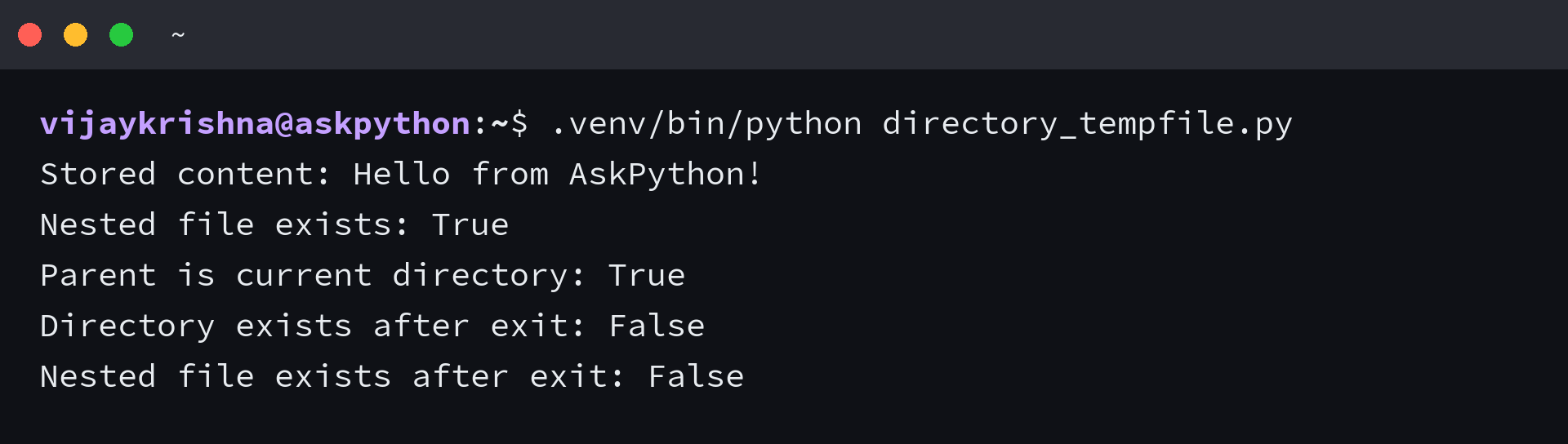
TemporaryDirectory removes its contents recursively, so the nested file disappears along with the directory. The write_text() and read_text() calls open and close their own file handles before cleanup begins.
Setting dir=”.” puts the generated directory beneath your working directory, so the parent comparison prints True. The argument selects an existing parent.
Without an explicit dir, tempfile.gettempdir() selects a writable default using environment settings before platform-specific locations. Python caches that selection, so pass dir to the constructor when you need one operation to use a particular location.
If the result should outlive the block, copy the file to its permanent destination before leaving. Returning a pathname inside the temporary directory does not preserve the file it names.
Step 4: Spill temporary data from memory to disk
SpooledTemporaryFile is a temporary stream that begins in memory and can switch to an on-disk file. Its max_size option controls that switch, which lets you keep small byte streams in memory without treating the threshold as a storage limit.
Save this as spooled_tempfile.py to write up to the threshold and beyond it, then read back the complete binary payload.
import tempfile

with tempfile.SpooledTemporaryFile(max_size=8, mode="w+b", dir=".") as file:
    file.write(b"12345678")
    print("Bytes at threshold:", file.tell())
    file.write(b"9")
    print("Bytes beyond threshold:", file.tell())
    file.seek(0)
    print("Read after spill:", file.read())
    print("File descriptor available:", isinstance(file.fileno(), int))

print("Closed after the block:", file.closed)
.venv/bin/python spooled_tempfile.py
Bytes at threshold: 8
Bytes beyond threshold: 9
Read after spill: b'123456789'
File descriptor available: True
Closed after the block: True
The ninth byte is accepted because exceeding max_size triggers rollover rather than rejecting the write, and the same stream still supports seek() and read() afterward.
| Operation | Documented effect |
|---|---|
| Write 8 bytes with max_size=8 | The size has not exceeded the threshold |
| Write the next byte | The stream exceeds the threshold and rolls over to disk |
| Call fileno() | Forces disk rollover if it has not happened already |
| Call rollover() | Explicitly forces disk rollover regardless of size |
| Use the default max_size=0 | No size-triggered rollover |
Calling fileno() asks for an operating-system file descriptor, so even a small stream must move to disk to provide one. If you need a hard upload limit, count incoming bytes and reject excess data separately.
Choose TemporaryFile() when disk-backed operations are needed from the start, and close either stream as soon as its work ends.
When temporary files do not behave as expected
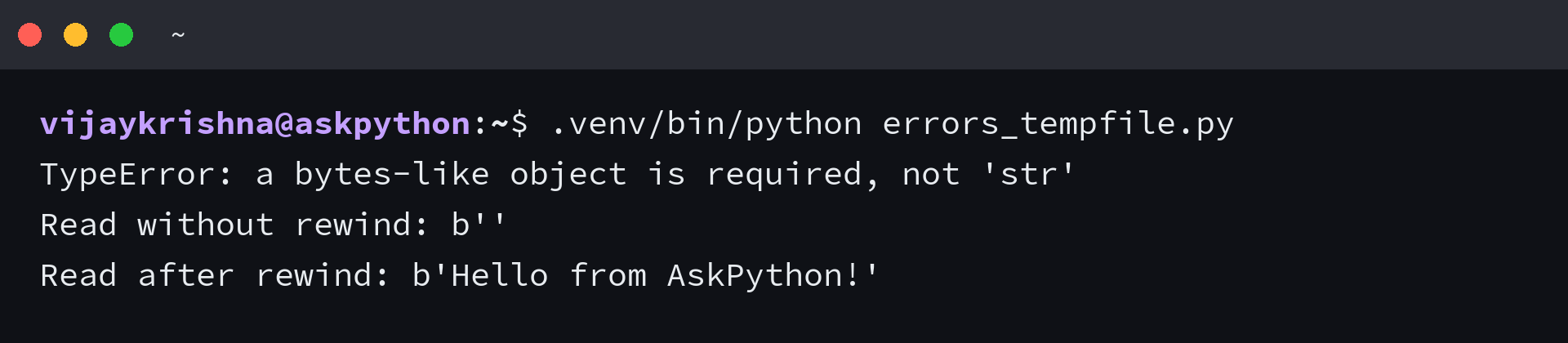
The failed string write below is caught so processing can continue with bytes and a rewind. The error concerns the mode, while the empty read concerns the cursor.
Save this as errors_tempfile.py, then run it to compare the rejected string write with the successful byte write.
import tempfile

with tempfile.TemporaryFile(dir=".") as file:
    try:
        file.write("Hello from AskPython!")
    except TypeError as error:
        print(type(error).__name__ + ":", error)
    file.write(b"Hello from AskPython!")
    print("Read without rewind:", repr(file.read()))
    file.seek(0)
    print("Read after rewind:", file.read())
.venv/bin/python errors_tempfile.py
| Symptom | Cause or boundary | Action |
|---|---|---|
| TypeError requiring a bytes-like object | Default w+b mode expects bytes | Write bytes, or select w+t with an explicit encoding |
| read() returns empty content after write() | The cursor is at the end | Call seek(0) before reading |
| Another reader cannot see buffered content | The writer has not flushed or closed | Flush before concurrent reading, or close before handoff |
| Reopening a named file raises PermissionError on Windows | The open handles do not permit the required sharing | Use delete_on_close=False and close additional readers before context exit |
| Custom dir raises FileNotFoundError | The parent directory does not exist | Create a writable parent before constructing the temporary resource |
| Files remain after delete=False | Automatic deletion was disabled | Remove exactly the files you own when their task ends |
On Windows, deletion can also fail when you lack delete permission in the chosen directory. The named-file documentation explains how delete_on_close changes when that permission is requested.
A with block handles ordinary exception unwinding, but it cannot guarantee cleanup after abrupt process termination. Python specifically documents that SIGKILL can leave named temporary files behind on POSIX systems.
Automatic deletion also does not promise secure erasure of the stored bytes. Do not use the cleanup contract as a claim that sensitive data cannot be recovered from the underlying storage.
Make cleanup survive an exception
Keep the temporary directory inside the operation that owns its lifetime, so failure takes the same cleanup route as success. Move an exception handler outside that with block when you want to inspect whether cleanup happened.
Save this as cleanup_exception.py and deliberately raise RuntimeError after writing the greeting, then test whether the directory survived the exception.
from pathlib import Path
import tempfile

try:
    with tempfile.TemporaryDirectory(dir=".") as name:
        directory = Path(name)
        (directory / "result.txt").write_text("Hello from AskPython!", encoding="utf-8")
        raise RuntimeError("Stop processing")
except RuntimeError as error:
    print("Caught:", error)

print("Directory exists after exception:", directory.exists())
.venv/bin/python cleanup_exception.py
Caught: Stop processing
Directory exists after exception: False
I raised the error before normal processing finished, and the directory still disappeared. The with block unwound before the except clause handled the error, so the temporary tree had already been removed.
Add the operation that consumes result.txt inside that block, before the intentional raise, and keep any permanent output outside the temporary tree. If you need custom error handling, Python exception handling explains how try and finally divide responsibility.
Python tempfile questions
These module questions distinguish built-in support from storage limits and manual cleanup. They apply when you choose options beyond the defaults used in the file examples.
Do I need to install the tempfile module?
No, tempfile is included in the Python standard library. Import it directly rather than installing a separate package with pip.
Where does Python save temporary files by default?
Python checks TMPDIR first, then TEMP and TMP, before trying platform-specific directories. tempfile.gettempdir() returns the selected default, while the dir argument overrides it for an individual resource.
Does max_size set a maximum temporary file size?
No, SpooledTemporaryFile uses max_size as a threshold for moving content from memory to disk. It accepts larger writes, so enforce a hard data limit in your own input handling.
Who deletes files created with mkstemp() or mkdtemp()?
Your code owns their cleanup. With mkstemp(), close the returned descriptor and delete the file, while mkdtemp() requires removing the directory and its contents.
Can I keep a temporary directory for debugging?
TemporaryDirectory supports delete=False on Python 3.12 and newer, which disables cleanup on context exit. Keep that decision explicit and remove the directory yourself after inspection.