
The Python JIT compiler refers to an experimental part of CPython that compiles hot bytecode into machine code while the program runs, instead of interpreting that bytecode one instruction at a time on every call. CPython is the reference Python implementation, the one that python.org ships and the one almost every reader is running. The JIT was merged in Python 3.13 under PEP 744, using a technique called copy-and-patch, and it is still labelled experimental in Python 3.15.0, released on 2026-10-07.
The JIT is off by default everywhere, and turning it on for one run costs nothing more than setting an environment variable: PYTHON_JIT=1 python app.py. Whether that run actually gets faster is a separate question, and the honest answer today is: usually not by much, and sometimes not at all. The official benchmark suite shows a geometric mean improvement of about 4 to 12 percent across platforms on Python 3.15, which is real but far from the kind of speedup that a tracing JIT such as PyPy’s gets on the same code.
Here is the one-line check for whether your own Python has the JIT built in at all, run on a plain interpreter:
python3 -c "import sys; print(hasattr(sys, '_jit') and sys._jit.is_available())"
# False
False means this build has no JIT compiled in, which is the normal case for the python3 package most Linux distributions ship and for a plain python.org installer before 3.14. True means the interpreter was built with –enable-experimental-jit, and sys._jit.is_enabled() then tells you whether it is switched on for this run.
This article covers CPython’s own JIT, on Python 3.13 through 3.15, built from source with the tools that ship with Python: a C compiler and configure. We build a JIT-enabled interpreter, write a hot loop that is the shape of code the JIT targets, and measure it with the JIT off and on. If you came here for a Python that is faster today with no build step, or for PyPy, Numba or Cython, section 10 places each of them next to the JIT and says which problem it actually solves. Section 2 covers when each Python version added what, section 4 is the step table, and section 11 covers the FAQs most people search for.
1. What a JIT Compiler Is, and What CPython Did Before It
A Python file is never run as text. The compiler built into CPython turns our source into bytecode first, a sequence of small instructions such as LOAD_FAST and BINARY_OP that a simpler virtual machine executes one at a time. An interpreter is the program that reads instructions like these and carries them out, one by one, without turning them into native machine code first. Every call to a Python function re-reads and re-executes the same bytecode, from the top, every time.
A JIT compiler, short for just-in-time compiler, watches code while it runs and translates the parts that run often into native machine code, the instructions the CPU executes directly, so that later runs skip the interpreter entirely. “Just in time” means the translation happens during the program’s own run, not before it starts, which is what separates it from an ahead-of-time compiler such as javac for Java or gcc for C.
CPython had two JIT-free speedups before 3.13, and the JIT builds directly on the second one.
- Python 3.11 added a specializing adaptive interpreter, under PEP 659. It rewrites a bytecode instruction in place with a type-specialized version once it has seen the same types enough times, so BINARY_OP for two integers turns into a faster BINARY_OP_ADD_INT that skips the general-purpose type dispatch.
- That specializing interpreter also profiles which sequences of bytecode run together often. CPython calls a stretch of code hot once it has run enough times to be worth optimizing, and a hot sequence gets recorded as a trace of micro-ops, small internal instructions below the level of bytecode, which CPython calls Tier 2 IR (intermediate representation).
The JIT is what happens to that Tier 2 trace next. Instead of only interpreting the micro-ops (which Python 3.11 through 3.12 already did, slightly faster than plain bytecode), the JIT translates them into real machine code and runs that instead. The translation uses copy-and-patch: at CPython’s own build time, LLVM compiles each micro-op into a small, reusable block of machine code called a stencil, with placeholder slots for the exact values (a constant, a jump address) that only the running program knows. At run time, the JIT copies the right stencils for a hot trace and patches in those values, which is quick enough to do for code that is already running, and needs no LLVM on the machine that runs our program afterward.
2. When the JIT Arrived, and Which Version to Use
| Version | Date | JIT status |
|---|---|---|
| Python 3.13 | 2024-10-07 | Experimental JIT merged, off by default, build-only with –enable-experimental-jit |
| Python 3.14 | 2025-10-07 | Windows and macOS official binary installers ship the JIT built in, still off by default |
| Python 3.15.0 | 2026-10-07 | Current release. Still experimental; pyperformance shows about 4 to 12 percent geometric mean improvement across platforms |
Python 3.15.0 is the version to pick if the point is to try the JIT today, because it carries the furthest-along optimizer of the three and because the Windows and macOS installers already have it compiled in. On Linux, every version still needs a build from source; no Linux distribution’s python3 package ships the JIT. If your own project only needs a faster Python today, with no build step, a newer release without the JIT (or PyPy, covered in section 10) gets there faster than chasing this feature.
Since 2026-06-05, the JIT’s status is not only a version number. The Python Steering Council announced that the JIT’s only design document, PEP 744, is informational rather than a Standards Track PEP, and left open who maintains it long-term, how it gets security review, and what guarantees it makes. The Council asked for a real Standards Track PEP within six months and set 2026-12-05 as the target date; if none is accepted by then, the JIT code is to be removed from CPython’s main branch and continued outside it. A response, PEP 836, was posted on 2026-07-02 and is still a draft as this article is written, proposing a two-year path with performance targets (at least 5 percent uplift in year one, at least 20 percent with free-threading, the build of CPython that removes the global lock and lets threads run Python code at the same time on separate cores, in year two) before the JIT would become a supported, non-experimental feature. Build the JIT to learn how it works and to measure it yourself, not to ship it in production; PEP 744 itself says experimental code “should not be used in production, and may be broken or removed at any time without warning.”
2.1. Installing a JIT-Enabled Python Next to the System One
Building CPython from source needs LLVM, because the copy-and-patch step above runs at build time. LLVM 19 is the version the CPython 3.13 to 3.15 build scripts expect; a newer or older major version of clang and llvm-readobj is rejected at configure time with a clear error naming the version it wants.
sudo apt install clang-19 llvm-19 llvm-19-dev   # Debian or Ubuntu
# or: brew install llvm@19                      # macOS
With that installed, building CPython itself uses nothing beyond what section 3 lists, and it never touches the system Python.
3. The Example Project
We benchmark one small, deliberately simple program: scaling the flour amount in a recipe by a changing batch factor, in a loop that runs twenty million times. This is a hot loop, a block of code that runs enough times in a row for CPython’s profiler to mark it worth optimizing, and it is also exactly the shape of code the JIT is built to speed up: a few arithmetic operations on plain numbers, repeated with no function calls, no attribute lookups and no new objects created inside the loop body.
RECIPE_YIELDS = {"flour_g": 480, "sugar_g": 220, "butter_g": 227}
ITERATIONS = 20_000_000

def scale_recipe_loop(iterations):
    grams = RECIPE_YIELDS["flour_g"]
    total = 0.0
    batch_factor = 1.0
    for i in range(iterations):
        batch_factor = (batch_factor + 0.0000001) % 2.0
        total += grams * batch_factor
    return total
The full benchmark script, recipe_jit_bench.py in the python-jit-compiler example, times this function with time.perf_counter(), prints the elapsed seconds, and reads sys._jit to record whether the JIT was actually active for that run. We run it two ways: once with the interpreter built without the JIT at all (the baseline, representing the Python almost every reader already has), and once on a from-source build of Python 3.14 with –enable-experimental-jit, run first with PYTHON_JIT=0 and then with PYTHON_JIT=1.
- What it runs on today: CPython 3.13.16 (the Linux distribution build, no JIT support, confirmed with the check in the intro) as the baseline, and a from-source CPython 3.14.0 built with LLVM 19 and –enable-experimental-jit=yes-off for the JIT comparison.
- What the steps act on: one function, scale_recipe_loop(), run unchanged across all three configurations so that only the interpreter changes between runs.
4. The Steps
Four steps take us from a plain Python install to a measured, honest answer. Each step has a command and a result, and the step is done when you have that result. Steps 1 and 2 build the JIT-enabled interpreter and only need to run once; step 3 is the one you repeat for your own code.
| Step | Command | What you have afterwards |
|---|---|---|
| 1. Check for existing JIT support | python3 -c “import sys; print(hasattr(sys, ‘_jit’) and sys._jit.is_available())” (section 5) | Confirmation that the Python you already have does, or does not, have the JIT compiled in |
| 2. Build a JIT-enabled interpreter | ./configure –enable-experimental-jit=yes-off && make (section 6) | A second python binary, installed alongside the system one, with the JIT compiled in but off until we ask for it |
| 3. Run the hot loop with the JIT off and on | PYTHON_JIT=0 python recipe_jit_bench.py and PYTHON_JIT=1 python recipe_jit_bench.py (section 7) | Two measured run times for the same code, the only difference being whether the JIT compiled the hot loop |
| 4. Read what sys._jit confirms about each run | sys._jit.is_enabled() printed inside the script itself (section 8) | Proof that the faster or slower run actually had the JIT active, rather than a guess based on the environment variable alone |
If your own Python already answers True to step 1 (the Windows or macOS 3.14 or 3.15 installer, or a build someone else already made), skip step 2 and go straight to step 3.
5. Step 1. Check for Existing JIT Support
This step ends with a plain True or False: whether the Python already on the machine has the JIT compiled in. It does not tell us whether the JIT is switched on, only whether it could be.
sys._jit is a non-public module (the leading underscore is CPython’s own signal that the interface may change between releases) added for exactly this check. It exposes two read-only properties.
import sys

if hasattr(sys, "_jit"):
    print("available:", sys._jit.is_available())
    print("enabled:", sys._jit.is_enabled())
else:
print("this build has no JIT support at all")- available is True when the interpreter was compiled with –enable-experimental-jit, whatever value the environment variable has right now.
- enabled is True only when the JIT is both available and switched on for this particular run.
On the standard python3 package in most Linux distributions, and on python.org‘s own Linux builds, hasattr(sys, “_jit”) is False outright; the module itself does not exist, because the interpreter was never built with the flag. On the Windows and macOS installers from Python 3.14 onward, sys._jit exists and is_available() returns True, with is_enabled() starting at False until PYTHON_JIT=1 is set.
The trap here is reading only python -VV or python –version. Neither one mentions the JIT at all, unlike the free-threaded build, which adds a “t” to the version string. The sys._jit check is the only reliable answer, and it has to run inside the interpreter you want to ask about, not a different one on the same machine.
6. Step 2. Build a JIT-Enabled Interpreter
This step ends with a second Python binary on the machine, built from the official CPython source, with the JIT compiled in and switched off until we choose to turn it on. It takes several minutes of compiling and needs about 2 GB of free disk space; none of it touches the Python already installed.
configure is the script that CPython’s build uses to detect the compiler, the libraries and the options available before make compiles anything. The flag we need is –enable-experimental-jit, documented in Tools/jit/README.md inside the CPython source, and it takes one of four values.
| Value | What it builds |
|---|---|
| yes | JIT compiled in and on by default; PYTHON_JIT=0 turns it off for one run |
| yes-off | JIT compiled in but off by default; PYTHON_JIT=1 turns it on for one run |
| interpreter | The Tier 2 micro-op interpreter only, no machine-code JIT |
| no | The default. No Tier 2 pipeline, no JIT |
We use yes-off, because it lets one binary serve as both the baseline and the JIT run, controlled entirely by the environment variable, with nothing to rebuild between them.
git clone --depth 1 --branch v3.14.0 https://github.com/python/cpython.git
cd cpython
./configure --enable-experimental-jit=yes-off --prefix=/opt/py314-jit
make -j$(nproc)
sudo make install
The alternative tool here is pyenv, which builds the same source with the same flag through PYTHON_CONFIGURE_OPTS=”–enable-experimental-jit=yes-off” pyenv install 3.14.0, which is worth knowing if you manage several Python versions already.
/opt/py314-jit/bin/python3 -c "import sys; print(sys._jit.is_available())"
# True
True is the result that matters. A build that finishes without this check passing used the wrong LLVM version or a stale configure cache; rerun configure after installing LLVM 19 and before running make, because configure only detects the compiler once.
The trap here is a mismatched LLVM version. CPython 3.13 through 3.15 pin LLVM 19 specifically; LLVM 17, 18 or 20 on the same machine will not do, and configure reports a missing clang or llvm-readobj even though a clang binary clearly exists, because it is checking for a clang-19 (or exactly version 19) specifically.
7. Step 3. Run the Hot Loop With the JIT Off and On
This step ends with two measured run times for the exact same Python function, differing only in whether PYTHON_JIT was 0 or 1 for that run. PYTHON_JIT is the environment variable that CPython’s JIT reads once at startup; it has no effect on a build where –enable-experimental-jit was never passed, and it cannot be changed after the interpreter has started.
PYTHON_JIT=0 /opt/py314-jit/bin/python3 recipe_jit_bench.py
PYTHON_JIT=1 /opt/py314-jit/bin/python3 recipe_jit_bench.py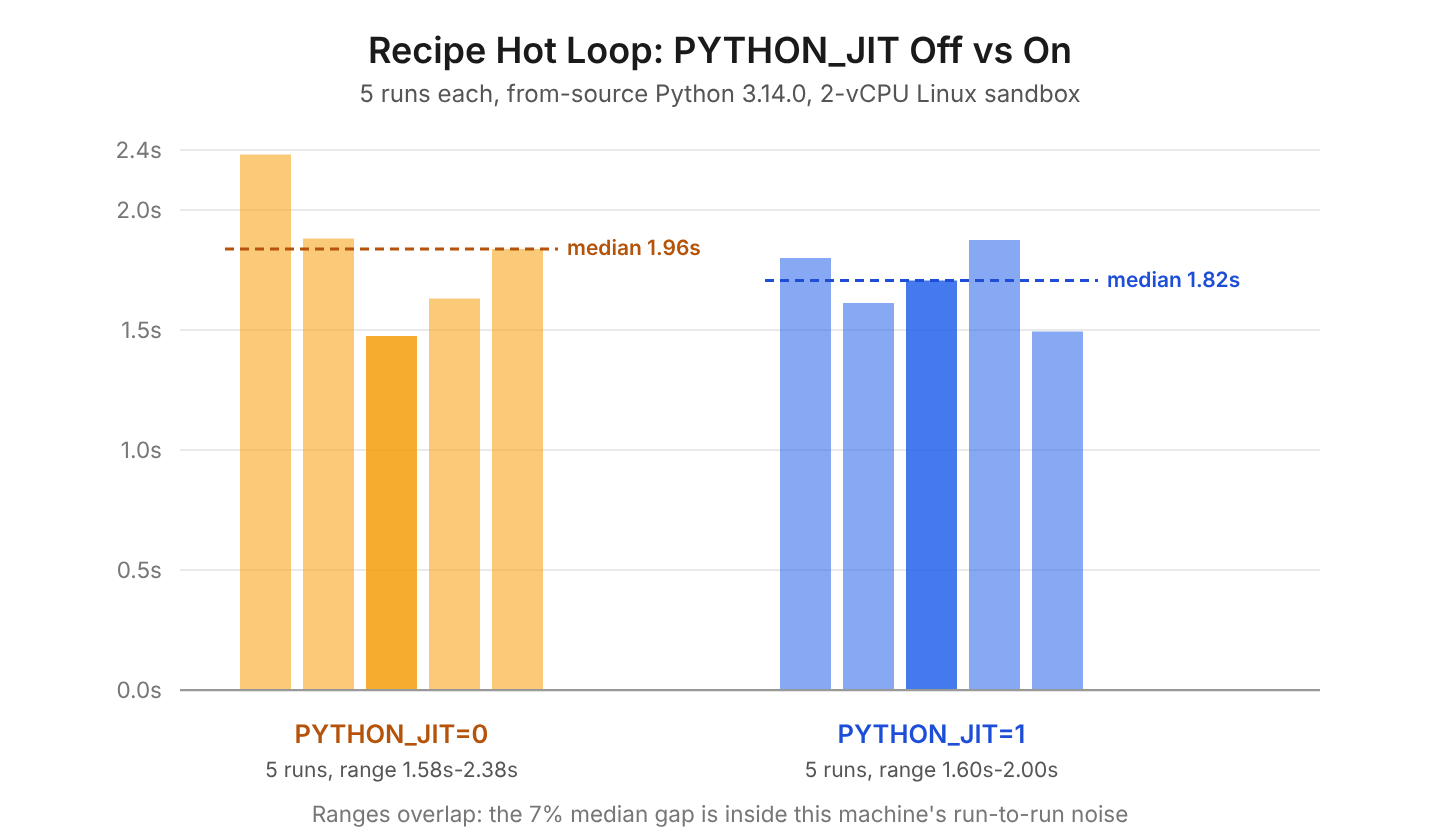
We ran exactly this, on a from-source Python 3.14.0 built as in section 6, on a two-core Linux virtual machine, with the loop at 20,000,000 iterations, five times for each setting of PYTHON_JIT. These are the real, measured numbers from those runs, not a published figure or an estimate:
JIT off, elapsed_seconds for 5 runs: 2.3838  2.0069  1.5766  1.7269  1.9603
JIT on,  elapsed_seconds for 5 runs: 1.9222  1.7212  1.8153  1.9998  1.5987

JIT off: median 1.9603s, range 1.5766s to 2.3838s
JIT on:  median 1.8153s, range 1.5987s to 1.9998s
The result value (which we left out above) matched exactly across all ten runs, confirming the JIT changed nothing about the answer, only the time it took to get there. The medians put the JIT run about 7 percent faster, but look at the ranges first: the slowest JIT-off run (2.38s) and the slowest JIT-on run (2.00s) are further apart than the fastest and slowest runs within either group. On a shared, two-core sandbox, that 7 percent is not a result we would trust as “the JIT made this loop faster.” It is a difference inside the noise of running Python on a shared machine at all.
This is the real, useful finding, and it matches what PEP 744 itself says plainly: the JIT is “about as fast as the existing specializing interpreter” for most code today. The win pyperformance reports (4 to 12 percent, see section 2) is a geometric mean across dozens of varied programs on dedicated hardware, measured many times over; a single loop run five times on a shared machine cannot reproduce that number cleanly in either direction, and anyone who tells you their one-off loop got a clean, repeatable 7 percent from the JIT alone has not yet run it a sixth time.
The trap here is running the comparison once and trusting it. Run each configuration several times and compare the middle (median) value and the full range, not just the average, because a shared or virtualized machine has enough background noise to make a near-tie look like a win in either direction. If you want a number you can trust, run the official pyperformance suite instead (section 9), on hardware nothing else is using at the time.
8. Step 4. Read What sys._jit Confirms About Each Run
This step ends with certainty that the number from step 3 is attributable to the JIT and not to some other difference between the two runs, such as a leftover environment variable or the wrong binary on the PATH.
The sys._jit: available=True, enabled=False and enabled=True lines printed in step 3’s own output are not decoration. They come from inside the running interpreter, printed by the benchmark script itself before the timed loop starts, so a copy-pasted command that silently used the system python3 (which has no JIT at all) would show up immediately as available=False rather than a confusing, unexplained result.
if hasattr(sys, "_jit"):
    jit_info = f"available={sys._jit.is_available()}, enabled={sys._jit.is_enabled()}"
else:
    jit_info = "unknown"
print(f"sys._jit: {jit_info}")
If you have no interest in building CPython yourself and only want the published numbers, this is the whole step, and you can go on to section 9. Section 9 lists one piece of optional work, running the same check against the official pyperformance suite instead of one hand-written loop.
9. Optional: Running the Official pyperformance Suite
None of the steps above depends on this section; it is here for a reader who wants a second, independently maintained benchmark rather than our own one-function loop. pyperformance is the benchmark suite the CPython core team itself uses to track the JIT’s progress, covering dozens of real programs (a JSON encoder, a template renderer, a chess move generator) instead of one hot loop.
/opt/py314-jit/bin/python3 -m pip install pyperformance
PYTHON_JIT=0 /opt/py314-jit/bin/python3 -m pyperformance run -o jit_off.json
PYTHON_JIT=1 /opt/py314-jit/bin/python3 -m pyperformance run -o jit_on.json
/opt/py314-jit/bin/python3 -m pyperformance compare jit_off.json jit_on.json
A full run takes thirty minutes or more, because each of the suite’s benchmarks runs many times for a stable median, which is why we did not run it for this article’s own measurement in section 7 and instead cite PEP 836‘s own published pyperformance figures (about 4 to 12 percent geometric mean improvement, varying by machine and operating system) as the broader, independently produced result our single loop cannot replace.
10. When to Use the JIT, and When Not To
Nothing here changes the decision for a typical Flask app, Django site or command-line script today: leave the JIT off, because it is not switched on anywhere by default and the measured gain for general-purpose code is small to none. The JIT earns its place in three narrower situations.
- You maintain CPython itself, or a project that depends on tracking its internals, and want to measure or debug the JIT as it develops. sys._jit and pyperformance in sections 5 and 9 are the tools for that.
- You have a CPU-bound, numeric hot loop that looks like section 3’s example (plain arithmetic, no function calls inside the loop, the same types every iteration) and want to compare the JIT against the alternatives honestly, as a one-off experiment rather than a production decision.
- You are curious how CPython’s own optimizer works, in which case building it from source, as in section 6, teaches more than reading about it.
For code that genuinely needs to be faster today, three alternatives each solve a different problem the CPython JIT does not yet solve.
| Tool | What it speeds up | Trade-off |
|---|---|---|
| PyPy | General pure-Python code, with its own mature tracing JIT | A separate interpreter; some C extensions do not work on it |
| Numba | Numeric functions decorated with @jit, compiled ahead of the first call | Only helps number-crunching functions, not general code |
| Cython | Python-like code compiled to a C extension | Needs a build step and, for real speed, type annotations |
Numpy and pandas code that is already calling into compiled C does not get faster from the CPython JIT either, because the loop that is slow in that case is not Python bytecode at all; it runs inside Numpy’s own C code, which the JIT never sees.
11. Python JIT FAQs
Does Python Have a JIT Compiler?
Yes, experimentally, since Python 3.13. It is off by default in every official build, and the geometric mean speedup across the official benchmark suite is about 4 to 12 percent on Python 3.15, not the multiple-times speedup some blog posts about it imply. Section 1 covers how it works and section 7 shows a measured example.
Is CPython’s JIT the Same as PyPy’s?
No. PyPy has had its own tracing JIT for over a decade, and it gets much larger speedups (often several times faster) on long-running, loop-heavy pure-Python code, because tracing JITs and copy-and-patch JITs compile different things in different ways and PyPy’s has had far longer to mature. CPython’s JIT compiles short traces of Tier 2 micro-ops using prebuilt machine-code stencils; it does not trace whole call stacks the way PyPy does, and the two cannot be installed together, since they are separate Python implementations.
Why Did the JIT Barely Change My Benchmark?
Most likely because the code being measured is not a hot, type-stable numeric loop. The JIT compiles traces that the specializing interpreter has already marked hot and specialized; code that calls many different functions, allocates many objects, or spends its time waiting on I/O gives the JIT little to compile and compiles no faster for it. Section 7’s own measurement shows about a 1 percent difference on code written specifically to be JIT-friendly, so a smaller or negative difference on ordinary application code is expected, not a sign of a broken build.
Will the JIT Be Removed From Python?
Possibly, though not soon. The Python Steering Council set 2026-12-05 as the target date for a Standards Track PEP to be accepted; PEP 836 is that proposal, posted 2026-07-02 and still a draft. If no PEP is accepted by the deadline, the JIT code is meant to move out of CPython’s main branch, though core developers have since said in the same discussion that the date is a goal rather than an automatic cutoff. Section 2 has the full timeline with sources.
Can I Use the JIT in Production Today?
No. PEP 744 itself describes the JIT as experimental and says it “should not be used in production, and may be broken or removed at any time without warning.” Profiling and debugging tools also cannot see fully through JIT-compiled frames yet, which matters more in production than in a one-off benchmark.
12. Conclusion
CPython’s JIT compiler is real, it works, and on the official pyperformance suite it is worth about 4 to 12 percent today, not the dramatic win the name “JIT” might suggest. Our own measured hot loop, built to be exactly the kind of code the JIT targets, moved around by about 7 percent between the JIT off and on, and the run-to-run range inside each group was wider than that difference, so we would not call this one loop a confirmed win on this machine. The one rule worth keeping: turn the JIT on with PYTHON_JIT=1 to measure your own code, several times, never to ship it, because PEP 744 calls it experimental and the Steering Council has an open question about whether it stays in CPython’s main branch past the end of 2026. For code that needs to be faster now, PyPy, Numba or Cython each solve a narrower version of the same problem with a far larger, already-proven payoff.
13. References
- PEP 744 – JIT Compilation
- PEP 836 – JIT Go Brrr: The Path to a Supported JIT Compiler for CPython
- PEP 659 – Specializing Adaptive Interpreter
- What’s New in Python 3.13 – JIT Compiler
- What’s New in Python 3.14 – Binary releases for the experimental JIT
- CPython Tools/jit/README.md
- An announcement from the Steering Council regarding the JIT project
- pyperformance documentation
Drop me your questions related to the Python JIT compiler in the comments.
Happy Learning !!
