

To remove the last character from a string in Java, we call str.substring(0, str.length() – 1), which returns a new string without the final character. Strings are immutable, so the original value stays unchanged and we keep the result in a new variable.
We need it when we trim a trailing comma from a generated list, a trailing slash from a URL path, or a newline from a line of input. The plain call fails on an empty string, so real code wraps it in a small null-safe helper.
The following example removes the last character from a word and shows the guard for empty input.
String word = "apples";
String singular = word.substring(0, word.length() - 1);   // "apple"
String empty = "";
String safe = empty.isEmpty() ? empty : empty.substring(0, empty.length() - 1);   // ""
Notice that substring() takes the end index as exclusive, so length() – 1 drops one character. We build a reusable helper, fix strings that end in an emoji, use StringBuilder for a trailing separator, remove a character only when it matches, and compare the regex and Apache Commons options.
1. Removing the Last Character With substring()
The method substring(beginIndex, endIndex) copies the characters from beginIndex up to, but not including, endIndex. Passing 0 and length() – 1 keeps everything except the last char. Because strings are immutable, the call returns a new String and the original variable still holds the full text.
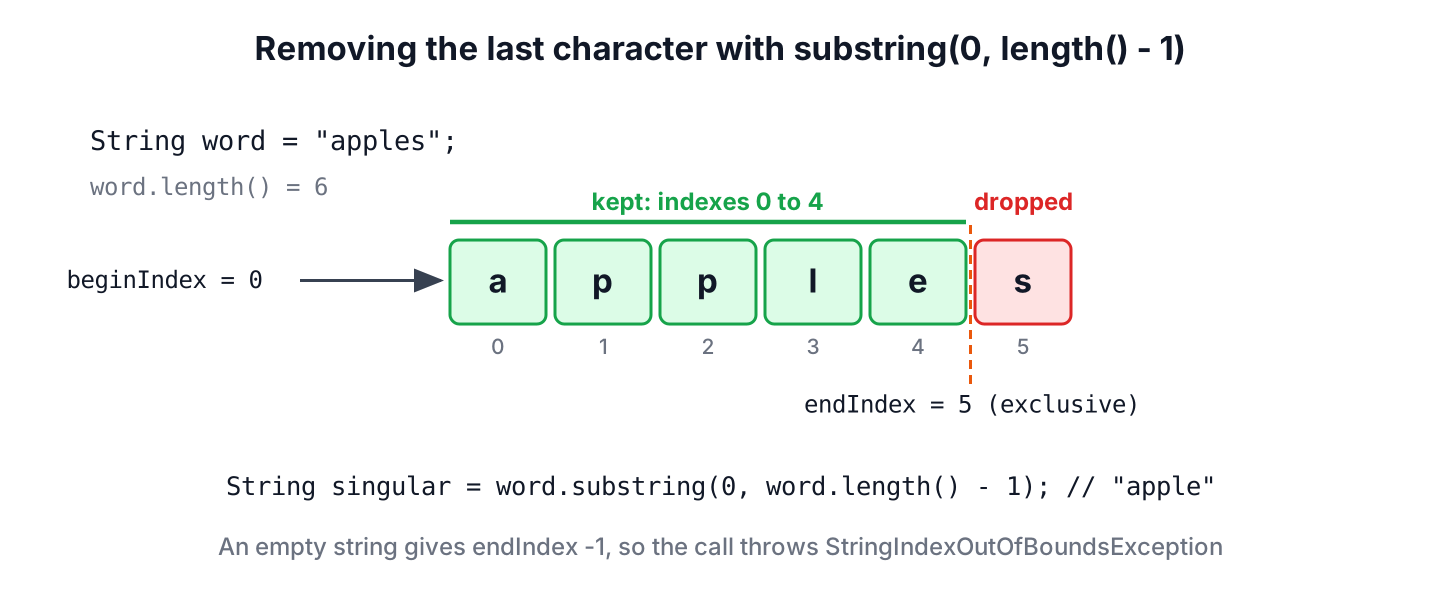
The direct call has two failure cases. A null reference throws NullPointerException, and an empty string throws StringIndexOutOfBoundsException, because the end index becomes -1.
String none = "";
String broken = none.substring(0, none.length() - 1);   // StringIndexOutOfBoundsException: Range [0, -1) out of bounds for length 0
A small helper handles both cases once. It returns null for null and the empty string for the empty string, so the caller can still tell missing data from blank data.
static String removeLastChar(String text) {
    if (text == null || text.isEmpty()) {
        return text;
    }
    return text.substring(0, text.length() - 1);
}
String plural = removeLastChar("apples"); // "apple"
String one = removeLastChar("a"); // ""
String blank = removeLastChar(""); // ""
String missing = removeLastChar(null); // null2. Strings That End With an Emoji
The length() method counts UTF-16 code units, not visible characters. An emoji such as the grinning face (U+1F600) is one code point stored as two char values, called a surrogate pair. Cutting one char off the end leaves half of the pair behind, and that half shows up as a question mark or a box in the UI.
A chat app that trims the last character of a user’s status message hits this case often, because many statuses end with an emoji. The following example builds the string from a code point, so the source code stays plain ASCII.
String status = "Hi" + Character.toString(0x1F600);
int units = status.length();                                    // 4
int codePoints = status.codePointCount(0, status.length());     // 3
String cut = status.substring(0, status.length() - 1);
boolean brokenHalf = Character.isHighSurrogate(cut.charAt(cut.length() - 1));   // true
To drop the last code point, we ask codePointBefore() for the final code point and Character.charCount() for its size, which is 1 or 2. The following helper is a drop-in replacement for removeLastChar() whenever the text comes from users.
static String removeLastCodePoint(String text) {
    if (text == null || text.isEmpty()) {
        return text;
    }
    int last = text.codePointBefore(text.length());
    return text.substring(0, text.length() - Character.charCount(last));
}
String greeting = removeLastCodePoint("Hi" + Character.toString(0x1F600)); // "Hi"
String plain = removeLastCodePoint("apples"); // "apple"Some emoji, such as flags or family emoji, are several code points joined together. Removing one visible symbol of that kind needs BreakIterator.getCharacterInstance(), which finds the boundaries of what the user sees as one character.
3. Deleting the Trailing Separator With StringBuilder
When we build text in a loop, the last character to remove is often a separator that the loop added after the final item. A StringBuilder can drop it in place with deleteCharAt(length() – 1) or with setLength(length() – 1), so no extra string is created.
For example, a recipe app prints the tags of a recipe as one line. The loop appends a comma after every tag, so the line ends with a comma that has to go.
List<String> tags = List.of("vegan", "quick", "dinner");
StringBuilder line = new StringBuilder();
for (String tag : tags) {
    line.append(tag).append(',');
}
if (!line.isEmpty()) {
    line.setLength(line.length() - 1);
}
String tagLine = line.toString();   // "vegan,quick,dinner"
The isEmpty() check on StringBuilder has existed since Java 15, and it protects the empty list case, where setLength(-1) would throw StringIndexOutOfBoundsException. The method deleteCharAt() works the same way and returns the builder, so it can be chained.
StringBuilder word = new StringBuilder("apples");
String trimmed = word.deleteCharAt(word.length() - 1).toString();   // "apple"
If the trailing separator comes from our own loop, the better fix is not to add it. The StringJoiner class, String.join() and Collectors.joining() put the separator only between items.
List<String> tags = List.of("vegan", "quick", "dinner");
String joined = String.join(",", tags);                            // "vegan,quick,dinner"
String streamed = tags.stream().collect(Collectors.joining(", "));    // "vegan, quick, dinner"
4. Removing the Last Character Only if It Matches
Often we want to remove the last character only when it is a specific one, such as a trailing slash or a period. The helper checks the last character with charAt() first, so the value stays the same when there is nothing to remove.
Say an API client joins a base URL from configuration with the path /recipes. One team writes the base URL with a trailing slash and another without one, so the client normalizes it before joining.
static String removeTrailing(String text, char ch) {
    if (text != null && !text.isEmpty() && text.charAt(text.length() - 1) == ch) {
        return text.substring(0, text.length() - 1);
    }
    return text;
}
String base = removeTrailing("https://api.example.com/", '/'); // "https://api.example.com"
String clean = removeTrailing("https://api.example.com", '/'); // "https://api.example.com"
String url = base + "/recipes"; // "https://api.example.com/recipes"Removing more than one trailing character, or whitespace of any kind, needs a different call than the single-character check.
- To remove several trailing slashes at once, the regex “/+$” matches one or more slashes at the end, as in path.replaceAll(“/+$”, “”).
- To remove trailing spaces, tabs or other whitespace, stripTrailing() from Java 11 handles every Unicode whitespace character, and the leading and trailing whitespace guide compares it with trim().
String slashes = "/recipes///".replaceAll("/+$", "");   // "/recipes"
String spaces = "apple \t ".stripTrailing();           // "apple"
5. Removing the Last Character With a Regular Expression
The regex “.$” matches one character at the end of the input, and replaceAll() with an empty replacement removes it. Java Pattern works with code points, so this regex removes a whole emoji instead of half of it.
String regexCut = "apples".replaceAll(".$", "");                            // "apple"
String emojiCut = ("Hi" + Character.toString(0x1F600)).replaceAll(".$", "");   // "Hi"
The regex has one trap with line endings. By default, . does not match a line terminator, and $ also matches right before a final line terminator. For a line that ends with a newline, “.$” removes the letter before the newline and keeps the newline. The pattern “(?s).\\z” fixes both problems, because the (?s) flag (DOTALL) lets . match the newline and \z matches only at the very end of the input.
String keepsNewline = "abc\n".replaceAll(".$", "");     // "ab\n"
String lastOnly = "abc\n".replaceAll("(?s).\\z", "");   // "abc"
The regex version compiles a pattern on every call, so it is slower than substring() and harder to read. We use it when the removal rule is a pattern anyway, as in the slash example of section 4. The Java regex tutorial covers the syntax.
6. Using StringUtils.chop() From Apache Commons Lang
Projects that already depend on Apache Commons Lang (artifact commons-lang3) can call StringUtils.chop(). It is null-safe, returns the empty string for empty input, and removes \r\n together when the string ends with a Windows line ending.
String chopped = StringUtils.chop("apples");      // "apple"
String chopNull = StringUtils.chop(null);         // null
String windows = StringUtils.chop("line\r\n");    // "line"
Adding the library only for chop() is not needed, because the helper in section 1 does the same in five lines. The method chop() also removes characters by char, so it splits an emoji like substring() does.
7. Comparing the Ways to Remove the Last Character
The choice depends on the input. For text from our own code, substring() in a helper is enough, while user input needs the code point version, and a loop that builds text should avoid the trailing character in the first place.
| Approach | null input | Empty input | Emoji at the end | Best for |
|---|---|---|---|---|
| substring(0, length() – 1) | NullPointerException | StringIndexOutOfBoundsException | Leaves half a surrogate pair | Values we know are not empty |
| removeLastChar() helper | Returns null | Returns “” | Leaves half a surrogate pair | General code |
| removeLastCodePoint() helper | Returns null | Returns “” | Removes the whole emoji | User input |
| StringBuilder.setLength() | n/a | StringIndexOutOfBoundsException without a check | Leaves half a surrogate pair | Text built in a loop |
| replaceAll(“(?s).\\z”, “”) | NullPointerException | Returns “” | Removes the whole emoji | Pattern-based rules |
| StringUtils.chop() | Returns null | Returns “” | Leaves half a surrogate pair | Projects using Commons Lang, CRLF lines |
The full list of Java String methods, including substring() and endsWith(), is in the String tutorial.
8. Remove Last Character FAQs
People who search for this task often need a variation of it, such as more than one character or a character at both ends.
8.1. How do we remove the last n characters from a string?
We pass length() – n as the end index and clamp it at zero, so a string shorter than n becomes empty instead of throwing an exception.
String file = "report.csv";
int n = 4;
String name = file.substring(0, Math.max(0, file.length() - n));   // "report"
8.2. How do we remove the first and the last character?
We call substring(1, length() – 1) after checking that the string has at least two characters. For example, we use it to strip the quotes around a quoted value.
String quoted = "\"apple\"";
String unquoted = quoted.length() >= 2 ? quoted.substring(1, quoted.length() - 1) : quoted;   // "apple"
8.3. How do we remove the last comma from a string?
We use the removeTrailing(text, ‘,’) helper from section 4, which removes the comma only when it is the last character. If the text may end with a comma followed by spaces, we call stripTrailing() first.
8.4. Does substring() change the original string?
No. The method returns a new String, and the original stays as it was. We have to assign the result, for example name = name.substring(0, name.length() – 1);, otherwise the call has no visible effect.
8.5. How do we get the last character instead of removing it?
We call charAt(length() – 1) on a non-empty string. To get several characters from the end, the guide on how to get the last 4 characters of a string shows a null-safe helper.
9. Conclusion
The call substring(0, length() – 1) removes the last character, and a helper that returns null and empty input unchanged makes it safe for any value. For text typed by users, we remove the last code point instead, so an emoji at the end does not turn into a broken symbol.
A StringBuilder fixes a trailing separator in place, although String.join() avoids the separator from the start. The charAt() check, regex and StringUtils.chop() cover conditional removal, pattern rules and Windows line endings.
10. References
- String (Java SE 25)
- StringBuilder (Java SE 25)
- Pattern (Java SE 25)
- StringUtils (Apache Commons Lang)
Happy Learning !!
