
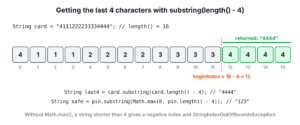
To get the last 4 characters of a string in Java, we call str.substring(str.length() – 4), and we wrap the start index in Math.max(0, …) so that a string shorter than 4 characters comes back whole instead of throwing an exception.
We use the last 4 characters to show the end of a card number on a receipt, the last digits of a phone number in a verification message, or the extension of a file name. The same expression works for any count when we replace 4 with n.
The following example takes the last 4 characters of a long value and of a value shorter than 4 characters.
String card = "4111222233334444";
String last4 = card.substring(card.length() - 4);                 // "4444"
String pin = "123";
String safe = pin.substring(Math.max(0, pin.length() - 4));       // "123"
We can see that Math.max() turns a negative start index into 0. We look at why the one-argument substring() fits this task, write a null-safe helper for the last n characters, handle emoji and formatted numbers, and compare it with the Apache Commons StringUtils.right() method.
1. Why substring(beginIndex) Fits the Task
The one-argument substring(beginIndex) returns everything from beginIndex to the end of the string. To keep the last 4 characters, the start index is the length minus 4, so we never need to compute an end index.
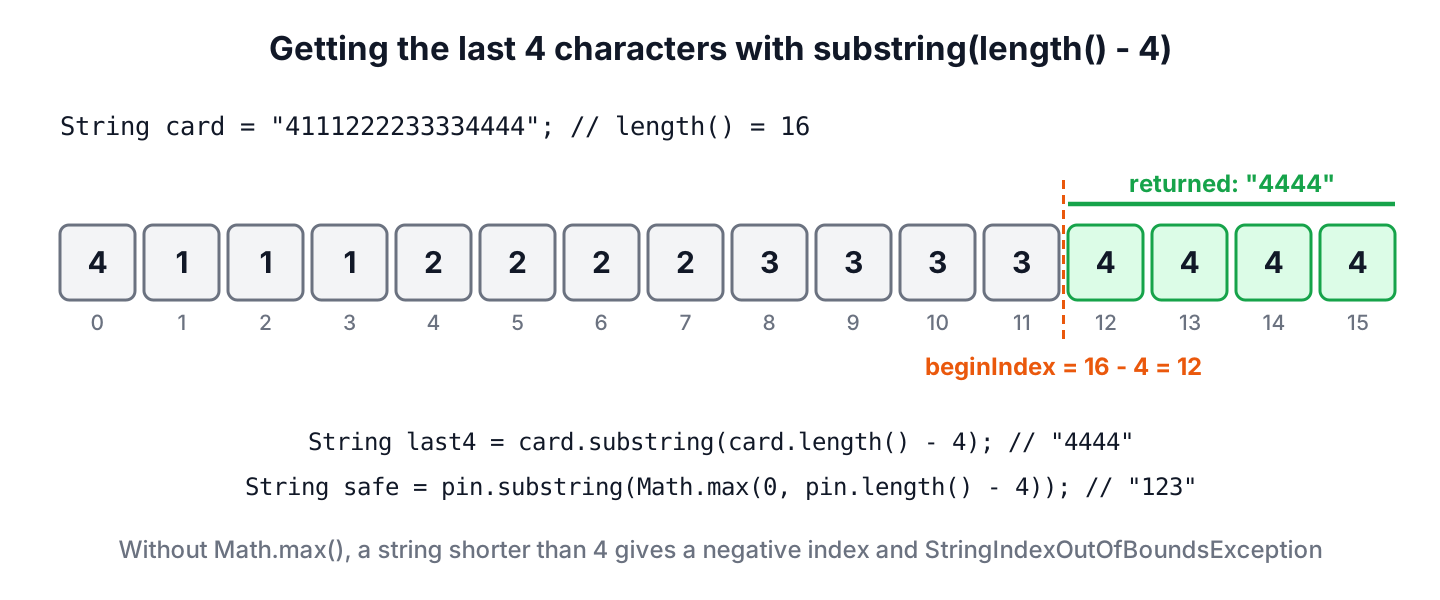
The start index must be between 0 and length(). For a string shorter than 4 characters, length() – 4 is negative, and the call throws StringIndexOutOfBoundsException. A null reference throws NullPointerException before substring() runs.
String code = "123";
String tail = code.substring(code.length() - 4);   // StringIndexOutOfBoundsException: Range [-1, 3) out of bounds for length 3
A ternary check is the long version of the fix from the intro, and both produce the same result. The Math.max() form is shorter and has no branch to forget.
String value = "98";
String byCheck = value.length() > 4 ? value.substring(value.length() - 4) : value;   // "98"
String byMax = value.substring(Math.max(0, value.length() - 4));                   // "98"
2. A Null-Safe Helper for the Last N Characters
Most code needs the last 4 characters in more than one place, and the input can be null when a field is optional. A helper keeps the rules in one method. It returns null for null, the whole string when it is shorter than n, and rejects a negative n, because a negative count is a bug in the caller.
static String lastChars(String text, int n) {
    if (n < 0) {
        throw new IllegalArgumentException("n must not be negative: " + n);
    }
    if (text == null) {
        return null;
    }
    return text.substring(Math.max(0, text.length() - n));
}
String digits = lastChars("4111222233334444", 4); // "4444"
String shortOne = lastChars("123", 4); // "123"
String none = lastChars(null, 4); // null
String zero = lastChars("apple", 0); // ""
String bad = lastChars("apple", -1); // IllegalArgumentException: n must not be negative: -1Returning the whole short string is right for display, but not for validation. If a card number with fewer than 4 digits means bad data, we check the length first and reject the value instead of showing it.
3. Last 4 Characters of a String With Emoji
The length() method counts UTF-16 char values. Letters and digits take one char each, but an emoji such as U+1F44D (thumbs up) takes two, a surrogate pair. When the start index falls between the two halves, substring() returns a string that begins with half an emoji.
Say a chat app shows the last 4 symbols of a user’s nickname as a hint in an account recovery screen. The nickname ends with an emoji, so the plain call shows a broken symbol at the start of the hint.
String nick = "sam" + Character.toString(0x1F44D) + "999";
int units = nick.length();                                           // 8
String byChars = nick.substring(nick.length() - 4);
boolean startsBroken = Character.isLowSurrogate(byChars.charAt(0));   // true
The method offsetByCodePoints(index, offset) moves an index by code points instead of char values. Moving back 4 code points from the end gives a start index that never splits a pair. We clamp n with codePointCount() first, because offsetByCodePoints() throws IndexOutOfBoundsException when the string has fewer code points than requested.
static String lastCodePoints(String text, int n) {
    if (n < 0) {
        throw new IllegalArgumentException("n must not be negative: " + n);
    }
    if (text == null) {
        return null;
    }
    int count = Math.min(n, text.codePointCount(0, text.length()));
    return text.substring(text.offsetByCodePoints(text.length(), -count));
}
String nickname = "sam" + Character.toString(0x1F44D) + "999";
String hint = lastCodePoints(nickname, 4);
int hintPoints = hint.codePointCount(0, hint.length()); // 4
boolean whole = hint.startsWith(Character.toString(0x1F44D)); // trueFor card numbers, phone numbers and IDs that contain only ASCII characters, the char-based helper is enough. We use the code point version for any text a person typed.
4. Last 4 Digits of a Formatted Phone Number
Phone numbers and card numbers often arrive with spaces or dashes, such as 555-010-7788. The last 4 characters of a formatted value are the last 4 digits only when the value ends with 4 digits in a row, which is not true for every format.
For example, a delivery app sends the courier a message with the last 4 digits of the customer’s phone number. Some customers type the number with dashes and some with spaces, so the app removes everything that is not a digit before it takes the tail.
String phone = "555-010-7788";
String phoneDigits = phone.replaceAll("\\D", "");          // "5550107788"
String lastFour = lastChars(phoneDigits, 4);               // "7788"
String spaced = lastChars("4111 2222 3333 44".replaceAll("\\D", ""), 4);   // "3344"
The regex \D matches any character that is not a digit. The last example shows why the cleanup matters, because lastChars(“4111 2222 3333 44”, 4) without it returns “3 44”. To show the tail with the rest hidden, as on a receipt, the guide to mask a string except the last 4 characters builds on the same helper.
5. Using StringUtils.right() From Apache Commons Lang
If the project already uses Apache Commons Lang (artifact commons-lang3), StringUtils.right(str, len) returns the rightmost len characters. It returns null for null input, the whole string when it is shorter, and the empty string for a negative length.
String right4 = StringUtils.right("4111222233334444", 4);   // "4444"
String rightShort = StringUtils.right("123", 4);           // "123"
String rightNull = StringUtils.right(null, 4);             // null
String rightNeg = StringUtils.right("apple", -1);          // ""
The method counts char values, so it splits an emoji like substring() does. A negative length returns the empty string instead of an exception, which hides a caller bug, so the plain JDK helper is the better default.
6. Last 4 vs First 4 Characters
Taking characters from the start of a string uses the two-argument substring(0, n), with Math.min() as the guard instead of Math.max(). The guide to get the first 4 characters of a string covers that direction in detail.
| Task | Safe expression | Guard | Result for “123” |
|---|---|---|---|
| Last 4 characters | s.substring(Math.max(0, s.length() – 4)) | Start index not below 0 | “123” |
| First 4 characters | s.substring(0, Math.min(4, s.length())) | End index not above length() | “123” |
| Last character | s.charAt(s.length() – 1) | String not empty | ‘3’ |
| Ends with a value | s.endsWith(“23”) | None needed | true |
Both helpers return a new string and leave the original unchanged. The Java String tutorial lists the other methods for extracting parts of a string.
7. Last 4 Characters FAQs
Related searches turn the task around, asking for digits of an int or a long, a single character or the result for short input.
7.1. How do we get the last 4 digits of an int or a long?
We use the remainder of a division by 10,000, and we format it with leading zeros, because % 10000 turns 0042 into 42. For negative numbers, we take the absolute value of the remainder.
long account = 9876500042L;
long tail = Math.abs(account % 10_000);                // 42
String tailText = String.format("%04d", tail);          // "0042"
7.2. How do we get the last character of a string?
For a non-empty string, charAt(length() – 1) returns it. For text that can end with an emoji, codePointBefore(length()) returns the whole code point.
String word = "apple";
char lastChar = word.charAt(word.length() - 1);   // 'e'
String lastWordChar = word.substring(word.length() - 1);   // "e"
7.3. What happens when the string has fewer than 4 characters?
The plain substring(length() – 4) call throws StringIndexOutOfBoundsException. The Math.max(0, length() – 4) guard and the lastChars() helper from section 2 return the whole string instead.
7.4. How do we check that a string ends with 4 digits?
We use the regex \d{4}$ with Pattern.compile(…).matcher(s).find(), or s.matches(“.*\\d{4}”), which must match the whole string.
boolean endsWithDigits = "order-2026".matches(".*\\d{4}");   // true
boolean noDigits = "order-26".matches(".*\\d{4}");          // false
8. Conclusion
The expression substring(Math.max(0, length() – 4)) returns the last 4 characters and keeps short strings whole. A helper with a null check and a negative count check makes the rule reusable for any n.
For text typed by users, offsetByCodePoints() keeps emoji in one piece, and for formatted numbers, removing non-digits first gives the real last 4 digits. The Commons StringUtils.right() method works too, but it hides a negative count.
9. References
Happy Learning !!
