

In Java, the break statement ends the innermost for, while, do-while or switch statement at once, and the program goes on with the code that follows that loop or switch. A break with a label ends the labeled statement instead, which can be an outer loop.
Common uses of break are to stop a search as soon as we find what we need, to leave a while (true) loop when an exit condition occurs, and to end a case in an old-style switch statement.
The following example finds the first temperature reading above 35 degrees and stops looking.
int[] temps = {21, 23, 38, 22, 40};
int firstHot = -1;
for (int i = 0; i < temps.length; i++) {
    if (temps[i] > 35) {
        firstHot = i;
        break;                          // 22 and 40 are never checked
    }
}
int index = firstHot;                   // 2
Notice that break leaves the whole loop, not only the current pass, so the loop never reaches the reading 40. The sections that follow cover break in each loop type and in switch, leaving nested loops, the places where the compiler rejects break, and the stream methods that replace it.
1. What Happens When Java Reaches break
When Java runs a break statement, it ends the nearest enclosing loop or switch, which the Java Language Specification calls the break target. The loop condition is not checked again, and the update part of a for loop does not run.
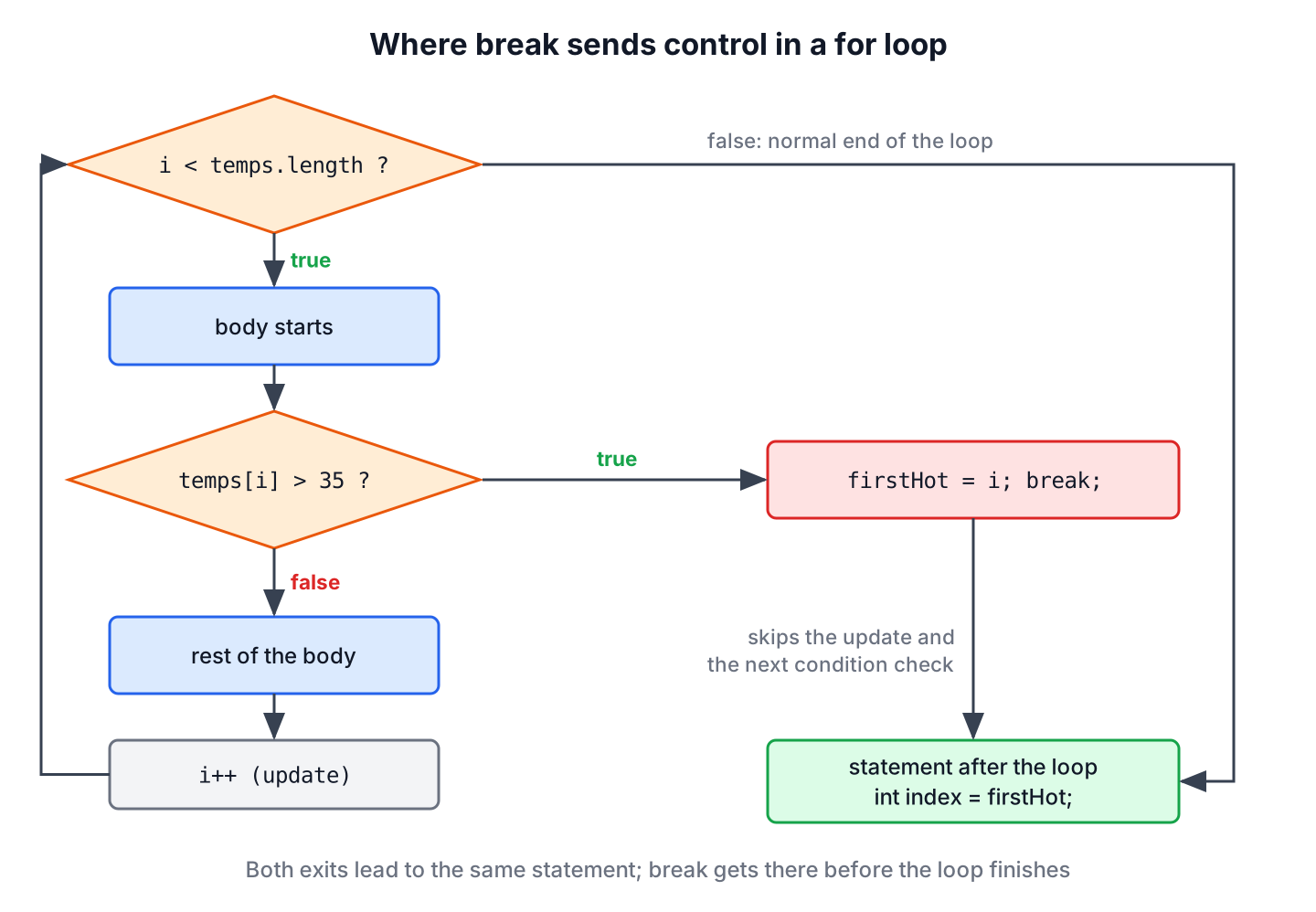
The behavior is the same in every loop type. In a while (true) loop, break is the only normal way out, which makes it the usual pattern for loops whose exit condition is easier to test in the middle of the body.
int balance = 100;
int withdrawals = 0;
while (true) {
    if (balance < 30) {
        break;                          // not enough money left
    }
    balance -= 30;
    withdrawals++;
}
int done = withdrawals;                 // 3
int left = balance;                     // 10
int volume = 7;
do {
volume--;
if (volume == 4) {
break; // stop at the comfort level
}
} while (volume > 0);
int finalVolume = volume; // 4The while loop and the do-while loop articles show more loop patterns. In all of them, break works only on the innermost loop around it, which matters when loops are nested, as we will see in section 3.
2. break in a switch Statement
In a switch statement with colon labels (case “pro”:), Java runs every statement from the matching case down to the end of the switch, unless a break stops it. That behavior is called fall-through, and here we use it on purpose, because a pro plan gets every basic feature too.
String plan = "pro";
List<String> features = new ArrayList<>();
switch (plan) {
    case "pro":
        features.add("reports");        // no break, falls through
    case "basic":
        features.add("email");
        break;
    default:
        features.add("none");
}
String granted = features.toString();   // "[reports, email]"
A forgotten break is the classic switch bug, because the code compiles and runs the wrong case as well. Arrow labels, standard since Java 14, never fall through, so an arrow switch needs no break at all. The switch expressions article covers the arrow form in detail.
String tier = "basic";
int seats = switch (tier) {
    case "pro" -> 10;
    case "basic" -> 3;
    default -> 1;
};
int seatCount = seats;                  // 3
A break inside a switch that sits in a loop ends only the switch, not the loop. In the following example, the stop command is meant to end the processing, but the loop goes on and runs the last add command.
String[] commands = {"add", "stop", "add"};
int added = 0;
for (String command : commands) {
    switch (command) {
        case "add":
            added++;
            break;
        case "stop":
            break;                      // leaves the switch, not the loop
    }
}
int addedCount = added;                 // 2
The fix is a labeled break that names the loop. The label loop marks the for loop, and break loop ends that loop from inside the switch.
String[] commands = {"add", "stop", "add"};
int added = 0;
loop:
for (String command : commands) {
    switch (command) {
        case "add" -> added++;
        case "stop" -> {
            break loop;
        }
        default -> { }
    }
}
int addedCount = added;                 // 1
3. Leaving Nested Loops
A plain break in an inner loop ends only the inner loop, and the outer loop starts its next pass. Say a warehouse app searches shelves for an item. After it finds the item on shelf 1, the outer loop still goes on to shelf 2.
String[][] shelves = {{"bolt", "nut"}, {"screw", "washer"}, {"hinge", "nail"}};
int foundShelf = -1;
int checks = 0;
for (int s = 0; s < shelves.length; s++) {
    for (String item : shelves[s]) {
        checks++;
        if (item.equals("screw")) {
            foundShelf = s;
            break;                      // ends only the inner loop
        }
    }
}
int shelf = foundShelf;                 // 1
int comparisons = checks;               // 5, shelf 2 was searched too
The result is still correct, but the program does work it does not need, and with a large inventory that work adds up. Java offers three ways to stop both loops.
- A labeled break names the outer loop and ends it. The article on labeled break and continue covers labels in depth.
- A boolean flag in the outer condition stops the outer loop at its next check.
- A separate method with return leaves both loops and the method in one step.
String[][] shelves = {{"bolt", "nut"}, {"screw", "washer"}, {"hinge", "nail"}};
int foundShelf = -1;
int checks = 0;
search:
for (int s = 0; s < shelves.length; s++) {
    for (String item : shelves[s]) {
        checks++;
        if (item.equals("screw")) {
            foundShelf = s;
            break search;               // ends both loops
        }
    }
}
int shelf = foundShelf;                 // 1
int comparisons = checks;               // 3
static int findShelf(String[][] shelves, String wanted) {
for (int s = 0; s < shelves.length; s++) {
for (String item : shelves[s]) {
if (item.equals(wanted)) {
return s;
}
}
}
return -1;
}String[][] shelves = {{"bolt", "nut"}, {"screw", "washer"}, {"hinge", "nail"}};
int screwShelf = findShelf(shelves, "screw"); // 1
int glueShelf = findShelf(shelves, "glue"); // -1We prefer the method with return when the nested loop is a search, because the method name says what the loops do and the caller gets the result in one line. The labeled break fits loops that do more work after the search in the same method, and the flag version is the most verbose of the three.
4. Where the Compiler Rejects break
A break needs an enclosing loop or switch in the same method. The compiler reports an error in four common cases.
- A break inside an if without a surrounding loop gives break outside switch or loop. An if statement is not a break target.
- A statement right after break in the same block can never run, so javac reports unreachable statement.
- A break inside a lambda, such as the body passed to forEach(), cannot reach a loop outside the lambda, because the lambda body is a separate method.
- A break cannot leave a switch expression, because the expression must produce a value. Inside one, we use yield or throw an exception.
// does not compile: break outside switch or loop
int stock = 3;
if (stock > 0) {
    break;
}
// does not compile: break outside switch or loop
List<String> names = List.of("ann", "bob");
names.forEach(name -> {
if (name.startsWith("b")) {
break;
}
});// does not compile: attempt to break out of a switch expression
for (int day = 1; day <= 7; day++) {
String type = switch (day) {
case 6, 7 -> {
break;
}
default -> "workday";
};
}One more rule matters at runtime. When a break leaves a try block, the finally block still runs before the loop ends, so cleanup code such as closing a resource is never skipped. The try-catch-finally article explains the order in detail.
List<String> steps = new ArrayList<>();
for (int i = 0; i < 3; i++) {
    try {
        if (i == 1) {
            break;
        }
        steps.add("work " + i);
    } finally {
        steps.add("cleanup " + i);
    }
}
String trace = steps.toString();        // "[work 0, cleanup 0, cleanup 1]"
5. Stopping a Log Scan at the First Error
A support tool reads an application log and shows the first error line, because the first error often causes the ones after it. Reading the rest of a large log file after that line wastes time, so the loop stops at the first match.
List<String> log = List.of("INFO start", "WARN slow query", "ERROR db down", "INFO retry");
String firstError = null;
int read = 0;
for (String line : log) {
    read++;
    if (line.startsWith("ERROR")) {
        firstError = line;
        break;
    }
}
String error = firstError;              // "ERROR db down"
int linesRead = read;                   // 3
With streams, we do not write break at all, because some stream methods stop on their own. The methods findFirst() and anyMatch() are short-circuiting, so they stop reading elements after the first match, and takeWhile() (Java 9) keeps elements until the first one that fails the test.
List<String> log = List.of("INFO start", "WARN slow query", "ERROR db down", "INFO retry");
Optional<String> first = log.stream().filter(l -> l.startsWith("ERROR")).findFirst();   // Optional[ERROR db down]
boolean hasError = log.stream().anyMatch(l -> l.startsWith("ERROR"));                 // true
List<String> beforeError = log.stream().takeWhile(l -> !l.startsWith("ERROR")).toList();   // [INFO start, WARN slow query]
6. break Statement FAQs
The same follow-up questions about break appear in search results, on Stack Overflow and in Java interviews.
6.1. Does break exit an if statement in Java?
No. A plain break ends the nearest loop or switch around the if, not the if itself. Without a surrounding loop or switch, it does not compile. Only a labeled break can end a labeled if or block.
6.2. What is the difference between break and return?
A break ends the loop or switch and continues with the next statement in the same method. A return ends the whole method and can hand a value to the caller, so it also leaves every loop around it.
6.3. Does break end all nested loops?
No. A plain break ends only the innermost loop around it, and the outer loop starts its next pass. To end the outer loop too, we use a labeled break or move the loops into a method and return, as section 3 shows. To skip only the current pass instead, we use continue.
6.4. Can we use break inside forEach()?
No. The body of forEach() is a lambda, and a break inside it does not compile. To stop early, we use a for-each loop with break, or a stream with findFirst(), anyMatch() or takeWhile().
6.5. Is using break bad practice?
No. A break that stops a search at the first match is clear and saves work. It becomes hard to read when a long loop body has several break statements, and moving the loop into a method with return is often the cleaner option.
7. Conclusion
The break statement ends the innermost loop or switch and continues after it, skipping the remaining condition checks. In a colon-style switch, it prevents fall-through, whereas an arrow case ends on its own.
A plain break never reaches an outer loop, so for nested loops we use a label, a flag or a method with return. The compiler rejects break outside a loop or switch, inside lambdas and inside switch expressions, and a finally block always runs when break leaves a try.
8. References
- JLS 25, The break Statement
- JLS 25, The switch Statement
- Stream.takeWhile() (Java SE 25 API)
- Branching Statements (Oracle Java Tutorials)
Happy Learning !!
