
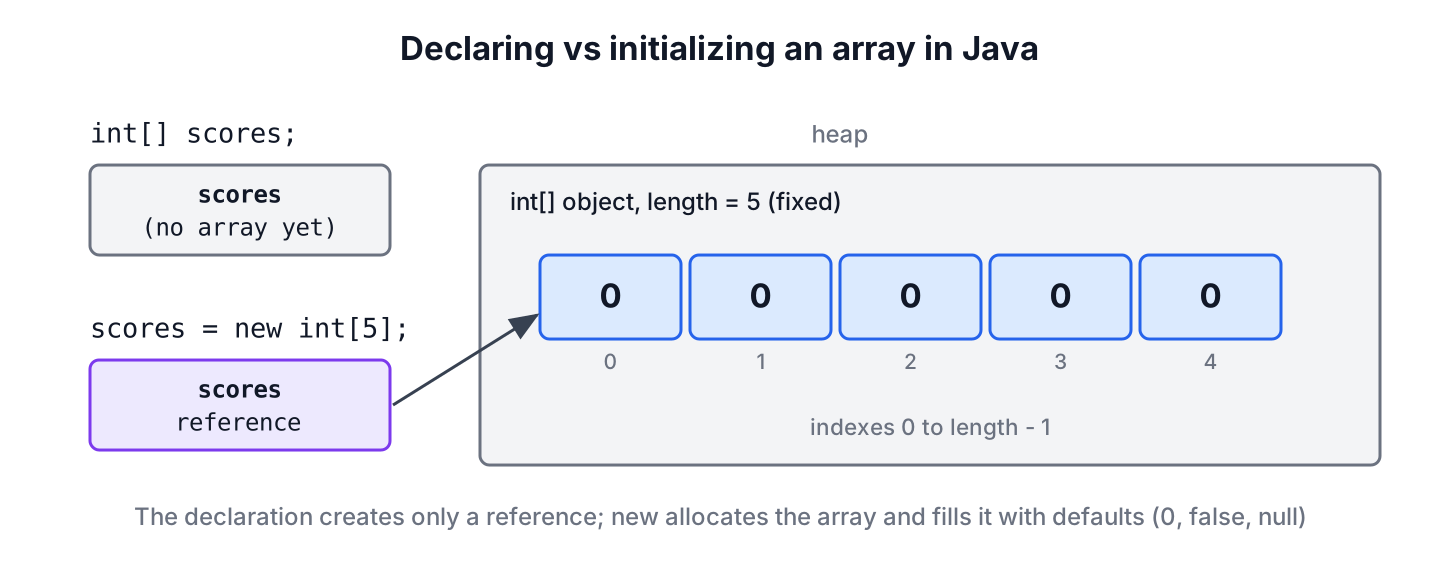
Declaring an array in Java means writing the element type, square brackets and a name, such as int[] scores, and initializing it means creating the array object, either with new and a length or with a list of values in curly braces. The declaration creates only a variable, while the initialization creates the array object with a fixed length, and we can declare and initialize an array in Java in one statement such as int[] primes = {2, 3, 5};.
We use arrays for fixed-size data that we access by position, such as the 12 monthly totals of a sales report, the seats of a cinema row, or the lines read from a small file. When the number of elements changes at runtime, an ArrayList is the better fit.
The following example shows the common ways to declare and initialize an array in one place.
int[] scores = new int[3];                       // [0, 0, 0]
int[] primes = {2, 3, 5, 7};                     // [2, 3, 5, 7]
String[] days = new String[] {"Mon", "Tue"};     // [Mon, Tue]
int[] squares = new int[5];
Arrays.setAll(squares, i -> i * i);
int[] filled = squares;                          // [0, 1, 4, 9, 16]
int[][] grid = new int[2][3];                    // [[0, 0, 0], [0, 0, 0]]
Notice that new int[3] gives an array of zeros, whereas the brace syntax sets the length from the number of values. The sections cover the declaration syntax, default values, the initializer rules that trip up the compiler, filling arrays with Arrays methods and streams, and 2D arrays.
1. Declaring an Array Variable
An array declaration names the element type and the variable, and nothing more. The variable is a reference, and it points to no array until we assign one, so a field declared as int[] scores; holds null, and a local variable cannot be read before the first assignment.
Java accepts the brackets after the type or after the name. The Java Language Specification allows both forms, but the brackets-after-type form is the standard style because the type int[] stays in one place.
int[] marks;          // preferred
int marks2[];         // C-style, legal but discouraged
int[] a, b;           // a and b are both int[]
int c[], d;           // c is int[], but d is a plain int
The last line is a common trap in code reviews. Mixing the two styles in one declaration gives variables of different types, so we keep one variable per line and the brackets on the type.
2. Creating an Array With new and a Length
The expression new int[5] creates an array object with five elements. The length can come from a variable or a method call, so it is decided at runtime, but once the array exists, its length never changes. Indexes run from 0 to length – 1.
int months = 12;
double[] monthlySales = new double[months];
monthlySales[0] = 1250.5;
int count = monthlySales.length;                     // 12
double march = monthlySales[2];                      // 0.0
double bad = monthlySales[12];                       // ArrayIndexOutOfBoundsException
int[] negative = new int[-1];                        // NegativeArraySizeException
Every element of a new array starts with the default value of its type, so we never read garbage from a fresh array. The defaults are the same as for fields of a class.
| Element type | Default value | Example |
|---|---|---|
| byte, short, int, long | 0 | new int[2] gives [0, 0] |
| float, double | 0.0 | new double[2] gives [0.0, 0.0] |
| char | ‘\u0000’ (the null character) | new char[2] prints two invisible characters |
| boolean | false | new boolean[2] gives [false, false] |
| Any reference type (String, Integer, records) | null | new String[2] gives [null, null] |
boolean[] seatsTaken = new boolean[4];    // [false, false, false, false]
String[] names = new String[2];           // [null, null]
Integer[] boxed = new Integer[2];         // [null, null]
The Integer[] line matters in practice. Unboxing one of its null elements into an int throws NullPointerException, so for counters we prefer int[], which starts at 0.
3. Initializing an Array With Known Values
When we know the values while writing the code, an array initializer lists them in curly braces. The compiler counts the values and sets the length, so we never write a length next to the braces.
String[] status = {"active", "paused", "closed"};      // length 3
int[] weights = new int[] {10, 20, 30,};                // trailing comma allowed
char[] vowels = {'a', 'e', 'i', 'o', 'u'};              // [a, e, i, o, u]
The short form without new works only in a declaration. Anywhere else, such as a reassignment, a return statement or a method argument, we must write new Type[] {…}.
// does not compile: illegal start of expression
String[] status = new String[3];
status = {"active", "paused"};
// does not compile: array creation with both dimension expression and initialization is illegal
int[] ids = new int[3] {1, 2, 3};static String[] defaultRoles() {
return new String[] {"viewer", "editor"};
}String[] status = new String[3];
status = new String[] {"active", "paused"}; // [active, paused]
String[] roles = defaultRoles(); // [viewer, editor]
var levels = new int[] {1, 2, 3}; // [1, 2, 3]The var keyword needs the new int[] part as well, because var levels = {1, 2, 3}; gives the compiler no element type to infer.
4. Filling Arrays With Arrays.fill() and Arrays.setAll()
For larger arrays, typing every value is not practical. The Arrays class has two methods that fill an existing array in one call.
- Arrays.fill(array, value) puts the same value into every element, and an overload with fromIndex and toIndex fills only a range, where toIndex is exclusive.
- Arrays.setAll(array, generator) calls a function with each index and stores its result, which suits values that depend on the position.
int[] retries = new int[5];
Arrays.fill(retries, 3);
int[] all = retries;                              // [3, 3, 3, 3, 3]
int[] partial = new int[6];
Arrays.fill(partial, 1, 4, 9);
int[] range = partial;                            // [0, 9, 9, 9, 0, 0]
int[] even = new int[4];
Arrays.setAll(even, i -> i * 2);
int[] evens = even;                               // [0, 2, 4, 6]
Say a cinema booking app shows a row of 20 seats, where the first two are wheelchair spaces. We create the row with new boolean[20], and the defaults mark every seat as free. One Arrays.fill(blocked, 0, 2, true) call marks the two reserved seats, with no loop in the code.
There is one trap with object arrays. Arrays.fill() stores the same reference in every element, so filling with new StringBuilder() gives one shared builder, and a change through one element shows up in all of them. Arrays.setAll() calls the generator once per index, so it creates a separate object for each element.
StringBuilder[] shared = new StringBuilder[2];
Arrays.fill(shared, new StringBuilder());
shared[0].append("x");
String second = shared[1].toString();                  // "x", same object
StringBuilder[] separate = new StringBuilder[2];
Arrays.setAll(separate, i -> new StringBuilder());
separate[0].append("x");
String other = separate[1].toString();                 // ""
5. Initializing an Array in a Loop or With Streams
A plain for loop gives full control and works on every Java version. It is the right tool when each value comes from input, a calculation with several steps, or another array.
String[] labels = new String[3];
for (int i = 0; i < labels.length; i++) {
    labels[i] = "Table " + (i + 1);
}
String[] tables = labels;                              // [Table 1, Table 2, Table 3]
Streams create and fill the array in one expression. IntStream.range() excludes the end value and rangeClosed() includes it, and for object arrays we pass a constructor reference such as String[]::new to toArray(), so the result has the right type. The stream and array conversion article covers the other direction.
int[] oneToFive = IntStream.rangeClosed(1, 5).toArray();          // [1, 2, 3, 4, 5]
int[] firstFive = IntStream.range(0, 5).toArray();                // [0, 1, 2, 3, 4]
double[] prices = DoubleStream.of(9.5, 12.0).toArray();           // [9.5, 12.0]
String[] zeros = Stream.generate(() -> "0").limit(3).toArray(String[]::new);   // [0, 0, 0]
String[] upper = Stream.of("tea", "jam").map(String::toUpperCase).toArray(String[]::new);   // [TEA, JAM]
An existing array can also be the starting point. Arrays.copyOf() and clone() create a new array from an old one, as the array copy article explains, and a longer copyOf() pads the new slots with default values.
int[] base = {4, 5};
int[] longer = Arrays.copyOf(base, 4);                 // [4, 5, 0, 0]
6. Declaring and Initializing a 2D Array
A 2D array in Java is an array whose elements are arrays. The first index picks the row and the second index picks the column. Because each row is a separate array, the rows can have different lengths, which is called a jagged array.
int[][] board = new int[3][3];                       // [[0, 0, 0], [0, 0, 0], [0, 0, 0]]
int[][] matrix = {{1, 2, 3}, {4, 5, 6}};               // [[1, 2, 3], [4, 5, 6]]
int rows = matrix.length;                              // 2
int cols = matrix[0].length;                           // 3
int[][] triangle = new int[3][];
triangle[0] = new int[] {1};
triangle[1] = new int[] {1, 1};
triangle[2] = new int[] {1, 2, 1};
int[][] jagged = triangle;                             // [[1], [1, 1], [1, 2, 1]]
With new int[3][], only the outer array exists, and each row is null until we assign it. Printing a 2D array needs Arrays.deepToString(), which the guide on printing an array shows along with the loop-based options.
7. How to Declare and Initialize an Array in Java for Each Data Source
All the styles produce the same kind of array object, so the choice depends only on where the values come from.
| Values come from | Use | Example |
|---|---|---|
| Fixed values known in the code | Array initializer | {“active”, “paused”} |
| A size known only at runtime | new with a length | new double[months] |
| One value for every element | Arrays.fill() | Arrays.fill(retries, 3) |
| A formula over the index | Arrays.setAll() or IntStream | Arrays.setAll(a, i -> i * i) |
| Input, files or other arrays | A for loop or a stream | for (int i = 0; …) |
| An existing array | Arrays.copyOf() or clone() | Arrays.copyOf(base, 4) |
When the final size is unknown, for example lines read from a file of any length, we collect the values in an ArrayList first and convert it at the end, as the list to array conversion shows. To grow an array that already exists, we copy it into a bigger one, which the article on resizing an array walks through.
8. Array Initialization FAQs
Readers who come from Python or JavaScript ask these questions most often about Java arrays.
8.1. Can we declare an array without a size in Java?
Yes, the declaration int[] data; has no size. We give the size only when we create the array with new int[n], and with an initializer such as {1, 2, 3}, the compiler counts it for us.
8.2. How do we create an empty array?
We write new int[0] or new String[0]. An empty array is safer to return from a method than null, because callers can loop over it and read length without a null check.
8.3. Can the size of an array change after initialization?
No. The length of an array is fixed when the array is created. Methods that seem to resize an array, such as Arrays.copyOf(), create a new array and copy the elements into it.
8.4. How do we initialize an array with the same value?
We create it with new and call Arrays.fill(array, value). For object arrays, we use Arrays.setAll(array, i -> new Item()) when each element needs its own object.
8.5. Is int[] a or int a[] better?
Both compile to the same array type, but int[] a is the convention in Java code and in the JDK. The C-style form int a[] exists for programmers coming from C, and mixing the two forms in one declaration gives variables of different types.
9. Conclusion
A Java array declaration such as int[] scores creates only a reference. The array itself comes from new int[n], which fills it with default values, or from an initializer in braces, which sets the length from the values.
For the contents, Arrays.fill() sets one value everywhere, Arrays.setAll() and IntStream compute values from the index, and loops handle everything else. A 2D array is an array of rows, and each row can have its own length.
10. References
- JLS 25, Chapter 10 Arrays
- Arrays (Java SE 25 API)
- IntStream (Java SE 25 API)
- The Java Tutorials, Arrays
Happy Learning !!
