
An array in Java has a fixed length that we set when we create it, whereas ArrayList is a class from the Collections Framework that grows as we add elements, because it copies its elements into a bigger internal array whenever the current one is full. Arrays can hold primitives such as int, while an ArrayList holds only objects.
We use an array when the number of elements is known up front or when we work with large amounts of primitive data, such as pixels or sensor readings. We use an ArrayList for most other lists in application code, such as the items in a shopping cart, because it can add, remove and search elements with ready-made methods.
The following example creates both and asks each one for its size.
int[] steps = new int[7];                 // 7 days, all 0
steps[0] = 8200;
int days = steps.length;                  // 7
List<String> cart = new ArrayList<>();
cart.add("milk");
cart.add("bread");
int items = cart.size();                  // 2
Notice that an array reports its fixed capacity through the length field, while an ArrayList reports the number of elements it holds through the size() method. We compare the two side by side, look inside an ArrayList to see how it grows, check boxing and type safety, and finish with a decision table and the conversions between them.
1. Array vs ArrayList in Java, Side by Side
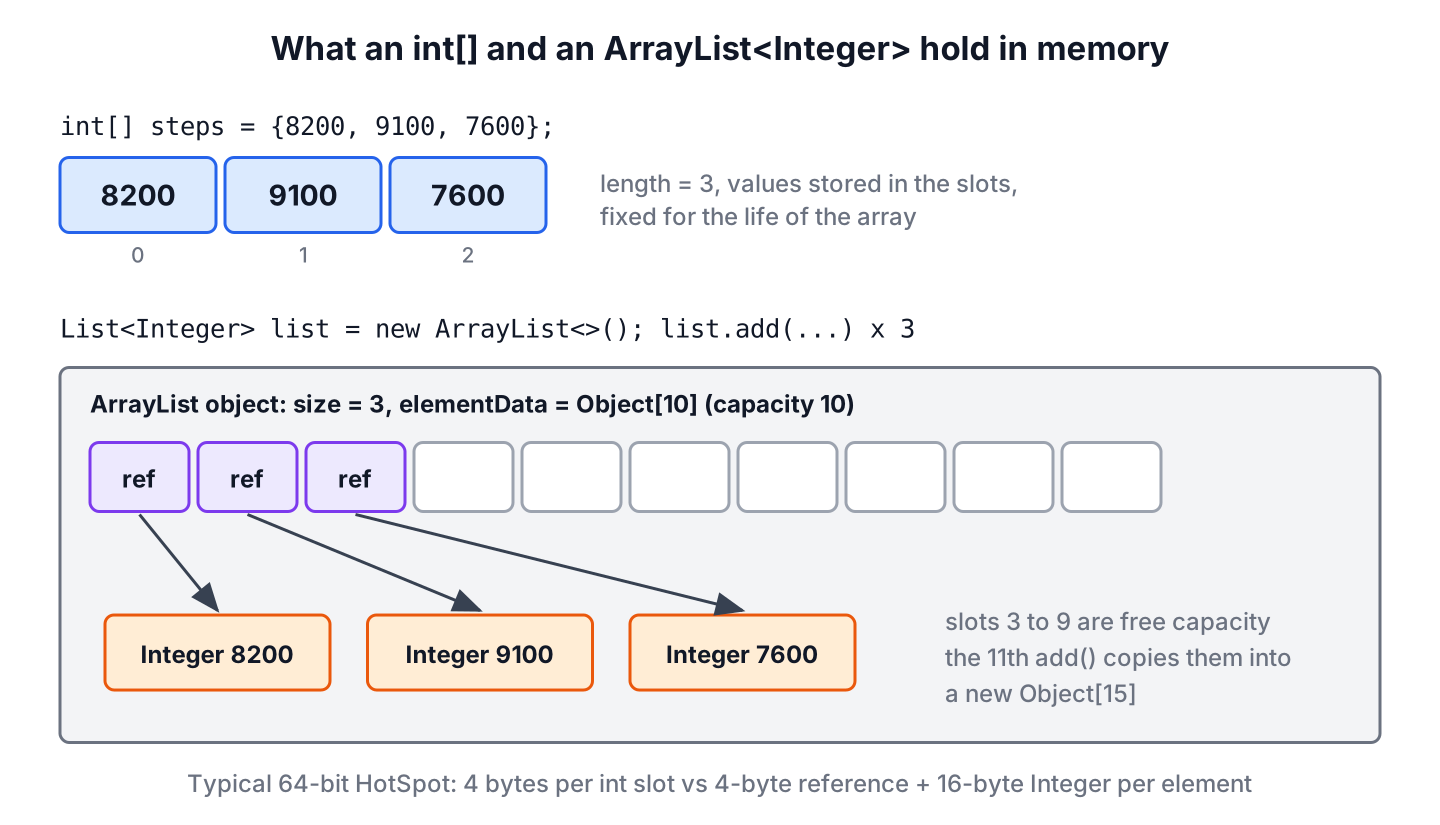
An array is part of the Java language itself. It has its own syntax with square brackets, a length field, and a type such as int[] or String[]. An ArrayList is an ordinary class that implements the List interface, and inside it keeps an Object[] named elementData plus a counter of the used slots.
Most differences follow from that design, a language-level container with a fixed length on one side and a class that manages such a container for us on the other.
| Feature | Array | ArrayList |
|---|---|---|
| Size | Fixed when created | Grows on add() |
| Element count | length field (capacity) | size() method (used slots) |
| Primitives | Yes, int[], double[] and so on | No, only wrapper objects such as Integer |
| Type check | At runtime, ArrayStoreException | At compile time through generics |
| Syntax | a[i], a[i] = v | get(i), set(i, v) |
| Add and remove | Not possible, we copy into a new array | add(), remove(), removeIf() |
| Helper methods | Static methods in java.util.Arrays | Instance methods plus Collections and streams |
| Multiple dimensions | int[][] | List<List<T>> |
| toString() | Type and hash code, such as [I@1b6d3586 | Elements, such as [milk, bread] |
| Thread safety | None | None, not synchronized |
Both give constant-time access by index, because an ArrayList reads from its internal array. Neither is thread-safe, so concurrent writers need a lock or a concurrent collection in both cases.
2. How an ArrayList Grows Past Its Capacity
The capacity of an ArrayList is the length of its internal array, and the size is the number of slots in use. In JDK 25, new ArrayList<>() starts with an empty shared array and allocates 10 slots on the first add(). When all slots are used, the next add() creates an array about 1.5 times larger and copies the elements into it, so the capacity goes 10, 15, 22, 33 and so on.
Each copy costs O(n), but the copies happen less often as the list grows, so add() at the end takes amortized constant time. When we know the final size, we pass it to the constructor or call ensureCapacity() and skip the intermediate copies.
ArrayList<String> orders = new ArrayList<>(1_000);   // room for 1,000, size 0
orders.add("A-1");
int used = orders.size();                              // 1
orders.ensureCapacity(5_000);                          // one resize up front
orders.trimToSize();                                   // capacity = size
Removing elements lowers the size but never the capacity. A list that once held a million elements keeps its large internal array until we call trimToSize() or let the list be garbage collected.
3. Primitives, Boxing and Memory Use
An int[] stores the numbers themselves, while an ArrayList<Integer> stores references to separate Integer objects. On a typical 64-bit HotSpot JVM with compressed references, an int slot takes 4 bytes, whereas each Integer element takes a 4-byte reference plus a 16-byte object, unless the value comes from the cache of small integers. For a million numbers, that is about 4 MB against about 20 MB.
Boxing also changes how the values behave. The operator == compares the references of two Integer objects, and a null element throws an exception when Java unboxes it into an int.
List<Integer> scores = new ArrayList<>(List.of(1000, 1000, 7));
boolean sameObject = scores.get(0) == scores.get(1);        // false
boolean sameValue = scores.get(0).equals(scores.get(1));    // true
Integer removed = scores.remove(1);                         // 1000, removes index 1
boolean gone = scores.remove(Integer.valueOf(7));           // true, removes value 7
List<Integer> withNull = new ArrayList<>();
withNull.add(null);
int value = withNull.get(0);                                // NullPointerException
The overload remove(int index) wins over remove(Object o) for an int argument, which is a common bug with lists of numbers. The differences between the two kinds of arrays are covered in primitive and wrapper arrays.
4. Type Safety of Arrays and Generic Lists
Arrays are covariant, which means a String[] is also an Object[]. The compiler accepts writing an Integer into such a variable, and the JVM rejects it at runtime with an ArrayStoreException.
Object[] labels = new String[2];
labels[0] = "sale";
labels[1] = 42;                           // ArrayStoreException: java.lang.Integer
Generic lists are invariant, so a List<String> is not a List<Object>, and the same mistake never compiles. The price is that generics and arrays do not mix well, because Java cannot create an array of a generic type.
// does not compile: incompatible types, and generic array creation
List<Object> labels = new ArrayList<String>();
List<String>[] pages = new List<String>[3];
The compile error is the better outcome, because the bug shows up while we type and not in production. Inside our own generic classes we therefore keep elements in a List<T> instead of a T[].
5. Cost of Common Operations
Both structures sit on a plain array, so the costs are close. The difference is who writes the copying code. With an array, a new element at the end means resizing the array ourselves with Arrays.copyOf(), whereas ArrayList does the same copy internally and only when its capacity runs out.
| Operation | Array | ArrayList |
|---|---|---|
| Read or write by index | O(1) | O(1) |
| Add at the end | O(n), new array every time | Amortized O(1) |
| Insert or remove in the middle | O(n), manual System.arraycopy() | O(n), add(i, e) and remove(i) shift elements |
| Search by value | O(n), loop or stream | O(n), contains(), indexOf() |
| Sort | Arrays.sort() | list.sort(), which sorts the internal array |
For data of primitives, the array is faster in practice, mostly because it avoids the boxed objects and keeps the numbers next to each other in memory. For lists of objects, an ArrayList and an array perform almost the same, so the choice comes down to the API. If a hot loop needs proof, we measure both with JMH instead of guessing.
6. Grids and Nested Lists
A two-dimensional array such as int[][] is an array of arrays, which suits data with a fixed shape like a seating plan. A list of lists models rows of different and changing lengths, such as the comments under each post.
int[][] seats = new int[3][4];            // 3 rows, 4 seats each
seats[1][2] = 1;                          // book row 1, seat 2
int rows = seats.length;                  // 3
List<List<String>> comments = new ArrayList<>();
comments.add(new ArrayList<>(List.of("nice")));
comments.add(new ArrayList<>());
comments.get(1).add("thanks");
String second = comments.get(1).get(0);   // "thanks"
7. Switching Between an Array and an ArrayList
Real code moves data across the boundary all the time, for example when a library method returns an array and our service works with lists. The methods Arrays.asList() and toArray() cover both directions for object arrays, and a stream handles primitive arrays.
String[] fruits = {"apple", "kiwi"};
List<String> view = Arrays.asList(fruits);                 // fixed-size view of the array
ArrayList<String> list = new ArrayList<>(Arrays.asList(fruits));   // [apple, kiwi]
boolean added = list.add("fig");                           // true
String[] back = list.toArray(String[]::new);               // [apple, kiwi, fig]
int[] nums = {3, 1};
List<Integer> boxed = Arrays.stream(nums).boxed().toList();   // [3, 1]
The list from Arrays.asList() writes through to the array and throws UnsupportedOperationException on add(), so we wrap it in new ArrayList<>() when the list must grow. All the variants, with their pitfalls, are in the guide to converting between a List and an array.
8. When to Use an Array and When an ArrayList
For most application code, ArrayList is the default, because the size of user data is rarely fixed and the List API works with streams, other collections and frameworks such as Spring and Jackson. Arrays are the better tool in a few specific situations.
| Situation | Pick | Reason |
|---|---|---|
| Items added and removed at runtime, such as a cart or search results | ArrayList | Grows on its own, rich API |
| Fixed number of slots, such as 7 days or 12 months | Array | Size never changes, simple syntax |
| Millions of numbers, image pixels, audio samples | int[], double[], byte[] | No boxing, about 5 times less memory |
| Method parameters and return values in public APIs | List | Callers can pass any list, generics check types |
| APIs that require arrays, such as varargs and main(String[] args) | Array | Required by the signature |
| Shared between threads | CopyOnWriteArrayList or a lock | Neither type is thread-safe |
For example, a fitness app that tracks steps per weekday stores them in an int[7], because a week always has seven days. The same app keeps the list of workouts a user logged today in an ArrayList, because that number changes with every new entry.
9. Array vs ArrayList FAQs
Performance, primitives and thread safety lead the questions developers ask about the two types.
9.1. Is an ArrayList slower than an array?
Only slightly for objects, and noticeably for primitives. Access by index has the same cost, but get() adds a bounds check and a method call that the JIT compiler mostly removes. The real gap comes from boxing, because an ArrayList<Integer> stores references to objects instead of plain numbers.
9.2. Can an ArrayList store int values?
Not as primitives. Type arguments must be reference types, so ArrayList<int> does not compile, and we use ArrayList<Integer>. Java boxes each int into an Integer on add() and unboxes it on get().
9.3. Why does an array use length and an ArrayList use size()?
The length of an array is a final field that the JVM sets at creation, because the length never changes. The size() of a list is a method, because the count changes with every add() and remove() and differs from the capacity of the internal array.
9.4. Is ArrayList thread-safe?
No. If several threads modify an ArrayList, we synchronize the ArrayList with Collections.synchronizedList() or use CopyOnWriteArrayList for lists that are read much more often than changed.
10. Conclusion
An array has a fixed length, holds primitives without boxing, and checks element types only at runtime. An ArrayList wraps an internal array, grows it by about 50 percent when it fills up, and gives us generics and a full List API.
We choose ArrayList for data that changes in size and for public method signatures, and we keep arrays for fixed-size data, large primitive data and APIs that require them. Converting between the two takes one line in either direction.
11. References
- ArrayList (Java SE 25 API)
- Arrays (Java SE 25 API)
- JLS 25, Chapter 10. Arrays
- The Java Tutorials, List Implementations
Happy Learning !!
