This official feed from the Google Workspace team provides essential information about new features and improvements for Google Workspace customers.


We are making video conferencing device interoperability between Google Meet and Microsoft Teams generally available. It was previously available in preview. This launch will enable you to:

  • Join Microsoft Teams meetings from Android (AOSP)-based Google Meet hardware devices.
  • Join Google Meet meetings from Android (AOSP)-based Microsoft Teams Rooms devices.

See our early preview announcement for more details.

Getting started

Rollout pace

Availability

  • Available to all Google Workspace customers with Google Meet hardware devices running Android/AOSP 

Resources

We recently announced a new, dedicated hub in the Gemini app to help get students started with all of Gemini's learning tools. Initially available in personal accounts, the Gemini student hub is now available to Google Workspace for Education users of all ages. The hub helps keep students organized; they can start a study notebook, create flashcards, take a practice quiz, and more. As Gemini creates more learning tools, you’ll find them in the student hub.

Getting started

  • Admins: The Gemini app and related in-app tools are controlled by the Generative AI settings in the Workspace Admin console. The Gemini student hub is subject to these existing controls. Visit the Help Center for more information on turning the Gemini app on or off.
  • End users: There is no end user setting for this feature. To get started, visit gemini.google.com/students or select Students in the Gemini app menu.

Rollout pace

Availability

  • Available to all Google Workspace customers and Workspace Individual subscribers outside of the European Economic Area (EEA), and users with personal Google accounts globally

Resources

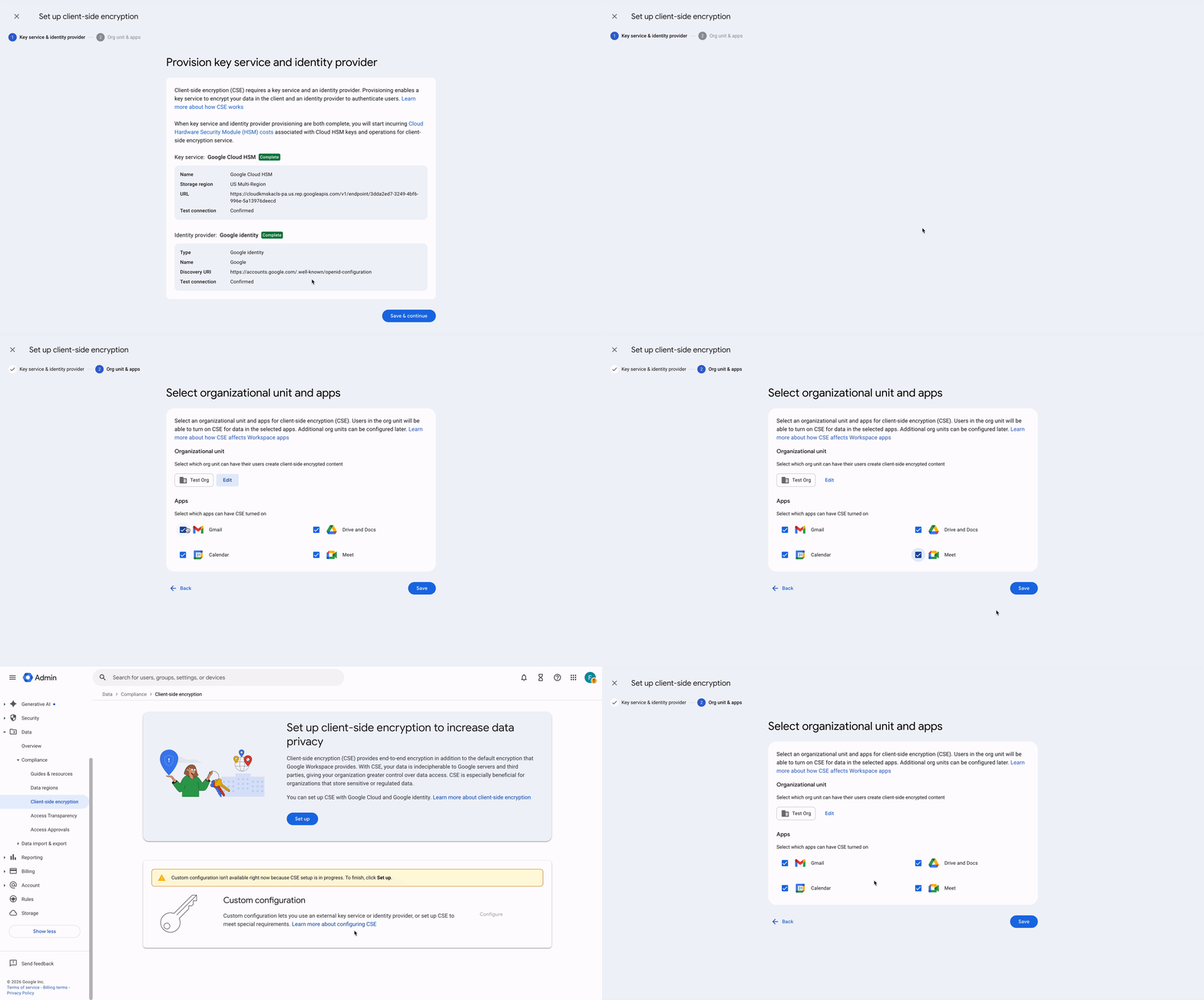
We are introducing a new option which can make the initial setup of Google Workspace Client-side encryption (CSE) significantly easier and faster for admins.

CSE now supports a simple setup path in the Admin console which can help customers get up and running with CSE in minutes. By combining Cloud HSM Keys with Google Identity, we have automated much of the setup flow which could be time consuming.  In a few clicks, admins can set up and deploy CSE, reducing the time to live and allowing customers to use their existing GCP resources to add CSE protection to your most sensitive data.

Customers use Client-side encryption across Workspace applications to encrypt emails, files, meetings and events, to comply with sovereignty and compliance regulations from HIPAA to ITAR. With Client-side encryption, data is encrypted by customer keys before it ever reaches Google servers, making the customer the sole arbiter of their data. Previously, this privacy control required deep technical knowledge to set up  a third-party key service and configure an identity provider. With simple setup, admins from enterprise to small businesses can start encrypting their important data within minutes.

For admins who require more custom configurations leveraging third-party key services, that option is also still available via the standard CSE setup process.


Getting started

Rollout pace

Availability

  • Enterprise: Enterprise Plus with the Assured Controls or Assured Controls Plus add-on

Resources

Developers can now programmatically create, read, and manage comments across Google Docs, Sheets, and Slides using their respective developer APIs. In Google Docs, this update also introduces API support for suggested edits, allowing automated tools and third-party systems to propose document revisions for user review rather than altering content directly.

These additions allow organizations and developers to connect internal review tools, automated content pipelines, and project tracking systems directly to Google Workspace editors. Key capabilities include:

  • Docs API: Programmatically add, review, and reply to comments, and submit proposed text changes as suggestions.
  • Sheets API: Programmatically add, review, and reply to comments on specific cells.
  • Slides API: Programmatically add, review, and reply to comments associated with individual slides and specific presentation elements.

Programmatic comment support within the Docs, Sheets, and Slides Model Context Protocol (MCP) servers remains in developer preview in accordance with the preview status of the MCP servers.

Rollout pace

Getting started

Availability

  • Available to all Google Workspace customers and users with personal Google accounts

Resources

Captions in Google Vids are now fully customizable. Until now, captions came in a set style. You can now change their font and typography, where they sit on screen, and how they animate, so they match your brand or the look of your video.

Captions make videos easier to follow when the sound is off or when viewers prefer to read along. Captions that look good help your video catch people's attention on social feeds and in company channels. They also make it look finished and ready to share.

Increased customization options for captions can help:

  • Marketing and social teams: Match captions to brand fonts and colors for social ads and promo videos. 
  • Creators: Add animated, eye-catching captions to make short videos more engaging.

Getting started

  • Admins: There is no admin control for this feature.
  • End users: There is no end user setting for this feature. Visit the Help Center to learn more.

Rollout pace

Availability

  • Business: Business Starter, Standard, Plus and Base
  • Enterprise: Enterprise Starter, Standard, and Plus
  • Education: Education Fundamentals, Standard, and Plus
  • Consumer: Google AI Plus and Ultra
  • Other Editions: Frontline Starter, Standard, and Plus; Essentials Starter, Enterprise Essentials, and Enterprise Essentials Plus; Individual; Nonprofits
  • Education Add-ons: Google AI Pro for Education; Teaching and Learning
  • Other Add-ons: AI Expanded Access

Resources