

Swapping two numbers in Java means exchanging the values of two variables, and the standard way copies the first value into a temporary variable, assigns the second value to the first variable and assigns the temporary value to the second variable. Whichever technique we use to swap two numbers, each variable ends up with the value that the other one had before.
We swap values in sorting algorithms, when we normalize input such as a price range typed in the wrong order, and in classic interview questions that ask for a swap without a third variable.
The following example swaps two int variables with a temporary variable.
int a = 100;
int b = 200;
int temp = a;                                  // temp = 100
a = b;
b = temp;
String result = "a = " + a + ", b = " + b;     // "a = 200, b = 100"
The temporary variable keeps the old value of a while a is overwritten. We also swap without a third variable with arithmetic and with XOR, look at the one-line trick, explain why a swap() method cannot change the caller’s variables, and compare all techniques.
1. Swapping With a Temporary Variable
An assignment replaces the old value of a variable, so a = b loses the original a. The temporary variable saves that value first. The order of the three steps is fixed, because each step reads a value that the previous step must not have overwritten yet.
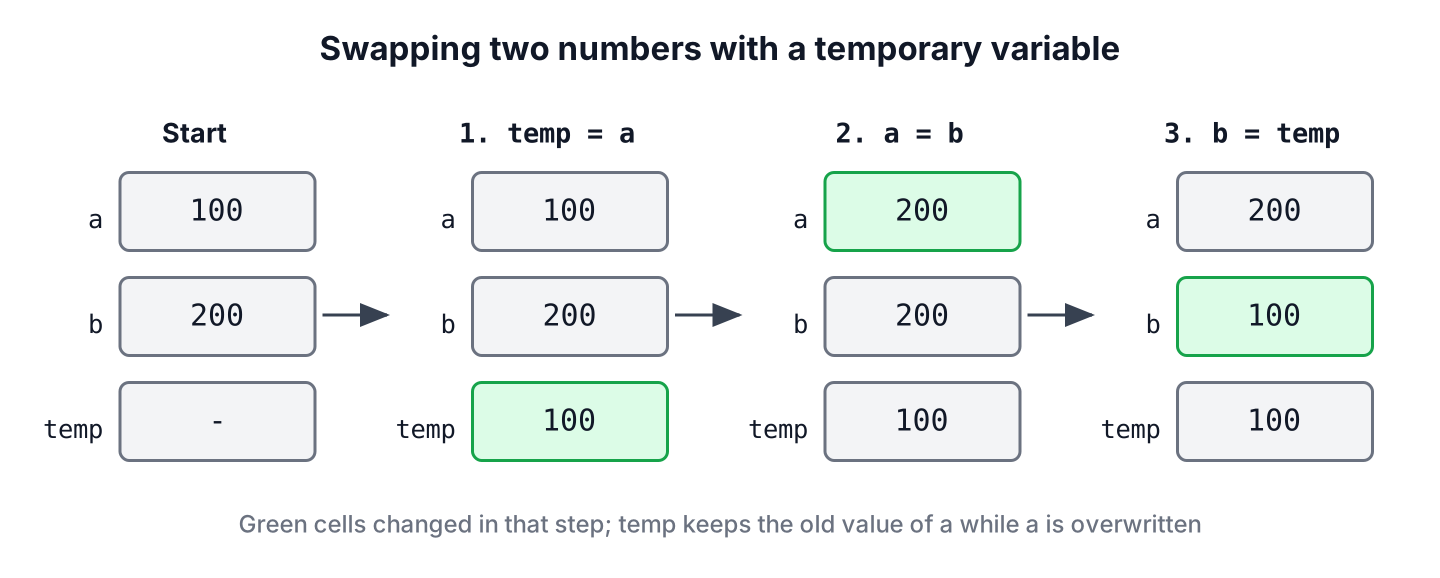
The temporary variable works for every type, not only for numbers. A sorting method swaps two array elements in the same way, for example, the bubble sort swaps neighbors that are in the wrong order.
static void swap(int[] values, int i, int j) {
    int temp = values[i];
    values[i] = values[j];
    values[j] = temp;
}
int[] scores = {42, 17, 8};
swap(scores, 0, 2);
String swapped = Arrays.toString(scores); // "[8, 17, 42]"The array version also works when i and j are the same index, which is not true for the XOR trick in section 3.
2. Swapping Without a Temporary Variable Using Addition
The arithmetic version stores the sum of both numbers in the first variable. With the sum in one variable and the original b in the other, a subtraction gives back the original a, and a second subtraction gives back the original b.
int a = 100;
int b = 200;
a = a + b;                                     // a = 300
b = a - b;                                     // b = 300 - 200 = 100
a = a - b;                                     // a = 300 - 100 = 200
String result = "a = " + a + ", b = " + b;     // "a = 200, b = 100"
Many tutorials say that the sum can overflow and break the swap. For int and long values, the swap still works, because integer addition in Java wraps around in two’s complement, and the subtraction wraps back to the original value.
int x = Integer.MAX_VALUE;
int y = 1;
x = x + y;                                     // x = -2147483648, overflow
y = x - y;                                     // y = 2147483647
x = x - y;                                     // x = 1
String wrapped = x + " " + y;                  // "1 2147483647"
The arithmetic swap is not safe for double and float values, because the sum is rounded and the small value is lost. A measurement of 0.1 next to 1.0E20 shows the problem.
double small = 0.1;
double large = 1.0E20;
small = small + large;                         // 1.0E20, the 0.1 is rounded away
large = small - large;                         // 0.0
small = small - large;                         // 1.0E20
String broken = small + " " + large;           // "1.0E20 0.0"
3. Swapping With the XOR Operator
The bitwise XOR operator ^ returns 1 for each bit where the two operands differ and 0 where they are equal. Two properties make it useful for a swap, namely v ^ v is 0 and v ^ 0 is v, so XOR with the same value twice restores the original number.
int a = 5;                                     // 5 = 0101
int b = 9;                                     // 9 = 1001
a = a ^ b;                                     // a = 1100 (12)
b = a ^ b;                                     // b = 1100 ^ 1001 = 0101 (5)
a = a ^ b;                                     // a = 1100 ^ 0101 = 1001 (9)
String result = "a = " + a + ", b = " + b;     // "a = 9, b = 5"
XOR works only for the integer types byte, short, char, int and long, and for boolean. The bigger problem is aliasing. When both operands are the same variable, for example, the same array element because i == j, the first step sets the value to 0 and the value is lost.
int[] marks = {7, 3};
int i = 0;
int j = 0;
marks[i] = marks[i] ^ marks[j];
marks[j] = marks[j] ^ marks[i];
marks[i] = marks[i] ^ marks[j];
int lost = marks[0];                           // 0
A sorting algorithm that swaps values[i] and values[j] meets i == j all the time, so the XOR swap corrupts the data there, whereas the swap() method from section 1 leaves the element unchanged.
4. Swapping in a Single Statement
Java evaluates the left operand of a binary operator before the right operand, and that rule makes a one-line swap possible. In the expression a + b – (a = b), Java reads a and b first, assigns b to a inside the parentheses, and subtracts the new value of a.
int a = 100;
int b = 200;
b = a + b - (a = b);                           // 300 - 200
String result = "a = " + a + ", b = " + b;     // "a = 200, b = 100"
The trick compiles and works in Java, but the same line in C or C++ has undefined behavior, and most reviewers have to stop and work it out. We use it to answer an interview question and keep the temporary variable in production code.
5. Why a swap() Method Cannot Swap the Caller’s Variables
Java passes arguments by value, so a method receives copies of the two numbers. The method swaps its own copies, and the caller’s variables keep their values.
static void swapInts(int first, int second) {
    int temp = first;
    first = second;
    second = temp;
}
int a = 100;
int b = 200;
swapInts(a, b);
String unchanged = "a = " + a + ", b = " + b; // "a = 100, b = 200"The same rule applies to objects. The method gets a copy of each reference, so assigning the references inside the method does not affect the caller. When a method must swap values for its caller, we choose one of the following designs.
- Swap elements inside an array, as the swap(int[], int, int) method in section 1 does, because the method changes the array that the caller also sees.
- Swap elements of a list with Collections.swap(), which is covered in swapping two elements in an ArrayList.
- Return the swapped values as a new object, such as a record, and let the caller assign them.
record Pair(int first, int second) {
    Pair swapped() {
        return new Pair(second, first);
    }
}
Pair pair = new Pair(100, 200).swapped(); // Pair[first=200, second=100]6. Normalizing a Price Range in a Shop Filter
An online shop has a price filter with two input fields, and some users type the higher price into the first field. Instead of rejecting the search, the shop swaps the two values so the minimum is never larger than the maximum. A compact constructor in a record is a good place for that rule, because every PriceRange object is valid from the moment it exists.
record PriceRange(int min, int max) {
    PriceRange {
        if (min > max) {
            int temp = min;
            min = max;
            max = temp;
        }
    }
}
PriceRange typed = new PriceRange(500, 100); // PriceRange[min=100, max=500]
PriceRange correct = new PriceRange(100, 500); // PriceRange[min=100, max=500]We can see that the swap uses a temporary variable, because readability matters more than saving one local variable in code that other developers maintain.
7. Comparing the Swap Techniques
Only the temporary variable works for every type and every input, which is why we recommend it. The other techniques are interview answers with limits that matter in real code.
| Technique | Works for | Fails when | Readability |
|---|---|---|---|
| Temporary variable | All types, including objects | Never | Clear |
| Addition and subtraction | int, long and smaller integer types | Floating-point values lose precision | Needs a comment |
| XOR | Integer types and boolean | Both operands are the same variable or array element | Needs a comment |
| b = a + b – (a = b) | Integer types | Floating-point values lose precision | Poor |
| Multiplication and division | Non-zero integers | A value is 0, or the product overflows | Poor |
8. Swap Two Numbers FAQs
An interviewer who hears the temporary variable answer asks for the other techniques next, and each one has a limit.
8.1. Can we swap two numbers using multiplication and division?
Yes, but only for non-zero integers whose product fits in the type. A zero value makes the division fail with ArithmeticException, and a product that overflows gives wrong results, so this technique is the weakest of all.
int a = 0;
int b = 5;
a = a * b;                                     // a = 0
b = a / b;                                     // b = 0
int failed = a / b;                            // ArithmeticException: / by zero
8.2. How do we swap two strings without a third variable?
We concatenate both strings into the first variable and cut the original values out with substring(). The temporary variable is still the better choice, because the trick creates new strings.
String first = "tea";
String second = "coffee";
first = first + second;                                         // "teacoffee"
second = first.substring(0, first.length() - second.length());  // "tea"
first = first.substring(second.length());                       // "coffee"
String result = first + " " + second;                           // "coffee tea"
8.3. Does Java have a built-in method to swap two variables?
No. Java has no method that swaps two local variables, because a method cannot change the caller’s variables. For lists, Collections.swap(list, i, j) swaps two elements, and for arrays we write the three-line swap() method ourselves.
8.4. Is the XOR swap faster than the temporary variable?
Not in a way that matters in Java. The JIT compiler keeps local variables in CPU registers, so the temporary variable does not cost a memory access, and the XOR version needs three dependent operations. We pick the temporary variable for readability and correctness.
9. Conclusion
To swap two numbers in Java, we use a temporary variable, because it works for every type and every input. The addition trick works for integers even when the sum overflows, but it fails for floating-point values, and the XOR trick sets a value to zero when both operands are the same variable.
A method cannot swap its caller’s variables, because Java passes arguments by value, so we swap array or list elements or return a new object. Similar beginner programs are in the Java examples list.
10. References
- JLS 25, Evaluate Left-Hand Operand First
- JLS 25, Additive Operators for Numeric Types
- JLS 25, Integer Bitwise Operators
- Collections.swap() (Java SE 25 API)
Happy Learning !!
