

The files java.exe and javaw.exe are the two Java application launchers on Windows, and the main difference between them is that java.exe runs the program in a console window, whereas javaw.exe runs it without any console window. These files are nearly identical versions of the Java application launcher. Both versions of the launcher take the same arguments and options, and both start the same JVM.
We use java.exe for command-line programs, build scripts and servers, where we want to see the output and wait for the program to finish. We use javaw.exe for desktop apps with a graphical user interface (GUI), such as the Eclipse IDE, where a black console window next to the app would only get in the way.
The following example starts the same JAR file from the Windows Command Prompt with both launchers, with what happens in a comment line above each command.
:: Output in this window, the prompt waits until the app exits
java -jar report.jar

:: No console output, the prompt returns at once
javaw -jar report.jar

:: No console window, the output goes to report.log
javaw -jar report.jar > report.log 2>&1
Notice that the comments are on their own lines, because the Command Prompt treats :: as a comment only at the start of a line. Also, javaw does not print anything, even when the program calls System.out.println(). If we need the output of a javaw program, we redirect it or write it to a log file, as we see in section 4.
Next, we compare the two launchers side by side and answer common questions, such as why javaw.exe shows up in the Task Manager.
1. What Is java.exe?
The java.exe file is the console version of the launcher, and it is used for applications with text-based interfaces or that output text. Windows marks java.exe as a console program, so it either uses the Command Prompt window that started it or opens a new console window when we start it in another way, for example from a shortcut.
Any application launched with java makes the Command Prompt wait until the application exits. Everything the program writes to System.out and System.err appears in the console window, including the stack trace of an uncaught exception. After the program ends, the Command Prompt stores its exit code in the variable %ERRORLEVEL%, so a batch script can check whether the program failed.
In a CI pipeline or a scheduled batch job, the waiting and the exit code matter most. The job runs java -jar import.jar, waits for it, keeps the log output in the job history and fails the build when the exit code is not 0.
2. What Is javaw.exe?
The javaw.exe file is the non-console version of the application launcher, and it is used to launch Java applications with graphical user interfaces. These applications have windows with menus, buttons and other interactive elements. We pick javaw.exe when no console window should appear, neither for input nor for output.
Windows marks javaw.exe as a GUI program, so no console window opens. When we start a GUI program from the Command Prompt, the start command documentation explains that cmd does not wait for the program to quit, so the prompt comes back at once while the app keeps running.
Without a console, the text that the program writes to System.out and System.err is lost. The javaw.exe launcher does, however, display a dialog box with error information if a launch of a Java application fails, for example when the JAR file does not exist or has no Main-Class entry. An exception that the running program throws later goes to System.err, so nobody sees it unless the output is redirected or logged.
For example, a team builds a small desktop tool in Swing that shows the open support tickets. The team starts it with a desktop shortcut to javaw -jar tickets.jar, so the users see only the app window. With java -jar tickets.jar, every user would also get a console window, and closing that window would close the app too.
3. java.exe vs javaw.exe
Both files are in the bin folder of every JDK on Windows. In the Eclipse Temurin JDK 25.0.4.1 build, java.exe has 50,304 bytes and javaw.exe has 50,296 bytes, because the two files are built from the same launcher source code. The difference is one setting in the file header, the Windows subsystem, which is “console” for java.exe and “GUI” for javaw.exe.
Every difference in the table comes from the subsystem setting. The options, the JVM and the exit code stay the same.
| java.exe | javaw.exe | |
|---|---|---|
| Windows program type | console program | GUI program |
| Console window | yes, the current one or a new one | no |
| System.out and System.err | shown in the console window | lost, unless redirected |
| Launch failure (missing JAR or class) | error text in the console | error dialog box |
| Command Prompt waits for the program | yes | no (yes inside a batch script) |
| Options, JVM and exit code | same | same |
| Typical use | command-line tools, scripts, servers, CI jobs | desktop GUI apps, shortcuts |
The diagram shows the same two commands from the Command Prompt. The left side keeps the prompt busy until the app ends, whereas the right side returns the prompt at once and has no place to show the output.
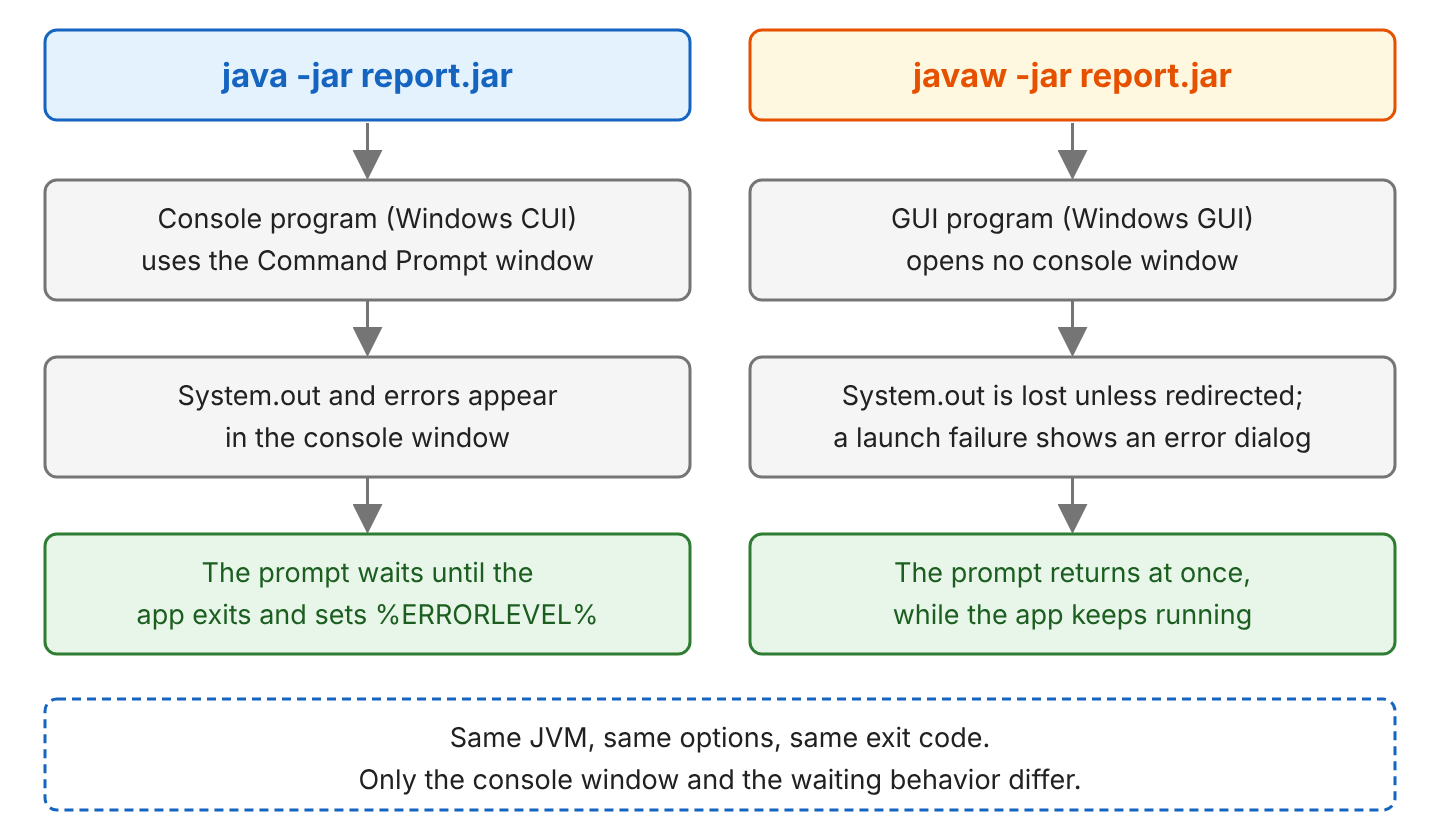
On Linux and macOS, the JDK has no javaw command. Those systems have no separate console and GUI program types, so the java command starts both kinds of programs. To run a program in the background there, we add & at the end of the command.
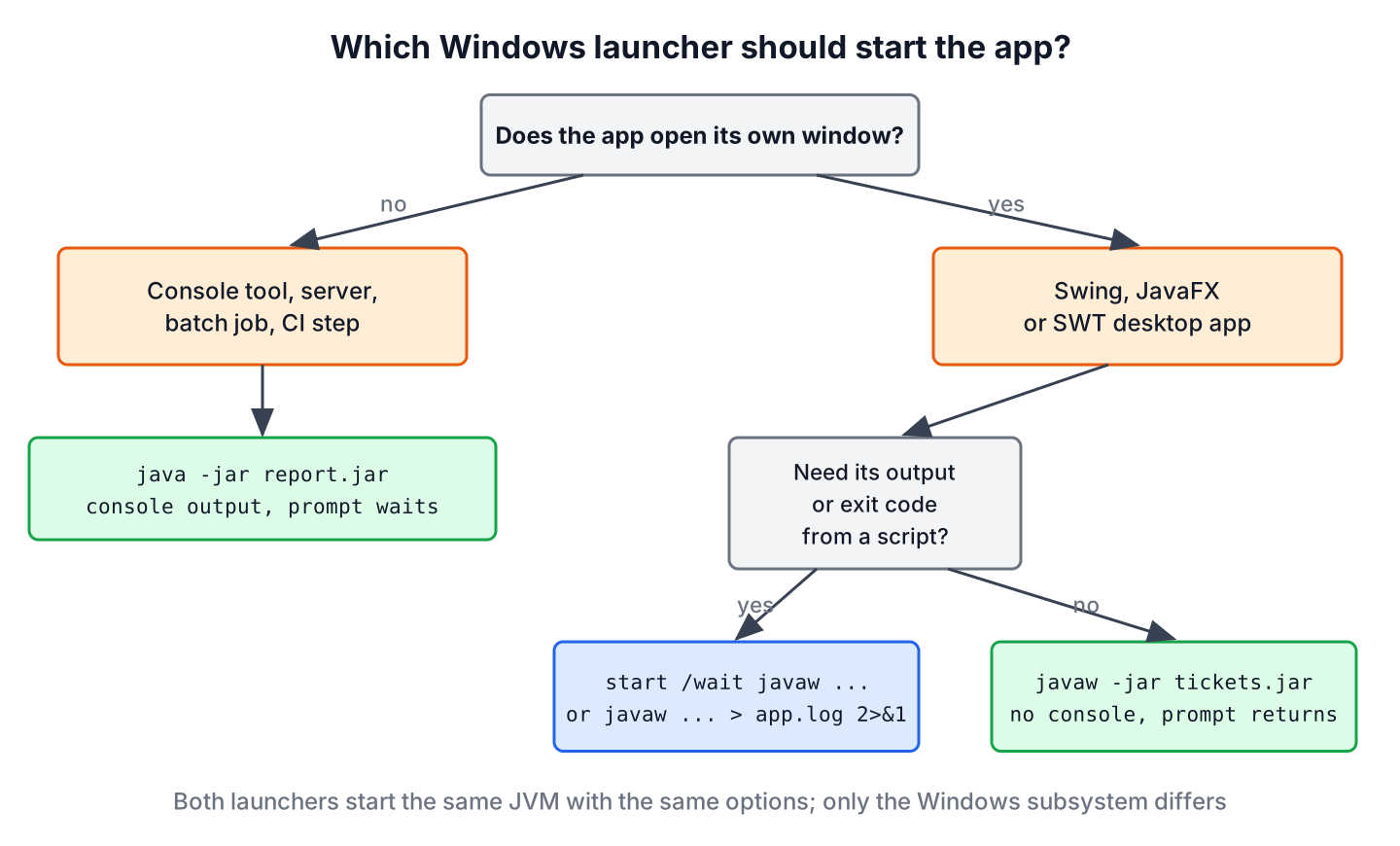
To pick a launcher for a new app, we ask two questions. The first is whether the app opens its own window, and the second is whether a script needs its output or its exit code.
4. Getting Output and the Exit Code From javaw
A javaw program has no console, so we have to send its output somewhere on purpose. The following example is a Java 25 compact source file that prints one line and also appends it to a log file. We run it with java LauncherDemo.java or javaw LauncherDemo.java, because both launchers accept a source file.
void main() throws IOException {
  String line = "Report created at " + LocalTime.now().withNano(0);
  IO.println(line);                                            // shown in the console window with java, lost with javaw
  Path log = Path.of("launcher-demo.log");
  Files.writeString(log, line + System.lineSeparator(),
      StandardOpenOption.CREATE, StandardOpenOption.APPEND);   // written with both launchers
}
With java, the line appears in the console and in the log file. With javaw, only the log file gets the line. A compact source file imports the java.base module for us, so the classes Files, Path and LocalTime need no import statements.
Report created at 22:30:20In a real app, we write the output with a logging library, such as Log4j2 or java.util.logging, and configure a file appender. So a javaw app keeps its errors in a file, and we can read them after a user reports a problem.
When we cannot change the code, we redirect the output in the command, or we use the start command with the /wait option to make the prompt wait for a javaw program.
:: System.out and System.err go to report.log
javaw -jar report.jar > report.log 2>&1

:: The prompt waits until the app exits, then prints its exit code
start /wait javaw -jar report.jar
echo %ERRORLEVEL%
Inside a batch script (.bat or .cmd file), the Command Prompt waits for GUI programs too, so javaw -jar report.jar in a script blocks until the app ends.
5. java.exe and javaw.exe FAQs
A javaw.exe entry in the Task Manager is the most common reason people look up the two launchers, so the first three answers deal with it.
5.1. What Is javaw.exe in the Task Manager?
The javaw.exe process is a Java program that runs without a console window, such as a desktop app or a background tool written in Java. Common examples are the Eclipse IDE, whose eclipse.ini can point to javaw.exe with the -vm option, and other Java desktop apps. To find out which app it is, we open the Details tab in the Task Manager, add the Command line column and read the JAR file or the main class after javaw.exe.
5.2. Is javaw.exe a Virus?
No, the real javaw.exe is part of every Java runtime on Windows. It is safe when it sits in the bin folder of an installed JDK or JRE, such as C:\Program Files\Java\jdk-25\bin, a JDK folder under C:\Program Files\Eclipse Adoptium, or in the runtime folder of an app that bundles Java. A file with that name in C:\Windows, in a temp folder or in the user profile deserves a malware scan, and the Digital Signatures tab in its file properties shows which vendor signed it.
5.3. Why Does javaw.exe Use So Much CPU or Memory?
The launcher itself uses almost nothing, so the CPU and memory belong to the Java app that it runs. We find the app in the Command line column of the Details tab, the same way as for the first question. For a deeper look, jcmd <pid> Thread.print shows what each thread is doing, and the -Xmx option in the app’s start command or shortcut limits the heap size.
5.4. Can We Use javaw With a Command-Line Program?
Yes, but we should not. The program runs, but nobody sees its output, and a program that reads from System.in gets no keyboard input. For any program that prints results or asks questions, we use java.
5.5. What Is the Difference Between javaw.exe and javaws.exe?
The javaws.exe file was the Java Web Start launcher, which downloaded a desktop app from a JNLP file on a web server and started it. Java Web Start was deprecated in JDK 9 and removed in JDK 11, so current JDKs such as JDK 25 ship java.exe and javaw.exe, but no javaws.exe.
5.6. How Do We Ship a Java Desktop App Without a Console Window?
We package it with jpackage, which builds a Windows installer with its own .exe launcher and a bundled runtime. By default, the launcher opens no console, the same as javaw. The option –win-console creates a console launcher for apps that need console interaction. The jpackage Maven plugin example builds such an installer from a Maven project.
6. Conclusion
The launchers java.exe and javaw.exe run the same JVM with the same options. The difference is the Windows program type, so java.exe runs in a console window and makes the Command Prompt wait, whereas javaw.exe opens no console and returns the prompt at once.
We use java for command-line tools, scripts and CI jobs, where the output and the exit code matter. We use javaw for desktop GUI apps, and we log their output to a file or redirect it, because the console output of a javaw program is lost. The Java tutorial covers the other basics of compiling and running Java programs.
7. References
- The java Command (Java 25)
- The jpackage Command (Java 25)
- start command (Microsoft Learn)
- JDK 11 Release Notes, Removed Features
Happy Learning !!

Can I eliminate either java or javaw on my computer. Or do I need both of them? Thank you
Yes, you need both. IDEs use javaw.exe.
import javax.swing.JFrame;
public class Hi{
	int someNumber;
	public static void main(String args[]){
		JFrame jf = new JFrame("Hi");
		jf.setVisible(true);
		jf.setDefaultCloseOperation(JFrame.EXIT_ON_CLOSE);
		System.out.println("Hi");
	}
}
Run this code with java.exe and javaw.exe to see the difference.
Thanks it was really a good example for beginners.
Could you please add an example, for better understanding… of how to launch with java.exe and javaw.exe
Use command prompt, please. Nothing complex here.