
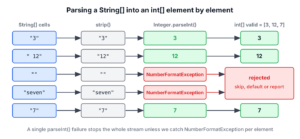
Converting a String[] to an int[] in Java means parsing every element with Integer.parseInt(), which a stream does in one line with Arrays.stream(texts).mapToInt(Integer::parseInt).toArray(); for an Integer[], we use map(Integer::valueOf) and toArray(Integer[]::new). Any element that is not a valid number makes the parse throw NumberFormatException.
Numbers arrive as text whenever we read them from outside the program, for example from command-line arguments, a CSV column, a query parameter or a form field with several values. Parsing them into an int[] lets us sum, sort and compare them as numbers.
The following example parses the quantities of three order lines.
String[] quantities = {"3", "12", "7"};
int[] ints = Arrays.stream(quantities).mapToInt(Integer::parseInt).toArray();               // [3, 12, 7]
Integer[] boxed = Arrays.stream(quantities).map(Integer::valueOf).toArray(Integer[]::new);   // [3, 12, 7]
Notice that the int[] version needs mapToInt(), which returns an IntStream. The rest of the post covers the loop version, the inputs that make parsing fail, safe ways to skip or replace bad values, parsing one comma-separated string, and the long and double variants.
1. Parsing Every Element into an int[]
The method Integer.parseInt() turns one string of decimal digits, with an optional leading + or –, into an int. Converting the array means calling it once per element and storing the result at the same index.

A plain loop does the work without streams, and it is the easiest version to debug, because the index of a failing element is right there.
String[] quantities = {"3", "12", "7"};
int[] result = new int[quantities.length];
for (int i = 0; i < quantities.length; i++) {
    result[i] = Integer.parseInt(quantities[i]);
}
String shown = Arrays.toString(result);   // "[3, 12, 7]"
The stream version from the intro does the same in one expression. The method reference Integer::parseInt fits mapToInt() because it takes a String and returns an int, so no boxing happens on the way to the int[].
2. Integer[] and List<Integer> Results
When the target is an Integer[] or a List<Integer>, we use map() instead of mapToInt(). The method Integer.valueOf() parses like parseInt() but returns an Integer, and it reuses cached objects for values from -128 to 127.
String[] quantities = {"3", "12", "7"};
Integer[] boxed = Arrays.stream(quantities).map(Integer::valueOf).toArray(Integer[]::new);   // [3, 12, 7]
List<Integer> list = Arrays.stream(quantities).map(Integer::valueOf).toList();               // [3, 12, 7]
Without the Integer[]::new generator, toArray() returns an Object[]. To switch between the two array types after parsing, see converting int[] to Integer[].
3. Strings That parseInt() Rejects
Real input is rarely as clean as “3”. The method parseInt() accepts only an optional sign followed by digits, within the int range, so many values that look like numbers to a user throw a NumberFormatException.
| Input | Result | Reason |
|---|---|---|
| “+5”, “-5”, “007” | 5, -5, 7 | Signs and leading zeros are allowed |
| ” 5″ or “5 “ | NumberFormatException | Spaces are not trimmed |
| “” | NumberFormatException | Empty string |
| null | NumberFormatException | Message Cannot parse null string |
| “1,000” or “2.5” | NumberFormatException | Separators and decimals are not digits |
| “3000000000” | NumberFormatException | Larger than Integer.MAX_VALUE |
int plus = Integer.parseInt("+5");           // 5
int padded = Integer.parseInt(" 5");         // NumberFormatException: For input string: " 5"
int empty = Integer.parseInt("");            // NumberFormatException: For input string: ""
int missing = Integer.parseInt(null);        // NumberFormatException: Cannot parse null string
int big = Integer.parseInt("3000000000");    // NumberFormatException: For input string: "3000000000"
Calling strip() before parsing fixes the most common problem, spaces around the value, so we strip every element that comes from user input or a file. For values above two billion, we parse into long instead, as section 6 shows.
4. Skipping or Replacing Invalid Values
Say a shop imports order quantities from a CSV file that a supplier fills by hand. The column contains “3”, ” 12″, an empty cell and “seven”, and one bad cell must not stop the whole import. We first write a helper that returns an empty OptionalInt when a value does not parse.
static OptionalInt tryParseInt(String text) {
    if (text == null) {
        return OptionalInt.empty();
    }
    try {
        return OptionalInt.of(Integer.parseInt(text.strip()));
    } catch (NumberFormatException e) {
        return OptionalInt.empty();
    }
}
With the helper, the stream can either drop the bad values or put a default in their place. The method OptionalInt.stream() (Java 9) returns a stream of zero or one value, so flatMapToInt() skips the empty ones.
String[] cells = {"3", " 12", "", "seven", "7"};
int[] valid = Arrays.stream(cells).map(c -> tryParseInt(c)).flatMapToInt(OptionalInt::stream).toArray();   // [3, 12, 7]
int[] withDefault = Arrays.stream(cells).mapToInt(c -> tryParseInt(c).orElse(0)).toArray();             // [3, 12, 0, 0, 7]
Skipping keeps only real quantities but loses the positions, whereas a default keeps the positions but hides the problem. A marker such as -1 is risky when -1 can be a real value. For an import, the better choice is often to collect the bad entries and report them to the user.
String[] cells = {"3", " 12", "", "seven", "7"};
List<String> rejected = Arrays.stream(cells).filter(c -> tryParseInt(c).isEmpty()).toList();   // [, seven]
The general patterns for checked and unchecked exceptions inside lambdas are covered in handling exceptions in streams.
5. From One String Such as “3,12,7” to int[]
Often the numbers come as one string, for example a query parameter ids=3,12,7. We split it into a String[] first and parse the parts, and a whitespace-tolerant regex removes the spaces around the commas.
String param = "3, 12,7";
int[] ids = Arrays.stream(param.split("\\s*,\\s*")).mapToInt(Integer::parseInt).toArray();   // [3, 12, 7]
int[] ids2 = Pattern.compile(",").splitAsStream(param).map(String::strip).mapToInt(Integer::parseInt).toArray();   // [3, 12, 7]
The second line uses Pattern.splitAsStream(), which streams the parts without creating the intermediate array. The splitting rules, such as dropped trailing empty strings, are explained in converting a String to a String array.
6. long and double Arrays
The same pattern works for the other numeric types with their own parse method and primitive stream. For float, short and byte, Java has no matching stream, so we use the loop from section 1.
String[] fileSizes = {"3000000000", "512"};
long[] sizes = Arrays.stream(fileSizes).mapToLong(Long::parseLong).toArray();   // [3000000000, 512]
String[] prices = {"9.99", "4.5"};
double[] amounts = Arrays.stream(prices).mapToDouble(Double::parseDouble).toArray();   // [9.99, 4.5]
Unlike Integer.parseInt(), Double.parseDouble() trims leading and trailing whitespace by itself, so ” 4.5″ parses fine. Single-value conversions are covered in more depth in converting a String to int and converting a String to long.
7. String Array to int Array FAQs
Exception types, separators and number bases cause most parsing surprises.
7.1. Which exception does Integer.parseInt() throw for invalid input?
NumberFormatException, which is an unchecked exception. It is not java.text.ParseException, so a catch (ParseException e) block never catches it.
7.2. What is the difference between parseInt() and valueOf()?
Both parse the same way. The method parseInt() returns a primitive int, whereas valueOf() returns an Integer object, so parseInt() fits mapToInt() and valueOf() fits map().
7.3. How do we convert a String array to int array without streams?
We create an int[] of the same length and fill it in a for loop with Integer.parseInt(), as in section 1. The loop also tells us the index of a failing element.
7.4. How do we parse numbers with thousands separators such as “1,000”?
We use NumberFormat for the right locale, or remove the separator first when the format is known.
String withComma = "1,000";
int thousand = Integer.parseInt(withComma.replace(",", ""));   // 1000
7.5. How do we parse hexadecimal or binary strings?
We pass a radix as the second argument, for example Integer.parseInt(“ff”, 16) returns 255 and Integer.parseInt(“101”, 2) returns 5.
8. Conclusion
Every String[] to int[] conversion parses each element, with mapToInt(Integer::parseInt) in a stream or Integer.parseInt() in a loop. For an Integer[] or a list, map(Integer::valueOf) does the same with boxed values.
The parse is strict, so spaces, empty cells, null and out-of-range values all throw NumberFormatException. We strip the input and decide whether to skip, replace or report the bad entries, and a small helper that returns an OptionalInt keeps that logic out of the stream.
9. References
- Integer.parseInt() (Java SE 25 API)
- NumberFormatException (Java SE 25 API)
- OptionalInt.stream() (Java SE 25 API)
- Stream.mapToInt() (Java SE 25 API)
Happy Learning !!
