AI for Customer Support

Ticket Management

Every ticket triaged, routed, and enriched before a human opens it.

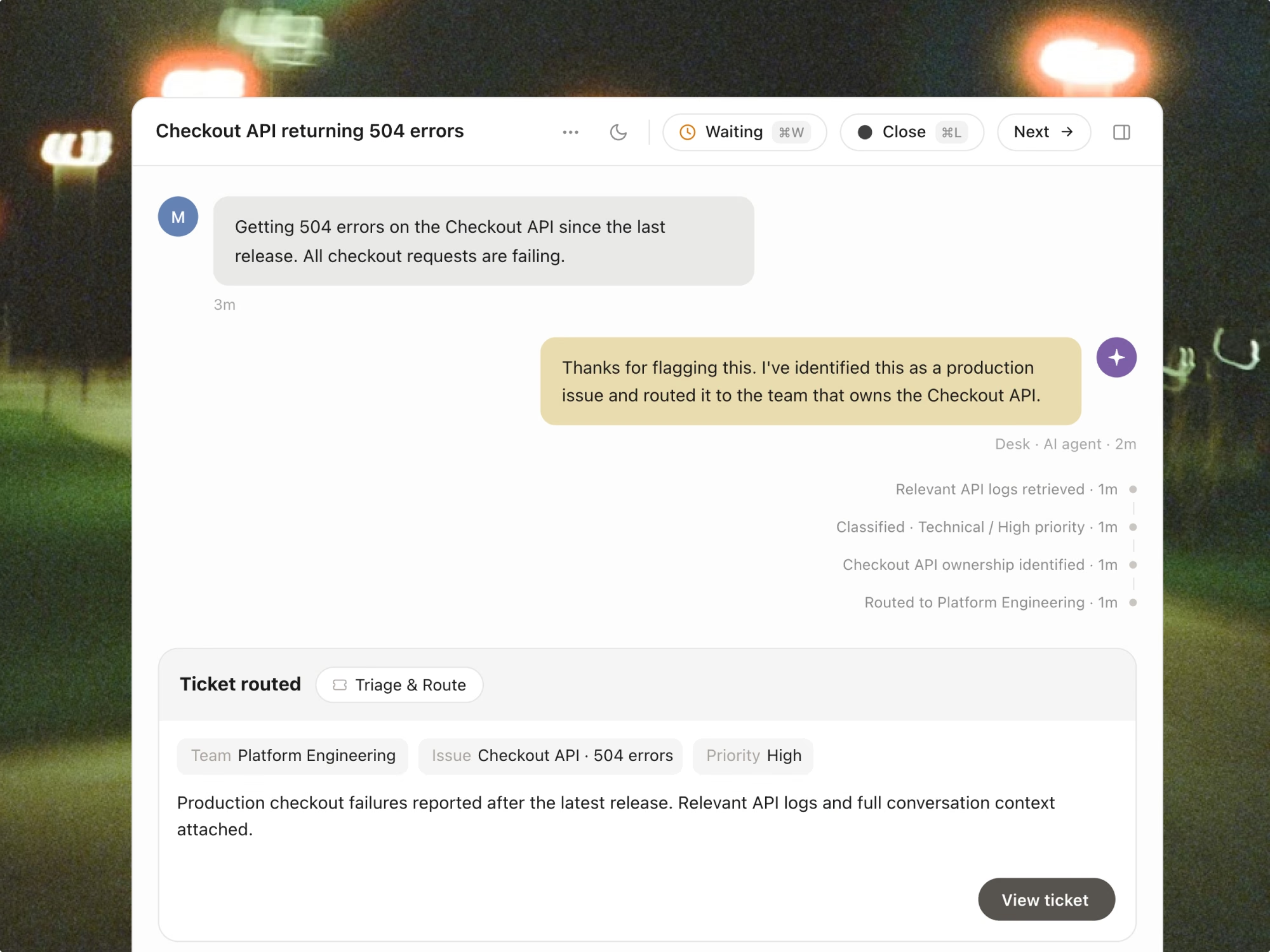
Botpress reads each incoming ticket, classifies it, assigns it to the right team, and pulls account context — so your agents spend time resolving issues, not figuring out what they are.

Connected to your helpdesk. Running in days.

Four things happen before your agent clicks in.

Most teams manually triage, categorize, and assign tickets — or rely on static rules that break the moment a new issue type appears.

Step 1: AI reads and classifies every ticket on arrival

The moment a ticket comes in — from email, chat, or your helpdesk — Botpress reads the content, identifies the issue type, and applies the right category and priority. No rules to maintain, no manual tagging.

  • Classifies by topic automatically — billing, technical, onboarding, account, compliance
  • Tags tickets for downstream routing and analytics
  • Handles new issue types without rule updates — learns from context

Step 2: Routes to the right team — every time

After classification, Botpress assigns the ticket to the right team or individual based on issue type, language, customer tier, and agent availability.

  • Routes based on team descriptions and routing instructions you define in plain language
  • Assigns to bot first for resolvable tickets — agents only see what needs them
  • Language-aware routing — matches tickets to agents by language if configured

Step 3: Pulls account context before the agent opens the ticket

Before an agent clicks in, Botpress has already pulled workspace config, recent activity, billing history, and bot logs — so the first reply can name the problem instead of asking about it.

  • Pulls workspace config, bot ID, conversation logs, and error context automatically
  • Surfaces account health, subscription status, and recent activity from connected CRMs
  • Suggests the likely root cause and resolution path alongside the ticket detail

Step 4: Resolves what it can — escalates the rest with full context

For tickets matching known resolution patterns, Botpress resolves them directly. For anything requiring judgment, it escalates — with the full conversation and AI summary already there.

  • Resolves high-confidence tickets automatically — policy questions, status lookups, known errors
  • Escalation includes AI summary: what was asked, what was tried, suggested next step
  • Human-in-the-loop mode for complex tickets — agent assists without taking full ownership
Step 1
Resolves what it can — escalates the rest with full context

Most teams manually triage, categorize, and assign tickets — or rely on static rules that break the moment a new issue type appears.

  • Pulls workspace ID, bot version, and configuration automatically
  • Pulls workspace ID, bot version, and configuration automatically
  • Pulls workspace ID, bot version, and configuration automatically
Step 2
Resolves what it can — escalates the rest with full context

Most teams manually triage, categorize, and assign tickets — or rely on static rules that break the moment a new issue type appears.

  • Pulls workspace ID, bot version, and configuration automatically
  • Pulls workspace ID, bot version, and configuration automatically
  • Pulls workspace ID, bot version, and configuration automatically
Step 3
Resolves what it can — escalates the rest with full context

Most teams manually triage, categorize, and assign tickets — or rely on static rules that break the moment a new issue type appears.

  • Pulls workspace ID, bot version, and configuration automatically
  • Pulls workspace ID, bot version, and configuration automatically
  • Pulls workspace ID, bot version, and configuration automatically
Step 4
Resolves what it can — escalates the rest with full context

Most teams manually triage, categorize, and assign tickets — or rely on static rules that break the moment a new issue type appears.

  • Pulls workspace ID, bot version, and configuration automatically
  • Pulls workspace ID, bot version, and configuration automatically
  • Pulls workspace ID, bot version, and configuration automatically

Ticket management is one part of the full Botpress customer support platform.

Botpress also handles ticket deflection, AI actions (refunds, lookups, record updates), CSAT improvement, and escalation workflows — all on the same platform, on your existing helpdesk.

See the full platform

Connected to your helpdesk. Running in days.

Ticket management AI doesn't require a migration. It sits on top of Zendesk or Intercom and starts working from day one.

Connect via OAuth

Authenticate Zendesk or Intercom in one step. Tickets, agents, teams, and custom fields sync automatically — no manual configuration.

Define your routing logic

Describe your teams, their specializations, and your escalation rules in plain language. The AI uses these to route intelligently from day one.

Go live and track

Triage and routing activate immediately. Monitor classification accuracy, routing quality, and resolution rates from the analytics dashboard.

01
Connect your systems

Authenticate your helpdesk, CRM, and any product or logging tools you want context pulled from.

02
Connect your systems

Authenticate your helpdesk, CRM, and any product or logging tools you want context pulled from.

03
Connect your systems

Authenticate your helpdesk, CRM, and any product or logging tools you want context pulled from.

FAQs

Does Botpress work with my existing helpdesk, or do I need to migrate?

No migration needed. Botpress connects directly on top of Zendesk or Intercom via OAuth. Your existing tickets, agents, teams, and custom fields sync automatically from day one — you keep your current setup, Botpress just adds the AI layer on top.

How does the AI know which team to route a ticket to?

You describe your teams, their specializations, and your escalation rules in plain language — no code or complex rule builders. Botpress uses those descriptions to route intelligently, and also factors in agent availability and customer language. If your team structure changes, you update the description, not a routing matrix.

What happens when the AI isn't confident enough to resolve a ticket on its own?

Botpress escalates it to a human — but not empty-handed. The agent receives a full AI summary: what the customer asked, what was already attempted, and a suggested next step. You set the confidence thresholds yourself, so you control exactly where the line between automated resolution and human handoff sits.

How is ticket enrichment different from just having a good CRM integration?

A CRM shows you data. Botpress pulls the right data at the right moment and surfaces it in context — workspace config, bot logs, error patterns, billing history, and prior ticket history — before the agent opens the ticket. It also cross-references similar past tickets and suggests the likely root cause, so the first reply names the problem instead of asking clarifying questions.

Can Botpress handle tickets in multiple languages?

Yes. Botpress detects the language of each incoming ticket and, if you've configured language-aware routing, matches it to an agent who speaks that language. No manual reassignment, no tickets falling through the cracks because they arrived in Spanish on a Monday morning.
What makes Botpress different from tools like Intercom's Fin or Zendesk AI?

Most support AI tools are built to deflect simple, repetitive questions — password resets, order status, FAQs — and hand everything else back to a human. Botpress handles the full range: it can issue refunds, execute multi-step workflows, pull live account data, and make judgment calls on complex tickets. It also connects to your existing Zendesk or Intercom without any migration, and charges a flat monthly fee instead of per seat or per resolution.

How long does it actually take to go live?

Most teams are in production within 3 to 5 days. Day 1 is connecting your helpdesk via OAuth and syncing your tickets and agents. Days 1–2 are pointing the AI at your knowledge base and past tickets. Days 2–3 are configuring your resolution logic, escalation rules, and routing. If you don't have a dedicated ops resource, Botpress offers done-for-you implementation — most teams are live within a week of signing.

How long does it actually take to go live?

Most teams are in production within 3 to 5 days. Day 1 is connecting your helpdesk via OAuth and syncing your tickets and agents. Days 1–2 are pointing the AI at your knowledge base and past tickets. Days 2–3 are configuring your resolution logic, escalation rules, and routing. If you don't have a dedicated ops resource, Botpress offers done-for-you implementation — most teams are live within a week of signing.

How long does it actually take to go live?

Most teams are in production within 3 to 5 days. Day 1 is connecting your helpdesk via OAuth and syncing your tickets and agents. Days 1–2 are pointing the AI at your knowledge base and past tickets. Days 2–3 are configuring your resolution logic, escalation rules, and routing. If you don't have a dedicated ops resource, Botpress offers done-for-you implementation — most teams are live within a week of signing.

How long does it actually take to go live?

Most teams are in production within 3 to 5 days. Day 1 is connecting your helpdesk via OAuth and syncing your tickets and agents. Days 1–2 are pointing the AI at your knowledge base and past tickets. Days 2–3 are configuring your resolution logic, escalation rules, and routing. If you don't have a dedicated ops resource, Botpress offers done-for-you implementation — most teams are live within a week of signing.

How long does it actually take to go live?

Most teams are in production within 3 to 5 days. Day 1 is connecting your helpdesk via OAuth and syncing your tickets and agents. Days 1–2 are pointing the AI at your knowledge base and past tickets. Days 2–3 are configuring your resolution logic, escalation rules, and routing. If you don't have a dedicated ops resource, Botpress offers done-for-you implementation — most teams are live within a week of signing.

How long does it actually take to go live?

Most teams are in production within 3 to 5 days. Day 1 is connecting your helpdesk via OAuth and syncing your tickets and agents. Days 1–2 are pointing the AI at your knowledge base and past tickets. Days 2–3 are configuring your resolution logic, escalation rules, and routing. If you don't have a dedicated ops resource, Botpress offers done-for-you implementation — most teams are live within a week of signing.

Stop triaging manually. Start resolving faster.