
How Claude Code Manages Memory: A Deep Technical Analysis
A comprehensive reverse-engineering of every memory and context management system inside Claude Code's leaked harness — from lightweight token pruning to a "dreaming" system that consolidates memories while you sleep.
1. The Problem: Bounded Context in an Unbounded World
LLMs have a fundamental constraint: a fixed context window. Claude Code typically operates with a 200K token window (expandable to 1M with the [1m] suffix). A single coding session can easily blow past this — a few file reads, some grep results, a handful of edit cycles, and you're at the limit.
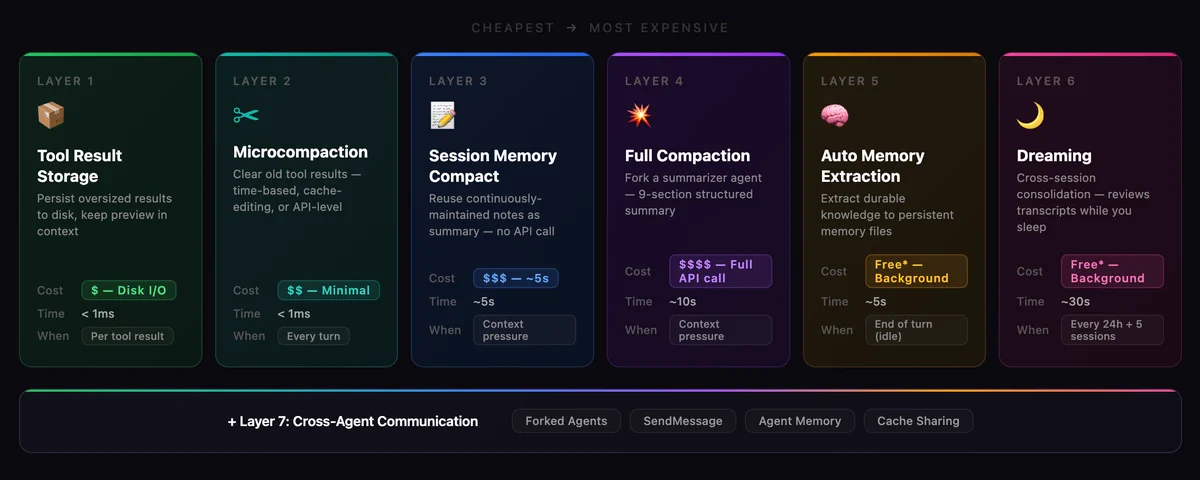
Claude Code solves this with a 7-layer memory architecture that spans from sub-millisecond token pruning to multi-hour background "dreaming" consolidation. Each layer is progressively more expensive but more powerful, and the system is designed so cheaper layers prevent the need for more expensive ones.
Token Counting: The Foundation
Everything starts with knowing how many tokens you've used. The canonical function is tokenCountWithEstimation() in src/utils/tokens.ts:
Canonical token count = last API response's usage.input_tokens
+ rough estimates for messages added since
The rough estimation uses a simple heuristic: 4 bytes per token for most text, 2 bytes per token for JSON (which tokenizes more densely). Images and documents get a flat 2,000 token estimate regardless of size.
Context Window Resolution
The system resolves the available context window through a priority chain:
[1m] model suffix → model capability lookup → 1M beta header → env override → 200K default
The effective context window subtracts a 20K token reserve for compaction output — you can't use the full window because you need room to generate the summary that saves you.
2. Architecture Overview: 7 Layers of Memory
Each layer is triggered by different conditions and has different costs. The system is designed so Layer N prevents Layer N+1 from firing whenever possible.

3. Layer 1: Tool Result Storage
- File: src/utils/toolResultStorage.ts
- Cost: Disk I/O only — no API calls
- When: Every tool result, immediately
The Problem
A single grep across a codebase can return 100KB+ of text. A cat of a large file might be 50KB. These results consume massive context and become stale within minutes as the conversation moves on.
The Solution
Every tool result passes through a budget system before entering context:

When a result exceeds its threshold:
- The full result is written to disk at tool-results/<sessionId>/<toolUseId>.txt
- A preview (first ~2KB) is placed in context, wrapped in <persisted-output> tags
- The model can later use Read to access the full result if needed
ContentReplacementState: Cache-Stable Decisions
A critical subtlety: once a tool result is replaced with a preview, that decision is frozen in ContentReplacementState. On subsequent API calls, the same result gets the same preview — this ensures the prompt prefix remains byte-identical for prompt cache hits. This state even survives session resume by being persisted to the transcript.
ContentReplacementState = {
  seenIds: Set<string>,          // Results already processed (frozen)
  replacements: Map<string, string>  // ID → preview text
}
GrowthBook Override
Per-tool thresholds can be remotely tuned via the tengu_satin_quoll feature flag — allowing Anthropic to adjust persistence thresholds for specific tools without a code deploy.
4. Layer 2: Microcompaction
- File: src/services/compact/microCompact.ts
- Cost: Zero to minimal API cost
- When: Every turn, before the API call
Microcompaction is the lightest-weight context relief. It doesn't summarize anything — it just clears old tool results that are unlikely to be needed.
Three Distinct Mechanisms
a) Time-Based Microcompact
Trigger: Idle gap since last assistant message exceeds threshold (default: 60 minutes)
Rationale: Anthropic's server-side prompt cache has a ~1 hour TTL. If you haven't sent a request in an hour, the cache has expired and the entire prompt prefix will be re-tokenized from scratch. Since it's being rewritten anyway, clear old tool results first to shrink what gets rewritten.
Action: Replaces tool result content with [Old tool result content cleared], keeping at least the most recent N results (floor of 1).
Configuration (via GrowthBook tengu_slate_heron):
TimeBasedMCConfig = {
  enabled: false,           // Master switch
  gapThresholdMinutes: 60,  // Trigger after 1h idle
  keepRecent: 5             // Keep last 5 tool results
}
b) Cached Microcompact (Cache-Editing API)
This is the most technically interesting mechanism. Instead of modifying local messages (which would invalidate the prompt cache), it uses the API's cache_edits mechanism to delete tool results from the server-side cache without invalidating the prefix.
How it works:
- Tool results are registered in a global CachedMCState as they appear
- When the count exceeds a threshold, the oldest results (minus a "keep recent" buffer) are selected for deletion
- A cache_edits block is generated and sent alongside the next API request
- The server deletes the specified tool results from its cached prefix
- Local messages remain unchanged — the deletion is API-layer only
Critical safety: Only runs on the main thread. If forked subagents (session_memory, agent_summary, etc.) modified the global state, they'd corrupt the main thread's cache editing.
c) API-Level Context Management (apiMicrocompact.ts)
A newer server-side approach using the context_management API parameter:
ContextEditStrategy =
  | { type: 'clear_tool_uses_20250919',   // Clear old tool results
      trigger: { type: 'input_tokens', value: 180_000 },
      clear_at_least: { type: 'input_tokens', value: 140_000 } }
  | { type: 'clear_thinking_20251015',     // Clear old thinking blocks
      keep: { type: 'thinking_turns', value: 1 } | 'all' }
This tells the API server to handle context management natively — the client doesn't need to track or manage tool result clearing.
Which Tools Are Compactable?
Only results from these tools get cleared:
FileRead, Bash/Shell, Grep, Glob, WebSearch, WebFetch, FileEdit, FileWrite
Notably absent: thinking blocks, assistant text, user messages, MCP tool results.
5. Layer 3: Session Memory
- Files: src/services/SessionMemory/
- Cost: One forked agent API call per extraction
- When: Periodically during conversation (post-sampling hook)
The Idea
Instead of waiting until context is full and then desperately trying to summarize everything, continuously maintain notes about the conversation. Then when compaction IS needed, you already have a summary ready — no expensive summarization call required.
Session Memory Template
Each session gets a markdown file at ~/.claude/projects/<slug>/.claude/session-memory/<sessionId>.md with a structured template:
# Session Title
_A short and distinctive 5-10 word descriptive title_

# Current State
_What is actively being worked on right now?_

# Task specification
_What did the user ask to build?_

# Files and Functions
_Important files and their relevance_

# Workflow
_Bash commands usually run and their interpretation_

# Errors & Corrections
_Errors encountered and how they were fixed_

# Codebase and System Documentation
_Important system components and how they fit together_

# Learnings
_What has worked well? What has not?_

# Key results
_If the user asked for specific output, repeat it here_

# Worklog
_Step by step, what was attempted and done_
Trigger Logic
Session memory extraction fires when both conditions are met:
Token growth since last extraction ≥ minimumTokensBetweenUpdate
AND (tool calls since last extraction ≥ toolCallsBetweenUpdates
OR no tool calls in the last assistant turn)
The token threshold is always required — even if the tool call threshold is met. The "no tool calls in last turn" clause captures natural conversation breaks where the model has finished a work sequence.
Extraction Execution
The extraction runs as a forked subagent via runForkedAgent():
- querySource: 'session_memory'
- Only allowed to use FileEdit on the memory file (all other tools denied)
- Shares the parent's prompt cache for cost efficiency
- Runs sequentially (via sequential() wrapper) to prevent overlapping extractions
Session Memory Compaction: The Payoff
When autocompact triggers, it first tries trySessionMemoryCompaction():
- Check if session memory has actual content (not just the empty template)
- Use the session memory markdown as the compaction summary — no API call needed
- Calculate which recent messages to keep (expanding backward from lastSummarizedMessageId to meet minimums)
- Return a CompactionResult with the session memory as summary + preserved recent messages
Configuration:
SessionMemoryCompactConfig = {
  minTokens: 10_000,          // Minimum tokens to preserve
  minTextBlockMessages: 5,     // Minimum messages with text blocks
  maxTokens: 40_000            // Hard cap on preserved tokens
}
The key insight: Session memory compaction is dramatically cheaper than full compaction because the summary already exists. No summarizer API call, no prompt construction, no output token cost. The session memory file is simply injected as the summary.
6. Layer 4: Full Compaction
- File: src/services/compact/compact.ts
- Cost: One full API call (input = entire conversation, output = summary)
- When: Context exceeds autocompact threshold AND session memory compaction unavailable
Trigger
effective context window = context window - 20K (reserved for output)
autocompact threshold = effective window - 13K (buffer)
If tokenCountWithEstimation(messages) > autocompact threshold → trigger
Circuit Breaker
After 3 consecutive failures, autocompact stops trying for the rest of the session. This was added after discovering that 1,279 sessions had 50+ consecutive failures (up to 3,272 in a single session), wasting approximately 250K API calls per day globally.
The Compaction Algorithm
Step 1: Pre-processing
- Execute user-configured PreCompact hooks
- Strip images from messages (replaced with [image] markers)
- Strip skill discovery/listing attachments (will be re-injected)
Step 2: Generate Summary The system forks a summarizer agent with a detailed prompt requesting a 9-section summary:
1. Primary Request and Intent
2. Key Technical Concepts
3. Files and Code Sections (with code snippets)
4. Errors and Fixes
5. Problem Solving
6. All User Messages (verbatim — critical for intent tracking)
7. Pending Tasks
8. Current Work
9. Optional Next Step
The prompt uses a clever two-phase output structure:
- First: <analysis> block — a drafting scratchpad where the model organizes its thoughts
- Then: <summary> block — the actual structured summary
- The <analysis> block is stripped before the summary enters context — it improves summary quality without consuming post-compact tokens
Step 3: Post-compact Restoration
After compaction, critical context is re-injected:
- Top 5 recently-read files (5K tokens each, 50K total budget)
- Invoked skill content (5K tokens each, 25K total budget)
- Plan attachment (if in plan mode)
- Deferred tool schemas, agent listings, MCP instructions
- SessionStart hooks re-execute (restores CLAUDE.md, etc.)
- Session metadata re-appended for --resume display
Step 4: Boundary Message
A SystemCompactBoundaryMessage marks the compaction point:
compactMetadata = {
  type: 'auto' | 'manual',
  preCompactTokenCount: number,
  compactedMessageUuid: UUID,           // Last msg before boundary
  preCompactDiscoveredTools: string[],  // Loaded deferred tools
  preservedSegment?: {                  // Session memory path only
    headUuid, anchorUuid, tailUuid
  }
}
Partial Compaction
Two directional variants for more surgical context management:
- from direction: Summarize messages AFTER a pivot index, keep earlier ones intact. Preserves prompt cache because the kept prefix is unchanged.
- up_to direction: Summarize messages BEFORE pivot, keep later ones. Breaks cache because the summary changes the prefix.
Prompt-Too-Long Recovery
If the compaction request itself hits prompt-too-long (the conversation is so large even the summarizer can't process it):
- Group messages by API round via groupMessagesByApiRound()
- Drop the oldest groups until the token gap is covered (or 20% of groups if gap is unparseable)
- Retry up to 3 times
- If all retries fail → ERROR_MESSAGE_PROMPT_TOO_LONG thrown
7. Layer 5: Auto Memory Extraction
- File: src/services/extractMemories/extractMemories.ts
- Cost: One forked agent API call
- When: End of each complete query loop (model produces final response with no tool calls)
Purpose
While Session Memory captures notes about the current session, Auto Memory Extraction builds durable, cross-session knowledge that persists in ~/.claude/projects/<path>/memory/.
Memory Types
Four types of memories, each with specific save criteria:

Memory File Format
---
name: testing-approach
description: User prefers integration tests over mocks after a prod incident
type: feedback
---

Integration tests must hit a real database, not mocks.

**Why:** Prior incident where mock/prod divergence masked a broken migration.

**How to apply:** When writing tests for database code, always use the test database helper.
What NOT to Save
The extraction prompt explicitly excludes:
- Code patterns, conventions, architecture (derivable from code)
- Git history (use git log/git blame)
- Debugging solutions (the fix is in the code)
- Anything in CLAUDE.md files
- Ephemeral task details
Mutual Exclusivity with Main Agent
If the main agent already wrote memory files during the current turn, extraction is skipped. This prevents the background agent from duplicating work the main agent already did:
function hasMemoryWritesSince(messages, sinceUuid): boolean {
// Scans for Edit/Write tool_use blocks targeting auto-memory paths
// Returns true if main agent already saved memories
}
Execution Strategy
The extraction prompt instructs the agent to be efficient with its limited turn budget:
Turn 1: Issue all FileRead calls in parallel for files you might update
Turn 2: Issue all FileWrite/FileEdit calls in parallel
Do not interleave reads and writes across multiple turns.
MEMORY.md: The Index
MEMORY.md is an index file, not a memory dump. Each entry should be one line under ~150 characters:
- [Testing Approach](feedback_testing.md) — Real DB tests only, no mocks after prod incident
- [User Profile](user_role.md) — Senior Go eng, new to React, focused on observability
Hard limits: 200 lines or 25KB — whichever is hit first. Lines beyond 200 are truncated when loaded into the system prompt.
8. Layer 6: Dreaming
- File: src/services/autoDream/autoDream.ts
- Cost: One forked agent API call (potentially multi-turn)
- When: Background, after sufficient time and sessions have accumulated
The Concept
Dreaming is cross-session memory consolidation — a background process that reviews past session transcripts and improves the memory directory. It's analogous to how biological memory consolidation happens during sleep: experiences from the day are reviewed, organized, and integrated into long-term storage.
Gate Sequence (Cheapest Check First)
The dream system uses a cascading gate design where each check is cheaper than the next, so most turns exit early:

The Lock Mechanism
The lock file at <memoryDir>/.consolidate-lock serves double duty:
Path: <autoMemPath>/.consolidate-lock
Body: Process PID (single line)
mtime: lastConsolidatedAt timestamp (the lock IS the timestamp)
- Acquire: Write PID → mtime = now. Verify PID on re-read (race protection).
- Success: mtime stays at now (marks consolidation time).
- Failure: rollbackConsolidationLock(priorMtime) rewinds mtime via utimes().
- Stale: If mtime > 60 minutes old AND PID is not running → reclaim.
- Crash recovery: Dead PID detected → next process reclaims.
Four-Phase Consolidation
The dream agent receives a structured prompt defining four phases:
Phase 1 — Orient:
- ls the memory directory
- Read MEMORY.md to understand the current index
- Skim existing topic files to avoid creating duplicates
Phase 2 — Gather Recent Signal:
- Review daily logs (logs/YYYY/MM/YYYY-MM-DD.md) if present
- Check for drifted memories (facts that contradict current codebase)
- Grep session transcripts narrowly for specific context:grep -rn "<narrow term>" transcripts/ --include="*.jsonl" | tail -50
- "Don't exhaustively read transcripts. Look only for things you already suspect matter."
Phase 3 — Consolidate:
- Write or update memory files
- Merge new signal into existing topic files rather than creating near-duplicates
- Convert relative dates to absolute ("yesterday" → "2026-03-30")
- Delete contradicted facts at the source
Phase 4 — Prune and Index:
- Update MEMORY.md to stay under 200 lines / 25KB
- Remove pointers to stale/wrong/superseded memories
- Shorten verbose index entries (detail belongs in topic files)
- Resolve contradictions between files
Tool Constraints
The dream agent operates under strict restrictions:
- Bash: Read-only commands only (ls, find, grep, cat, stat, wc, head, tail)
- Edit/Write: Only to memory directory paths
- No MCP tools, no Agent tool, no destructive operations
UI Surfacing
Dreams appear as background tasks in the footer pill, with a two-phase state machine:
DreamPhase: 'starting' → 'updating' (when first Edit/Write lands)
Status: running → completed | failed | killed
Users can kill a dream from the background tasks dialog — the lock mtime is rolled back so the next session can retry.
Progress Tracking
Each assistant turn from the dream agent is watched:
- Text blocks captured for UI display
- Tool_use blocks counted
- Edit/Write file paths collected for the completion summary
- Capped at 30 most recent turns for live display
9. Layer 7: Cross-Agent Communication
- Files: src/utils/forkedAgent.ts, src/tools/AgentTool/, src/tools/SendMessageTool/
- Cost: Varies by pattern
- When: Agent spawning, background tasks, teammate coordination
The Forked Agent Pattern
Nearly every background operation in Claude Code (session memory, auto memory, dreaming, compaction, agent summaries) uses the forked agent pattern. This is the foundation:
CacheSafeParams = {
  systemPrompt: SystemPrompt,      // Must be byte-identical to parent
  userContext: { [k: string]: string },
  systemContext: { [k: string]: string },
  toolUseContext: ToolUseContext,   // Contains tools, model, options
  forkContextMessages: Message[],  // Parent's conversation (cache prefix)
}
The fork creates an isolated context with cloned mutable state:
- readFileState: Cloned LRU cache (prevents cross-contamination)
- abortController: Child controller linked to parent
- denialTracking: Fresh tracking state
- ContentReplacementState: Cloned (preserves cache-stable decisions)
But it shares the prompt cache by keeping identical cache-critical parameters. The API sees the same prefix and serves a cache hit.
Agent Tool: Spawning Sub-Agents
The Agent tool supports multiple spawning patterns:

Fork anti-recursion: Fork children keep the Agent tool in their tool pool (for cache-identical definitions) but detect the <fork_boilerplate_tag> in conversation history to reject recursive fork attempts.
Fork message construction for cache sharing:
All fork children produce byte-identical API request prefixes:
1. Full parent assistant message (all tool_use blocks, thinking, text)
2. Single user message with:
- Identical placeholder result for every tool_use
- Per-child directive text block (only this differs)
→ Maximum prompt cache sharing across concurrent forks
SendMessage: Inter-Agent Communication
The SendMessage tool enables runtime communication between agents:
SendMessage({
to: 'research-agent', // or '*' for broadcast, 'uds:<path>', 'bridge:<id>'
message: 'Check Section 5',
summary: 'Requesting section review'
})
Routing logic:
- In-process subagent by name → queuePendingMessage() → drained at next tool round boundary
- Ambient team (process-based) → writeToMailbox() → file-based mailbox
- Cross-session → postInterClaudeMessage() via bridge/UDS
Structured messages for lifecycle control:
- shutdown_request / shutdown_response — Graceful agent shutdown coordination
- plan_approval_response — Leader approves/rejects teammate plans
Agent Memory: Persistent Cross-Invocation State
Agents can maintain persistent memory across invocations in three scopes:

Agent Summary: Periodic Progress Snapshots
For coordinator-mode sub-agents, a timer forks the conversation every 30 seconds to generate a 3-5 word progress summary:
Good: "Reading runAgent.ts"
Good: "Fixing null check in validate.ts"
Bad: "Investigating the issue" (too vague)
Bad: "Analyzed the branch diff" (past tense)
Uses Haiku (cheapest model) and denies all tools — it's a pure text generation task.
10. The Query Loop: How It All Fits Together
File: src/query.ts

11. Prompt Cache Optimization
One of the most sophisticated aspects of Claude Code's architecture is its obsessive prompt cache optimization. Nearly every design decision considers cache impact.
The Problem
Anthropic's API caches prompt prefixes server-side (~1 hour TTL). A cache hit means you only pay for new tokens. A cache miss means re-tokenizing the entire prompt. At 200K tokens, that's the difference between ~$0.003 and ~$0.60 per request.
Cache-Preserving Patterns
1. CacheSafeParams: Every forked agent (session memory, compaction, dreaming, extraction) inherits the parent's exact system prompt, tools, and message prefix. The fork's API request has an identical prefix → cache hit.
2. renderedSystemPrompt: The fork threads the parent's already-rendered system prompt bytes, avoiding re-rendering divergence (e.g., GrowthBook flag value changes between renders).
3. ContentReplacementState cloning: Tool result persistence decisions are frozen. The same results get the same previews on every API call → stable prefix.
4. Cached microcompact: Uses cache_edits to modify the server cache without changing the local prefix → no cache break.
5. Fork message construction: All fork children get byte-identical prefixes. Only the final directive differs → maximum cache sharing across concurrent forks.
6. Post-compact cache break notification: After compaction, notifyCompaction() resets the cache baseline so the expected post-compact cache miss isn't flagged as an anomaly.
Cache Break Detection
The system actively monitors for unexpected cache misses via promptCacheBreakDetection.ts, flagging them for investigation. Known-good cache breaks (compaction, microcompact, etc.) are pre-registered to avoid false positives.
12. Key Numbers
Context Thresholds

Tool Result Budgets

Session Memory

Compaction

Dreaming

Microcompact

13. Design Principles
1. Layered Defense, Cheapest First
Every context management layer is designed to prevent the next, more expensive layer from firing:
- Tool result storage prevents microcompact from needing to clear as much
- Microcompact prevents session memory compaction
- Session memory compaction prevents full compaction
- Full compaction prevents context overflow errors
2. Prompt Cache Preservation
Almost every design decision considers prompt cache impact. The system goes to extraordinary lengths to keep API request prefixes byte-identical: frozen ContentReplacementState, rendered system prompt threading, cache_edits API, identical fork message construction.
3. Isolation with Sharing
Forked agents get cloned mutable state (preventing cross-contamination) but share the prompt cache prefix (preventing cost explosion). This is a careful balance — too much isolation wastes cache, too much sharing causes bugs.
4. Circuit Breakers Everywhere
- Autocompact: 3-strike limit
- Dream scan: 10-minute throttle
- Dream lock: PID-based mutex with stale detection
- Session memory: Sequential execution wrapper
- Extract memories: Mutual exclusivity with main agent writes
5. Graceful Degradation
Each system fails silently and lets the next layer catch. Session memory compaction returns null on failure → full compaction runs. Dream lock acquisition fails → next session retries. Extract memories errors → logged, not thrown.
6. Feature Flags as Kill Switches
Nearly every system is gated by GrowthBook feature flags:
- tengu_session_memory — session memory
- tengu_sm_compact — session memory compaction
- tengu_onyx_plover — dreaming
- tengu_passport_quail — auto memory extraction
- tengu_slate_heron — time-based microcompact
- CACHED_MICROCOMPACT — cache-editing microcompact
- CONTEXT_COLLAPSE — context collapse
- HISTORY_SNIP — message snipping
This allows rapid rollback without code deploys if any system causes problems.
7. Mutual Exclusivity Where Needed
- Context Collapse ↔ Autocompact (collapse manages context its own way)
- Main agent memory writes ↔ Background extraction (prevents duplication)
- Session memory compaction ↔ Full compaction (SM tried first, full is fallback)
- Autocompact ↔ Subagent query sources (prevents deadlocks)


