

The Queue interface is part of the java.util package and extends the Collection interface. It represents a data structure where elements are processed based on a specific order.
- Elements follow FIFO (First-In-First-Out) in LinkedList and priority order in PriorityQueue
- Elements cannot be accessed directly using an index
- Allows storing duplicate elements
import java.util.PriorityQueue;
import java.util.Queue;

public class Geeks{

    public static void main(String[] args){

        // Create a PriorityQueue of Integers
        Queue<Integer> pq = new PriorityQueue<>();

        // Adding elements to the PriorityQueue
        pq.add(50);
        pq.add(20);
        pq.add(40);
        pq.add(10);
        pq.add(30);

        // Display the PriorityQueue elements
        System.out.println("PriorityQueue elements: " + pq);
    }
}
Output
PriorityQueue elements: [10, 20, 40, 50, 30]
Note: PriorityQueue arranges elements according to priority order (ascending by default), not insertion order.
Declaration
public interface Queue<E> extends Collection<E>
We cannot instantiate a Queue directly as it is an interface. Instead, we use classes like PriorityQueue, LinkedList, or ArrayDeque that implement the Queue interface.
Queue<Obj> queue = new LinkedList<Obj>();
or
Queue<Obj> queue = new PriorityQueue<>();
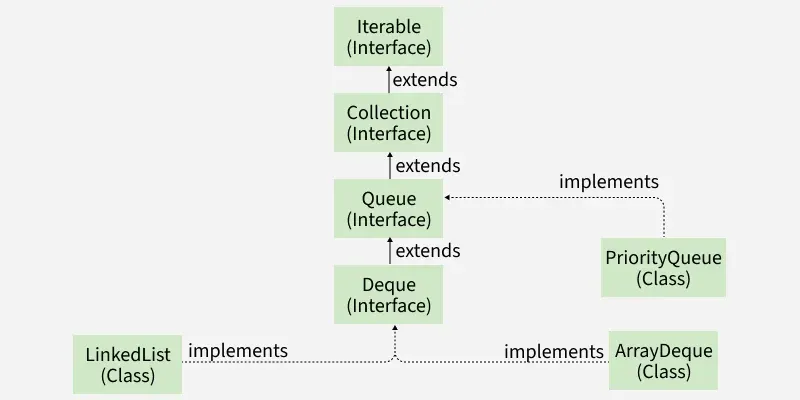
Hierarchy of Queue Interface
It extends the Collection interface and has implementations like LinkedList, ArrayDeque, PriorityQueue.
Common Implementations of Queue Interface
- LinkedList: Implements List and Deque interfaces, allows null elements, and can be used as a FIFO queue when used through the Queue interface.
- ArrayDeque: A resizable array-based queue that is faster than LinkedList and does not allow nulls.
- PriorityQueue: A queue where elements are processed according to their priority instead of insertion order.
- ConcurrentLinkedQueue: A thread-safe, non-blocking queue suitable for concurrent environments.
Different Operations on Queue Interface using PriorityQueue
Different operations on the Queue interface using PriorityQueue demonstrate how elements can be added, removed, and accessed while maintaining a priority-based ordering instead of simple FIFO.
1. Adding Elements
To add an element in a queue, we can use the add() method. The insertion order is not retained in the PriorityQueue. The elements are stored based on the priority order which is ascending by default.
import java.util.*;

public class Geeks {

    public static void main(String args[])
    {
        Queue<String> pq = new PriorityQueue<>();

        pq.add("Geeks");
        pq.add("For");
        pq.add("Geeks");

        System.out.println(pq);
    }
}
Output
[For, Geeks, Geeks]
Explanation: The add() method inserts an element into the queue. In a PriorityQueue, elements are ordered according to their priority, not insertion order.
2. Removing Elements
The Queue interface provides remove() and poll() to retrieve and remove the head of the queue. The main difference between them is their behavior when the queue is empty.
- remove() throws a NoSuchElementException if the queue is empty.
- poll() returns null if the queue is empty.
import java.util.*;

public class Geeks {

    public static void main(String args[])
    {
        Queue<String> pq = new PriorityQueue<>();

        pq.add("Geeks");
        pq.add("For");
        pq.add("Geeks");

        System.out.println("Initial Queue: " + pq);

        pq.remove("Geeks");

        System.out.println("After Remove: " + pq);

        System.out.println("Poll Method: " + pq.poll());

        System.out.println("Final Queue: " + pq);
    }
}
Output
Initial Queue: [For, Geeks, Geeks]
After Remove: [For, Geeks]
Poll Method: For
Final Queue: [Geeks]
Explanation: The remove() method removes a specified element, while poll() removes and returns the head of the queue. remove() throws an exception if the queue is empty, whereas poll() returns null.
3. Accessing Elements
We can access the head element without removing it using peek() or element().
import java.util.PriorityQueue;
import java.util.Queue;

public class Geeks{

    public static void main(String[] args) {
        // Create a PriorityQueue of Strings
        Queue<String> pq = new PriorityQueue<>();

        // Adding elements to the queue
        pq.add("Geeks");
        pq.add("For");
        pq.add("Geeks");

        // Access the head element without removing
        System.out.println("Head using peek(): " + pq.peek());
        System.out.println("Head using element(): " + pq.element());

        // Display the queue to show elements are not removed
        System.out.println("Queue after accessing head: " + pq);
    }
}
Output
Head using peek(): For
Head using element(): For
Queue after accessing head: [For, Geeks, Geeks]
Explanation: The peek() and element() methods retrieve the head element without removing it. peek() returns null if the queue is empty, while element() throws an exception.
4. Iterating the Queue
There are multiple ways to iterate through the Queue. The most famous way is converting the queue to the array and traversing using the for loop. The queue has also an inbuilt iterator which can be used to iterate through the queue.
import java.util.*;

public class Geeks {

    public static void main(String args[])
    {
        Queue<String> pq = new PriorityQueue<>();

        pq.add("Geeks");
        pq.add("For");
        pq.add("Geeks");
         // use Type safe Iterator
        Iterator<String> iterator = pq.iterator();

        while (iterator.hasNext()) {
            System.out.print(iterator.next() + " ");
        }
    }
}
Output
For Geeks Geeks
Explanation: A queue can be traversed using an Iterator. For a PriorityQueue, iteration does not necessarily follow priority order; to process elements according to priority, repeatedly use poll().
Methods of Queue Interface
| Method | Description |
|---|---|
add(E e) | Inserts an element and throws an exception if it cannot be added. |
offer(E e) | Attempts to insert an element and returns false if it cannot be added. |
remove() | Retrieves and removes the head; throws an exception if the queue is empty. |
poll() | Retrieves and removes the head; returns null if the queue is empty. |
element() | Retrieves but does not remove the head; throws an exception if empty. |
peek() | Retrieves but does not remove the head; returns null if empty. |
Advantages of Queue Interface
- Provides a standard way to represent queue-based data structures.
- Supports different implementations based on application requirements.
- Provides simple methods for insertion, removal, and head-element access.
- Supports FIFO processing through suitable implementations.
- PriorityQueue provides priority-based processing.
- BlockingQueue supports producer-consumer applications.
- ConcurrentLinkedQueue provides a thread-safe non-blocking option.