Email Response Management & SLA Tracking Software

Never Miss an Email That Needs a Response

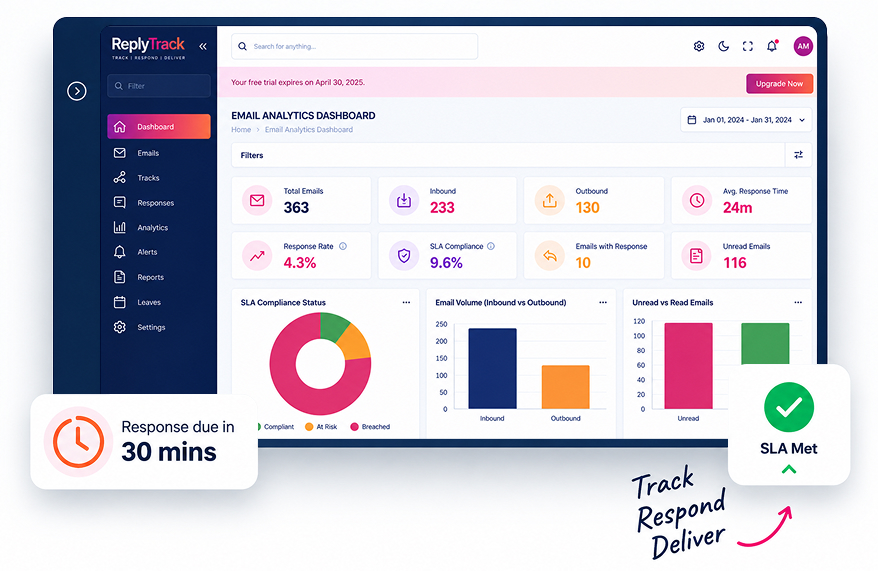
ReplyTrack helps customer-facing teams track email response times, manage SLA deadlines, prioritize important conversations, and monitor team performance from one centralized platform.
Connect your existing Microsoft 365, Gmail, or Microsoft Exchange environment and give your teams a clear view of what needs attention, who needs to respond, and when the response is due.
Integrations

Connect With the Email Platforms You Already Use

Microsoft 365
Monitor customer-facing email response performance across your Microsoft 365 environment.
Microsoft Outlook
Provide response status and deadline information through supported Outlook workflows.
Gmail / Google Workspace
Track email response activity and deadlines for teams using Gmail.
Microsoft Exchange
Support on-premises Microsoft Exchange environments through Exchange Web Services (EWS).
Chrome Extension
Access supported ReplyTrack functionality through Chrome-based workflows.
About ReplyTrack

The Missing Layer Between “Received” and “Responded”

Most teams can see their inbox. Almost none can see their response performance. Emails pile up across shared mailboxes, individual accounts, and multiple platforms  and by the time a client calls to ask “did anyone see my email?”, it’s already too late. ReplyTrack connects directly to the email systems your team already uses  Microsoft 365, Gmail, or on-premises Exchange and turns raw inbox activity into a live, measurable response timeline. Every email gets a deadline based on your SLA rules. Every conversation gets a status. Every team member and manager can see, at a glance, what needs attention, who owns it, and how much time is left.
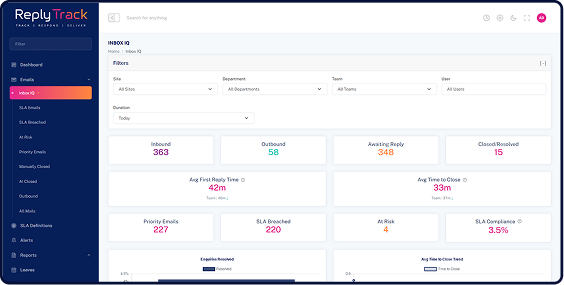
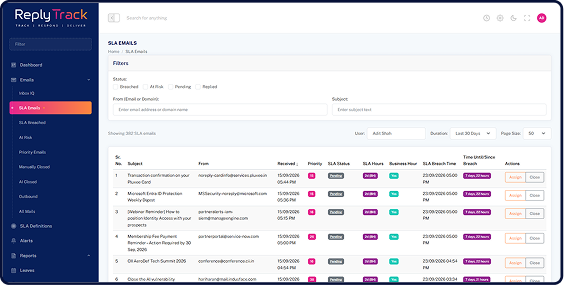
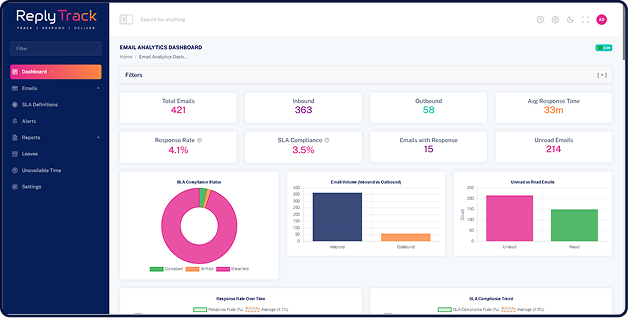
Most teams can see their inbox, but not their response performance. ReplyTrack connects with Microsoft 365, Gmail, and on-premises Exchange to turn email activity into a live, measurable response timeline. Every email gets an SLA deadline, every conversation has a clear status, and teams can instantly see what needs attention, who owns it, and how much time is left.
3D 5-Image Coverflow Slider (1230px)
Image 1
Image 2
Image 3 (Center)
Image 4
Image 5
No inbox migration. No change to how your team writes or sends email. ReplyTrack works quietly in the background inside Outlook, inside Gmail, and on a live dashboard so response performance becomes something you can manage, not something you find out about after the fact.

How It Works

Connect. Monitor. Act. Improve.

  1. 01

    Connect Your Email

    Connect ReplyTrack with Microsoft 365, Gmail, or on-premises Microsoft Exchange and configure your teams, clients, priorities, and response rules.

  2. 02

    Monitor Response Deadlines

    See which emails need attention, how much time remains, and which conversations are approaching or exceeding their response targets.

  3. 03

    Take Action

    Alerts and priority lists help your teams act before a response becomes overdue.

  4. 04

    Measure Performance

    Managers get a centralized view of response performance through dashboards, KPIs, analytics, and scheduled reports.

Your team manages the conversation. ReplyTrack manages the response timeline.

Features

Everything You Need to Manage Email Response Performance

Email Response Time Tracking

Measure first-response time, average response time, email volume, and response trends to understand how quickly your teams respond.

SLA & Deadline Management

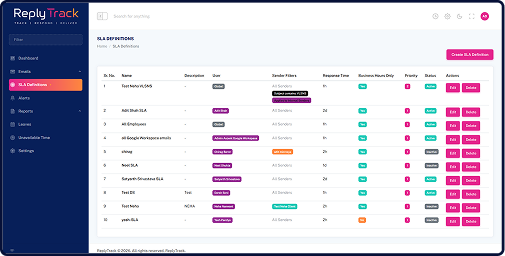
Set response targets based on clients, client groups, priorities, teams, or business requirements and monitor performance against those targets.

Real-Time Performance Dashboard

Get a centralized view of individual and team performance. Monitor KPIs, overdue conversations, response trends, and email activity from one dashboard.

Smart Priority Inbox

Automatically surfaces which emails need attention first, based on response deadlines, SLA risk, and message signals like importance and age - not manual inbox sorting.

Alerts & Notifications

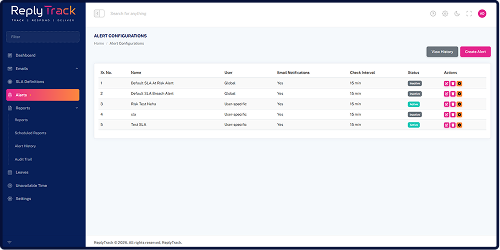
Receive email alerts when a conversation is approaching its response deadline or has become overdue, giving your team time to act before it's too late.

Scheduled & On-Demand Reports

Automatically deliver response-performance reports (PDF) to managers and leadership on a schedule. Generate additional reports on demand and export to PDF, Excel, or CSV.

Email Assignment & Ownership

Assign emails to the right team member, reassign as workloads shift, and keep a complete history of who owned each conversation and when.

Audit Trail

Maintain records of important configuration and assignment changes for greater operational visibility.

The Difference

From Reactive Email Management to Proactive Response Control

Without ReplyTrack

Reactive, Uncertain, Risky

  • Difficult to identify overdue emails
  • Manual SLA tracking
  • Limited visibility across teams
  • Customers may follow up before teams notice delays
  • Spreadsheet-based reporting
  • Inconsistent response monitoring

With ReplyTrack

Proactive, Visible, In Control

  • Clear response deadlines
  • Real-time email status
  • Automated alerts
  • Centralized performance dashboards
  • Scheduled reports
  • Measurable team performance

Know about the problem before your customer does.

Turn Insight Into Action

Make Email Response Performance Measurable

Email is one of the most important communication channels for customer-facing organizations. But an inbox alone doesn't tell you whether your team is meeting its response commitments. ReplyTrack provides the missing layer between receiving an email and knowing how effectively your organization responded.

  • Track

    Know what needs a response.

  • Prioritize

    Focus on conversations that need attention first.

  • Assign

    Ensure every
    conversation has a
    clear owner.

  • Alert

    Act before deadlines are missed.

  • Analyze

    Understand individual and team performance.

  • Improve

    Use response data to improve your customer communication process.

What is ReplyTrack?

ReplyTrack is an email response management and SLA tracking platform. It helps organisations monitor response times, manage reply deadlines, prioritize emails, and measure team performance.

It shows which emails need a reply, how much time is left, and how the team is performing — in the web dashboard, in the Outlook add-in, and (for browser mail) in the Chrome extension.

Most teams can see their inbox. Almost none can see their response performance. Emails pile up, and by the time a client asks “did anyone see my email?”, it is already late.

ReplyTrack is the missing layer between “received” and “responded.”

Customer-facing teams that work in email, including:
  • Customer support
  • Service desks
  • Sales teams
  • Other groups with reply-time commitments
Users work next to the inbox (Outlook add-in or Chrome extension). Managers and administrators use the dashboard and reports.

No. People continue to send and receive mail in Microsoft Outlook or Gmail. ReplyTrack does not replace the inbox and does not require mailbox migration.

Outlook users can use the add-in panel. Gmail and Outlook-on-the-web users can use the Chrome extension. Managers use the web dashboard.

No. It is not a new inbox, not an email marketing tool, and not a generic AI sorter. It measures response performance against the SLA rules you define. Optional AI (when you configure a provider) can classify whether a reply is needed and automatically close emails that do not need one.

Which email platforms does ReplyTrack support?

ReplyTrack supports:

  • Microsoft 365
  • Gmail / Google Workspace
  • On-premises Microsoft Exchange
  • Microsoft Outlook add-in
  • Chrome extension for Gmail and Outlook on the web


Each user in ReplyTrack is set to one mail provider. An organisation can mix providers across users.

Yes. The Outlook add-in provides response status, deadline timers, priority / at-risk / breached lists, and personal metrics in a pane beside the inbox. It can be sideloaded for testing or deployed by Microsoft 365 administrators. Users can open the full web dashboard from the add-in.
Yes. Each Gmail user connects their own mailbox securely in a few clicks. The Chrome extension shows timers and metrics inside Gmail in the browser. The same dashboard, SLA rules, alerts, and reports apply once mail is syncing.
Yes. ReplyTrack connects to on-premises Microsoft Exchange environments with help from your IT team.
Yes. ReplyTrack is deployed on Windows/IIS. Adit Microsys can also host it for you.
It depends on your mail platform and how many mailboxes you connect. In general: connect your mail platform, set up teams and SLA rules, and optionally deploy the Outlook add-in and Chrome extension. Book a demo and we will walk through it with your IT team.
Can ReplyTrack track email SLAs?
Yes. You define response targets by client, client group, user, team, or site, and can even target specific senders or domains for tighter control on key accounts. ReplyTrack tracks matching conversations against their deadline automatically.
An SLA rule is a reply deadline — for example, first response within 4 business hours for a client group. Conversations that match get a live status: on track, at risk, or overdue. Emails that do not match a rule, or do not require a response, do not get that deadline.
Yes. It lists emails approaching their deadline (at risk) and emails that have already missed it (breached). Those lists are in the web app, in the Outlook add-in, and in the Chrome extension.
Using business hours and holiday calendars, so nights, weekends, and holidays don’t count against your team unless you choose to include them. You can also set a rule to use calendar hours instead.
Yes. Managers use the dashboard and reports to see individual and team response performance, SLA compliance, volume, and overdue / at-risk lists. They can open a conversation from the dashboard, and filter by team, site, client, or date range. Access is limited by role (User, Team Lead, Manager, Admin).
What does the priority inbox do?
It ranks emails that need attention first, based on deadline risk and signals like age and importance. There are also dedicated lists for at-risk and breached emails. Optional AI can identify messages that do not need a reply.
Email alerts when a conversation is approaching its deadline or has become overdue, sent to the recipients you choose. Recent alerts show on the dashboard, and Alert History keeps a full record. Alerts run on a regular automatic check rather than the instant an email arrives, so there’s always some time to act.
On-demand reports covering volume, response times, SLA compliance, and team performance, exportable to PDF (with Excel available for SLA reporting). Scheduled reports are emailed automatically on a daily, weekly, or monthly schedule. Individual reports include a team leaderboard.
Yes. You can assign or reassign a conversation from the SLA, at-risk, breached, and priority lists in a click. Changes are recorded in the audit trail.
Yes. Administrators can use the audit trail for configuration changes, assignments, logins, and other recorded actions.
Yes. That is a core use of SLA definitions with clients and client groups. Key accounts can have tighter targets than general enquiries.
What data do you store?

Email metadata: sender, recipients, subject, timestamps, identifiers, folder flags, and thread status. This is used for sync, analytics, SLA tracking, and reporting.

Email body content is not stored in the database. Optional AI may read content in memory only — to classify whether a reply is needed, and optionally for sentiment. Only results (for example a classification or a sentiment label) are stored, not the body.

See the Privacy Policy for the full description.

No. ReplyTrack does not persist email body content in the database. Metadata is stored. Optional AI processing may read the body in memory and then discard it.
The application is served over HTTPS, and access is controlled by role. Adit Microsys is certified to ISO 27001:2022 and ISO 9001:2015. Ask us about encryption-at-rest options for your specific hosting environment.
If you self-host, data stays on your Windows/IIS environment. If Adit Microsys hosts ReplyTrack for you, data is held in that hosting environment. Details are agreed at deployment.
Is there a free trial?

Ask us. A trial or proof-of-concept can be discussed depending on your mail platform and mailbox count. Book a demo to start.

Book a demo, watch the product tour, or download the datasheet. We can help you connect a pilot set of mailboxes.

Adit Microsys Pvt. Ltd.

502 Shapath II, Opp. Rajpath Club, S. G. Road, Ahmedabad 380015, Gujarat, India

Phone: +91 81405 88555

Email: adit@aditmicrosys.com

Web: ReplyTrack.in

Become a Partner

Let's have a chat

Book a Demo

Let's have a chat