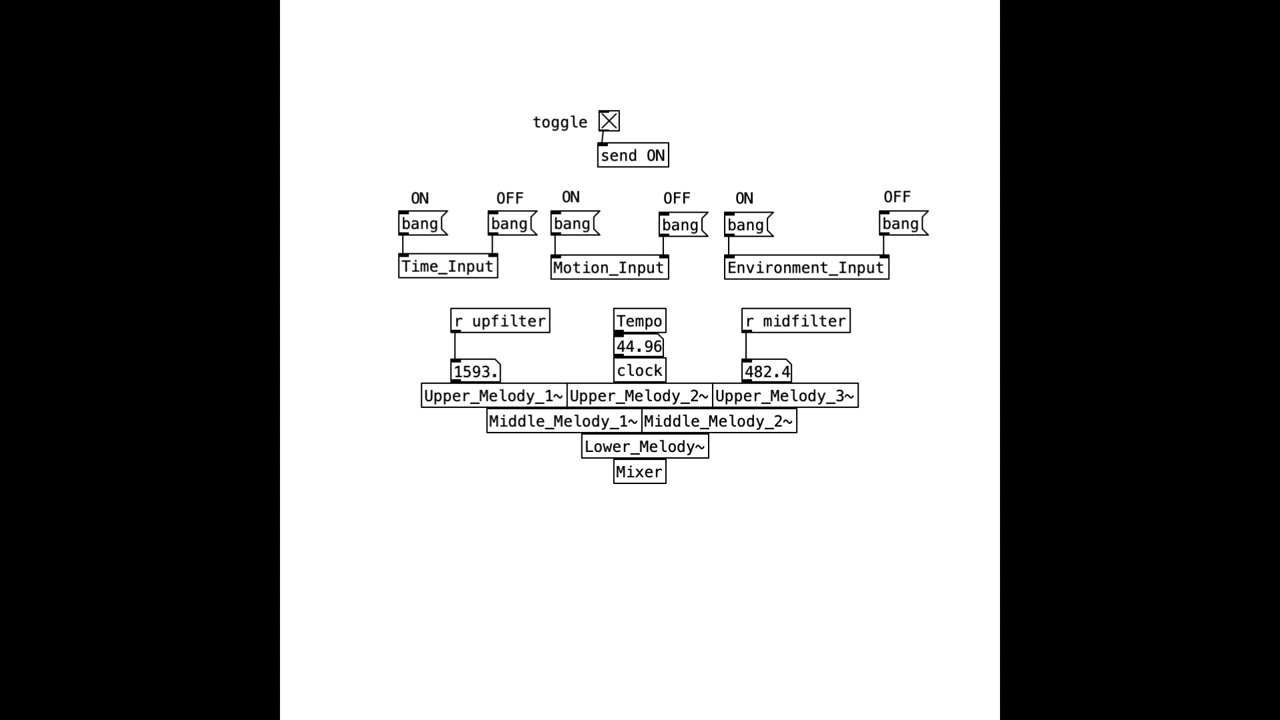
This project demonstrates an innovative approach to integrating environmental and motion data into a custom sound engine. Below are detailed instructions on setting up and running the instrument.

Follow the steps below in the intended order to set up and run the instrument.
- Open
OSCWeatherClient.pylocated in theEnvironment_data_collectionfolder. - Install the required dependencies:
pip install -r requirements.txt
- Replace the placeholder
YYYat the top of the file with your API key from OpenWeatherMap. - Replace the placeholder
XXXat the top of the file with your computer’s current IP address. - Run the program:
python OSCWeatherClient.py- Open
OSCTimeClient.pyin theEnvironment_data_collectionfolder. - Install the required dependencies:
pip install -r requirements.txt ``` - Replace the placeholder XXX at the top of the file with your computer’s current IP address.
- Run the program in a separate terminal window:
python OSCTimeClient.py- Install GyrOSC from the App Store.
- Launch the app.
- Enter your computer's current IP address in the Target IP address field.
- Set the Port to
6000. - Enable Gyroscope and run it in the background.
- Install Pure Data from this link.
- Run Sound_Engine.pd located in the soundEngine folder.
- Press the bang button for the Time_Input, Motion_Input, and Environment_Input.
- Activate the sound engine by toggling the switch.