Weird monospace bug #98
Description

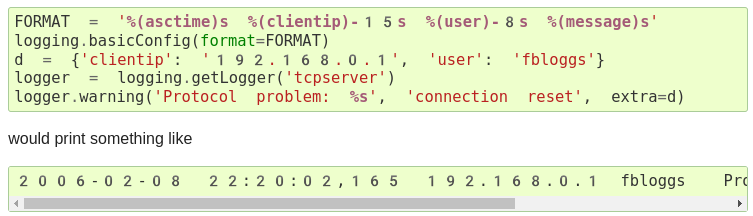
I have some strange issues with the monospace fonts in Vivaldi (Chrome):
(https://docs.python.org/3/library/logging.html)
Notice how the spacing is too large and numbers seem to be unicode symbols(?)
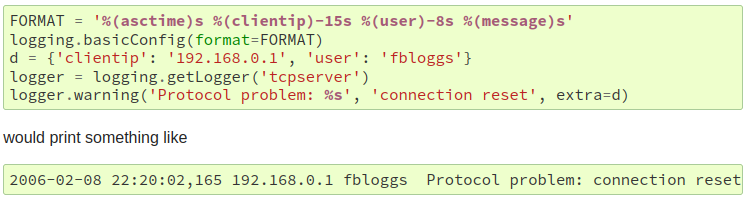
It looks fine in Firefox:
I can see there were some changes last year (#85, #87). If I change the CSS to:
tt, code, pre {
    font-family: monospace, monospace;
    font-size: 96.5%;
}
this seems to fix my issue. Having just a single monospace causes the text size to be a bit strange.
Activity
hugovk commentedon Nov 1, 2022
With what version of Vivaldi, and what version of Chrome does it use?
ZedThree commentedon Nov 1, 2022
ezio-melotti commentedon Nov 8, 2022
Can you try to inspect the element and check the CSS rules that apply to that text?
It almost looks like the numbers are using Unicode fullwidth text (i.e.
2006-02-08instead of2006-02-08) but on that page they are ASCII. There might be something weird going on with the monospace font used for the code blocks though -- you should be able to see that from the inspector too.ZedThree commentedon Nov 8, 2022
Here's the text section from the "computed styles":
There's also a bit that says "Rendered Fonts" that lists:
If I remove the quotes from
"monospace", or reorder them tomonospace, "monospace"then Noto Color Emoji is removed from the list, and the text renders fine.It's also affects function signatures:
hugovk commentedon Nov 8, 2022
Chrome, especially on Android, has a sketch history with monospace:
I'd be tempted to just do something like Stack Overflow:
ZedThree commentedon Jan 30, 2023
That ends up looking like this for me:
which is maybe not quite nice as how Firefox renders it, but it is at least monospace. I'll make a PR for that
Fix problem with monospace rendering in Vivaldi
Merge pull request #104 from ZedThree/fix-monospace-vivaldi