


Open PDFs, Office documents, images and other files inside your Cordova or Capacitor app on iOS and Android.
One call, any source: a file on the device, a URL, a base64 string, or a file bundled with your app.
| iOS (Quick Look) | Android (installed viewer app) |
|---|---|
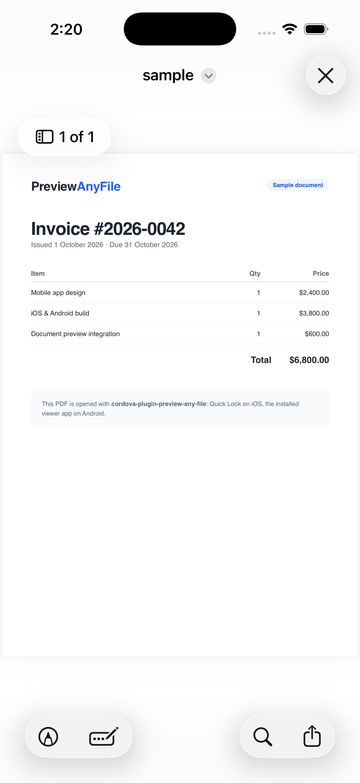 |
 |
await window.PreviewAnyFile.previewPath('https://example.com/files/invoice.pdf', {
    headers: { Authorization: 'Bearer ' + token },   // optional
    onClose: () => console.log('closed'),
});- Features
- Why this plugin exists
- Requirements
- Install
- API
- Examples
- Hiding share and save (iOS)
- How it works
- Troubleshooting
- Upgrading from 0.3.x
- Upgrading from 0.2.x
- Changelog
- Contributing
- Author
- Any file type: PDF, Word, Excel, PowerPoint, Keynote, Pages, Numbers, RTF, CSV, text, images, USDZ 3D models, and anything else the platform can display.
- Any source: local
file://paths,content://URIs (Android), remote URLs, base64 strings or data URLs, and files in your app'swwwassets. - Native viewer: Quick Look on iOS; the user's installed viewer app on Android (for example Google Drive's PDF viewer or Google Photos).
- Promises and TypeScript:
awaitany method; types included. The callback style still works. - Protected files: send headers such as
Authorizationwhen downloading a URL. canPreview: check whether the device can show a file type before you try.- Hide share and save (iOS): an option to remove Quick Look's share, save, print and markup buttons.
- Close callback: know when the user dismisses the preview.
- Cordova and Capacitor: one plugin for both.
- No setup: no permissions to request, no extra configuration.
In 2019 I was building a mobile app and wanted users to open files right inside it: a PDF, then a Word file, then an Excel sheet, without leaving the app. I couldn't find a Cordova plugin that did it cleanly on both iOS and Android, so I spent a few evenings writing one and put it on GitHub.
Seven years and more than 600,000 downloads later, it has become one of the plugins developers use to show files in Cordova and Ionic apps, and 2026 is already its busiest year. Versions 0.3 and 0.4 bring it up to date with current Cordova and Capacitor, fix the long-standing issues, and add Promises, TypeScript types and authenticated downloads.
| Platform | Version |
|---|---|
| cordova-android | 14 or newer |
| cordova-ios | 8 or newer |
| Capacitor | 7 or newer |
Cordova projects on older platforms keep installing 0.2.9 automatically.
Tested with 0.4.0. Built and run on an Android 16 emulator (API 36) and an iOS 26.5 simulator. Each run previewed local, remote, base64 and bundled files, sent auth headers (including across redirects), called canPreview, and checked the callbacks and Promises.
| Setup | Android | iOS |
|---|---|---|
| Cordova 13 + cordova-android 15.1 / cordova-ios 8.1 | ✅ | ✅ |
| cordova-android 14.0 | ✅ | — |
| Capacitor 8.5 | ✅ | ✅ |
| Capacitor 7.6 | ✅ | ✅ |
Not yet verified on physical devices.
Cordova
cordova plugin add cordova-plugin-preview-any-fileCapacitor
npm install cordova-plugin-preview-any-file
npx cap sync
Capacitor runs Cordova plugins directly, so no extra setup is needed.
Ionic: a typed wrapper is maintained in the community awesome-cordova-plugins project (@awesome-cordova-plugins/preview-any-file). If a method does not behave as expected through the wrapper, call window.PreviewAnyFile directly.
The plugin is available as window.PreviewAnyFile once the deviceready event has fired. Every method can be used with a Promise or with callbacks.
| Method | Use it for |
|---|---|
previewPath(path, options?) |
A file:// path, a content:// URI, or an http(s):// URL |
previewBase64(base64, options?) |
A base64 string or a data: URL |
previewAsset(assetPath, options?) |
A file in your app's www folder, for example /assets/manual.pdf |
canPreview(nameOrMimeType) |
Check whether the device can show a type: 'report.pdf' or 'application/pdf'. Resolves to true or false. |
The preview methods resolve with "SUCCESS" when the preview opens, or "NO_APP" (Android) when no installed app can open the file. They reject with an error message.
Callback style. Pass (success, error, file, options?) instead. This is the original API and is unchanged; the success callback also receives "CLOSING" when the user closes the preview.
window.PreviewAnyFile.previewPath(status => console.log(status), error => console.error(error), path, options);Options (all optional):
| Option | Type | Description |
|---|---|---|
name |
string |
File name to use, for example report.pdf. Needed when the path has no file extension. Only the file name is used; any folder part is ignored. |
mimeType |
string |
MIME type, for example application/pdf. An alternative to name. |
headers |
object |
HTTP headers for remote URLs, for example { Authorization: 'Bearer …' }. If the server redirects to another host or from https to http, the headers are not sent there. |
disableShare |
boolean |
iOS only: hide Quick Look's share, save, print and markup buttons. See Hiding share and save. |
onClose |
function |
Promise style: called when the user closes the preview. |
TypeScript. Types are included. Add /// <reference types="cordova-plugin-preview-any-file" /> (or add the package to types in tsconfig.json) to get window.PreviewAnyFile typed.
Callback values:
| Value | Meaning |
|---|---|
"SUCCESS" |
The preview opened. |
"CLOSING" |
The user closed the preview. |
"NO_APP" |
No app on the device can open this file type (Android). |
The error callback receives a message string, for example Download failed with HTTP 404.
Pass an absolute file:// path. With cordova-plugin-file, use entry.nativeURL or cordova.file.dataDirectory + name.
const status = await window.PreviewAnyFile.previewPath(cordova.file.dataDirectory + 'report.pdf');
if (status === 'NO_APP') alert('No app installed can open this file.');The file is downloaded before the preview opens, so show a loading indicator until the Promise settles.
showLoader();
try {
    await window.PreviewAnyFile.previewPath('https://example.com/download?id=42', {
        name: 'statement.pdf',                         // the URL has no extension, so give it a name
        headers: { Authorization: 'Bearer ' + token },
    });
} catch (error) {
    alert(error);                                      // e.g. "Download failed with HTTP 401"
} finally {
    hideLoader();
}// a data: URL carries its own MIME type
await window.PreviewAnyFile.previewBase64('data:image/png;base64,iVBORw0KGgo...');
// plain base64 needs a name or a MIME type
await window.PreviewAnyFile.previewBase64('JVBERi0xLjMKJcTl8uXr...', { mimeType: 'application/pdf' });await window.PreviewAnyFile.previewAsset('/assets/user-guide.pdf');if (await window.PreviewAnyFile.canPreview('slides.key')) {
await window.PreviewAnyFile.previewPath(path);
} else {
showDownloadInstead();
}On iOS this asks Quick Look. On Android it checks whether an installed app can open the type, so the answer depends on the device.
await window.PreviewAnyFile.previewPath(path, { disableShare: true });On iOS this removes Quick Look's share button, the "Save to Files" and "Print" title menu, and markup editing. The close button stays. Checked on iOS 18.5 and 26.5.
This changes the buttons only; it is not a security control. People can still take screenshots or copy text from the document, and a future iOS version may show the buttons again. On Android the option has no effect, because the file opens in another app that the plugin does not control.
iOS uses Apple's Quick Look inside your app. Remote files are downloaded first, and an HTTP error is reported to the error callback. Files Quick Look cannot display show a screen with a share button. Previewed files are stored in the app's temporary folder.
Android has no built-in document viewer, so the plugin hands the file to an installed app with Intent.ACTION_VIEW. Remote files are downloaded first. Files are shared with the viewer app through the plugin's own FileProvider. If several apps can open the file, Android asks the user to choose one.
Android opens the viewer but the page is blank.
Upgrade to 0.3.0 or later. Older versions shared their FileProvider with cordova-android and other plugins, so the viewer app was denied access to the file.
iOS build fails, or cordova plugin add fails on cordova-ios 8.
Upgrade to 0.3.0 or later. Versions up to 0.2.9 do not support cordova-ios 8.
unsupported URL when previewing a file from cordova-plugin-file.
You passed entry.toURL(). On current platforms it returns a WebView address (app://localhost/... or https://localhost/...). Pass entry.nativeURL instead.
A remote file does not open on Android. Upgrade to 0.4.0, which downloads the file before opening it. Version 0.3.0 and earlier passed the URL straight to the viewer app, which many viewers do not accept.
The Ionic wrapper throws The old format of this exec call has been removed.
Call window.PreviewAnyFile directly, as in the examples above. Since 0.4.0 it returns Promises and ships its own types, so the wrapper is not needed.
The callback API is unchanged. Two things behave differently on Android:
- Remote URLs are downloaded first, as on iOS. Show a loading indicator for large files. An HTTP error (404, 401, ...) now calls the error callback instead of opening the viewer.
- The app manifest gets a
<queries>entry forACTION_VIEW, whichcanPreviewneeds on Android 11 and newer to see installed viewer apps.
The JavaScript API is unchanged. Check these if they apply to your app:
- Minimum platforms are now cordova-android 14 and cordova-ios 8. Older Cordova projects keep getting 0.2.9.
- iOS stores previewed files in the temporary folder instead of
Documents. Save your own copy if you need to keep the file. - Android no longer adds the
WRITE_EXTERNAL_STORAGEpermission to your app. If your own code needs it, declare it in yourconfig.xml. - Android uses its own
FileProvider(<applicationId>.previewanyfile.provider). Nothing to change unless your code referenced the old<applicationId>.fileproviderauthority from this plugin.
See CHANGELOG.md.
Bug reports and pull requests are welcome on GitHub. For a bug, please include your platform versions (Cordova or Capacitor, iOS or Android), the method you called and the error message.
Thanks to everyone who has contributed fixes over the years, including @Siedlerchr, @florianguillaumin, @camhungh, @drewwynne0, and the Missive team, whose fork pointed the way to the FileProvider and URL-encoding fixes in 0.3.0.
Built and maintained by Mostafa Mansour. Also by Mostafa: OPAL, a free offline explorer for Oracle Fusion REST APIs.