Repository navigation
[ENH]: Add ability to snap view to primary axis planes in 3D plots #23544
Description

Problem
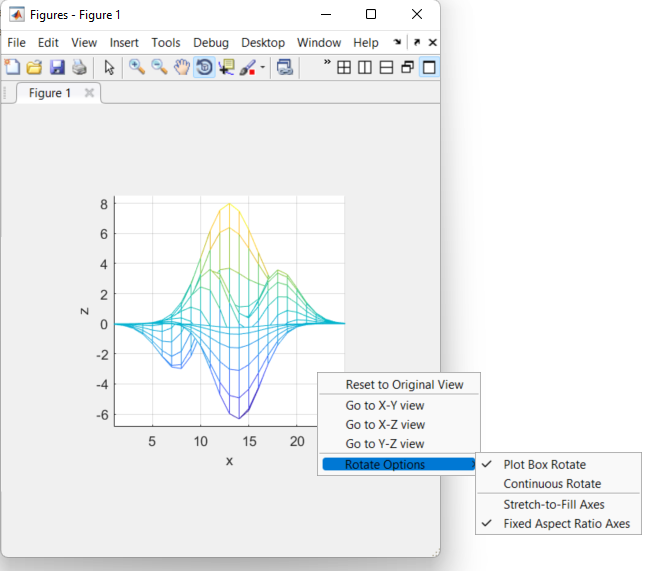
In matlab, you can right-click on a 3D plot and a context menu pops up that gives you the option to 'Go to X-Y view', 'Go to X-Z view', and 'Go to Y-Z view'. The view then snaps to viewing that plane face-on. Something similar would be very useful in matplotlib.
Proposed solution
Either a right-click menu or a toolbar dropdown with similar snapping options. That would then set the appropriate ax.view_init(elev, azim, roll) elevation and azimuth view angles.
Activity
scottshambaugh commentedon Aug 3, 2022
Here are the view angles I would propose. This matches matlab's conventions and keeps the roll angle at 0. The inverse views show the other 3 sides of the box, and are defined by a 180 deg rotation about the local vertical axis. Might be worth a PR at some point to make all the axes in these orientations show along the bottom and left edges. (Edit: see #23644)
oscargus commentedon Aug 10, 2022
This requires adding a right-click menu in a backend independent way? I think that will be a huge benefit in general as well, being a right-click person...
scottshambaugh commentedon Aug 10, 2022
Yeah, I see the scope of this as twofold.
Programmatic interface to look at primary view planes. I think DOC: view_init docstring for 3d axes primary view angles #23600 is good enough to suffice this, but maybe we accept "XY", etc. strings as an input to view_init as well.
Right-click context menu to expose this to the gui. That's a pretty big chunk of work I'd expect.
github-actions commentedon Dec 19, 2025
This issue has been marked "inactive" because it has been 365 days since the last comment. If this issue is still present in recent Matplotlib releases, or the feature request is still wanted, please leave a comment and this label will be removed. If there are no updates in another 30 days, this issue will be automatically closed, but you are free to re-open or create a new issue if needed. We value issue reports, and this procedure is meant to help us resurface and prioritize issues that have not been addressed yet, not make them disappear. Thanks for your help!
timhoffm commentedon Dec 19, 2025
Maybe a simpler feature would be to snap the angles to discrete steps (say, 5 or 10 degrees) if a modifier key is pressed.
WeatherGod commentedon Dec 19, 2025
QuLogic commentedon Dec 23, 2025
I vaguely recall a question somewhere about trying to produce an XYZ "cursor" that has arrows in the 3 primary directions and rotates to match the 3D Axes by making an inset 3D Axes and trying to lock the view direction to the main one somehow, but I cannot remember where I saw it.
I wonder if we would want to implement one of those, for which snapping to a primary plane would mean clicking on one of the XYZ arrows. This would be something like the orbit navigation gizmo in Blender: https://docs.blender.org/manual/en/latest/editors/3dview/navigate/introduction.html#navigation-gizmo
AdwaithBatchu commentedon Dec 23, 2025
Hi everyone, I am interested in working on this.
Reading through the discussion, I see there are a few proposed ways to handle view snapping (modifier keys, programmatic interface, context menus, XYZ "cursor"). I am posting this comment to clarify what would be the preferred approach.
I am currently working on the Right-Click Context Menu approach. I have a working prototype for the Qt and WebAgg backends that allows users to right-click a 3D plot and snap to primary views. I plan to focus my initial PR on this context menu interaction to establish the UI pattern. However, if the maintainers prefer modifier key or a programmatic interface as the priority, I am happy to pivot or include those in a follow-up.
timhoffm commentedon Dec 23, 2025
A right-click context menu would generally be nice to have (also outside the scoreboard this issue. However, doing this properly is a hard task. From your limited public GitHub profile, I‘d infer that this is probably too hard for you. But please judge yourself.
Some aspects to consider:
If you have experience with this and the mentioned aspects instill a clear solution strategy with you, this is probably a good fit, if not, I‘d have doubts that you can come up with a suitable solution.
scottshambaugh commentedon Jan 16, 2026
Noting for later, some or all of the below buttons may be useful for setting the view as well. At the risk of clutter, this would complete the set of every head-on orientation:
scottshambaugh commentedon Jan 22, 2026
We talked about this in the weekly meeting today, and have a consensus that it's better to build a menu / hamburger drop-down into the toolbar rather a right-click context menu. Reasoning:
AdwaithBatchu commentedon Feb 3, 2026
@scottshambaugh I would like to know your thoughts on how to handle cases with multiple 3D axes.
Few ideas that hit my mind are:
But one problem with this approach is that, It isn't clear how to name the menu items. As in, it may not always be obvious which axes "Axes 1" refers to.
scottshambaugh commentedon Feb 3, 2026
That's a really good point that we didn't discuss... let me bring it up in the weekly meeting again on Thursday. You're welcome to join as well if you'd like, the zoom link is at the link above.
scottshambaugh commentedon Feb 5, 2026
Hey @AdwaithBatchu, we talked for a while today about different options to solve this for subplots, and think the context menu is actually probably the best path forward! Your work so far was very helpful in showing a proof of concept for that discussion. I'll reopen and add a note or two to the PR