This repository was archived by the owner on Jun 21, 2023. It is now read-only.
Repository navigation
This repository was archived by the owner on Jun 21, 2023. It is now read-only.
Can't uninstall extension from Visual Studio 2017 #1393
Description

- GitHub Extension for Visual Studio version: 2.2.0.10
- Visual Studio version: 15.6.85+g13c9ab559b
What happened
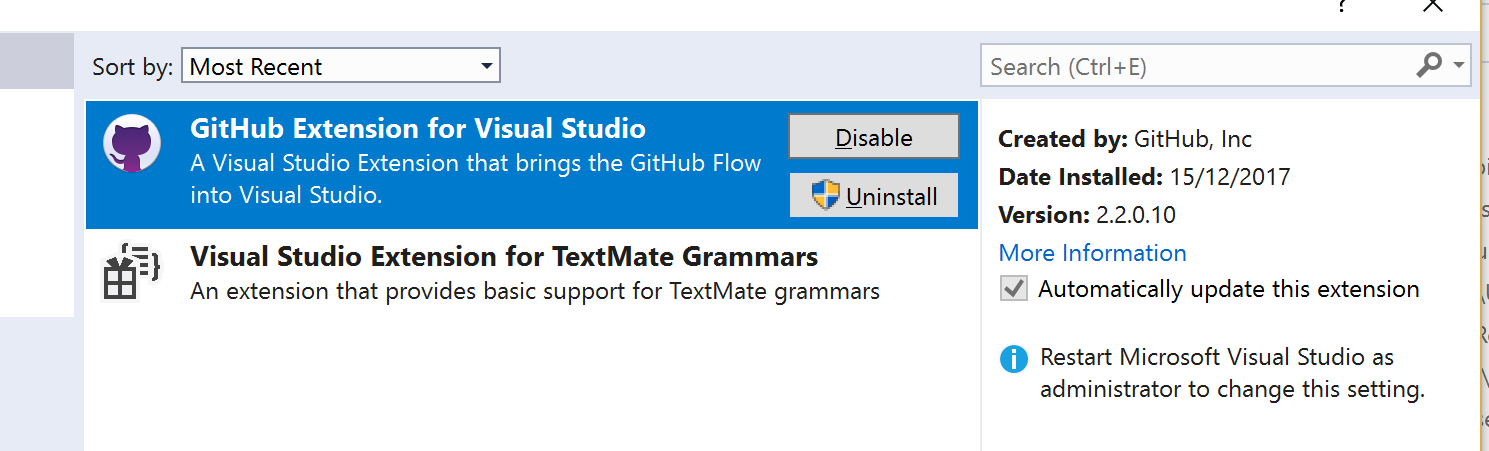
- Clicked on
Revertto revert the extension to2.2.0.10:

- Closed Visual Studio
- Clicked on
Modify - VSIX Installer dialog shows
Modifications Complete - Relaunched Visual Studio
- Clicked on
Uninstallto remove the extension:

- Closed Visual Studio
- Clicked on
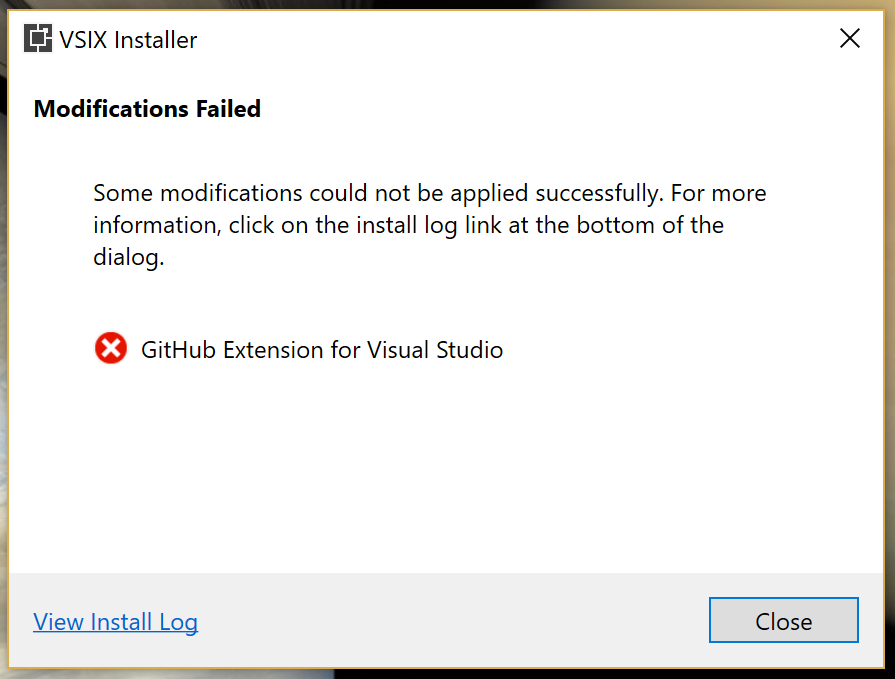
Modify - Uninstall dialog shows
Modifications Failed

Here is the log:
VSIXInstaller_539b821d-57ec-4c11-be13-f077e7c14721.log

Here is some pertinent info from the log:
15/12/2017 10:41:44 - Microsoft VSIX Installer
15/12/2017 10:41:44 - -------------------------------------------
15/12/2017 10:41:44 - vsixinstaller.exe version:
15/12/2017 10:41:44 - 15.6.85+g13c9ab559b
15/12/2017 10:41:44 - -------------------------------------------

15/12/2017 10:41:47 - Initializing Uninstall...
15/12/2017 10:41:47 - Extension Details...
15/12/2017 10:41:47 - 	Identifier         : c3d3dc68-c977-411f-b3e8-03b0dccf7dfc
15/12/2017 10:41:47 - 	Name               : GitHub Extension for Visual Studio
15/12/2017 10:41:47 - 	Author             : GitHub, Inc
15/12/2017 10:41:47 - 	Version            : 2.2.0.10
15/12/2017 10:41:47 - 	Description        : A Visual Studio Extension that brings the GitHub Flow into Visual Studio.
15/12/2017 10:41:47 - 	Locale             : en-US
15/12/2017 10:41:47 - 	MoreInfoURL        : https://visualstudio.github.com/
15/12/2017 10:41:47 - 	InstalledByMSI     : False
15/12/2017 10:41:47 - 	SupportedFrameworkVersionRange : [4.5,)

15/12/2017 10:41:47 -
15/12/2017 10:42:40 - The following target products have been selected...
15/12/2017 10:42:40 - 	Microsoft Visual Studio Team Explorer 2017
15/12/2017 10:42:40 -

15/12/2017 10:42:41 - Uninstalling 'GitHub Extension for Visual Studio', version 2.2.0.10.
15/12/2017 10:42:41 - pkgCatalogPath is 'C:\PROGRAM FILES (X86)\MICROSOFT VISUAL STUDIO\2017\TEAMEXPLORER\COMMON7\IDE\EXTENSIONS\WYHGZAQI.MH1\catalog.json'.
15/12/2017 10:42:42 - vsPkg.Version is '2.2.0.10'.  extension.Header.Version is '2.2.0.10'
15/12/2017 10:42:42 - Embedded catalog does not contain a component.
15/12/2017 10:42:42 - System.InvalidOperationException: A value for 'Component' needs to be specified in the catalog.
   at Microsoft.VisualStudio.ExtensionManager.ExtensionEngineImpl.PerformSetupEngineUnInstall(IInstalledExtension extension, Boolean downgrade)
   at Microsoft.VisualStudio.ExtensionManager.ExtensionEngineImpl.UninstallInternal(IInstalledExtension extension, Boolean forceDelete, Version targetedVSVersion, Boolean downgrade)
   at Microsoft.VisualStudio.ExtensionManager.ExtensionEngineImpl.Uninstall(IInstalledExtension extension, Version targetedVSVersion)
   at VSIXInstaller.InstallProgressPage.UninstallVsix(String vsixId, SupportedVSSKU targetSku, IProgress`1 progress)
Attempt to resolve
I have 3 versions installed, so I'm not sure which directory use use:
cd c:\programdata\Microsoft\VisualStudio\Packages\_Instances\
dir

15/12/2017  10:25    <DIR>          92b5e4e1
05/12/2017  20:57    <DIR>          a23816c9
15/12/2017  10:22    <DIR>          c6ffbe0c
Will try the following from: #1206 (comment)
This fix is actually pretty painful (especially if you have more than one version installed) and not something we'd want to give our users!
Activity
meaghanlewis commentedon Dec 15, 2017
Using the latest version of the GitHub for Visual Studio extension and then uninstalling by running
vsixinstaller /uninstall:c3d3dc68-c977-411f-b3e8-03b0dccf7dfc(as an administrator fromC:\Program Files (x86)\Microsoft Visual Studio\2017\TeamExplorer\Common7\IDE) worked for @jcansdale and myself to uninstall the extension from the latest version of Visual Studio Team Explorer.meaghanlewis commentedon Dec 15, 2017
@Michael-Eng just a heads up that we're experiencing installer issues with the latest version of Visual Studio Team Explorer.
meaghanlewis commentedon Dec 18, 2017
👋 @jcansdale just tried this again with the latest version of Visual Studio Enterprise 2017 (15.5.2) and confirmed uninstalling the GitHub extension is not a problem. This only seems to be with Visual Studio Team Explorer 2017
Michael-Eng commentedon Dec 18, 2017
@jcansdale Can you please confirm the repro steps you're following to hit this issue. For example, what version of the extension did you install after installing Team Explorer? Can you also please run https://aka.ms/vscollect.exe and place the zip file created in %temp% somewhere we can take a look?
jcansdale commentedon Dec 19, 2017
@Michael-Eng,
You should be able to repro it like this:
https://ghfvs-installer.github.com/releases/2.3.6.391/GitHub.VisualStudio.vsix
RevertGitHub for Visual Studio v2.3.6.391(relaunch VS and let VSIXInstaller run)
UninstallGitHub for Visual Studio 2.2.0.10(relaunch VS and let VSIXInstaller run)
VSIXInstaller_bbae1b9a-ea01-4a3e-98c0-7be29fd1147c.log
As @meaghanlewis mentioned above, this appears to be specific to Visual Studio Team Explorer. When I tried the the same steps with Visual Studio Enterprise 2017 15.5.2, the
Uninstallstep launched the Visual Studio Installer which was able to complete the uninstall successfully.I've just tried the same with Visual Studio Community Preview 2017 15.6.0, which also launches the Visual Studio Installer and completes successfully. Is appears the difference is with Visual Studio Team Explorer, which doesn't launch the Visual Studio Installer.
It is a little strange that it allows us to
Revertto2.2.0.10, which was never actually installed (although it was available as an option on the Visual Studio Installer).I hope that gives a clue as to what might be going wrong?
luddet commentedon Apr 20, 2018
I'm having the same problem in VS Professional 2017 (15.6.6)
I have GitHub extension version 2.3.6.391 installed and VS can neither update nor uninstall it.
jcansdale commentedon Apr 20, 2018
@luddet what happens if you try the following from the command line?
luddet commentedon Apr 24, 2018
@jcansdale
That uninstalled it from VS2015. But I haven't tried to uninstall that even from within VS, so I don't know if that would have even failed.
When trying to uninstall from VS2017 I'm getting this in the installer log:
2018-04-24 13:24:21 - Uninstalling 'GitHub Extension for Visual Studio', version 2.3.6.391. 2018-04-24 13:24:21 - pkgCatalogPath is 'C:\PROGRAM FILES (X86)\MICROSOFT VISUAL STUDIO\2017\PROFESSIONAL\COMMON7\IDE\EXTENSIONS\GITHUB\GITHUB\catalog.json'. 2018-04-24 13:24:23 - vsPkg.Version is '2.3.6.391'. extension.Header.Version is '2.3.6.391' 2018-04-24 13:24:24 - System.InvalidOperationException: Uninstall of GitHub Extension for Visual Studio failed. To uninstall this extension please uninstall all of the following components: at Microsoft.VisualStudio.ExtensionManager.ExtensionEngineImpl.PerformSetupEngineUnInstall(IInstalledExtension extension, Boolean downgrade) at Microsoft.VisualStudio.ExtensionManager.ExtensionEngineImpl.UninstallInternal(IInstalledExtension extension, Boolean forceDelete, Version targetedVSVersion, Boolean downgrade) at Microsoft.VisualStudio.ExtensionManager.ExtensionEngineImpl.Uninstall(IInstalledExtension extension, Version targetedVSVersion) at VSIXInstaller.InstallProgressPage.UninstallVsix(String vsixId, SupportedVSSKU targetSku, IProgress1 progress)`VitorNeilAvelino commentedon Nov 20, 2018
Worked!
BhanuKorthiwada commentedon Jun 24, 2019
similar issue, now unable to install any extension. in
VS 15.9.136/24/2019 3:19:26 PM - -------------------------------------------
6/24/2019 3:19:26 PM - Microsoft VSIX Installer
6/24/2019 3:19:26 PM - -------------------------------------------
6/24/2019 3:19:31 PM - Initializing Install...
6/24/2019 3:19:31 PM - Extension Details...
6/24/2019 3:19:31 PM - Identifier : f4ab1e64-5d35-4f06-bad9-bf414f4b3bbb
6/24/2019 3:19:31 PM - Name : Open Command Line
6/24/2019 3:19:31 PM - Author : Mads Kristensen
6/24/2019 3:19:31 PM - Version : 2.3.999
6/24/2019 3:19:31 PM - Description : Opens a command line at the root of the project. Support for all consoles such as CMD, PowerShell, Bash etc. Provides syntax highlighting, Intellisense and execution of .cmd and .bat files.
6/24/2019 3:19:31 PM - Locale : en-US
6/24/2019 3:19:31 PM - MoreInfoURL : https://github.com/madskristensen/OpenCommandLine
6/24/2019 3:19:31 PM - InstalledByMSI : False
6/24/2019 3:19:31 PM - SupportedFrameworkVersionRange : [0.0,2147483647.2147483647]
6/24/2019 3:19:31 PM -
6/24/2019 3:19:31 PM - SignatureState : Unsigned
6/24/2019 3:19:31 PM - Supported Products :
6/24/2019 3:19:31 PM - Microsoft.VisualStudio.Pro
6/24/2019 3:19:31 PM - Version : [14.0,17.0)
6/24/2019 3:19:31 PM -
6/24/2019 3:19:31 PM - References :
6/24/2019 3:19:31 PM - Prerequisites :
6/24/2019 3:19:31 PM - -------------------------------------------------------
6/24/2019 3:19:31 PM - Identifier : Microsoft.VisualStudio.Component.CoreEditor
6/24/2019 3:19:31 PM - Name : Visual Studio core editor
6/24/2019 3:19:31 PM - Version : [15.0,)
6/24/2019 3:19:31 PM -
6/24/2019 3:19:31 PM - Signature Details...
6/24/2019 3:19:31 PM - Extension is not signed.
6/24/2019 3:19:31 PM -
6/24/2019 3:19:31 PM - System.InvalidOperationException: VSHiveStub.exe failed: Unknown error
at VSIXInstaller.LocationBasedSKU.get_RegRootHiveOverride()
at VSIXInstaller.SupportedVSSKU.InitializeSettingsManager()
at VSIXInstaller.SupportedVSSKU.get_Host()
at VSIXInstaller.SupportedVSSKU.CreateExtensionEngine()
at System.Lazy
1.CreateValue() at System.Lazy1.LazyInitValue()at System.Lazy
1.get_Value() at VSIXInstaller.ExtensionService.GetExtensionEngineForApplicableSKU(ICommandLineData cmdLineData, SupportedVSSKU supportedSKU, IInstallableExtension installableExtension, List1 applicableSKUs, Boolean isRepairSupported)at VSIXInstaller.ExtensionService.GetInstallableData(String vsixPath, String extensionPackParentName, Boolean isRepairSupported, IStateData stateData, IEnumerable
1& skuData) at VSIXInstaller.App.Initialize(Boolean isRepairSupported) at VSIXInstaller.App.Initialize() at System.Threading.Tasks.Task1.InnerInvoke()at System.Threading.Tasks.Task.Execute()
--- End of stack trace from previous location where exception was thrown ---
at Microsoft.VisualStudio.Telemetry.WindowsErrorReporting.WatsonReport.GetClrWatsonExceptionInfo(Exception exceptionObject)
jparcell commentedon Aug 5, 2019
VS2017 Same issue - unable to install Github extension. Revert did not return to an uninstall option. None of the commands above resulted removed the extension.