Repository navigation
Compress world data to reduce loading time using socket compression options for large data transfer events. #5942

Description

Originally in GitLab by @manuelVo
Feature Summary
Compress the world data before transmission, to reduce the loading time of foundry.
Priority/Importance
The world data can get quite big rather quickly. For example my pathfinder 1 world with ~70 actors is already over 10 MB in size. This is (at least in part) because feats, spells and classes contain lengthy description texts. Additionally, JSON as a text format is rather wasteful in space usage. Since foundry needs to do a blocking wait for this data, the transmission time of the world data is fully added to the loading time, which can make foundry slow to load over slower connections (especially when self-hosting, where it's not unusual to have upload speeds that don't exceed 1 MB/s; distributing this world to 6 other players would take 1 minute - furthermore this cannot be mitigated via a CDN because it's transmitted through the websocket). Compression can significantly reduce the amount of data that needs to be transmitted (the world data from above takes under 2 MB when it's compressed), thus improving loading times (our previously mentioned slow connection would only take 12 seconds to transmit the data to all players instead of a minute).
Since compression libraries for JS are readily available (maybe socket.io even supports this natively already) this feature should be fairly simple to implement.
Edit: Compressing templates could be worthwhile as well, though that won't be as impactful as compressing the world data.
Metadata
Metadata
Assignees
Type
Fields
Priority
Activity
aaclayton commentedon Sep 29, 2021
It pains me when someone submits an issue and they say "should be simple" because whenever those cursed words are included in the issue description, it's never simple.
Socket.io supports automatic compression of "large" messages (gated by default at 1024kb or greater) which was added in 1.4.0, see https://socket.io/blog/socket-io-1-4-0/
I have experimented with customizing the compression rules with some custom per-message deflate options but this (1) did not work in my experimentation and (2) has several reported memory leaks associated with this feature so I got deterred from investigating it further.
See websockets/ws#1617 and websockets/ws#1369
aaclayton commentedon Sep 29, 2021
Originally in GitLab by @manuelVo
How about a custom compression stack? There are several pure JS compression libraries out there (or even wasm ones, for better performance). All that would be necessary would be to put the world json through the respective compression function and convert the compressed blob to base64 (or better ascii85 for better space efficiency) to send it through socket.io's text channel. When receiving the world, the client just needs to do the same thing reverse: unbase64, decompress, then josn decode; that should be it. Or am I missing something?
(Apparently socket.io has a binary mode that could be used to send the compressed data without using base64 or something similar, but I haven't investigated that thoroughly, so this might be wrong)
aaclayton commentedon Sep 29, 2021
It's a possibility to explore, yes. I don't think we will prioritize it for v9, but maybe if we have some extra bandwidth we can take this up and explore a custom compression/decompression approach.
aaclayton commentedon Sep 29, 2021
Originally in GitLab by @stwlam
Might it be viable to send the initial world data payload over http, with all subsequent data going through a websocket connection? At least then the data could be compressed if piped through a reverse proxy.
aaclayton commentedon Feb 8, 2022
Originally in GitLab by @Weissrolf
The latter suggestion would maybe even work if all database files were initially sent over via HTTP. Because their compressed total size would still be lower than the uncompressed snippet currently sent via websocket.
aaclayton commentedon Feb 8, 2022
Comment from @ben_lubar
Feature Summary
My friend is setting up a D&D game on Foundry, and so far the UI seems really responsive, except for a very long initial load time. I opened my browser's developer tools to investigate and found that the client sends
["world"], and then there is a long pause before the server sends a 91407939 character response. On a 12Mbps upload connection, this would take 60 seconds per player, not including overhead from TCP and so on.However, if I take the response and pass it through gzip, I get a file that is only 13708208 bytes (under 10 seconds per player). I believe this can be done automatically using the perMessageDeflate option in socket.io, although that may negatively affect the performance of the messages that aren't multiple megabytes in length.
Additionally, the packet seemed to have a lot of unnecessary data, such as objects containing only empty strings or zeroes or nulls as field values and data the client almost definitely doesn't need like Windows filesystem paths. (they're not long individually, but they add up!) Filtering the data that gets sent could save a lot of space (and therefore loading time) without the downsides of perMessageDeflate.
As a third possible solution, the initial state could be presented as a difference from some static file, so that the websocket would only need to describe the differences between the current state and "world state snapshot 1", where the static file would be cacheable by a proxy server or a web browser unlike a websocket message.
User Experience
There does not need to be any user-visible effect of this feature other than the game loading faster.
Priority/Importance
This is firmly in the "would be nice to have" tier of importance.
aaclayton commentedon Feb 8, 2022
Comment from @aaclayton:
The socket.io library and zlip that it depends on has some notable issues with memory fragmentation when using the
perMessageDeflateoption which is why we have kept it disabled. You are right that this could be beneficial. In my own testing with it (during v9 development) it did make a difference - but I did see some signs of increases in server-side memory profile the longer that the host ran. Overall I don't think this is stable enough (without a viable memory management solution) to enableperMessageDeflateSome context on the issue here: https://serverfault.com/questions/1066025/how-to-fix-ws-and-socket-io-memory-leak
aaclayton commentedon Feb 8, 2022
Comment from @mkahvi
Compressing just the initial world data message would provide lots of benefits by itself, and if it's limited to just that it should avoid all the memory leak problems except for servers that run for months without restart. Additionally you could provide a setting for it so people can disable it if it causes problems, since this seems to be a linux specific bug?
aaclayton commentedon Feb 8, 2022
Comment from @Weissrolf
Compressing down the initial database messages could squeeze them to about 15-25% their original size using "fastest" deflate. Maybe add a single garbage collection after login/reload to get around the memory leak?
But even without GC I did notice that not all data is initially transferred and that most of it is squeezed into a single large message. So only compressing that one websocket message would already help for a group of 1 GM + 4 players logging in or reloading (F5).
My my real-world PF2E lv1-3 adventure has 10.1 mb worth of data files, out of which 5.5 mb is FoW data for a single largish map (all other maps reset). Upon login as GM 5.34 mb of combined JSON data is send as a single large message to my client, plus other messages adding up to 6.22 mb total. If my actors db was 60 mb worth of data then that single large message would have been over 60 mb large.
PS: For comparison, all non websocket data adds up to 19.65 MB / 9.54 MB transferred in that world, so about half of it is compressed. Most of these show "Cache-Control: no cache" in their header and there doesn't seem to be happening much caching in Firefox even for large background map images. Chrome seems to cache them a bit more aggressively, only transferring 256-259 bytes per file (checking file headers I guess?).
aaclayton commentedon Feb 8, 2022
This could possibly become "bonus" territory in V10, but my past foray into per-message-deflate was stymied by the aforementioned memory leak which served as a substantial deterrent.
aaclayton commentedon Feb 8, 2022
Originally in GitLab by @zeel02
If the memory issue can't be resolved, would it be feasible to offer as a configuration option instead? A user with plenty of memory but poor bandwidth might be willing to accept the tradeoff.
aaclayton commentedon Feb 8, 2022
Originally in GitLab by @Weissrolf
Does this have to be an all or nothing decision? What speaks against only compressing that single large message that includes over 95% of the total initial websocket data? I would expect the memory leak to happen due to many/all messages being compressed, but not necessarily a single one.
And the HTTP idea also holds some merit if websockets is incapable of doing this. In my last example the whole database folder is compressed down to 16% its initial size via "fastest" deflate, from 10.1 mb down to 1.76 mb. That's still much smaller than the 5.34 mb of websocket data currently being sent that don't even include all data.
aaclayton commentedon Feb 8, 2022
No decision at all is going to be made here until and unless we accomplish our stated v10 priorities and have some spare bandwitdh for bonus work. If and when we take on this issue we will explore a wider variety of possibilities to try and accomplish the end goal (compressing the payload) in whatever way is best performing or least risky with regards to potential downsides.
aaclayton commentedon Feb 8, 2022
Originally in GitLab by @Weissrolf
I thought I had checked that I did not disable the cache in developer tools, but then I mixed that up with the Chrome developer tools. So I had the cache enabled in Chrome, but accidentally disabled in Firefox. Sorry for the confusion and good to know it's working (cached) all properly.
30 remaining items
kakaroto commentedon Feb 4, 2023
I'm gonna blame @LukeAbby for nerd-sniping me earlier this week by linking me to this issue (and messing with my sleep and time off), and @aaclayton can thank him instead!
As I hadn't realized that the websocket data was uncompressed, I've decided to experiment and see if we could achieve that for The Forge, since we're already acting as a middleman/proxy between the user and the Foundry server and we have gzip compression enabled for other HTTP requests via our load balancer.
I've changed our passthrough proxy approach to instead be a websocket server which then connects to Foundry as a client on the local network (where compression is less useful) and emits messages back and forth between the client and the foundry server.
Doing that had a small impact on performance (and I'm looking at ways to improve that, possibly by using custom parsers to pass events from the server to the client without going through encoding/decoding of the messages themselves) but it allowed us to have the deflate option enabled on our server for the client to use.
Loading speeds
I tested a small and a large world, with my normal (fast) internet (500 Mbps fiber, about 10ms latency) and using chrome network throttling to fast 3g (which is 1.44Mbps with 500ms latency).
I tested 3 reloads, on each of the 2 worlds, with and without deflate..
small world (3.5MB)
large world (37MB)
So we can see a small decrease in performance for users with very fast connections probably due to the compression/decompression taking more time than what it would have taken to transfer that uncompressed data over the network. There's also a not-insignificant hit on the performance due to my own server having both the socket.io server and client stacks running instead of being a direct socket passthrough.
To eliminate that discrepancy in the data, I did 4 more tests with normal passthrough, with the websocket proxy with deflate off, and the websocket proxy with deflate on:
false: 4.6 - 5.1 - 4.9 - 4.5 (average 4.77 seconds)true: 5.1 - 5.2 - 5.4 - 5.5 (average 5.3 seconds)Which does confirm that there is some small slowdown with deflate on for users with a very good connection, but not as bad as it originally seemed. If the option was in Foundry itself, the difference would be very small indeed.
The speed advantage however on a slow connection are definitely not insignificant! And I would expect the larger the world and slower the internet connection, the more of an impact it will have of course. For many users, loading time going from 5 minutes to 2 minutes could make a real difference in their ability to play.
Bandwidth usage
I've also tested bandwidth usage (though not on those 2 worlds in production, I only had a 19MB world to test with on my dev environment, and I could only check for packet sizes by capturing network packets in an unencrypted local env):
I've also done testing with replacing the client side socket.io library with one that uses the
msgpackparser for encoding the messages, instead of JSON. This made all the data over the websocket be transferred as binary and using less space, but I ended up not pursuing this further as it was adding more overhead and had insignificant improvements once the deflate option was enbaled.So, my 19.6MiB world became 16.8Mib with msgpack, but they were both equal at 2.4Mib in size with the deflate option enabled. While msgpack did provide a lower world size, it's relatively insignificant compared to the deflate option and therefore, msgpack or alternative encodings is likely not worth pursuing, as long as we have deflate instead.
Memory leak concerns
Now, I haven't yet looked into the specific consequences of CPU and RAM usage on enabling the option on my servers, but I was concerned by @aaclayton's claim of memory leaks from that option and I've investigated this thoroughly. Once I have some actual data from real-world testing, I'll be able to report back on the effects of enabling the option, however, I can already guess that it is perfectly safe to use the option without any negative impact on RAM usage or server performance.
I've read through most of those issues, and here's what I found:
jemalloclibrary to replace the glibc's memory allocator. This was confirmed by multiple node devs as well throughout all that issue. It's probably something we'll use as a replacement for the glibc allocate on our Forge deployment, though I don't think it's something worth investigating from Foundry's side, since the FVTT server will never be handling thousands/millions of requests in parallel, which is the real issue causing memory fragmentation in a production environmentConclusion
In conclusion... enabling deflate significantly reduces the amount of traffic used and significantly decreases the time to load the world. It may or may not add a small overhead that wouldn't be particularly noticeable for users with a very fast connection or on localhost.
The concerns about the memory leak seem to be unfounded as it has been issues fixed as far back as 2019, via both a mitigation in the websocket library as well as in Node itself. That being said, I don't yet have any hard experimental data in terms of RAM/CPU usage comparisons between the deflate option being enabled/disabled.
In light of this, I think that it is definitely something that would be worth exploring for an upcoming update of the Foundry core software.
From our side, we'll continue to investigate this for The Forge and hopefully soon have that option working via our proxy setup and improving the user experience of all users, regardless of the Foundry version used, basically backporting it to previous releases. It would still be nice if non-Forge users would also benefit from the loading speed improvements once v11 drops, if the option is enabled there.
I'd recommend testing it on your side, and possibly enabling it in the next prototype release for more people to test and report if they notice any issues due to the option being enabled.
I hope this research was helpful to you.
Thanks for reading!
Weissrolf commentedon Feb 4, 2023
Thanks for the hard work and sharing it with the community. One could argue that the transfer of data is one of Foundry's main jobs, so this should not be postponed forever. And as far as I understood your timing tests were done for a single connection, so multiple users connecting (or reloading) at the same time may show even more impact.
Fog of war improvements will also play into this as even a single map's fow can be of considerable size.
aaclayton commentedon Feb 4, 2023
@kakaroto thanks for sharing your findings. We do have this issue scoped for our current Prototype 2 milestone, so we'll investigate on our end and likely make this change.
aaclayton commentedon Feb 16, 2023
I spent some time today working on this and encountered frustration in my inability to verify the benefit of these proposed changes.
I'm going to outline my findings. Perhaps @kakaroto or @esb who implemented changes and measured a different might have perspectives on why I'm not observing any benefit.
Test Setup
On the client side,
perMessageDeflateistrueby default (https://socket.io/docs/v3/client-api/#io) and does not need to be enabled. This is verified by the headers.On the server-side, the Deflate Off scenario is
perMessageDeflate: false(the default value and current V10 configuration), the Deflate On scenario isperMessageDeflate: truewith no advanced configuration options, just the defaults.Scenario 1 - Deflate Off
The first test is the status-quo scenario of
perMessageDeflate: false.Headers
You see from the websocket headers that the client requests
permessage-deflatebut the server does not respond with that extension enabled.Data Transfer
This scenario transferred 3.4MB of data. The world data payload was the following message:
Using Firefox dev tools instead reveals that 9.51MB of data was received:
Scenario 2 - Deflate On
Now I repeat the same test with server-side
perMessageDeflate: true.Headers
We can now see from the headers that both the client and server request
permessage-deflateas a websocket extension.Data Transfer
Chrome reports the exact same amount of data transfer, 3.4MB although there is a small difference in speed.
The world data payload was the following message and is the same length as before:
Using Firefox dev tools also reports the same 9.51MB of data received:
Open Questions
perMessageDeflateon vs. off?mkahvi commentedon Feb 16, 2023
Only thing I can think of from the presented info to be missing is
.compress(true)from.emit()calls. Simple mistake, but seems unlikely, but it needs to be there withperMessageDeflate.kakaroto commentedon Feb 16, 2023
I think that if you use the devtools to check the size, you won't see any difference, because that's post-deflate sizes, because yes, the message is and will always be 9348171 bytes, but the amount of data actually transferred over the network will be difference.

Basically, you were expecting the size shown in chrome to be the actual amount transferred, like for HTTP requests:
But for the websocket, Chrome will only show the size of the parsed data, not of what is transferred over the network.
I don't know if that's what accounts for the discrepancy between chrome and firefox, but it might be, though I think 3.4MB would be quite a lot for a compressed 9MB world (since mine went from 19MB to 2.4MB)
The only way I found to actually check for those sizes is by using Wireshark/tcpdump and analyzing the actual websocket message data. The only time I alluded to it though in my long post from before was in this line:
Basically, use non-ssl to be able to capture the content unencrypted, use Wireshark or tcpdump to dump the network packets (then open it in Wireshark) as you refresh the page.
Hex DumpviewAt this point, you can probably just check the size of the conversion as a whole to get an estimate of how much data was transferred:

This shows a 2.5MB versus a 16MB conversation, which is not actually accurate because for some reason, I had a few packets that didn't get captured in my tcpdump, and it didn't make sense that a 19MB uncompressed world was using only 16MB, so I had to look at the websocket protocol itself to be sure.
So what you can do to see the actual size of the compressed world, which is what I used in my report above, is that you can analyze the packets being sent/received and look for the size in their binary header. That's what Chrome/Firefox does as it decodes those packets and only shows the content itself, and since the deflate protocol is part of the protocol itself, it happens at an OSI layer above the application layer.
You can use the websockets RFC to understand each field, more specifically the chapter 5 Data Framing: https://www.rfc-editor.org/rfc/rfc6455#section-5
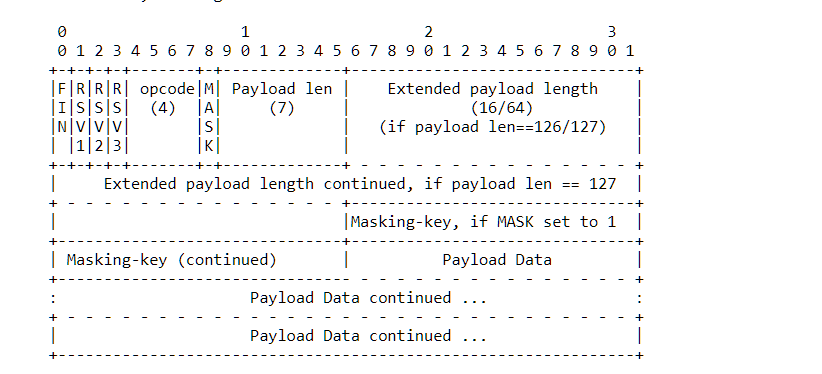
Here's the header representation:
Here's a good sample of the data, which shows 5 messages being sent and received. Red is sent by the client to the server and blue is what we received from the server. You can see that the client is always sending compressed data, even for small packets, but Foundry server is sending a mix between compressed and uncompressed data, likely due to the 1024 bytes threshold limit as default for the deflate option on the server.

For fun (at least, it's my idea of fun 😁), let's analyze that first packet the client sent.
Header is
0xc1 84 67 94 ca 76where 0xc1 represents the following bits:FIN: 1 (it's the final fragment of the message)
RSV1: 1 (this is the field to represent whether it's using deflate or not)
RSV2, RSV3: 0
Opcode: 1 (text frame)
The next byte is 0x84 which is:

Mask: 1 (means there's 4 bytes after the size that represents a mask for the data)
Payload size: 4
Then we have 0x6794ca76 which is the mask, and finally the 4 bytes of the payload, 0x55a5ca76 which is the masked data.
The next packet which the server sends is the session line, it's simpler:
Header: 0x8120
FIN: 1
RSV1, RSV2, RSV3: 0 (not compressed)
Mask: 0 (not masked)
Payload size: 0x20
You then have 0x20 (32) bytes of non compressed and non masked, plaintext data. Then there's another uncompressed/plaintext message from the server with header 0x8152 which has a size of 0x52 bytes.
Then another message sent by the client which is compressed and has a size of 0xe bytes and includes a mask.
Then we get to the interesting part, the message where the world data is being sent by the server, compressed:
Header:
0xc1 7f 00 00 00 00 00 25 ed b4FIN: 1
RSV1: 1 (compressed)
Payload size: 0x7f = 127
According to the RFC, a size of 127 means that it uses the 64 bits extended size field:
This means that the next 8 bytes (
00 00 00 00 00 25 ed b4) are the size of this packet, and since it's big endian formatting, it's easy to validate that 0x25edb4 = 2485684 = 2.4MiBCompared now with the packet with deflate disabled (same world)

Header:
0x81 7f 00 00 00 00 01 2b e8 e8FIN: 1
RSV: 0 (not compressed)
Payload size: 0x7f
Extended payload size: 0x12be8e8 = 19654888 = 19.6MiB
You'll notice how the size was indeed 19.6MB even though Wireshark said "Entire conversation (16MB)" and I remember seeing a
[TCP packets missing...]line somewhere in my huge dump, but I can't find it at this time in the dump.Same configuration, just make sure the websocket response has
Sec-WebSocket-Extensions: permessage-deflatein the response headers. That'll tell you for sure that it was configured correctly.Likely just the way to verify the size. I also had the same problem initially before I figured out chrome won't show me the numbers I was looking for.
For your purposes, just looking at the size estimate from Wireshark's "Entire conversation" line can be enough to prove that the compression did occur and impact significantly the size transferred, but if you want an accurate read on the world size transferred, The TLDR of it is to check the first two bytes of the packet, if it's
0x81then it's uncompressed, and if it's0xc1, it's compressed. Then the next byte should be0x7fsince it's a big packet, then the next 8 bytes are the actual size you're looking for. With that in mind, it should be fairly easy to see how much the world was compressed.I hope this helps, and I hope this was as fun for you to read/follow than it was for me to discover and write it down :)
kakaroto commentedon Feb 16, 2023
Annnnd just after posting, I realized I'm a total idiot and didn't use my tools properly and overcomplicated things for no good reason (other than it being fun, and me being used to reverse engineering things the hard way due to proprietary formats).
There's a much much easier way to check for the packet sizes with wireshark, which I'm sure you'll appreciate 😁🤦♂️


Instead of doing a filter for 'http', do a filter for 'websocket' instead, then sort by the Length column. Click on the large packet sizes, expand the "Websocket" line and you'll have your size pre-parsed for you.
With deflate on:
With deflate off:


(notice how the one with the world was the second larger packet, it's because the first one is one TCP frame which contains multiple websocket frames sent together, so they ended up being larger than the first world packet)
EDIT:
No, it's not needed, you only need to do it to force a packet to be compressed, but the default options is that any packet with a size larger than 1024 bytes will be compressed by default.
aaclayton commentedon Feb 16, 2023
Thanks for the in-depth response @kakaroto - it sounds like the TL;DR is that the data is getting compressed as intended with
perMessageDeflateset totrue, but the effects of that are not able to be detected in Chrome or Firefox dev tools. That's a bit frustrating, but I suppose the important part is that the feature is "working" - although it does as mentioned before likely make load times slightly slower for small worlds or for users with fast connections.I'll include this change in V11P2 and see how it fares in the wild.
kakaroto commentedon Feb 16, 2023
No problem, and yep, that's the TL;DR :) But I figured a more in-depth response was needed as you likely wanted to verify the claim that it had an actual effect.
As for the slightly slower load times, I actually have an update on that. I've implemented a custom parser for the websocket which doesn't unpack/repack the data to avoid doing a JSON.parse/JSON.stringify needlessly, and the result is that the large world which was loading in 4 seconds and became 5.7 seconds with the deflate option, it dropped it to 4.4 seconds, which is not as bad. I would bet that the slowdown would be completely insignificant if it's implemented directly within Foundry itself, and most of my added latency is because of the socket.io server+client stack that I have to put in the middle of the connection, which isn't a problem for Foundry's server itself.
Glad to see this included in v11p2, I can't wait to test it out natively!
Weissrolf commentedon Jun 16, 2023
I did a quick test using a PF2 Abomination Fault server to load websocket data with and without compression, measuring via a TCP packet sniffer on my local ethernet port.
The data is compressed manyfold now, which should help whenever multiple players connect at the same time or everyone is forced to do a reload. Thanks for the implementation!