
Define dashboards as code. Connect APIs. Render real-time interfaces.
Website • Demo • Docs • Roadmap • Discord • Sponsor
Dashfy is an open-source framework for building dashboards using declarative configuration.
Instead of manually building dashboards in a UI, developers define dashboards as structured configuration. Dashfy connects to APIs and data sources, composes widgets, and renders real-time interfaces.
Dashfy is designed to make dashboards:
- developer-friendly
- composable
- extensible
- and maintainable
Dashfy is published as a set of npm packages (for example @getdashfy/server, @getdashfy/ui, @getdashfy/themes, @getdashfy/utils, and @getdashfy/ext-*).
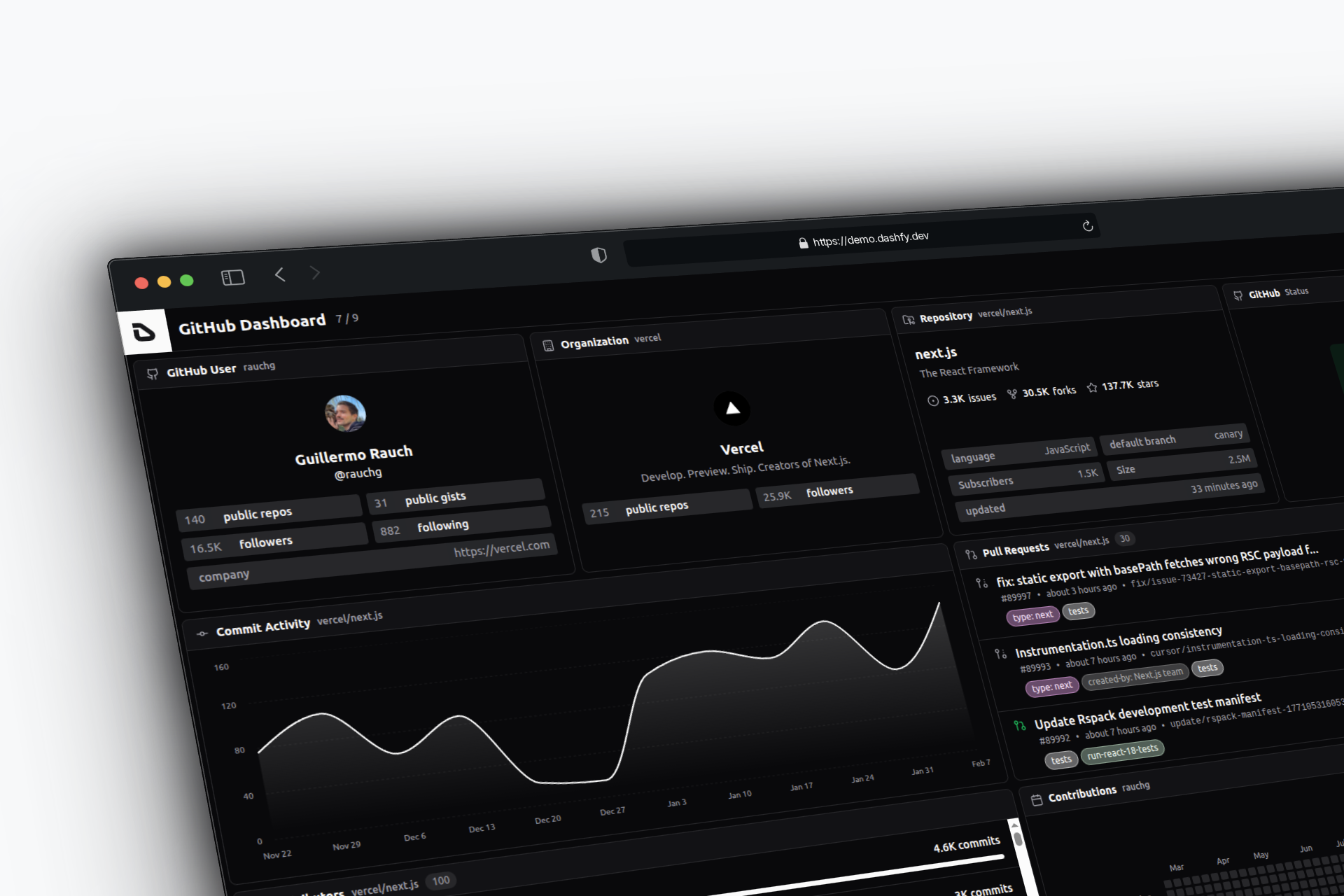
A live demo is available at: demo.dashfy.dev ⇗
If you found this project useful, then please consider giving it a ⭐ on GitHub and sharing it with your friends via social media. It helps to promote the project and attract more contributors.
Dashfy is a free and open-source project, but it is not free to run and develop. If you want to support the project, you can become a sponsor on GitHub Sponsors. If you are a company, you can also contact me to discuss a sponsorship on sponsor@dashfy.dev.
| Add your logo here |
- 📊 Compiled dashboards: Dashboards are generated from declarative configuration instead of being manually constructed.
- 📝 Declarative configuration: Define dashboards as structured configuration files.
- ⚡ Real-time updates: Server–client architecture built around WebSockets and subscriptions.
- 🧩 Extendable by extensions: Add widgets and data sources through extension packages (GitHub, JSON/REST APIs, or custom integrations).
- 📐 Scalable layout: Compose responsive dashboards for different screen sizes and environments.
- 🔄 Multiple dashboards: Define and manage multiple dashboards with automatic rotation support.
- 🎨 Themes support: Built-in themes, light/dark mode, and custom theme support.
- 🔒 Wake lock support: Prevent dashboards from sleeping during continuous monitoring.
- ⌨️ Keyboard shortcuts: Productivity-focused shortcuts for common actions.
- 🛠️ CLI: Scaffold projects, add and remove extensions, and audit a project's setup with
npx dashfy@latest. - 🌐 Extension registry: Extensions are resolved over HTTP from the hosted
@getdashfycatalog, with support for custom, private, and GitHub-hosted registries. - 🚀 Framework templates: Minimal starters and full pre-configured demos for Vite, Next.js, Astro, React Router, and TanStack Start.
- 🔌 MCP server: Model Context Protocol tools so AI assistants can search registries, read extension docs, and get the right install command.
- 🤖 AI agent skill: A project-aware agent skill for Cursor, Claude Code, and other agents, plus a Cursor plugin that bundles the skill, project rules, and the MCP server.
- 📘 TypeScript: Fully typed for safety and developer experience.
- ⚛️ React-based UI: Modern React architecture with composable components.
- 📦 Monorepo architecture: Clean structure with pnpm and Turborepo.
- 📄 Open source: Licensed under AGPL-3.0.
Dashboards are everywhere.
Developers build dashboards to monitor systems, track metrics, visualize APIs, and power internal tools. But building and maintaining dashboards is harder than it should be.
Traditional dashboards are often:
- tightly coupled to UI implementations
- difficult to version and review
- hard to extend and evolve
- manually constructed and maintained
Over time, dashboards become fragile systems instead of reliable interfaces.
Dashfy was created to solve this problem.
Dashfy treats dashboards as structured configuration instead of handcrafted UI. Developers define dashboards declaratively, connect APIs and data sources, and Dashfy handles rendering, real-time updates, and composition.
This approach makes dashboards:
- easier to maintain
- easier to version
- easier to extend
- easier to reproduce across environments
Dashfy is built for developers who want dashboards that integrate naturally with their codebase, infrastructure, and APIs.
Dashfy is designed around a simple principle: dashboards should be defined as code, not built manually in a UI.
This changes how dashboards are created, maintained, and extended.
Traditional dashboards are constructed manually through graphical interfaces.
Dashfy dashboards are defined using structured configuration. This makes them easier to version, review, and maintain.
Dashfy is designed for developers and integrates naturally with modern workflows:
- version control
- CI/CD pipelines
- code review
- infrastructure as code
Dashboards become part of your system, not external tools.
Dashfy connects directly to APIs and data sources through extensions.
Instead of being tied to a specific backend or database, Dashfy can compose dashboards from any system.
Dashfy uses extensions to add widgets and data sources.
You can build custom integrations without modifying the core, making Dashfy adaptable to any environment.
Dashfy uses a server–client architecture with WebSockets and subscriptions, enabling dashboards to update automatically as data changes.
No polling hacks. No manual refresh.
Dashboards are defined as configuration and can be:
- versioned
- reused
- shared
- reproduced across environments
This makes Dashfy suitable for both local development and production systems.
Dashfy dashboards are defined using declarative configuration. You can use TypeScript object, JSON or YAML to define your dashboards. To learn more about the configuration options, please refer to the configuration documentation.
TypeScript Example
import type { DashfyConfig } from '@getdashfy/types'

export const dashfyConfig: DashfyConfig = {
  dashboards: [
    {
      title: 'GitHub Dashboard',
      columns: 3,
      rows: 2,
      widgets: [
        {
          extension: 'github',
          widget: 'RepoBadge',
          x: 0,
          y: 0,
          columns: 1,
          rows: 1,
          repository: 'react/react',
        },
        {
          extension: 'github',
          widget: 'PullRequests',
          x: 1,
          y: 0,
          columns: 2,
          rows: 1,
          repository: 'vercel/next.js',
          state: 'open',
        },
        {
          extension: 'json',
          widget: 'JsonStatus',
          x: 0,
          y: 1,
          columns: 3,
          rows: 1,
          title: 'API Status',
          url: 'https://api.example.com/health',
          statuses: [
            {
              assert: 'equals(status, ok)',
              status: 'success',
              label: 'API Online',
            },
          ],
        },
      ],
    },
  ],
}
JSON Example
{
  "dashboards": [
    {
      "title": "GitHub Dashboard",
      "columns": 3,
      "rows": 2,
      "widgets": [
        {
          "extension": "github",
          "widget": "RepoBadge",
          "x": 0,
          "y": 0,
          "columns": 1,
          "rows": 1,
          "repository": "react/react"
        },
        {
          "extension": "github",
          "widget": "PullRequests",
          "x": 1,
          "y": 0,
          "columns": 2,
          "rows": 1,
          "repository": "vercel/next.js",
          "state": "open"
        },
        {
          "extension": "json",
          "widget": "JsonStatus",
          "x": 0,
          "y": 1,
          "columns": 3,
          "rows": 1,
          "title": "API Status",
          "url": "https://api.example.com/health",
          "statuses": [
            {
              "assert": "equals(status, ok)",
              "status": "success",
              "label": "API Online"
            }
          ]
        }
      ]
    }
  ]
}
YAML Example
title: GitHub Dashboard
columns: 3
rows: 2
widgets:
  - extension: github
    widget: RepoBadge
    x: 0
    y: 0
    columns: 1
    rows: 1
    repository: react/react
  - extension: github
    widget: PullRequests
    x: 1
    y: 0
    columns: 2
    rows: 1
    repository: vercel/next.js
    state: open
  - extension: json
    widget: JsonStatus
    x: 0
    y: 1
    columns: 3
    rows: 1
    title: API Status
    url: https://api.example.com/health
    statuses:
      - assert: equals(status, ok)
        status: success
label: API OnlineCreate a Dashfy server and load a dashboard configuration:
import { createJsonClient } from '@getdashfy/ext-json/client'
import { createGitHubClient } from '@getdashfy/ext-github/client'
import { Dashfy } from '@getdashfy/server'

// Create server instance
const dashfy = new Dashfy()

// Load dashboard configuration from a file (JSON or YAML):
await dashfy.configureFromFile('./dashfy.config.yml')

// or from a TypeScript object:
// import type { DashfyConfig } from '@getdashfy/types'
// const dashfyConfig: DashfyConfig = {...}
// dashfy.configure(dashfyConfig)

// Register JSON API
dashfy.registerApi('json', createJsonClient())

// Register GitHub API
dashfy.registerApi(
  'github',
  createGitHubClient({
    token: process.env.GITHUB_TOKEN!,
  }),
)

// Start server
await dashfy.start()
// Server running at http://0.0.0.0:5001
Register extension widgets in your React app:
import { CustomJson, JsonKeys, JsonStatus } from '@getdashfy/ext-json'
import {
  Branches,
  CommitActivityLine,
  ContributorsStats,
  Gitmap,
  OrgBadge,
  PullRequests,
  RepoBadge,
  Status,
  UserBadge,
} from '@getdashfy/ext-github'
import { Dashfy, WidgetRegistry } from '@getdashfy/ui'

// Register GitHub extension
WidgetRegistry.addExtension('github', {
  Branches,
  CommitActivityLine,
  ContributorsStats,
  Gitmap,
  OrgBadge,
  PullRequests,
  RepoBadge,
  Status,
  UserBadge,
})

// Register JSON extension
WidgetRegistry.addExtension('json', {
  CustomJson,
  JsonKeys,
  JsonStatus,
})

export const App = () => {
  return <Dashfy />
}Dashfy uses a server–client architecture to load, compose, and render dashboards.
flowchart TB
    Config[Dashboard Configuration<br/>TypeScript / JSON / YAML]

    subgraph Extensions["📦 Extensions"]
        direction TB
        Widgets[Widgets<br/><i>Visual Components</i>]
        DataSources[Data Sources<br/><i>API Integrations</i>]
        Logic[Custom Logic<br/><i>Transformations</i>]
    end

    subgraph Server["🖥️ Dashfy Server"]
        direction TB
        S1[1. Load Config]
        S2[2. Connect APIs]
        S3[3. Manage Updates]
        S4[4. WebSocket Server]
        S1 --> S2 --> S3 --> S4
    end

    subgraph Client["🌐 Client"]
        direction TB
        C1[3. Connect WebSocket]
        C2[4. Receive Data]
        C3[5. Render Widgets]
        C4[6. Real-time Updates]
        C1 --> C2 --> C3 --> C4
    end

    Config --> S1
    DataSources -.->|Provide API Clients| S2
    Widgets -.->|Provide Components| C3
    S4 <-->|WebSocket<br/>Real-time Data| C1

    style Config fill:#4a90e2,stroke:#2e5c8a,color:#fff
    style Extensions fill:#f39c12,stroke:#d68910,color:#fff
    style Server fill:#9b59b6,stroke:#7d3c98,color:#fff
    style Client fill:#27ae60,stroke:#1e8449,color:#fff
The Dashfy server is responsible for:
- loading dashboard configuration
- connecting to APIs and data sources
- managing real-time data updates
- exposing data to clients via WebSockets
The server acts as the runtime that powers dashboards.
The Dashfy client renders dashboards using composable widgets and extensions.
It connects to the server and:
- receives real-time data updates
- renders widgets and layouts
- manages dashboard state and interactions
Dashfy is extensible through extensions.
Extensions provide:
- widgets (visual components)
- data source integrations
- custom logic and transformations
This allows Dashfy to connect to any API, service, or system.
At runtime, the flow looks like this:
- Dashfy loads the dashboard configuration
- The server connects to APIs and data sources
- The client connects to the server
- Dashfy renders the dashboard
- Updates are pushed in real time
Dashboards are defined as configuration and executed by the Dashfy runtime.
Dashfy is ideal when you need dashboards that are defined as code, integrated with APIs, and easy to maintain.
Common use cases include:
Monitor APIs, services, CI/CD pipelines, and infrastructure using dashboards defined alongside your codebase.
Build dashboards for internal metrics, operational visibility, and system health without building custom UI from scratch.
Visualize API responses, service status, and external integrations in real time.
Track deployments, system metrics, and service health across environments.
Dashfy is designed for real-time updates using WebSockets and subscriptions, making it suitable for live dashboards and operational displays.
Dashfy supports fullscreen mode, rotation, and continuous display, making it ideal for TV dashboards and monitoring screens.
Dashfy can connect to any API using extensions, allowing you to build dashboards for any system.
We recommend running the app locally for development. Follow these steps:
- Requirements:
See
package.jsonengines for more details.
- Clone this repository:
git clone https://github.com/dashfy/dashfy.git
cd dashfy- Install dependencies:
pnpm install- Build all packages:
pnpm build

|

|

|
| Default Theme | Midnight Blue Theme | Nord Theme |

|

|

|
| Settings | Connection Panel | Console Panel |
More screenshots here.
Contributions are welcome! Please refer to the CONTRIBUTING.md file for guidelines on how to get started, report issues, and submit pull requests. You can find easy-to-pick-up tasks with the good first issue or PR welcome labels.
Join the community on Dashfy's Discord server to discuss the project, ask questions, or get help.
Join the conversation on X (Twitter) and follow @dashfydev for updates and announcements.
This project is licensed under the AGPL-3.0 License - see the LICENSE file for details.
The CLI (dashfy) is MIT-licensed; the runtime libraries (@getdashfy/*) are AGPL-3.0.

For AI/LLM agents: https://dashfy.dev/llms.txt