You signed in with another tab or window. Reload to refresh your session.You signed out in another tab or window. Reload to refresh your session.You switched accounts on another tab or window. Reload to refresh your session.Dismiss alert
{{ message }}
This repository was archived by the owner on Apr 8, 2020. It is now read-only.
Repository navigation
This repository was archived by the owner on Apr 8, 2020. It is now read-only.
WILL NOT RUN - ASP.NET Core + Angular 2 template for Visual Studio #449
I started VS and went to Visual Studio’s File New Project menu, expand the Web category, and picked ASP.NET Core Angular 2 Starter Application (.NET Core)
I let the prjoect build and waited until the depencies finsihed restoring
I then tried to run the project - NO LUCK
Ctrl+F5 - nothing
F5 - nothing
The Start button on the tool bar just says "Start", not IIS or Chorme, or anthing like that. Pressing the "Start" button get the error "Unable to start debugging. The startup project cannot be launched"
Under VS's Debug Menu, both the "Start Debugging" and "Start without Debugging" options are disabled.
I also noticed that in the solution explorer there is an entry "References (Errors - see Error List ) --- there is no Error List...
Does Visual Studio's "File -> New Project" menu offer you the option to create a "ASP.NET Core Web Application (.NET Core)" project? If not, I suspect the issue is that you also need to install the Visual Studio tools for .NET Core 1.0.1: https://www.microsoft.com/net/core#windowsvs2015
Please let me know whether or not this fixes it! I'll close this since I think that is likely to be the solution, but please reopen the issue if not.
Yes, I believe I do have Visual Studio tools for .NET Core 1.0.1 installed. I sent several screen shots and the project created from the template to you in eMail. To bad I can't paste screen shots here. Please let me know if you did not receive the email reply,
Here is some text from command prompt results showing I have dot ent core 1.1:
Microsoft Windows [Version 10.0.14393]
(c) 2016 Microsoft Corporation. All rights reserved.
C:\WINDOWS\system32>dotnet --version
1.0.0-preview2-003131
C:\WINDOWS\system32>node -v
v5.10.1
=========================
Thank you again for your help as I believe this template will be of enormous value to me as we have had no luck upgrading our Angular 2 beta 17 application to more recent versions of Angular 2.
The run/debug options become enabled if I changed the lin in the project.json file from :
==========================
But then 40 errors in the project.json file pop up:
`
Severity Code Description Line
Error NU1002 The dependency Microsoft.Extensions.Logging 1.0.0 in project OmniPotA2 does not support framework DNX,Version=v4.5.1. 1
Error NU1002 The dependency Microsoft.Extensions.Caching.Abstractions 1.0.0 in project OmniPotA2 does not support framework DNX,Version=v4.5.1. 1
Error NU1002 The dependency Microsoft.Extensions.DependencyInjection 1.0.0 in project OmniPotA2 does not support framework DNX,Version=v4.5.1. 1
Error NU1002 The dependency Microsoft.Extensions.DependencyInjection.Abstractions 1.0.0 in project OmniPotA2 does not support framework DNX,Version=v4.5.1. 1
Error NU1002 The dependency Microsoft.Extensions.WebEncoders 1.0.0 in project OmniPotA2 does not support framework DNX,Version=v4.5.1. 1
Error NU1002 The dependency Microsoft.Extensions.Localization.Abstractions 1.0.0 in project OmniPotA2 does not support framework DNX,Version=v4.5.1. 1
Error NU1002 The dependency System.Text.Encodings.Web 4.0.0 in project OmniPotA2 does not support framework DNX,Version=v4.5.1. 1
Error NU1002 The dependency System.Buffers 4.0.0 in project OmniPotA2 does not support framework DNX,Version=v4.5.1. 1
Error NU1002 The dependency Microsoft.Extensions.Globalization.CultureInfoCache 1.0.0 in project OmniPotA2 does not support framework DNX,Version=v4.5.1. 1
Error NU1002 The dependency OmniPotA2 1.0.0 in project OmniPotA2 does not support framework DNX,Version=v4.5.1. 1
Error NU1002 The dependency Microsoft.Extensions.FileProviders.Composite 1.0.0 in project OmniPotA2 does not support framework DNX,Version=v4.5.1. 1
Error NU1002 The dependency Microsoft.Extensions.Configuration.Abstractions 1.0.0 in project OmniPotA2 does not support framework DNX,Version=v4.5.1. 1
Error NU1002 The dependency Microsoft.Extensions.FileProviders.Abstractions 1.0.0 in project OmniPotA2 does not support framework DNX,Version=v4.5.1. 1
Error NU1002 The dependency Microsoft.Extensions.Logging.Abstractions 1.0.0 in project OmniPotA2 does not support framework DNX,Version=v4.5.1. 1
Error NU1002 The dependency Microsoft.Extensions.Primitives 1.0.0 in project OmniPotA2 does not support framework DNX,Version=v4.5.1. 1
Error NU1002 The dependency Microsoft.Net.Http.Headers 1.0.0 in project OmniPotA2 does not support framework DNX,Version=v4.5.1. 1
Error NU1002 The dependency Microsoft.Extensions.Options 1.0.0 in project OmniPotA2 does not support framework DNX,Version=v4.5.1. 1
Error NU1002 The dependency Microsoft.AspNetCore.Html.Abstractions 1.0.0 in project OmniPotA2 does not support framework DNX,Version=v4.5.1. 1
Error NU1002 The dependency Microsoft.AspNetCore.Diagnostics.Abstractions 1.0.0 in project OmniPotA2 does not support framework DNX,Version=v4.5.1. 1
Error NU1002 The dependency Microsoft.Extensions.Configuration 1.0.0 in project OmniPotA2 does not support framework DNX,Version=v4.5.1. 1
Error NU1002 The dependency Microsoft.AspNetCore.JsonPatch 1.0.0 in project OmniPotA2 does not support framework DNX,Version=v4.5.1. 1
Error NU1002 The dependency Microsoft.NETCore.App 1.0.1 in project OmniPotA2 does not support framework DNX,Version=v4.5.1. 3
Error NU1002 The dependency Microsoft.Extensions.Configuration.CommandLine 1.0.0 in project OmniPotA2 does not support framework DNX,Version=v4.5.1. 19
Error NU1002 The dependency Microsoft.Extensions.Options.ConfigurationExtensions 1.0.0 in project OmniPotA2 does not support framework DNX,Version=v4.5.1. 23
Error NU1008 "netcoreapp1.0" is an unsupported framework. 33
Error CS0234 The type or namespace name 'AspNet' does not exist in the namespace 'Microsoft' (are you missing an assembly reference?) 1
Error CS0115 '_Page_Views_Shared__Layout_cshtml.ExecuteAsync()': no suitable method found to override 1
Error CS0234 The type or namespace name 'AspNet' does not exist in the namespace 'Microsoft' (are you missing an assembly reference?) 1
Error CS0103 The name 'ViewData' does not exist in the current context 6
Error CS0103 The name 'RenderBody' does not exist in the current context 11
Error CS0103 The name 'RenderSection' does not exist in the current context 13
`
The most important is probably the one build error:
Severity Code Description Project File Line Source
Error The design time host build failed with the following error: Object reference not set to an instance of an object. OmniPotA2 C:\Program Files (x86)\MSBuild\Microsoft\VisualStudio\v14.0\DotNet\Microsoft.DotNet.Common.Targets 269 Build
```
`
from :
```
...
<DesignTimeHostBuild
Condition="'$(_DesignTimeHostBuild)' == 'true'"
Port="$(DTHPort)"
HostID="$(DTHHostID)"
ContextID="$(DTHContextID)"
DTHProtocolVersion="$(DTHProtocolVersion)"
Rebuild ="$(RebuildInvoked)"
/>
</Target>
```
I do not see an option to reopen this closed issue, unless you wanted me to open a new issue?
Yes, I believe I do have Visual Studio tools for .NET Core 1.0.1
installed. I can share some screen shots here:
And here is the app I created with the template ( I called the project
OmniPotA2 ):
If I change type form “platform” to “default” the run options then appear,
but I get 40 errors from the project.json file :
I went ahead and zipped up the solution and included it --- I’m am sure it
is something very simple and maybe even trivial to you.
(The file was renamed from “OmniPotA2.zip” to “OmniPotA2.MYzip” )
Thank you again for your help as I believe this template will be of
enormous value to me as we have had no luck upgrading our Angular 2 beta
17 application to more recent versions of Angular 2.
Does Visual Studio's "File -> New Project" menu offer you the option to
create a "ASP.NET Core Web Application (.NET Core)" project? If not, I
suspect the issue is that you also need to install the Visual Studio tools
for .NET Core 1.0.1: https://www.microsoft.com/net/core#windowsvs2015
Please let me know whether or not this fixes it! I'll close this since I
think that is likely to be the solution, but please reopen the issue if not.
LEGAL NOTICE: The contents of this email and any attachments to it contain
confidential and/or legally privileged information from Kind Manage, LLC
and/or it's affiliates and are only for use of the intended recipient. If
you are not the intended recipient or received this email in error, please
contact us immediately by forwarding this email to info@kind.financial. You
are hereby notified that any disclosure, copying, distribution, or taking
of any action in reliance on the comments of the contained information is
strictly prohibited.
To clarify, installing the .NET Core SDK is not the same as installing Visual Studio Tools for .NET Core. Running dotnet --version only shows that you have the .NET Core SDK installed - it doesn't show that you have installed the Visual Studio tools.
Could you ensure you've installed DotNetCore.1.0.1-VS2015Tools.Preview2.0.3.exe? I don't know for sure that will fix the issue, but it's something you do need if you want VS to be able to launch your projects correctly.
Yes, I certainly have DotNetCore.1.0.1-VS2015Tools.Preview2.0.3.exe installed from the very first. If I try to use the link you sent, it just prompts me to download the same file I already have saved. If I try to run it, it just comes up with the repair or uninstall option.
No I am not using VS 2017 RC yet, I didn't want to introduce new unknowns. I have VS2015 Pro.
I have tried using the template with several .Net Frame works ( selected when you create the project ). I have through 4.6.1 available, but I have also tried several others including 4.5.2 which you show in your tutorial. No matter which one I use to build the app with the template, I always get this error in the project.json file:
intellisense says that "type" must be either "default" or "build" -- I have tried both of those and I trade a single error about the type to a pile of errors complaining about DNC4.5.1 not being supported. ( this error regardless which .net framework selected at project creation ( 4.6.1, 4.5.2 or even 4.5.1 )
Same issue here.
I've made sure all the prerequisites above are installed and as @pgorbas stated, when trying to reinstall the tools the option given is either repair/uninstall meaning it's there.
Here's what the IDE looks like. Brand new project from the "ASP.NET Core Angular 2 Starter Application (.NET Core)" - click to enlarge:
Activity
SteveSandersonMS commentedon Nov 21, 2016
Does Visual Studio's "File -> New Project" menu offer you the option to create a "ASP.NET Core Web Application (.NET Core)" project? If not, I suspect the issue is that you also need to install the Visual Studio tools for .NET Core 1.0.1: https://www.microsoft.com/net/core#windowsvs2015
Please let me know whether or not this fixes it! I'll close this since I think that is likely to be the solution, but please reopen the issue if not.
pgorbas commentedon Nov 21, 2016
Thank you for taking time to help me with this.
Yes, I believe I do have Visual Studio tools for .NET Core 1.0.1 installed. I sent several screen shots and the project created from the template to you in eMail. To bad I can't paste screen shots here. Please let me know if you did not receive the email reply,
Here is some text from command prompt results showing I have dot ent core 1.1:
=========================
Thank you again for your help as I believe this template will be of enormous value to me as we have had no luck upgrading our Angular 2 beta 17 application to more recent versions of Angular 2.
The run/debug options become enabled if I changed the lin in the project.json file from :
===================
to:
==========================
But then 40 errors in the project.json file pop up:
`
`
The most important is probably the one build error:
pgorbas commentedon Nov 21, 2016
All my email replies are getting bounce back – trying again without
attaching the zip file…
Paul Gorbas
Software Engineer
direct: 816.735.0224 <215.839.1070>
mobile: 816.929.9360
paul@kind.financial
http://KIND.financial http://kind.financial
From: Paul Gorbas [mailto:paul@kind.financial]
Sent: Monday, November 21, 2016 17:26
To: 'aspnet/JavaScriptServices' <
reply@reply.github.com>;
'aspnet/JavaScriptServices' JavaScriptServices@noreply.github.com
Cc: 'Author' author@noreply.github.com
Subject: RE: [aspnet/JavaScriptServices] WILL NOT RUN - ASP.NET Core +
Angular 2 template for Visual Studio (#449)
Thank you for tanking time to help me with this.
Yes, I believe I do have Visual Studio tools for .NET Core 1.0.1
installed. I can share some screen shots here:
And here is the app I created with the template ( I called the project
OmniPotA2 ):
If I change type form “platform” to “default” the run options then appear,
but I get 40 errors from the project.json file :
I went ahead and zipped up the solution and included it --- I’m am sure it
is something very simple and maybe even trivial to you.
(The file was renamed from “OmniPotA2.zip” to “OmniPotA2.MYzip” )
Thank you again for your help as I believe this template will be of
enormous value to me as we have had no luck upgrading our Angular 2 beta
17 application to more recent versions of Angular 2.
---- Regards,
Paul Gorbas
Software Engineer
Direct: (816) 735-0224
Agrisoft: (323) 870-8300 ext 412
Mobile: (816) 929-9360
[image:
http://electronic-technicians.com/wp-content/uploads/2015/11/kind-financial-cannabis-business-solutions-353x100.png]
Paul@Kind.Financial
www.Kind.Financial http://www.kind.financial/
[image:
https://docs.google.com/uc?export=download&id=0B1dPz2xIqirqQ0RTTDJpQ0ZscHM&revid=0B1dPz2xIqirqS01JaVFqb3NLdHFtZ2dPMmlBbDVZN3c5MUMwPQ]
www.Agrisoft.Software http://www.agrisoft.software/
From: Steve Sanderson [mailto:notifications@github.com
notifications@github.com]
Sent: Monday, November 21, 2016 10:43
To: aspnet/JavaScriptServices JavaScriptServices@noreply.github.com
Cc: fubar pgorbas@yahoo.com; Author author@noreply.github.com
Subject: Re: [aspnet/JavaScriptServices] WILL NOT RUN - ASP.NET Core +
Angular 2 template for Visual Studio (#449)
Does Visual Studio's "File -> New Project" menu offer you the option to
create a "ASP.NET Core Web Application (.NET Core)" project? If not, I
suspect the issue is that you also need to install the Visual Studio tools
for .NET Core 1.0.1: https://www.microsoft.com/net/core#windowsvs2015
Please let me know whether or not this fixes it! I'll close this since I
think that is likely to be the solution, but please reopen the issue if not.
—
You are receiving this because you authored the thread.
Reply to this email directly, view it on GitHub
#449 (comment),
or mute the thread
https://github.com/notifications/unsubscribe-auth/ALLv9TQIEzSwYmrm6cANy6RMBkvh0645ks5rAcorgaJpZM4K3Zqv
.
LEGAL NOTICE: The contents of this email and any attachments to it contain
confidential and/or legally privileged information from Kind Manage, LLC
and/or it's affiliates and are only for use of the intended recipient. If
you are not the intended recipient or received this email in error, please
contact us immediately by forwarding this email to info@kind.financial. You
are hereby notified that any disclosure, copying, distribution, or taking
of any action in reliance on the comments of the contained information is
strictly prohibited.
pgorbas commentedon Nov 21, 2016
Steve, the email I got from you said "Reply directly", but all my emails are getting bounced back.
I tried twice, then a third time without the zip file of the solution.
My direct email is pgorbas@yahoo.com is you want me to email the solution zip to you directly so you can see what the template is creating for me.
SteveSandersonMS commentedon Nov 22, 2016
To clarify, installing the .NET Core SDK is not the same as installing Visual Studio Tools for .NET Core. Running
dotnet --versiononly shows that you have the .NET Core SDK installed - it doesn't show that you have installed the Visual Studio tools.Could you ensure you've installed DotNetCore.1.0.1-VS2015Tools.Preview2.0.3.exe? I don't know for sure that will fix the issue, but it's something you do need if you want VS to be able to launch your projects correctly.
pgorbas commentedon Nov 22, 2016
Yes, I certainly have DotNetCore.1.0.1-VS2015Tools.Preview2.0.3.exe installed from the very first. If I try to use the link you sent, it just prompts me to download the same file I already have saved. If I try to run it, it just comes up with the repair or uninstall option.
ClaudioNunes commentedon Nov 22, 2016
@pgorbas Have you installed vs 2017 RC ?
pgorbas commentedon Nov 22, 2016
No I am not using VS 2017 RC yet, I didn't want to introduce new unknowns. I have VS2015 Pro.
I have tried using the template with several .Net Frame works ( selected when you create the project ). I have through 4.6.1 available, but I have also tried several others including 4.5.2 which you show in your tutorial. No matter which one I use to build the app with the template, I always get this error in the project.json file:
intellisense says that "type" must be either "default" or "build" -- I have tried both of those and I trade a single error about the type to a pile of errors complaining about DNC4.5.1 not being supported. ( this error regardless which .net framework selected at project creation ( 4.6.1, 4.5.2 or even 4.5.1 )
weitzhandler commentedon Jan 5, 2017
Same issue here.
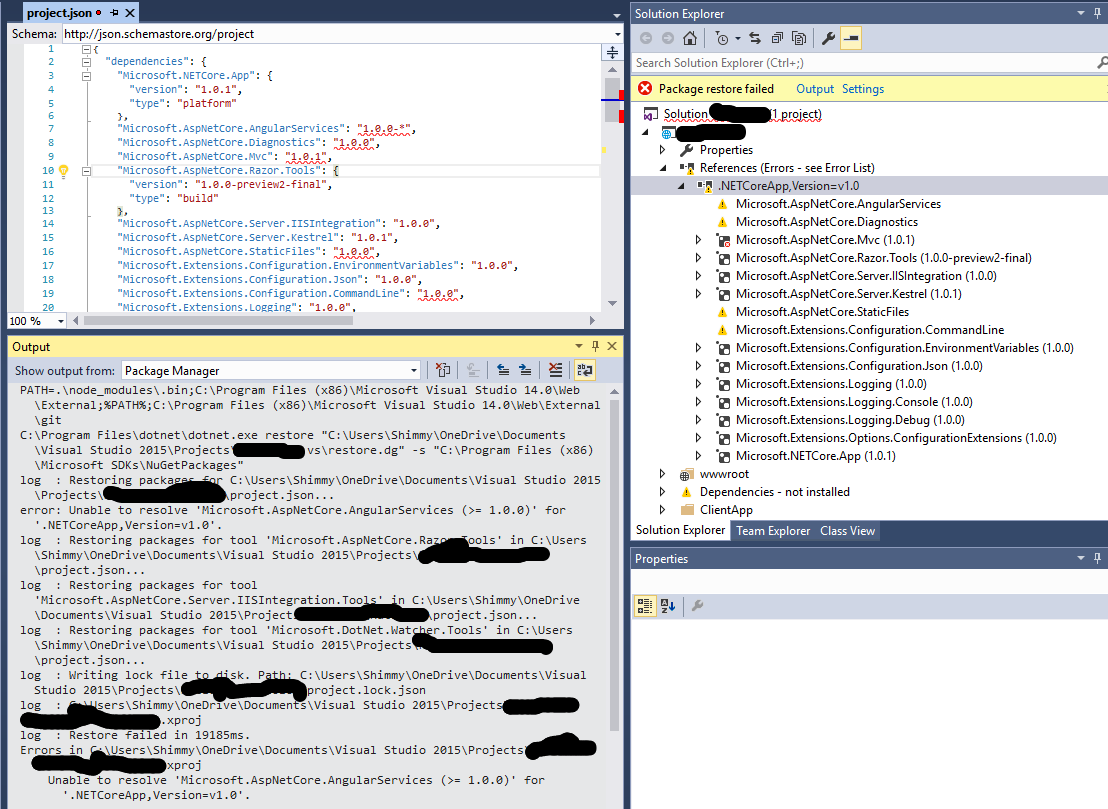
I've made sure all the prerequisites above are installed and as @pgorbas stated, when trying to reinstall the tools the option given is either repair/uninstall meaning it's there.
Here's what the IDE looks like. Brand new project from the "ASP.NET Core Angular 2 Starter Application (.NET Core)" - click to enlarge:
weitzhandler commentedon Jan 5, 2017
I've found a solution here.
HTH.