You signed in with another tab or window. Reload to refresh your session.You signed out in another tab or window. Reload to refresh your session.You switched accounts on another tab or window. Reload to refresh your session.Dismiss alert
Mh, I can confirm something isn't working correctly ATM, it seems like spotify changed something with OAuth tokens, gonna need some time to find out what tho.
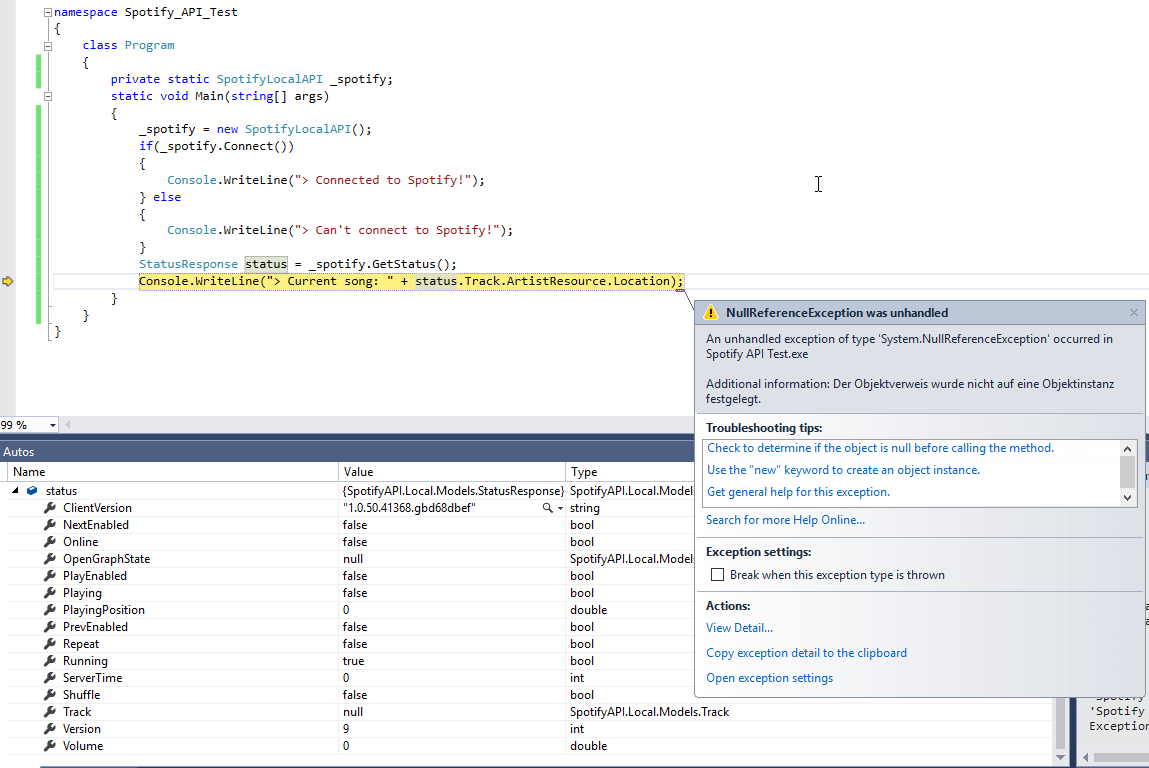
And btw, your status is null because it wasn't assigned yet, put a breakpoint after the GetStatus()
Can you guys please test the following endpoint: https://open.spotify.com/token
Do you receive a string with "faketoken" at the end? It seems it delivers fake tokens currently (at least for me)
Adding a "user-agent" Header in GetOAuthKey() method's WebClient worked for me.
Now it is returning token without the "faketoken" string attached at the end.
Hello, Maybe this issue is open again.
From the endpoint "https://open.spotify.com/token" I only get a token with "faketoken" at the end. I already tried to update the User-Agent to "Spotify (1.0.86.337.ga8d5cef9)".
Any Ideas? Struggling with this issue since a couple of days...


Activity
jipjan commentedon Mar 9, 2017
Do you make sure spotify is running and connected before requesting the status?
You can do this with
if (Spotify.Connect()) { }JohnnyCrazy commentedon Mar 9, 2017
Mh, I can confirm something isn't working correctly ATM, it seems like spotify changed something with OAuth tokens, gonna need some time to find out what tho.
And btw, your
statusis null because it wasn't assigned yet, put a breakpoint after theGetStatus()M4sterZer0 commentedon Mar 9, 2017
@jipjan Yes, I check it before I call the function.
Let's wait for a API fix. :)
jipjan commentedon Mar 9, 2017
But what is wrong with the OAuth? I'm using the API at this very moment and don't have any issues..
M4sterZer0 commentedon Mar 9, 2017
Do you have updated your Spotify (client)?
JohnnyCrazy commentedon Mar 9, 2017
Can you guys please test the following endpoint: https://open.spotify.com/token
Do you receive a string with "faketoken" at the end? It seems it delivers fake tokens currently (at least for me)
jipjan commentedon Mar 9, 2017
Don't know, my version is 1.0.50.41368.gbd68dbef
JohnnyCrazy commentedon Mar 9, 2017
And please test it within the API and with a browser. You can put a breakpoint in the
RemoteHandler.csconstructorjipjan commentedon Mar 9, 2017
nope, it's working, got:
{"t":"NAowChgKB1Nwb3RpZnkSABoGmAEByAEBJfgbwlgSFM7t94j8ebJU4H0kGoaT_uEbk_O-"}M4sterZer0 commentedon Mar 9, 2017
@jipjan I've the same version. hm.
@JohnnyCrazy No, I get this result:
JohnnyCrazy commentedon Mar 9, 2017
Are those values gathered by the C# API client? Maybe just an issue on my side...
jipjan commentedon Mar 9, 2017
I'm using the compiled .dll in my project atm, so it's kinda hard for me to test this. As far as I can see everything is working fine in my solution.
M4sterZer0 commentedon Mar 9, 2017
So, I've created a new console application and installed this api with nuget.
Result:
xcrow commentedon Mar 9, 2017
Adding a "user-agent" Header in GetOAuthKey() method's WebClient worked for me.
Now it is returning token without the "faketoken" string attached at the end.
henningms commentedon Mar 9, 2017
Can confirm. Adding a User-Agent header in the GetOAuthKey will do the trick to get the local api working again.
JohnnyCrazy#134 Adds User-Agent in the OAuth request due to recent ch…
Merge pull request #135 from henningms/master
JohnnyCrazy commentedon Mar 9, 2017
Will be published as a Hotfix in 2.13.1 within the next hours
ryandel13 commentedon Aug 7, 2018
Hello, Maybe this issue is open again.
From the endpoint "https://open.spotify.com/token" I only get a token with "faketoken" at the end. I already tried to update the User-Agent to "Spotify (1.0.86.337.ga8d5cef9)".
Any Ideas? Struggling with this issue since a couple of days...
JohnnyCrazy commentedon Aug 8, 2018
A simple search would help in a lot of times... #254