I've followed the installation (upload zip to my site, unzip, etc.) and the site loads properly.
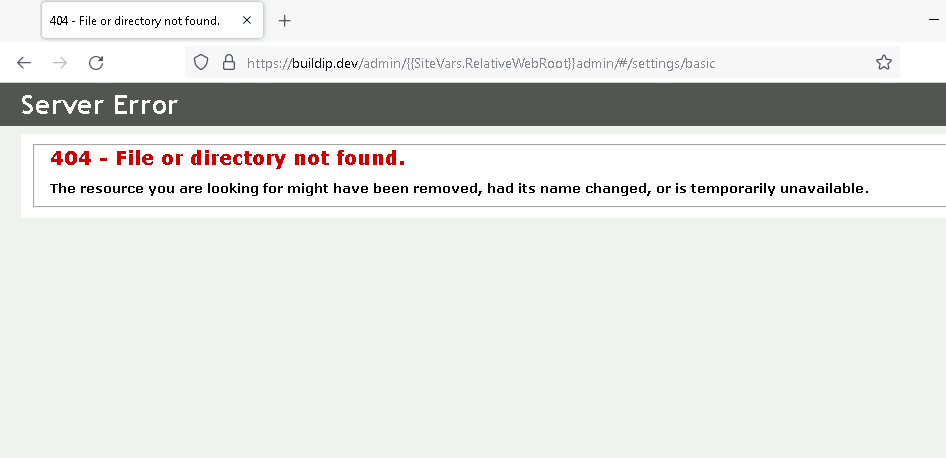
However, when I attempt to go to the admin page to change the password for example, then I see an error which looks like the one at the end of this post.
The error is actually incorrect, it is not a missing file or folder but it is actually because URL filtering is turned on at my site.
URL filtering was turned on my the web host but I cannot control that item & each time I install a new Blogengine.net then I have to ask the admins to use a special tool to turn off URL filtering. You can see all the details of URL filtering on the official microsoft site.
Is there any other way around this that you know of, besides removing URL filtering?
The image below occurs when I sign in using default admin & password & then click the Settings link.
I've followed the installation (upload zip to my site, unzip, etc.) and the site loads properly.
However, when I attempt to go to the admin page to change the password for example, then I see an error which looks like the one at the end of this post.
The error is actually incorrect, it is not a missing file or folder but it is actually because URL filtering is turned on at my site.
URL filtering was turned on my the web host but I cannot control that item & each time I install a new Blogengine.net then I have to ask the admins to use a special tool to turn off URL filtering. You can see all the details of URL filtering on the official microsoft site.
Is there any other way around this that you know of, besides removing URL filtering?
The image below occurs when I sign in using default admin & password & then click the Settings link.