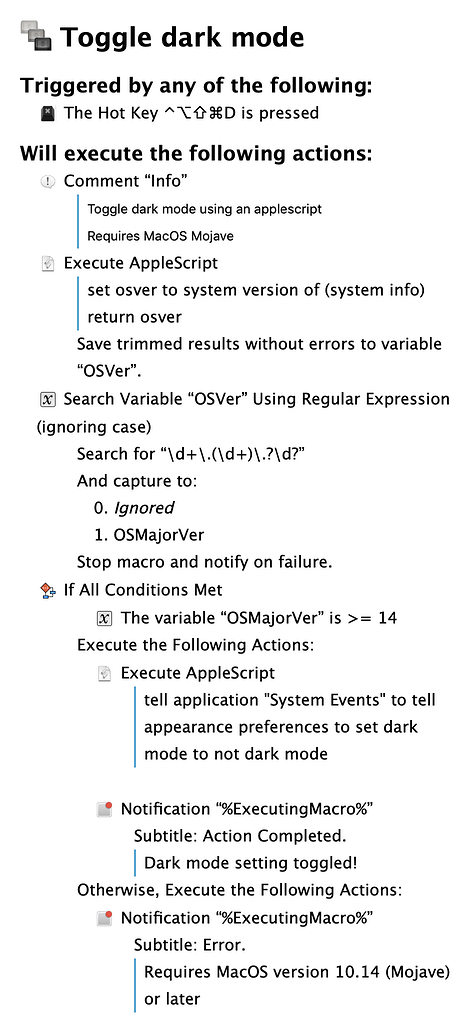
I created this little macro to toggle dark mode on Mojave. After checking the OS version, it runs a short appleScript to toggle the Dark Mode state. If not running Mojave or later, the macro exits with a notification.
Toggle dark mode.kmmacros (5.5 KB)
4 Likes
CJK
2
Thanks for sharing this. I think many Mojave users will find this useful. Out of curiosity, why did you limit this to Mojave (and above) ? High Sierra has dark mode too—in a more limited capacity—and it is set via AppleScript using exactly the same code.
I see the macro starts off by executing an AppleScript, then breaking out of it to do a regular expression search before going back in to another AppleScript. As a small hint or tip, you can isolate the major version number like so:
set text item delimiters to "."
set OSMajorVer to text item 2 of system version of (system info)
Then, of course, follow it with:
if the OSMajorVer < 14 then return false
tell application "System Events" to tell ¬
	the appearance preferences to ¬
	set dark mode to not dark mode
Forgive me if you already knew about text item delimiters and simply chose to use more core KM actions out of personal preference.
1 Like
Thanks for the suggestions. This was my first macro posted to the site as I am fairly new to Keyboard Maestro. I am familiar with the text item delimiters approach within AppleScript. I haven't done much AppleScript coding in a while, so it didn't dawn on me at the time. I did want to play with the RegEx capabilities within KBM. It is a very flexible utility, so lots of ways to get to the same end.
Again, thank you!
Norm
My macOS is Mojave, so I use this shellscript:
osascript -e 'tell app "System Events" to tell appearance preferences to set dark mode to not dark mode'
Hey @suliveevil,
You're running an AppleScript from a shell script.
That’s redundant when running from Keyboard Maestro.
Just use an Execute an AppleScript action and run the pure AppleScript.
-Chris
1 Like
Thanks for your comments.
Yes it is  a "shell version" AppleScript,just incase someone want to use it in terminal or write into *.sh file.
Pure AppleScript is good enough.
tell app "System Events" to tell appearance preferences to set dark mode to not dark mode
1 Like