SammyGuru is reader-supported. We have affiliate and sponsored partnerships, so we may earn a commission when you buy through links on our site, at no extra cost to you. Posts may contain sponsored or affiliate link placements. Learn more.
At Galaxy Unpacked, Samsung pulled the wraps off the Galaxy S25 trio. The Galaxy S25, S25+, and S25 Ultra are now out and official. Samsung is sticking to its tradition of offering seven years of software upgrades. However, with so many updates over time, the batteries are bound to show some wear and tear. Until now, there wasn’t a way to monitor this easily. Thankfully, that’s changing with the Galaxy S25 series. Users can now directly check battery health, cycle count, and more details on the Galaxy S25 series.
Galaxy S25 series can show battery health, cycle count, and more details
As spotted by @Razar_the_Raven, the Galaxy S25 series now displays detailed battery stats directly within the Settings app. While Android 14 introduced detailed battery information, Samsung didn’t implement it with One UI 6.0. Finally, with the Galaxy S25 series, the feature has debuted. It’s one of the most helpful things with the Galaxy S25 series.
SammyGuru November 2026 Giveaway
Smartwatch of your choice, up to $499
956 entries so far.
Enter free →On your Galaxy S25, S25+, or S25 Ultra, you can head to the Battery Information section in Settings > Battery. Here, you’ll find Battery Health (in percentage), Cycle Count, the battery’s manufacturing date, and its first used date.
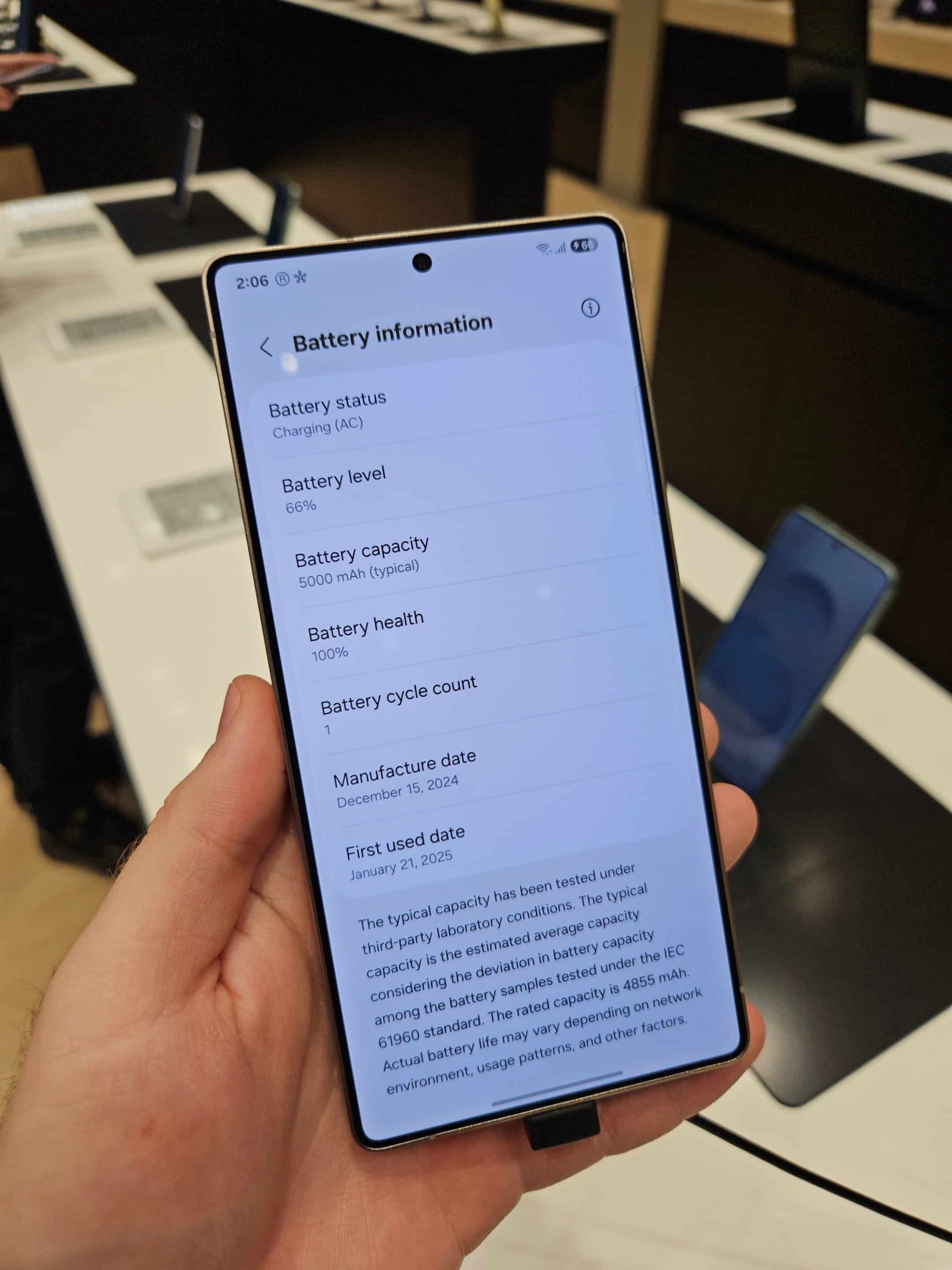
Among these, the most useful detail is the battery charge cycle count, which shows how many times the phone has been charged. This is particularly helpful if you’re troubleshooting a failing battery or considering buying a used phone. By knowing the details, you can make a sound decision.
That said, not much else is known about the feature for now. It’s unclear whether it will roll out to other Galaxy phones with the One UI 7 update or remain exclusive to the Galaxy S25 series. It’s entirely possible that Samsung could keep this feature limited to the S25 lineup. But I really hope other models will get it.

Written by
Abhinav AnandAbhinav Anand is the News Editor at SammyGuru and a technology journalist based in New Delhi. Before joining SammyGuru, he contributed to numerous outlets, including Android Headlines, ExtremeTech, The Mac Observer, Financial Express, Economic Times, iGeeksBlog, KnowTechie, PhonesWiki, SlashGear, and more. You can reach him at [email protected].