Wolfram Function Repository
Instant-use add-on functions for the Wolfram Language
Function Repository Resource:
A wrapper function for dynamic modules that causes a placeholder to be shown during initialization
ResourceFunction["AsynchronousDynamicModule"][DynamicModule[…,Initialization⧴(init)]] returns a new DynamicModule that initializes the expression init asynchronously. During the initialization, a spinner will be shown and the content of the DynamicModule will not evaluate before the initialization has finished. | |
ResourceFunction["AsynchronousDynamicModule"][DynamicModule[…],placeholder] shows placeholder during initialization. | |
ResourceFunction["AsynchronousDynamicModule"][DynamicModule[…],placeholder,flag] uses the variable flag to determine if the initialization has finished. |
The following DynamicModule shows a pink box during the initialization because the inner dynamic causes an error message:
| In[1]:= | ![DynamicModule[{x},
Dynamic[First[x]],
SynchronousInitialization -> False,
Initialization :> (
x = {};
Pause[3];
AppendTo[x, 1]
)
]](https://www.wolframcloud.com/obj/resourcesystem/images/171/171c1486-60f1-4582-838e-9c1958e80f52/0aacf6054e32c257.png) |
| Out[1]= |  |
AsynchronousDynamicModule automatically fixes this problem:
| In[2]:= | ![ResourceFunction["AsynchronousDynamicModule"]@DynamicModule[{x},
Dynamic[First[x]],
SynchronousInitialization -> False,
Initialization :> (
x = {};
Pause[3];
AppendTo[x, 1]
)
]](https://www.wolframcloud.com/obj/resourcesystem/images/171/171c1486-60f1-4582-838e-9c1958e80f52/5e1bee0c79283235.png) |
| Out[2]= |  |
The Print statement will not evaluate before the initialization finishes. All evaluation of the DynamicModule is prevented before the initialization has finished:
| In[3]:= | ![ResourceFunction["AsynchronousDynamicModule"]@DynamicModule[{x},
Dynamic[
Print["Hi!"];
First[x]
],
SynchronousInitialization -> False,
Initialization :> (
x = {};
Pause[3];
AppendTo[x, 1]
)
]](https://www.wolframcloud.com/obj/resourcesystem/images/171/171c1486-60f1-4582-838e-9c1958e80f52/709175395b6eab19.png) |
| Out[3]= |  |
Any placeholder can be used to show progress of the initialization:
| In[4]:= | ![ResourceFunction["AsynchronousDynamicModule"][
DynamicModule[{x},
Dynamic[
x
],
SynchronousInitialization -> False,
Initialization :> (
x = {};
Pause[1];
AppendTo[x, 1];
Pause[1];
AppendTo[x, 2];
Pause[1];
AppendTo[x, 3];
Pause[1];
AppendTo[x, 4];
)
],
Dynamic@ProgressIndicator[Length[x], {0, 4}]
]](https://www.wolframcloud.com/obj/resourcesystem/images/171/171c1486-60f1-4582-838e-9c1958e80f52/2417d5e0ec373bc7.png) |
| Out[4]= | 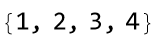 |
You can specify a dynamically updated variable that returns the content to its initialization state. This update action can then be reused in the content of the DynamicModule:
| In[5]:= | ![ResourceFunction["AsynchronousDynamicModule"][
DynamicModule[{
x,
start,
updateAction
},
Dynamic[
Column[{
x,
Slider[Dynamic[start], {0, 10, 1}],
Button["Update",
updateAction[start],
Method -> "Queued",
ImageSize -> All
]
}]
],
SynchronousInitialization -> False,
Initialization :> (
start = 0;
updateAction[startVal_] := (
initQ = False;
x = {};
Pause[1];
AppendTo[x, startVal + 1];
Pause[1];
AppendTo[x, startVal + 2];
Pause[1];
AppendTo[x, startVal + 3];
Pause[1];
AppendTo[x, startVal + 4];
initQ = True
);
updateAction[start]
)
],
Dynamic@ProgressIndicator[Length[x], {0, 4}],
initQ
]](https://www.wolframcloud.com/obj/resourcesystem/images/171/171c1486-60f1-4582-838e-9c1958e80f52/614e2c94f6c8e727.png) |
| Out[5]= | 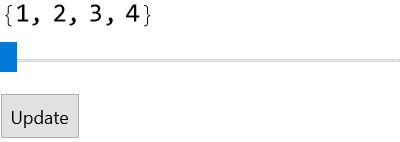 |
Wolfram Language 11.3 (March 2018) or above
This work is licensed under a Creative Commons Attribution 4.0 International License