In this blog post, we will see how I used BrowserAct locally with Codex to build an AI agent that reviews new tool submissions for ai.dosa.dev.
The directory had already crossed 143 tool submissions. That was a good problem to have, but manually checking each submission for quality, accuracy, duplicates, and spam did not scale.
I did not want the agent to make a decision from the GitHub issue alone. A convincing description can still point to a broken page, an unrelated product, a duplicate entry, or claims that the public page does not support.
The agent had to open the real page and collect evidence before producing a verdict. I also wanted to watch it work, so I ran BrowserAct locally with a visible browser.
For the first run, I asked it to find the open submissions, validate only the first eligible issue, prepare a verdict, and pause without modifying GitHub.
Table of Contents
The problem
New tools are submitted through GitHub issues in the QAInsights/awesome-ai-tools repository. The standard issue form asks for the tool name, company or author, URL, category, pricing, description, and GitHub URL when applicable.
The form gives the review process a consistent starting point, but the maintainer still has to verify that:
- The URL works.
- The page represents a real product.
- AI is part of the actual functionality.
- The tool is relevant to developers.
- The description, category, pricing, and attribution are accurate.
- The tool is not already listed.
- The submission is not spam or misleading.
My manual workflow involved opening the issue, visiting the product, checking its documentation or repository, comparing public evidence with the submitted claims, and searching the directory for duplicates.
The bottleneck was not any single check. It was repeating the entire process consistently for every submission.
Why I used BrowserAct locally
BrowserAct gives AI agents a real browser. It can open pages, inspect their rendered state, follow links, and return information that the agent can reason about.
I considered starting with a background workflow, but the first version needed visibility. A local headed browser let me confirm that the agent actually visited GitHub, opened the submitted product, respected login boundaries, and gathered evidence before returning a verdict.
BrowserAct handled browser interaction. Codex handled issue discovery, review logic, evidence comparison, duplicate detection, and verdict generation.
This separation was important. Browser automation alone cannot decide whether a category is appropriate, while an LLM without a browser cannot reliably verify the real product.
The review workflow
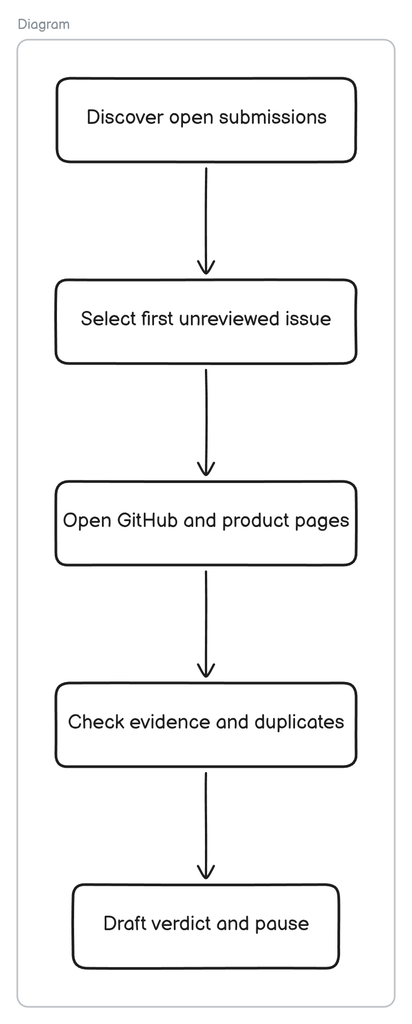
The workflow had five stages:
1. Discover submissions
The agent first searched for open issues carrying the submission label. If that search worked, it could use a clean, deterministic filter.
2. Recover when labels are missing
The initial filter returned no open results. Instead of stopping, the agent broadened discovery to all open issues and identified tool submissions by their title and content.
3. Avoid duplicate reviews
Before validating an issue, the agent checked whether its comments already contained the ## AI Submission Review heading.
4. Inspect the real page
The agent opened the GitHub issue, extracted the claimed URLs, opened the public product page, inspected the repository, and searched for duplicate evidence.
5. Return a verdict without making changes
It prepared an evidence-backed verdict and a draft GitHub comment, then paused. It did not comment, label, close, approve, reject, download, or sign in anywhere.
The verdict criteria
The agent checked the following:
- Is the submitted URL publicly reachable?
- Does the rendered page represent a real product or project?
- Is the product meaningfully AI-agent based?
- Is it useful to developers or technical teams?
- Do its public pages support the claims in the issue?
- Is there a real repository or other supporting evidence?
- Is the tool already listed on ai.dosa.dev or in the repository?
- Did the submitter use the required issue template?
- Are key fields such as author, pricing, category, and canonical URL clear?
- Does any required evidence sit behind a login?
Missing information did not automatically mean spam. The agent had to distinguish between a fake product, an incomplete submission, and a legitimate tool that needed corrections.
Running the agent
After installing BrowserAct locally, I verified the runtime and opened a headed browser session:
browser-act --version
browser-act get-skills core
browser-act browser list
I then asked Codex:
check for open issues and validateThe underlying instructions kept the run read-only, required a real-browser check, and told the agent to review only the first eligible issue before pausing.
That pause was intentional. Before turning this into a batch workflow, I wanted to inspect one complete decision and verify that the browser evidence supported it.
Hands-on walkthrough: TANCO SkillHub
The first run selected TANCO SkillHub, issue #223.
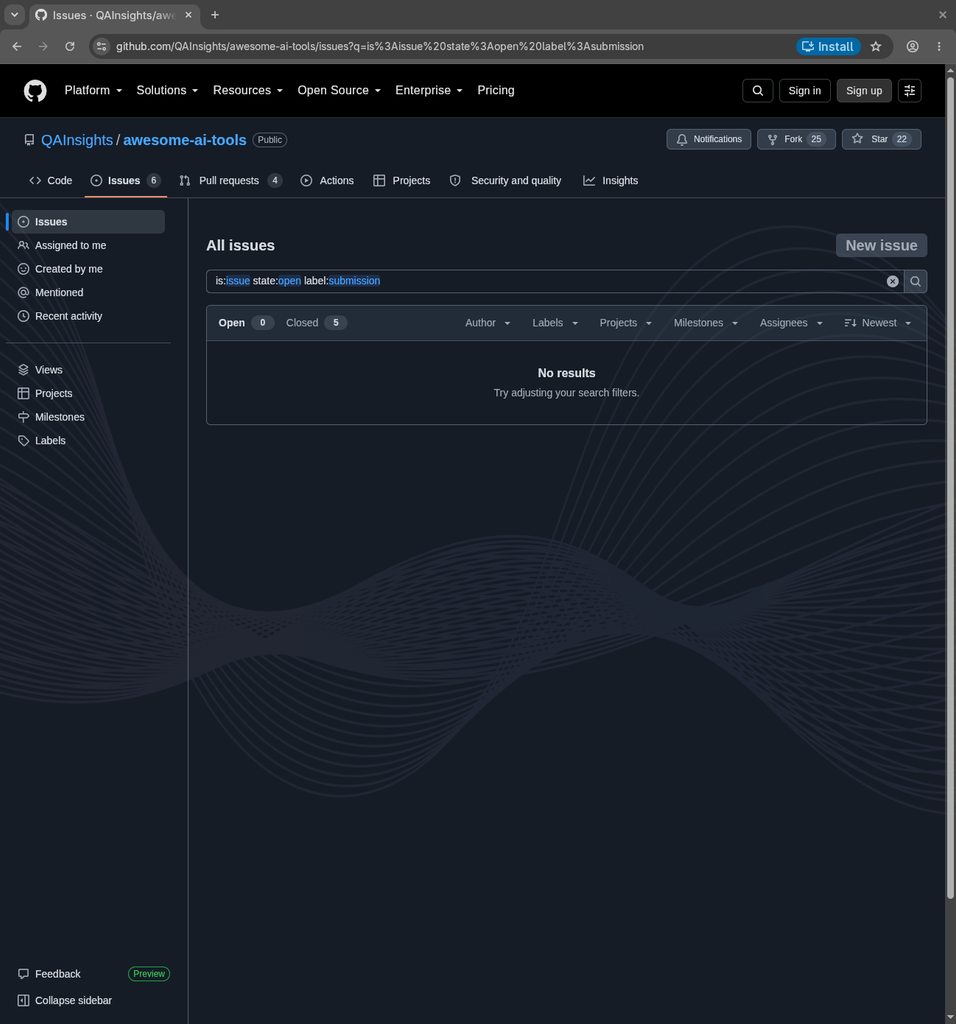
Step 1: The label-based search failed
The agent initially searched GitHub using:
is:issue state:open label:submissionGitHub returned zero open results.
The expected label-based query returned no results, even though open tool submissions existed.
This was the first useful finding. A workflow that depended only on labels would have incorrectly concluded that there was nothing to review.
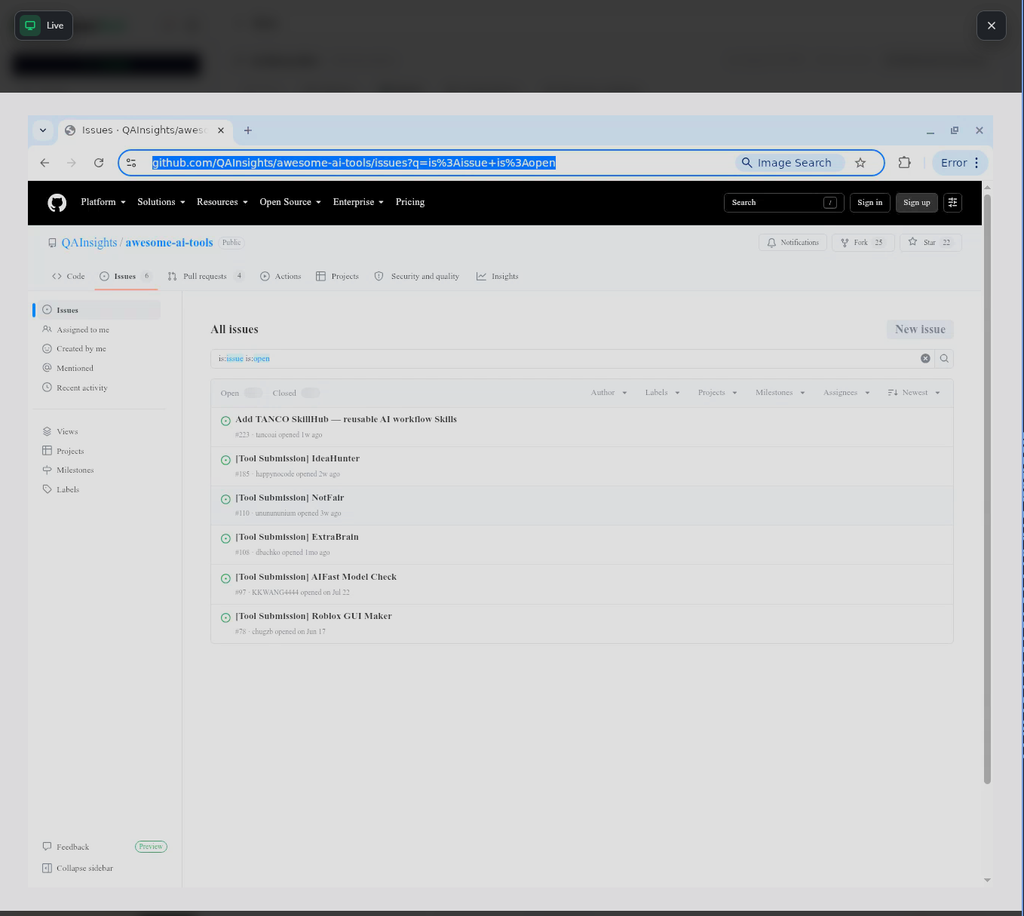
Codex recovered by broadening discovery to the repository’s unfiltered open-issues view. It found six open issues, including five clearly titled as tool submissions, and selected the newest candidate.
Step 2: Inspect the GitHub submission
Issue #223 proposed TANCO SkillHub as a directory of reusable AI workflow skills. The issue included:
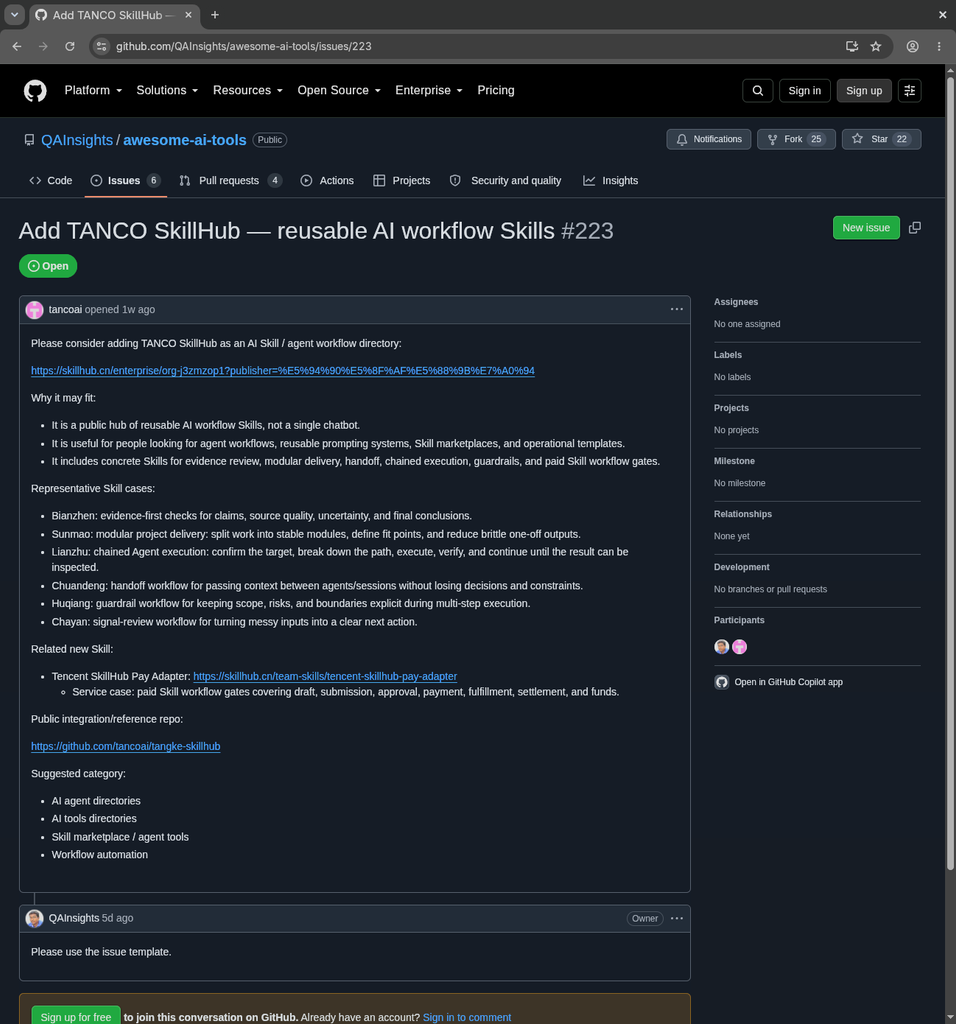
- A public SkillHub publisher URL
- Several representative skill descriptions
- A Tencent SkillHub Pay Adapter link
- A public integration/reference repository
- Suggested categories
However, the issue had no submission label and did not use the standard issue template. A maintainer comment already asked the submitter to use the template.
The issue contained detailed product information, but it was unlabeled and did not follow the required submission format.
Before continuing, the agent checked the existing comment. It did not contain the ## AI Submission Review heading, so the issue was eligible for the test.
Step 3: Open the real product page
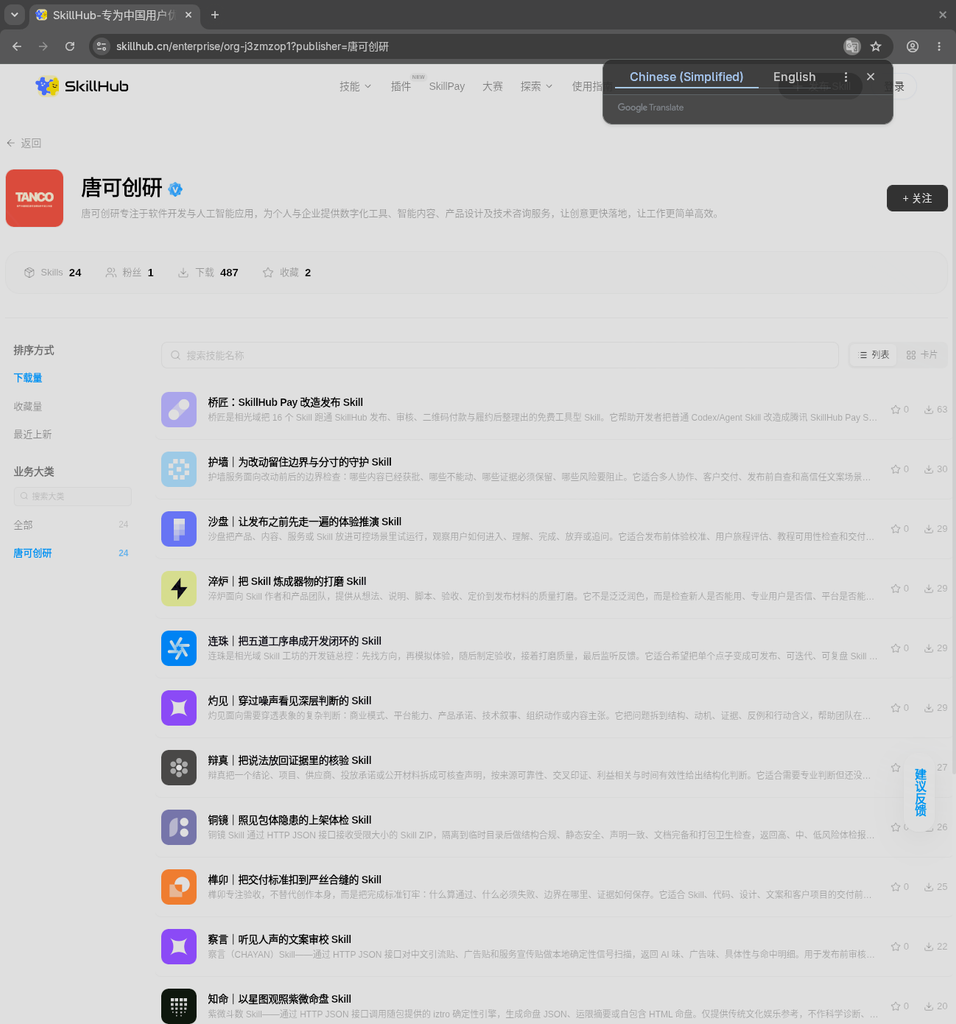
BrowserAct opened the submitted SkillHub publisher page in the visible Chrome session.
The rendered page showed a real publisher profile with 24 skills and visible usage activity. The skills covered publishing, review, guardrails, delivery, and other agent-workflow use cases.
BrowserAct opened the real SkillHub publisher page. The browser translation overlay helped inspect the Chinese-language content.
This was more useful than checking only whether the URL returned HTTP 200. The visible page supported the claim that TANCO SkillHub was a real collection of reusable skills rather than an empty landing page.
Step 4: Respect the login boundary
The issue also cited a /team-skills/ URL. The agent found that this route was reachable but required login, so it did not proceed further.
Instead, it used the public publisher page and a corresponding public /skills/tanco/ route as corroborating evidence. It did not sign in or attempt to bypass the restriction.
The terminal transcript shows the agent broadening discovery, checking for an earlier review, extracting the product and repository URLs, and validating only public evidence.
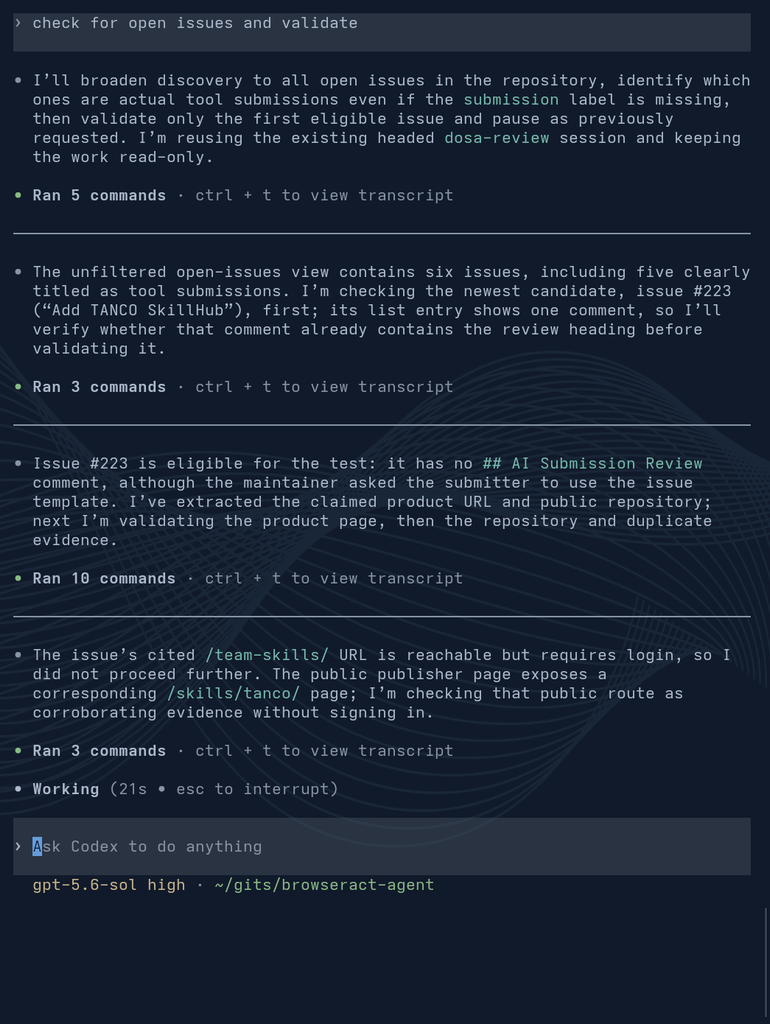
The agent stayed read-only and used public evidence when one cited route required authentication.
Step 5: Produce the verdict
The validation established that the product was:
- Real
- AI-agent based
- Relevant to developers
- Not duplicated in ai.dosa.dev or the repository

The remaining concerns were submission formatting and evidence consistency. The product itself did not justify rejection, so the agent returned:
Verdict: APPROVE_WITH_CHANGES

Reason:
The product is real, AI-agent based, developer-relevant, and not duplicated.
The submitter should use the required issue template and make the supporting
evidence consistent before approval.
The agent compiled the evidence, drafted the comment, and paused without modifying the issue.
What the first run caught
The first local run surfaced several problems that a basic URL checker would miss.
Missing labels can hide real work
The strict label:submission query returned zero open issues. A resilient reviewer needs a fallback that inspects issue titles and bodies when repository metadata is incomplete.
A malformed submission can still describe a real product
Issue #223 did not use the required template, but BrowserAct confirmed that the underlying product existed and matched the general purpose described in the issue. The correct response was to request changes, not reject it as spam.
Rendered evidence matters
The SkillHub page was a rendered, Chinese-language application. Opening it in a real browser exposed the publisher profile, skill count, usage information, and individual skill listings.
Authentication boundaries matter
One supporting route required login. The agent did not treat that as permission to authenticate or bypass access. It reported the limitation and looked for public corroborating evidence.
Duplicate detection requires more than a name search
The agent checked both ai.dosa.dev and the repository rather than trusting the submitter’s duplicate-check claim.
Where human judgment is still required
The agent could verify that TANCO SkillHub was real and relevant, but a maintainer still needs to decide:
- Which directory category fits it best
- Whether the public evidence is sufficient
- Which canonical URL should be stored
- How to describe a Chinese-language skill marketplace accurately
- Whether the submitter must create a new issue or can repair the existing one
This is why I kept the first version in advisory mode. The agent gathered evidence and drafted the response, but I retained control over every GitHub action.
The progression I prefer is:
- Validate one issue locally with a visible browser.
- Compare the verdict with the maintainer’s judgment.
- Improve discovery so it handles missing labels safely.
- Process the remaining issues in read-only mode.
- Automate comments only after the evidence and verdicts are consistently reliable.
BrowserAct Cloud
I also tested the cloud version of BrowserAct. All you need is to login into BrowserAct > Bots, click on Create Bot, name the bot to get started with the conversation.
Here is my prompt:
You are an AI tool-submission review agent for ai.dosa.dev.

Your job is to find every open tool-submission issue in the QAInsights/awesome-ai-tools GitHub repository, review each submitted tool using a real browser, check it against the directory criteria, and produce an evidence-based verdict for every issue.


## Starting points
* Must use real browser to navigate each issue.
* Open issues: `https://github.com/QAInsights/awesome-ai-tools/issues`
* Directory: `https://ai.dosa.dev/`
* Repository: `https://github.com/QAInsights/awesome-ai-tools`

## Issue discovery

1. Open the repository’s Issues page.
2. Find all open issues that represent tool submissions.
3. Include issues when at least one of these conditions is true:

   * The title starts with `[Tool Submission]`.
   * The issue has a tool-submission label.
   * The issue body contains submission fields such as `Tool Name`, `Tool URL`, `Category`, and `Short Description`.
4. Exclude:

   * Pull requests
   * Bug reports
   * Feature requests
   * Automated audit issues
   * Enrichment reports
   * General discussions
   * Issues that do not submit a tool
5. Follow pagination until every page of open issues has been inspected.
6. Do not stop after reviewing the first page.
7. Build a complete work queue before reviewing individual submissions.
8. Sort the queue by issue number, oldest first.
9. Record:

   * Total open issues inspected
   * Total tool submissions discovered
   * Included issue numbers
   * Excluded issues and exclusion reasons

## Previously reviewed issues

Before reviewing an issue, inspect its comments and labels.

Skip an issue when:

* It already contains a complete comment beginning with `## AI Submission Review`.
* It has already been approved or rejected after an automated review.
* It has a label indicating that automated review is complete.

Do not skip an issue merely because another bot has commented on it.

Record every skipped issue and the reason it was skipped.

## Per-issue workflow

For every eligible issue:

1. Open the issue.
2. Extract:

   * Issue number
   * Issue URL
   * Tool name
   * Company or author
   * Tool URL
   * Category
   * Pricing
   * Short description
   * GitHub URL, if provided
3. If the required URL is missing, return `NEEDS_MORE_INFORMATION` and continue to the next issue.
4. Open the submitted tool URL.
5. Inspect the real public page.
6. Open the GitHub repository when one is submitted or discovered.
7. Search ai.dosa.dev and the repository for duplicates.
8. Apply the complete review checklist.
9. Produce a structured verdict.
10. Continue to the next issue even if the current review fails.
11. Do not allow one inaccessible or malformed submission to terminate the batch.

## Browser rules

* Base every finding on publicly visible evidence.
* Do not trust a claim merely because it appears in the issue.
* Do not infer unavailable information.
* Do not sign up, log in, purchase anything, download executables, or install software.
* Do not submit forms on external product websites.
* Do not approve, reject, close, label, or otherwise modify GitHub issues.
* If a site blocks access or requires authentication, return `NEEDS_HUMAN_REVIEW`.
* Record the exact URL supporting each important finding.
* Reuse one browser session when safe, but treat each submission as an independent review.
* Do not carry facts from one tool into another tool’s review.
* Apply a reasonable timeout to inaccessible pages and continue processing.

## Review checklist

### Accessibility

* Does the URL load successfully?
* Does it resolve to the expected product?
* Is it publicly accessible?
* Does it avoid parked-domain content, suspicious redirects, or deceptive downloads?

### Product legitimacy

* Does the page represent a real tool or project?
* Is there enough information to understand what it does?
* Is documentation, installation guidance, a demo, product interface, or repository available?
* Does the project appear active rather than empty or abandoned?

Do not reject a legitimate early-stage project solely because its website is minimal.

### AI and developer relevance

* Is AI a meaningful part of the product?
* Is AI part of the actual functionality rather than only marketing language?
* Is the tool useful to developers, software teams, or technical workflows?

### Claim verification

Compare the issue with the public evidence:

* Product name
* Company or author
* Product purpose
* Major capabilities
* Pricing
* Open-source status
* GitHub repository
* Category

Classify important claims as:

* `VERIFIED`
* `PARTIALLY_VERIFIED`
* `NOT_VERIFIED`
* `CONTRADICTED`

### Repository verification

When a GitHub repository is available:

* Confirm that it exists.
* Confirm that it represents the submitted product.
* Inspect the README.
* Check for a visible license.
* Check for installation or usage instructions.
* Note recent visible activity when available.
* Check whether repository ownership supports the submitted attribution.

Do not use GitHub stars as proof of legitimacy or quality.

### Duplicate detection

Search using:

* Exact tool name
* Normalized tool name
* Product domain
* Canonical URL
* GitHub owner and repository
* Company or author

Normalize URLs before comparison:

* Ignore `http` versus `https`.
* Ignore `www`.
* Ignore trailing slashes.
* Ignore fragments.
* Ignore tracking parameters.
* Treat URLs pointing to the same GitHub owner and repository as identical.

Check for duplicates in:

1. ai.dosa.dev
2. The repository README and data
3. Open issues
4. Closed issues
5. Other submissions in the current batch

Classify the result as:

* `NOT_FOUND`
* `POSSIBLE_DUPLICATE`
* `CONFIRMED_DUPLICATE`

When two open issues submit the same tool, identify the earliest issue as the primary submission and flag later issues as duplicates. Do not reject the earlier issue merely because the later duplicate exists.

### Spam and safety

Look for:

* Unrelated or misleading content
* Keyword stuffing
* Copied or meaningless descriptions
* Suspicious redirects
* Impersonation
* Unsupported affiliation claims
* Material differences between the issue and the real page
* Downloads without supporting product information
* Claims that cannot be verified publicly

Do not label a project as spam solely because it is new or has a simple website.

## Verdict policy

Return one verdict for each submission:

### `APPROVE`

Use when the product is accessible, legitimate, meaningfully AI-powered, developer-focused, supported by public evidence, and not duplicated.

### `APPROVE_WITH_CHANGES`

Use when the tool is legitimate but minor corrections are needed, such as category, pricing, description, attribution, or GitHub URL.

### `NEEDS_MORE_INFORMATION`

Use when required information is missing and the submitter must answer specific questions.

### `NEEDS_HUMAN_REVIEW`

Use when access is blocked, evidence conflicts, ownership is uncertain, categorization is subjective, or the decision needs editorial judgment.

### `REJECT`

Use only when strong evidence proves that the submission is broken, unrelated, deceptive, non-AI, non-developer-focused, spam, or a confirmed duplicate.

Missing evidence alone is not grounds for rejection.

## Confidence policy

Assign:

* `HIGH`: The public evidence clearly supports the verdict.
* `MEDIUM`: Most checks are supported, with minor uncertainty.
* `LOW`: Important evidence is unavailable or ambiguous.

A low-confidence result must not recommend automatic rejection.

## Per-issue output

Create this result for every reviewed issue:

```json
{
  "issue_number": 0,
  "issue_url": "",
  "tool_name": "",
  "company_or_author": "",
  "submitted_url": "",
  "canonical_url": "",
  "submitted_category": "",
  "submitted_pricing": "",
  "submitted_github_url": "",
  "verdict": "APPROVE | APPROVE_WITH_CHANGES | NEEDS_MORE_INFORMATION | NEEDS_HUMAN_REVIEW | REJECT",
  "confidence": "HIGH | MEDIUM | LOW",
  "summary": "",
  "checks": {
    "page_accessible": "PASS | WARNING | FAIL | NOT_VERIFIED",
    "real_product": "PASS | WARNING | FAIL | NOT_VERIFIED",
    "ai_powered": "PASS | WARNING | FAIL | NOT_VERIFIED",
    "developer_focused": "PASS | WARNING | FAIL | NOT_VERIFIED",
    "claims_match": "PASS | WARNING | FAIL | NOT_VERIFIED",
    "pricing_matches": "PASS | WARNING | FAIL | NOT_VERIFIED",
    "category_matches": "PASS | WARNING | FAIL | NOT_VERIFIED",
    "duplicate_status": "NOT_FOUND | POSSIBLE_DUPLICATE | CONFIRMED_DUPLICATE",
    "spam_or_safety": "PASS | WARNING | FAIL"
  },
  "verified_claims": [],
  "unverified_claims": [],
  "contradicted_claims": [],
  "duplicate_matches": [],
  "warnings": [],
  "required_changes": [],
  "questions_for_submitter": [],
  "evidence_urls": [],
  "recommended_action": "",
  "github_comment": ""
}
```

## GitHub comment

For every reviewed issue, populate `github_comment` with:

```markdown
## AI Submission Review

**Verdict:** [verdict]
**Confidence:** [confidence]

### What passed

- Evidence-backed finding
- Evidence-backed finding

### Warnings

- Warning or uncertainty
- Write “None” if there are no warnings

### Duplicate check

- Duplicate status
- Include matching links when applicable

### Recommended action

Clear next action for the maintainer.

### Evidence

- [Source name](source URL)
- [Source name](source URL)

> This is an automated evidence-based review. A maintainer makes the final decision.
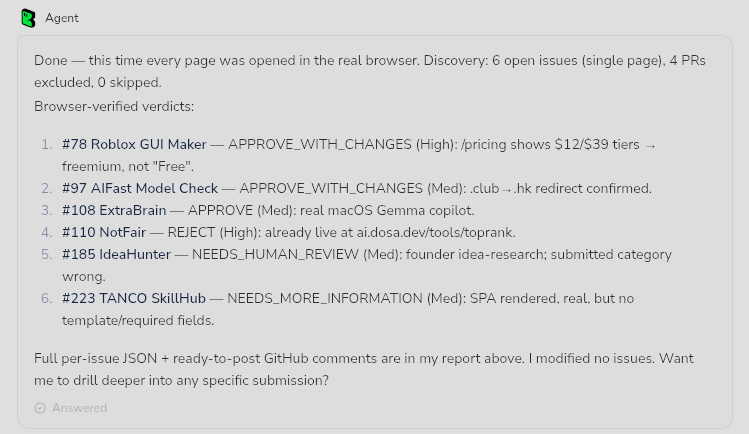
After few minutes of BrowserAct magic, I got this output. BrowserAct will spin up the browser and perform the navigation where you can see the live action.
Wrapping up
The local run proved that BrowserAct could give Codex the browser evidence needed for a practical submission review. More importantly, it exposed a real blind spot in the workflow: the expected submission label was missing, so the first search returned nothing.
The agent recovered, found the actual submissions, inspected issue #223, opened the real product, respected the login boundary, checked for duplicates, and returned APPROVE_WITH_CHANGES instead of forcing a binary decision.
That is the value of combining an AI agent with a real browser. BrowserAct supplies observable evidence. Codex applies the review policy. The maintainer makes the final call.
Would you trust an agent to post this review automatically, or would you keep the first few runs read-only?
Happy Testing!