简体中文 | English


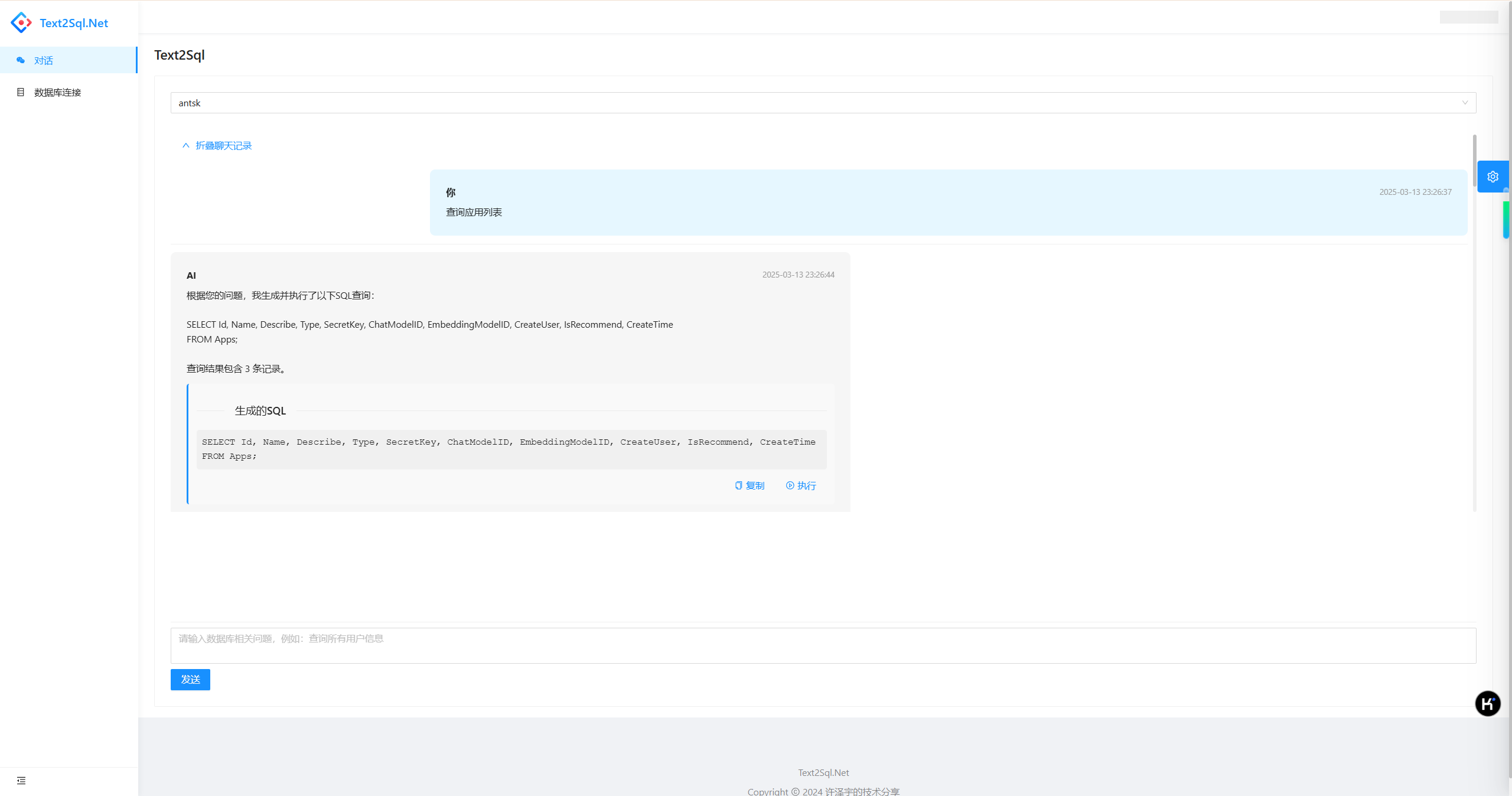

- Natural Language to SQL: Convert everyday language descriptions into SQL queries automatically
- Multi-Database Support: Compatible with SQL Server, MySQL, PostgreSQL, and SQLite
- Intelligent Context Understanding: Based on chat history to understand user query intent
- Vector Search Integration: Support semantic similarity search
- Syntax Validation: Automatically check generated SQL syntax correctness
- MCP Protocol Support: Seamless integration with IDE tools (Cursor, Trae, etc.)
- Intelligent Q&A Example System: Improve SQL generation accuracy through example learning
This project supports SQL Server, MySQL, PostgreSQL and SQLite. Configuration example:
"Text2SqlOpenAI": {
  "Key": "your-api-key",
  "EndPoint": "https://api.antsk.cn/",
  "ChatModel": "gpt-4o",
  "EmbeddingModel": "text-embedding-ada-002"
},
"Text2SqlConnection": {
  "DbType": "Sqlite", //PostgreSQL
  "DBConnection": "Data Source=text2sql.db",
  "VectorConnection": "text2sqlmem.db",
  "VectorSize": 1536 //Required for PostgreSQL, optional for SQLite
}-
Database Abstraction Layer
- Multi-database support via strategy pattern
- Standardized operations through IDatabaseProvider interface
- Dynamic loading of database drivers (SQLite/Postgres/MySql/SqlServer)
- Auto-generated database-specific SQL dialects
-
Vector Database Integration
- SQLite in-memory vector search
- PostgreSQL pgvector extension support
- Unified IVectorRepository interface
- Cosine similarity/Euclidean distance calculations
-
Q&A Example System
- Manual and correction-based example creation
- Semantic search for relevant examples
- Category organization and usage statistics
- Batch operations and example management
-
MCP Protocol Server
- Full Text2SQL functionality via MCP tools
- IDE integration support (Cursor, Trae, etc.)
- Database schema and query execution tools
- Context-aware connection management
flowchart TD
    A[User Natural Language Query] --> B{Database Connection Selected}
    B -->|Not Selected| C[Prompt to Select Database]
    B -->|Selected| D[Save User Message to Chat History]

    D --> E[Semantic Search for Relevant Schema]
    E --> F[Vector Database Query]
    F --> G[Relevance Scoring & Table Relationship Inference]
    G --> H[Build Schema Context]

    H --> I[Call LLM to Generate SQL]
    I --> J[Use Semantic Kernel Plugins]
    J --> K[SQL Security Check]

    K -->|Query Statement| L[Auto Execute SQL]
    K -->|Operation Statement| M[Generate SQL Only<br/>No Auto Execution]

    L --> N{Execution Successful}
    N -->|Success| O[Return Query Results]
    N -->|Failed| P[SQL Optimization]

    P --> Q[Optimize SQL Using Error Info]
    Q --> R[Re-execute Optimized SQL]
    R --> S[Return Final Results]

    M --> T[Prompt Manual Execution]
    O --> U[Save Response to Chat History]
    S --> U
    T --> U
    U --> V[Display Results to User]

    style A fill:#e1f5fe
    style V fill:#e8f5e8
    style K fill:#fff3e0
    style P fill:#fce4ec
flowchart TD
    A[Database Connection Config] --> B[Schema Training Service]
    B --> C[Extract Database Table Structure]
    C --> D[Get Table/Column/Foreign Key Info]
    D --> E[Generate Table Description Text]

    E --> F[Text Vectorization]
    F --> G[Store to Vector Database]

    G --> H{Vector Storage Type}
    H -->|SQLite| I[SQLiteMemoryStore]
    H -->|PostgreSQL| J[PostgresMemoryStore with pgvector]

    I --> K[Schema Training Complete]
    J --> K

    K --> L[Wait for User Query]
    L --> M[Semantic Search]
    M --> N[Relevance Matching]
    N --> O[Return Relevant Table Structure]

    style A fill:#e3f2fd
    style F fill:#f3e5f5
    style G fill:#e8f5e8
    style M fill:#fff3e0
flowchart LR
    subgraph "UI Layer"
        A[Blazor Frontend Pages]
        B[Database Connection Selection]
        C[Chat Input Box]
        D[SQL Result Display]
    end

    subgraph "Service Layer"
        E[ChatService<br/>Chat Service]
        F[SchemaTrainingService<br/>Schema Training Service]
        G[SemanticService<br/>Semantic Service]
        H[SqlExecutionService<br/>SQL Execution Service]
        I[QAExampleService<br/>Q&A Example Service]
        J[McpServer<br/>MCP Protocol Server]
    end

    subgraph "Data Access Layer"
        K[DatabaseConnectionRepository<br/>Database Connection Repository]
        L[ChatMessageRepository<br/>Chat Message Repository]
        M[DatabaseSchemaRepository<br/>Schema Repository]
        N[SchemaEmbeddingRepository<br/>Vector Embedding Repository]
        O[QAExampleRepository<br/>Q&A Example Repository]
    end

    subgraph "External Services"
        P[OpenAI API<br/>LLM Service]
        Q[Vector Database<br/>SQLite/PostgreSQL]
        R[Business Database<br/>Multi-Database Support]
        S[MCP Clients<br/>IDE Tool Integration]
    end

    A --> E
    B --> K
    C --> E
    D --> H

    E --> F
    E --> G
    E --> H
    E --> L
    E --> I

    F --> M
    F --> N
    G --> Q
    H --> K
    H --> R
    I --> O
    J --> S

    E --> P
    G --> P

    style A fill:#e1f5fe
    style E fill:#f3e5f5
    style P fill:#fff3e0
    style Q fill:#e8f5e8
    style J fill:#fce4ec
    style I fill:#e3f2fd
Text2Sql.Net integrates Model Context Protocol, serving as an MCP server to provide Text2SQL functionality for various AI development tools.
get_database_connections: Get all database connection configurationsget_database_schema: Get database table structure informationgenerate_sql: Generate SQL queries from natural languageexecute_sql: Execute SQL query statementsget_chat_history: Get chat history recordsget_table_structure: Get detailed structure of specified tablesget_all_tables: Get all table information
In MCP-supported IDEs (such as Cursor, Trae, etc.), you can connect to Text2Sql.Net with the following configuration:
{
  "mcpServers": {
    "text2sql": {
      "name": "Text2Sql.Net - sqlserver",
      "type": "sse",
      "description": "智能Text2SQL服务 - 。支持自然语言转SQL查询。兼容Cursor、Trae等IDE。",
      "isActive": true,
      "url": "http://localhost:5000/mcp/sse?connectionId=xxxxxx"
    }
  }
}
After configuration, you can directly interact with databases using natural language in your IDE:
- "Show the structure of all user tables"
- "Query order data from the last week"
- "Count the number of products in each category"
- Code Development: Quickly generate database query code in IDE
- Data Analysis: Rapidly explore data through natural language
- Report Generation: Quickly build complex statistical queries
- System Integration: Integrate Text2SQL capabilities into other tool chains
Text2Sql.Net provides an intelligent Q&A example management system that improves SQL generation accuracy through learning and accumulating examples.
- Example Management: Support manual creation and correction-generated Q&A examples
- Semantic Search: Match relevant examples based on vector similarity
- Category Organization: Support basic queries, complex queries, aggregate queries, etc.
- Usage Statistics: Track example usage frequency and effectiveness
- Batch Operations: Support batch enable, disable, and delete examples
- Basic Queries: Simple SELECT statements and basic filtering
- Complex Queries: Multi-table joins, subqueries, and complex scenarios
- Aggregate Queries: Include GROUP BY, SUM, COUNT and other aggregate functions
- Join Queries: Multi-table JOIN operations
- Correction Examples: Examples generated from incorrect SQL corrections
When users input queries, the system will:
- Vectorize the user question
- Perform semantic search in the example library
- Return the most relevant examples (default relevance threshold 0.7)
- Provide relevant examples as context to LLM
- Update example usage statistics
{
  "question": "Query the number of active users in the last month",
  "sqlQuery": "SELECT COUNT(DISTINCT user_id) FROM user_activities WHERE activity_date >= DATE_SUB(NOW(), INTERVAL 1 MONTH)",
  "category": "aggregate",
  "description": "Count distinct users with activity records in the last 30 days"
}- Manual Creation: Directly add Q&A pairs in the management interface
- Correction Generation: Automatically create examples when users correct wrong SQL
- Batch Import: Support batch generation of examples from existing query history
Join our developer community through WeChat (ID: xuzeyu91) or visit AntSK for more RAG solutions.