|
| 1 | +# Allocation Endpoint |
| 2 | + |
| 3 | +This is a sample solution to enable an Allocation Endpoint proxy in front of GKE Agones clusters. |
| 4 | + |
| 5 | +In this folder you will find: |
| 6 | + |
| 7 | +1. Terraform modules that create resources in GCP |
| 8 | +2. The Allocation Endpoint Proxy code that gets deployed to Cloud Run |
| 9 | +3. An [ESP container](https://cloud.google.com/endpoints/docs/grpc/get-started-cloud-run) that gets deployed as a sidecar alongside the `agones-allocator` |
| 10 | +4. A sample client code to send allocation requests to the proxy |
| 11 | +5. Dockerfile that builds the proxy and scripts to push the image to a docker repository |
| 12 | +6. Documentation on how to use the solution. |
| 13 | + |
| 14 | +Here is the architecture of GCP resources created: |
| 15 | + |
| 16 | +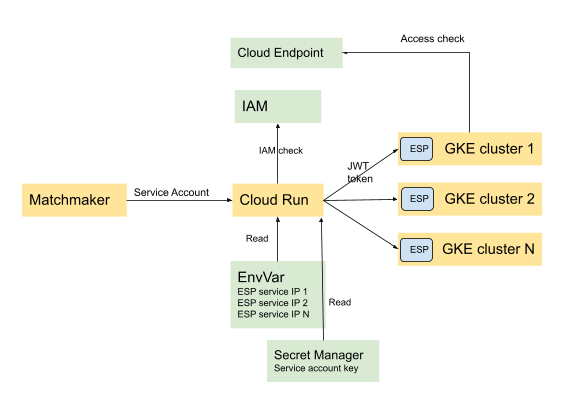 |
| 17 | + |
| 18 | + |
| 19 | +## GKE cluster |
| 20 | +First and foremost you need to create clusters and install Agones to experiment with this solution. |
| 21 | +The clusters can be in the same GCP project as your Allocation Endpoint proxy or they can be in a different project. |
| 22 | + |
| 23 | +--- |
| 24 | +**NOTE** |
| 25 | + |
| 26 | +The solution has not been tested with non-GKE clusters. |
| 27 | + |
| 28 | +--- |
| 29 | + |
| 30 | +When creating GKE Clusters, [Workload Identity](https://cloud.google.com/kubernetes-engine/docs/how-to/workload-identity) needs to be enabled. Please follow [GKE cluster setup](https://agones.dev/site/docs/installation/creating-cluster/gke/) and include workload-pool, e.g: |
| 31 | + |
| 32 | +<pre> |
| 33 | +gcloud container clusters create [NAME] \ |
| 34 | + ... |
| 35 | + <b>--workload-pool=[GKE-PROJECT-ID].svc.id.goog \ </b> |
| 36 | +</pre> |
| 37 | + |
| 38 | +Install Agones on your cluster. You need to disable mTLS because the `agones-allocator` container will be the backend for ESP container. |
| 39 | + |
| 40 | +``` |
| 41 | +helm upgrade my-release --install --namespace agones-system --create-namespace agones/agones \ |
| 42 | + --set agones.allocator.disableMTLS=true \ |
| 43 | + --set agones.allocator.disableTLS=true \ |
| 44 | + --set agones.allocator.service.http.enabled=false |
| 45 | +``` |
| 46 | + |
| 47 | +After installing Agones, deploy [ESP](https://cloud.google.com/endpoints/docs/grpc/specify-esp-v2-startup-options) which is an envoy based proxy, deployed as a sidecar along side `agones-alloator` container. Run the following to patch the service deployement, change the service port to ESP and add annotation to `agones-allocator` service account to impersonate GCP service account. |
| 48 | + |
| 49 | +Replace [GKE-PROJECT-ID] in `patch-agones-allocator.yaml` with your project ID before runing the scripts. |
| 50 | + |
| 51 | +``` |
| 52 | +kubectl patch deployment agones-allocator -n agones-system --patch-file patch-agones-allocator.yaml |
| 53 | +kubectl patch svc agones-allocator -n agones-system --type merge -p '{"spec":{"ports": [{"port": 443,"name":"https","targetPort":9443}]}}' |
| 54 | +kubectl annotate sa -n agones-system agones-allocator iam.gke.io/gcp-service-account=ae-esp-sa@[PROJECT-ID].iam.gserviceaccount.com |
| 55 | +``` |
| 56 | + |
| 57 | +## Terraform |
| 58 | +The terraform modules create resources in GCP: |
| 59 | + |
| 60 | +``` |
| 61 | +terraform apply \ |
| 62 | + -var "project_id=[PROJECT-ID]" \ |
| 63 | + -var "authorized_members=[\"serviceAccount:[SERVICE-ACCOUNT-EMAIL]\"]" \ |
| 64 | + -var "clusters_info=[CLUSTERS-INFO]" \ |
| 65 | + -var "workload-pool=[GKE-PROJECT-ID].svc.id.goog" |
| 66 | +``` |
| 67 | + |
| 68 | +`[CLUSTERS-INFO]` is in the form of `[{\"name\":\"cluster1\",\"endpoint\":\"34.83.14.82\",\"namespace\":\"default\",\"allocation_weight\":100},{...}]` deserializing to []ClusterInfo, defined in the `server/clusterselector.go`. |
| 69 | + |
| 70 | +- The `name` is a unique randomly selected name for the cluster. |
| 71 | +- The `endpoint` is the `agones-allocator` external IP. |
| 72 | +- The `namespace` is the game server namespace. |
| 73 | +- The `allocation_weight` is a value between 0 and 100, which sets the relative allocation rate a cluster receives compared to other clusters. By setting weight to zero, a cluster stops receiving allocation requests. |
| 74 | + |
| 75 | +`[SERVICE-ACCOUNT-EMAIL]` is the service account to be granted access the Allocation Endpoint. You need to have [the service account created](https://cloud.google.com/iam/docs/creating-managing-service-accounts) before running terraform. |
| 76 | + |
| 77 | +## Server |
| 78 | + |
| 79 | +The Allocation Endpoint proxy code is in `./server` folder. You can make changes and run the following to build and push the image to your own GCR repository: |
| 80 | + |
| 81 | +``` |
| 82 | +docker build --tag gcr.io/[PROJECT-ID]/allocation-endpoint-proxy:[VERSION] . |
| 83 | +docker push gcr.io/[PROJECT-ID]/allocation-endpoint-proxy:[VERSION] |
| 84 | +``` |
| 85 | + |
| 86 | +If you are building your own image, you can set `ae_proxy_image` terraform variable to your image. |
| 87 | + |
| 88 | +## Client |
| 89 | + |
| 90 | +The Allocation Endpoint client code is in `./client` folder. Get the Service Account Key for one of the Service Accounts in the list of `authorized_members` and put it under `sa_key.json`. Alternatively, you can leverage [Workload Identity](https://cloud.google.com/kubernetes-engine/docs/how-to/workload-identity) to retrieve the access token using default service account from metadata serer, when deploying your client in a GCP solution, e.g. GKE. |
| 91 | + |
| 92 | +``` |
| 93 | +go run *.go --url=[CLOUD-RUN-ENDPOINT] |
| 94 | +
|
| 95 | +``` |
| 96 | + |
| 97 | +`[CLOUD-RUN-ENDPOINT]` is the cloud run endpoint FQDN printed out after running the terraform. Leave out the scheme when setting the value e.g. `allocation-endpoint-proxy-<code>.a.run.app`. |
| 98 | + |
| 99 | +## Future considerations |
| 100 | +- Requests using this example goes to public IP. For clusters in the same project you can instead leverage VPC with private IPs and remove dependency to the Service Account and Secret Manager to issue JWT in the proxy. |
| 101 | +- The proxy is skipping server cert validation. When you create a valid TLS cert, remove `InsecureSkipVerify: true``. |
| 102 | +- The solution should be compatible with non-GKE Agones clusters, but has not been tested. |
| 103 | + |

0 commit comments