Repository navigation
IDLE won't launch on XP #53650
Description

| BPO | 9404 |
|---|---|
| Nosy | @loewis, @ned-deily, @serwy |
| Superseder | |
| Files |
Note: these values reflect the state of the issue at the time it was migrated and might not reflect the current state.
Show more details
GitHub fields:
assignee = None
closed_at = <Date 2011-12-14.08:21:40.902>
created_at = <Date 2010-07-28.21:27:59.079>
labels = ['expert-IDLE', 'type-bug']
title = "IDLE won't launch on XP"
updated_at = <Date 2011-12-14.08:21:40.899>
user = 'https://bugs.python.org/ChrisLeaf'
bugs.python.org fields:
activity = <Date 2011-12-14.08:21:40.899>
actor = 'ned.deily'
assignee = 'none'
closed = True
closed_date = <Date 2011-12-14.08:21:40.902>
closer = 'ned.deily'
components = ['IDLE']
creation = <Date 2010-07-28.21:27:59.079>
creator = 'Chris.Leaf'
dependencies = []
files = ['18240']
hgrepos = []
issue_num = 9404
keywords = []
message_count = 18.0
messages = ['111850', '111853', '111854', '111855', '111856', '111858', '111859', '111860', '111862', '111863', '111864', '111869', '111940', '111973', '111977', '122253', '149418', '149430']
nosy_count = 5.0
nosy_names = ['loewis', 'ned.deily', 'roger.serwy', 'Chris.Leaf', 'rugburnpy']
pr_nums = []
priority = 'normal'
resolution = 'duplicate'
stage = 'resolved'
status = 'closed'
superseder = '4625'
type = 'behavior'
url = 'https://bugs.python.org/issue9404'
versions = ['Python 2.7', 'Python 3.2', 'Python 3.3']
Activity
ChrisLeaf commentedon Jul 28, 2010
I have been using IDLE on my previous laptop and it was working well although I have to say I'm still very new to python. I've read around about the issue and can't find any solution I can use. I can run the IDLE GUI through the python command line version by saying "import idle" but it generates a bunch of error lines (copied the command prompt):
>>> import idle
Traceback (most recent call last):
  File "<stdin>", line 1, in <module>
  File "c:\python31\lib\idlelib\idle.py", line 11, in <module>
    idlelib.PyShell.main()
  File "c:\python31\lib\idlelib\PyShell.py", line 1388, in main
    shell = flist.open_shell()
  File "c:\python31\lib\idlelib\PyShell.py", line 277, in open_shell
    self.pyshell = PyShell(self)
  File "c:\python31\lib\idlelib\PyShell.py", line 813, in __init__
    OutputWindow.__init__(self, flist, None, None)
  File "c:\python31\lib\idlelib\OutputWindow.py", line 16, in __init__
    EditorWindow.__init__(self, *args)
  File "c:\python31\lib\idlelib\EditorWindow.py", line 261, in __init__
    self.update_recent_files_list()
  File "c:\python31\lib\idlelib\EditorWindow.py", line 779, in update_recent_fil
es_list
    rf_file = open(self.recent_files_path, 'w')
IOError: [Errno 13] Permission denied: 'C:\\Documents and Settings\\<USERNAME>\\.idle
rc\\recent-files.lst'
I have tried to use Explorer to reach the files and I get a permission error (the same occurs when trying to reach with the command prompt). I have tried to change the read only nature of this folder and it automatically reverts after the attribute is set. Also the folder is empty according to explorer. I have tried running it with my firewall disabled.
I am running 32bit XP on a lenovo T510 with 3.1.2 python installed
Thanks in advance!
loewis commentedon Jul 28, 2010
As a work-around, remove the hidden flag from the idlerc folder and
all of its files.
ChrisLeaf commentedon Jul 28, 2010
Also the IDLE that I do manage to get open really doesn't work correctly, more errors appear on the command line console as I try to do things like close the IDLE window. So that doesn't serve as a useful tool either
ChrisLeaf commentedon Jul 28, 2010
I can clear the attributes from the properties window of the folder but if I remove them both it will automatically reset it back to Read Only every time i close the properties window. I can get it to be hidden but I can't make it permanently available.
loewis commentedon Jul 28, 2010
I'm not talking about the read-only attribute. It's alright that you
can't clear it - Windows doesn't support that, and it's not a problem
at all.
I'm talking about the "hidden" attribute.
ChrisLeaf commentedon Jul 28, 2010
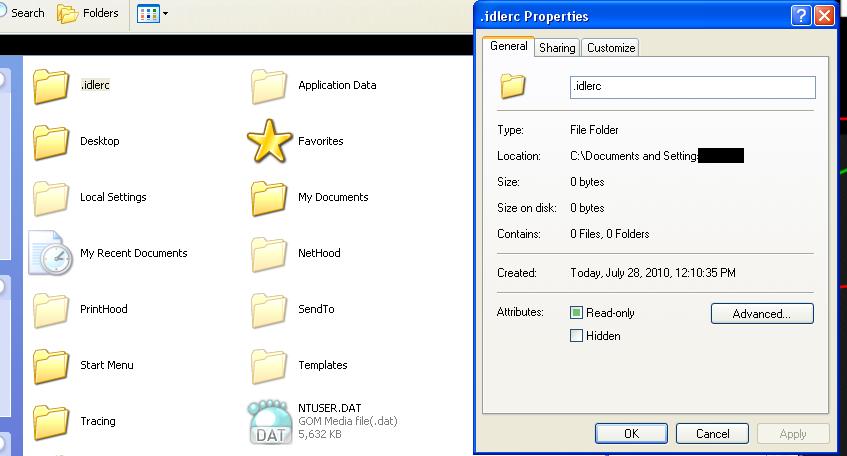
The hidden field is not filled in, here's a screenshot of the attributes options
loewis commentedon Jul 28, 2010
Ok. Remove the entire .idlerc folder, then.
loewis commentedon Jul 28, 2010
Before doing that (if you still can) try something else.
Go *into* the .idlerc folder, and remove the hidden flag
from all individual files.
ChrisLeaf commentedon Jul 28, 2010
Upon trying to delete I'm prompted with an error:
Access is denied.
Make sure the disc is not full or write-protected and that the file is currently not in use.
My disc isn't full and I cannot find anything accessing it (and the folder is empty so...)
Is there a way around this?
loewis commentedon Jul 28, 2010
The folder is not empty. Configure Explorer so that it displays hidden files.
ChrisLeaf commentedon Jul 28, 2010
I also cannot get into the folder itself.
"Access Denied"
ChrisLeaf commentedon Jul 28, 2010
The problem is that I can do nothing to the folder at all
ChrisLeaf commentedon Jul 29, 2010
Sorry but I still cannot get it to work because the folder remains inaccessible to me and immutable. Is there any way around this problem?
ChrisLeaf commentedon Jul 29, 2010
I solved the problem myself by editing the EditorWindow.py file where it sets self.recent_files_path by setting it to a different file location (I created a file in my Python31 directory named recent-files.lst and then set the recent_files_path to the absolute path to this file I made). This seems to be working so far and works like a complete work around the .idlerc folder issue. Will report if this doesn't work out later
loewis commentedon Jul 29, 2010
Sorry, I'm busy with other stuff and won't be able to look into this for another week or so.
rugburnpy commentedon Nov 24, 2010
Had this issue.. figured out what's causing it... definitively.
I had an earlier version of python installed, and I created a pythonhome user variable: "c:\python24."
I'm now using Python 2.5, and that old variable was:
1.) Keeping me from opening the IDLE
2.) Keeping the console from finding the os module. This is also the source of the import os error.
TO FIX:
-Dmark
www.dmarkphotography.com
serwy commentedon Dec 14, 2011
This is a duplicate of bpo-4625.
ned-deily commentedon Dec 14, 2011
As there are proposed patches in bpo-4625 that address the original problem reported here, let's move the discussion there.