Skip to content

Support inset_axes zooms for all GeoAxes projections #133

Open

Description

@zxdawn

Description

inset_axes doesn't work for geographic plots.

Steps to reproduce

import proplot as plot

f, axs = plot.subplots(
    ncols=2, axwidth=2.5,
    proj='robin', proj_kw={'lon_0': 180}
)
axs.format(
    suptitle='Figure with single projection',
    coast=True, latlines=30, lonlines=60
)

axi = axs.inset(
    [0, 0, 10, 10], transform='data', zoom=True,
    zoom_kw={'color': 'red3', 'lw': 2}
)

Error

Traceback (most recent call last):
  File "test_del.py", line 16, in <module>
    zoom_kw={'color': 'red3', 'lw': 2}
  File "/yin_raid/xin/miniconda3/envs/python37/lib/python3.7/site-packages/proplot/subplots.py", line 217, in _iterator
    ret.append(func(*args, **kwargs))
  File "/yin_raid/xin/miniconda3/envs/python37/lib/python3.7/site-packages/proplot/axes.py", line 1334, in inset_axes
    bb = locator(None, None)
  File "/yin_raid/xin/miniconda3/envs/python37/lib/python3.7/site-packages/proplot/axes.py", line 348, in inset_locator
    bb = mtransforms.TransformedBbox(bbox, trans)
  File "/yin_raid/xin/miniconda3/envs/python37/lib/python3.7/site-packages/matplotlib/transforms.py", line 1005, in __init__
    raise ValueError("'transform' must be an instance of "
ValueError: 'transform' must be an instance of 'matplotlib.transform.Transform'

Proplot version

0.5.0

Activity

  1. lukelbd commented on Apr 22, 2020

    @lukelbd
    Collaborator

    This is actually not an advertised feature but it's on my to-do list under the category "make XYAxes features work with rectangular projections like Mercator and Plate Carrée". See #131 for details.

    Will leave this issue open as a feature request for now. As a workaround you can probably make your own inset axes using the default cartopy API with e.g.

    import cartopy.crs as ccrs
    ax = fig.add_axes([x0, x1, y0, y1], projection=ccrs.PlateCarree())
    ax.set_extent([lon0, lon1, lat0, lat1])
    <plotting_code_here>
  2. zxdawn commented on Jul 30, 2021

    @zxdawn
    Author

    @lukelbd

    I tried this feature again:

    import proplot as pplt
    import cartopy.crs as ccrs
    
    pplt.rc.reso = 'med'
    fig, axs = pplt.subplots(proj='pcarree')
    axs.scatter(120, 30)
    
    bounds = (1, 1, 1, 1)
    # bounds = (118, 28, 4, 4)
    
    axs.inset(bounds, proj='pcarree',
              zoom=True,
             zoom_kw={'color': 'red3', 'lw': 2, 'ls': '--'}
             )
    
    axs.format(coast=True, lonlim=(100, 130), latlim=(15, 40))
    

    image

    The bounds are relative to axis, is it possible to use lon and lat?
    If I set transform='data', I got this error:

    ~/new/miniconda3/envs/pyresample_min/lib/python3.8/site-packages/matplotlib/cbook/__init__.py in _check_isinstance(_types, **kwargs)
       2244     for k, v in kwargs.items():
       2245         if not isinstance(v, types):
    -> 2246             raise TypeError(
       2247                 "{!r} must be an instance of {}, not a {}".format(
       2248                     k,
    
    TypeError: 'transform' must be an instance of matplotlib.transforms.Transform, not a cartopy.crs.PlateCarree
    
  3. lukelbd commented on Jul 30, 2021

    @lukelbd
    Collaborator

    In v0.7 I try to translate transform='data' into transform=ccrs.PlateCarree() so that you can position with longitude-latitude bounds rather than map projection bounds... but I guess matplotlib's axes positioning system can't handle cartopy transforms like its plotting commands can.

    You can use transform=ax.transData instead for now -- since you're using the Plate Carrée projection, "map projection coordinates" are equivalent to longitude-latitude coordinates

  4. zxdawn commented on Jul 30, 2021

    @zxdawn
    Author

    @lukelbd Thanks, here's the example:

    import numpy as np
    import proplot as pplt
    import cartopy.crs as ccrs
    
    pplt.rc.reso = 'med'
    fig, axs = pplt.subplots(proj='pcarree')
    axs.scatter(120, 30)
    
    bounds = (120, 18, 10, 10)
    
    iax = axs.inset(bounds, proj='pcarree',
                    transform=axs.transData,
                    zoom=True,
                    zoom_kw={'color': 'red3', 'lw': 2, 'ls': '--'}
                   )
    iax.scatter(120, 30)
    
    iax.format(coast=True, lonlim=(118, 122), latlim=(28, 32), labels=True, dms=False)
    axs.format(coast=True, lonlim=(100, 130), latlim=(15, 40))
    

    However, grid labels are wrong and no "zoom in" lines are plotted:
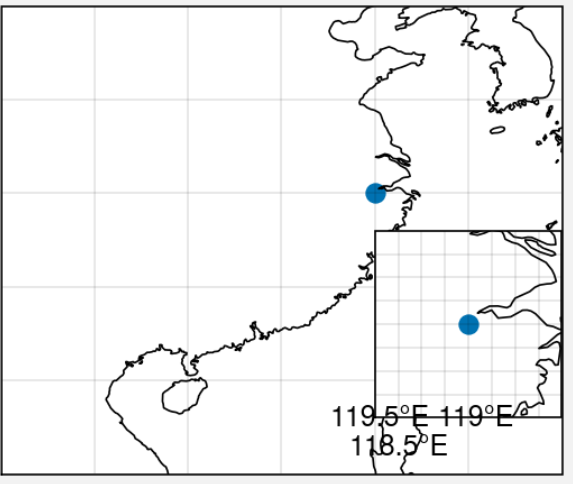
    image

  5. added this to the Version 0.8 milestone on Jul 30, 2021
  6. lukelbd commented on Jan 24, 2022

    @lukelbd
    Collaborator

    This seems to work pretty well for Plate Carree projections in the latest version. Have to set manually set the left/bottom spaces or else the result is wrong... but not too much effort.

    import proplot as pplt
    import cartopy.crs as ccrs
    pplt.rc.reso = 'med'
    fig, axs = pplt.subplots(
        proj='pcarree', coast=True, tight=True, bottom=7, left=1
    )
    fig.format(lonlim=(0, 180), latlim=(0, 90))
    axs.scatter(120, 30)
    bounds = (0.8, -0.6, 0.8, 0.8)
    iax = axs.inset(bounds, proj='pcarree', zoom=True, zoom_kw={'ec': 'red', 'lw': 2})
    iax.format(coast=True, rivers=True, lonlim=(100, 130), latlim=(15, 40))
    fig.show()

    tmp1

    Non-Plate Carree are a different story thought. Again matplotlib isn't supplying the correct bounds:

    import proplot as pplt
    import cartopy.crs as ccrs
    
    pplt.rc.reso = 'med'
    fig, axs = pplt.subplots(
        proj='robin', coast=True, tight=True, bottom=7, left=1
    )
    fig.format(lonlim=(0, 180), latlim=(0, 90))
    axs.scatter(120, 30)
    bounds = (0.8, -0.6, 0.8, 0.8)
    iax = axs.inset(bounds, proj='pcarree', zoom=True, zoom_kw={'ec': 'red', 'lw': 2})
    iax.format(coast=True, rivers=True, lonlim=(100, 130), latlim=(15, 40))

    tmp2

    Since the issue with using the wrong "transform" is fixed I'll remove the "bug" tag.

  7. changed the title [-]inset_axes for geographic plots[/-] [+]Support inset_axes zooms for all GeoAxes projections[/+] on Jan 24, 2022
Sign up for free to join this conversation on GitHub. Already have an account? Sign in to comment

Metadata

Metadata

Assignees

No one assigned

    Type

    No type

    Projects

    No projects

      Milestone

      Relationships

      None yet

      Development

      No branches or pull requests

      Issue actions