You signed in with another tab or window. Reload to refresh your session.You signed out in another tab or window. Reload to refresh your session.You switched accounts on another tab or window. Reload to refresh your session.Dismiss alert
{{ message }}
Repository navigation
npm WARN deprecated hoek@2.16.3: The major version is no longer supported. Please update to 4.x or newer #1539
/usr/bin/npm -> /usr/lib/node_modules/npm/bin/npm-cli.js
/usr/bin/npx -> /usr/lib/node_modules/npm/bin/npx-cli.js
+ npm@6.4.0
added 278 packages, removed 363 packages and updated 41 packages in 99.728s
ran
npm -v
node -v
output
6.4.0
v8.11.4
still getting the following issue while building my project:
Module "site-app-Screen": command output
>  npm WARN deprecated hoek@2.16.3: The major version is no longer supported. Please update to 4.x or newer
ERROR: Failed to build module "site-app-Screen". Command timed out
I am getting npm WARN deprecated hoek@2.16.3: The major version is no longer supported. Please update to 4.x or newer
this error, Any one fixed this issue????
I am using node version is 8.11.4, npm version is 5.6.0
Please help me anyone have solution for this issue
We already resolved this issue in the latest development version of Cordova. However, the fix has not yet been included in a release of Cordova. That's why you still see the warning. However, there's nothing more to do than wait for the next release.

Activity
dj-github commentedon Aug 21, 2018
npm install npm@latest -g
amitsharma1729 commentedon Aug 22, 2018
@dj-github tried that. ran command
Output:
ran
output
still getting the following issue while building my project:
hackjie commentedon Aug 26, 2018
met the sample problem
jackchoumine commentedon Aug 26, 2018
met the same problem just now
lanumula commentedon Sep 4, 2018
I am getting npm WARN deprecated hoek@2.16.3: The major version is no longer supported. Please update to 4.x or newer
this error, Any one fixed this issue????
I am using node version is 8.11.4, npm version is 5.6.0
Please help me anyone have solution for this issue
walterpalladino commentedon Sep 4, 2018
Same problem here
hdale commentedon Sep 5, 2018
Same here. When installing Cordova : sudo npm install -g cordova same error.
shashankdevp commentedon Sep 5, 2018
I guess its a new version of the npm which is causing this issue. Has anyone found the solution ?
rahmatrmdn commentedon Sep 8, 2018
node.js v10.x has the same error
DzViRuZ commentedon Sep 8, 2018
open cmd go to npm folder user/yourname/appdata/roaming/npm and run this
npm i -g hoek
preetskhalsa97 commentedon Sep 10, 2018
For Ubuntu, navigate to /usr/lib/nodejs/npm and do:
npm i -g hoek
(similarly npm i -g socks if you're getting a warning for that as well)
dAiMoN-LeUnAm commentedon Sep 16, 2018
Gracias, a mi me sirvió, ejecute:
sudo npm install npm@latest -g
Luego ejecute:
sudo npm install -g cordova ionic
Y el resultado fue:
added 649 packages from 450 contributors in 55.465s
Y la versiones fueron:
npm -v
6.4.1
node -v
v8.12.0
Gracias y saludos.
Yowsifahamed commentedon Sep 17, 2018
I did all above instruction bt problems in not solved
Yowsifahamed commentedon Sep 20, 2018
Give me solution
node version 10
learnmemore commentedon Sep 22, 2018
Hello,
I tried this solution
"open cmd go to npm folder user/yourname/appdata/roaming/npm and run this
npm i -g hoek "
I had this result :
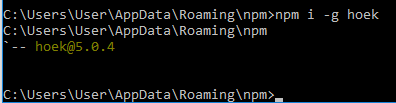
It seems OK
meman94 commentedon Sep 22, 2018
We already resolved this issue in the latest development version of Cordova. However, the fix has not yet been included in a release of Cordova. That's why you still see the warning. However, there's nothing more to do than wait for the next release.
Yowsifahamed commentedon Oct 29, 2018
it is stopped here Why
Subhang23 commentedon Jan 26, 2019
Can anyone help me out with this?
rogersnowden commentedon Nov 19, 2019
Why in the hell to people put dark red letters on a black background?
rcjsuen commentedon Nov 19, 2019
@rogersnowden Did you mean to comment in another issue? We are not talking about terminal colours here.
Subhang23 commentedon Nov 20, 2019
@rogersnowden I was new back then and did not have much experience. So I didn't know how to change color.