Repository navigation
"Python: Create new blank Juypter notebook" shows a blank editor #500

Description

Issue Type: Bug
Repro
- Run the
Python: Create new blank Juypter notebookcommand
Bug
A blank editor shows up. It never is filled in:

The developer tools for the webview show:
Uncaught Error: An instance of the VS Code API has already been acquired
    at <anonymous>:11:13
    at e.acquireApi (commons.initial.bundle.js:2)
    at e.addHandler (commons.initial.bundle.js:2)
    at Object.k (commons.initial.bundle.js:2)
    at Module.U4QP (nativeEditor.js:1)
    at o (nativeEditor.js:1)
    at Object.0 (nativeEditor.js:1)
    at o (nativeEditor.js:1)
    at a (nativeEditor.js:1)
    at nativeEditor.js:1
Extension version: 2020.9.114305
VS Code version: Code - Insiders 1.51.0-insider (16f4a29aa0ac05d3cba222b1f347b7404626c680, 2020-10-26T05:32:45.135Z)
OS version: Darwin x64 19.6.0
Metadata
Metadata
Assignees
Labels
No labels
Activity
mjbvz commentedon Oct 27, 2020
Same error + blank window when for opening a notebook file
Possibly related: microsoft/vscode#109273 /cc Connor Peet (@connor4312)
connor4312 commentedon Oct 27, 2020
Looks like (just by searching keywords on github) one usage is coming from a minified bundle whose source I don't have access to.
First usage: (not sure where this is in source)
Second usage:
From https://github.com/microsoft/vscode-python/blob/f02fce43c46eea68932ac95773d67d1cb70588dd/src/startPage-ui/react-common/postOffice.ts#L76
Using an Insiders version from a few days ago, I only see a single call from the latter location -- so something with changing const -> globalThis (which should be generally identical as far as I know) is causing the extension to make an additional call. Or there was some other behavior change in the same time period.
Can you toss a code pointer to the source of the former location?
[-]"Python: Create new blank Juypter notebook" shows a blank window[/-][+]"Python: Create new blank Juypter notebook" shows a blank editor[/+]eternalphane commentedon Oct 27, 2020
It seems that
globalThis.acquireVsCodebreaks the notebook ui test (#10675):https://github.com/DonJayamanne/pythonVSCode/blob/f38b636455a507e867a043df5d735d4e3968da23/src/datascience-ui/interactive-common/redux/store.ts#L307-L308
joyceerhl commentedon Oct 27, 2020
Connor Peet (@connor4312) we're attempting to access acquireVsCodeApi off the global window object below, this is the source of the duplicate acquire. It's possible the globalThis change caused this check to no longer work:
https://github.com/microsoft/vscode-python/blob/cec827ffcb1917c3acc7494f11785408c8a18ca1/src/datascience-ui/interactive-common/redux/store.ts#L307-L309
Would you mind clarifying what you mean by this?
connor4312 commentedon Oct 27, 2020
Okay. I think a good fix would be some additional or marker for unit tests that doesn't require you to call
acquireVsCodeApi, since now it's present on the window.joyceerhl commentedon Oct 27, 2020
Yeah I'm not sure why this fails now when it didn't before (those three lines haven't changed in 7 months), but in any case we should be passing the vscodeApi object through as recommended in https://code.visualstudio.com/api/extension-guides/webview#passing-messages-from-a-webview-to-an-extension. I've put up a PR to address this. Thanks Connor Peet (@connor4312) and Matt Bierner (@mjbvz) 😊
connor4312 commentedon Oct 27, 2020
Previously acquireVscodeApi was defined in a global scope, but not on the window. The change we made caused it to be defined on the window, which made the UI-test-detecting code start calling
acquireVsCodeApi()joyceerhl commentedon Oct 27, 2020
Ah got it. Thanks for explaining!
jejsemin commentedon Oct 28, 2020
Has anyone fixed this issue yet? I am still getting a blank screen when I open up Python files
joyceerhl commentedon Oct 28, 2020
Hi Justin (@jejsemin), we are releasing a fix for blank Jupyter notebooks in VSCode Insiders as part of the Python extension's October stable release, which should go out today or tomorrow. If you are experiencing a blank screen in VSCode stable, that is likely a different bug—please file a new issue describing the bug and provide logs and system information so we can assist you. Thanks for your patience!
joyceerhl commentedon Oct 28, 2020
Justin (@jejsemin) we just released https://github.com/microsoft/vscode-python/releases/tag/2020.10.332292344, please let me know if this fixes the problem for you!
jejsemin commentedon Oct 28, 2020
Seems like everything is working again ! Thank you
deepan-py commentedon Oct 29, 2020
Everything is back to normal thanks for letting us to know. Do you know what caused the problem?
joyceerhl commentedon Oct 29, 2020
Deepan Sankar (@deepan-py) Yes, our codebase contains two calls to
acquireVsCodeApi, which is a special function that allows VSCode webviews to use the VSCode API and should only be called once per session. The second call was only intended to invoke a mock of the function which we set up on the window object while running UI tests. The latest Insiders build included a change which made the realacquireVsCodeApiavailable on the window object. This caused our extension to call it more than once and our Jupyter notebook UI and interactive window, both of which are implemented using webviews, to crash. The fix that went out in today's stable release removes that second invocation.rchiodo commentedon Oct 29, 2020
Fix should be in latest release
jejsemin commentedon Nov 3, 2020
I'm still getting this problem after it was fixed for a few days
joyceerhl commentedon Nov 3, 2020
Justin (@jejsemin) I can't repro this problem on Windows 10 with Insiders 1.51.0 and our latest release of the Python extension (v2020.10.332292344). Would you mind providing details, including your OS, VSCode version, Python extension version, logs, and any relevant screenshots, please? Thanks!
jejsemin commentedon Nov 3, 2020
OS. MacOS Catalina Version 10.15.7
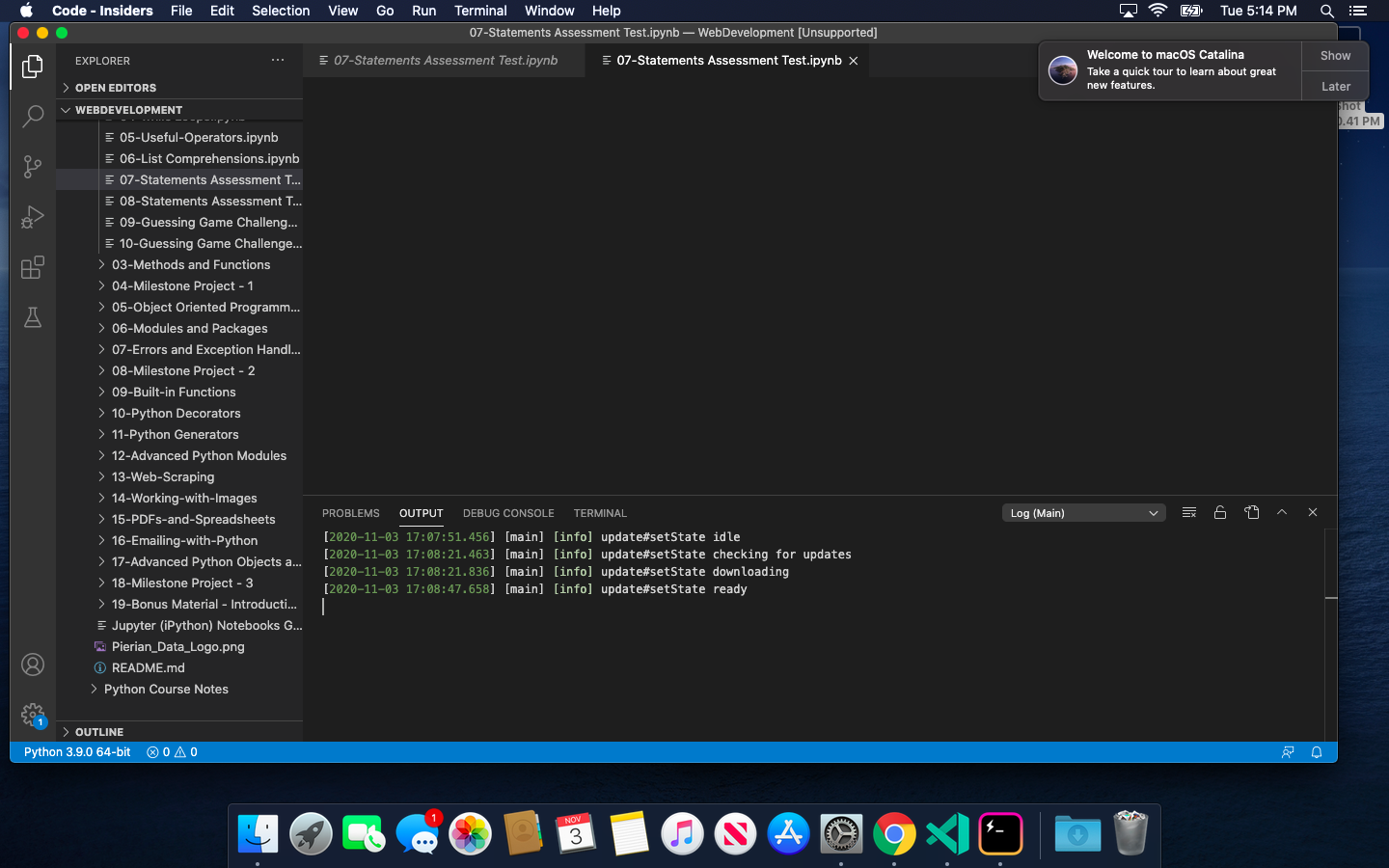
Python Extension: 3.9.0 64-bit
It
joyceerhl commentedon Nov 3, 2020
Hm, I cannot repro this on my Macbook (admittedly running 10.14). Could you confirm that you have the latest Python extension installed and are also running VSCode Insiders 1.51? Then could you run Command+Shift+P and type in "Developer: Open Webview Developer Tools" to bring up the developer console log, and see if there are any error logs in there?
LaurensvanG commentedon Nov 5, 2020
I am on Windows 10, using the v2020.11.311084263-dev version of the extension in VSC insiders 1.51.0-insider, experiencing the same issue.
The following console log results from opening a notebook:

The notebook opens normally in the public release 2020.10.332292344, with the following console logs:

I hope this info helps somewhat. If you need more information, I'd be happy to provide it.
edit: Perhaps important to note is that 'Open in preview Notebook Editor' does work as expected. But opening it in the normal Notebook Editor (either clicking on the file or in the right-click context menu) produces the empty window.
flazouh commentedon Nov 8, 2020
Getting the same error when trying out the new notebook feature by downloading code inside.
Version: 1.52.0-insider
Commit: 24b28f57be22fe3029cb17a1dd72d8d9c2d6468b
Date: 2020-11-06T05:39:23.276Z (2 days ago)
Electron: 9.3.3
Chrome: 83.0.4103.122
Node.js: 12.14.1
V8: 8.3.110.13-electron.0
OS: Darwin x64 19.6.0
joyceerhl commentedon Nov 8, 2020
@Maulorian, what version of the Python extension are you using? Could you try using v2020.10.332292344 (the latest stable version) and let me know if you still encounter the same behavior?
flazouh commentedon Nov 9, 2020
Ah yes, it works!
flazouh commentedon Nov 9, 2020
Joyce Er (@joyceerhl) Hey, I installed insiders to be able to have features like linting (missing imports and such) in my notebooks. but it doesn't seem to be working:
great_circle is not highlighted or anything if I remove the import