.wiz-todo, .wiz-todo-img {width: 16px; height: 16px; cursor: default; padding: 0 10px 0 2px; vertical-align: -10%;-webkit-user-select: none;} .wiz-todo-label { display: inline-block; padding-top: 7px; padding-bottom: 6px; line-height: 1.5;} .wiz-todo-label-checked { /text-decoration: line-through;/ color: #666;} .wiz-todo-label-unchecked {text-decoration: initial;} .wiz-todo-completed-info {padding-left: 44px; display: inline-block; } .wiz-todo-avatar { width:20px; height: 20px; vertical-align: -20%; margin-right:10px; border-radius: 2px;} .wiz-todo-account, .wiz-todo-dt { color: #666; }[TOC]
# Introduction
Java.io包几乎包含了所有操作输入、输出需要的类。所有这些流类代表了输入源和输出目标。Java.io包中的流支持很多种格式,比如:基本类型、对象、本地化字符集等等。一个流可以理解为一个数据的序列。输入流表示从一个源读取数据,输出流表示向一个目标写数据。Java为I/O提供了强大的而灵活的支持,使其更广泛地应用到文件传输和网络编程中。 Java是面向对象的编程语言,对象是对现实实体的抽象表述。所以Java API中流(Stream)是对一连串数据的抽象,同时定义了一些操作,write和read等。所以现实实体,只要包含数据和对数据的读写操作都可以表 示为流。OutputStream类和InputStream类,是2个抽象类,分别对应输出、输入流,所有其它流对象,都是其子类。 比如文件,文件本质是保存在存储设备中的一连串数据,在Java API中抽象为FileOutputStream类和FileInputStream类,文件的读写可以通过对相应流的读写实现的。
比如控制台中命令和结果的输入输出,键盘的输入是一串数据,程序的输出是一串数据,所以在Java API中也被抽象为流对象。控制台输入由System.in对象体现,System.in是类型为InputStream的对象。控制台输出由 System.out对象体现,System.out是类型为PrintStream的对象。 由于文件和控制台输入输出都和操作系统有关,所以文件流和控制台流对象最终都是由Java虚拟机创建的。
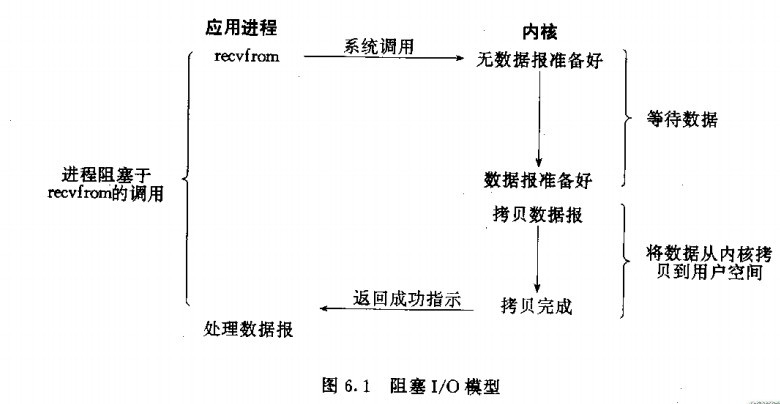
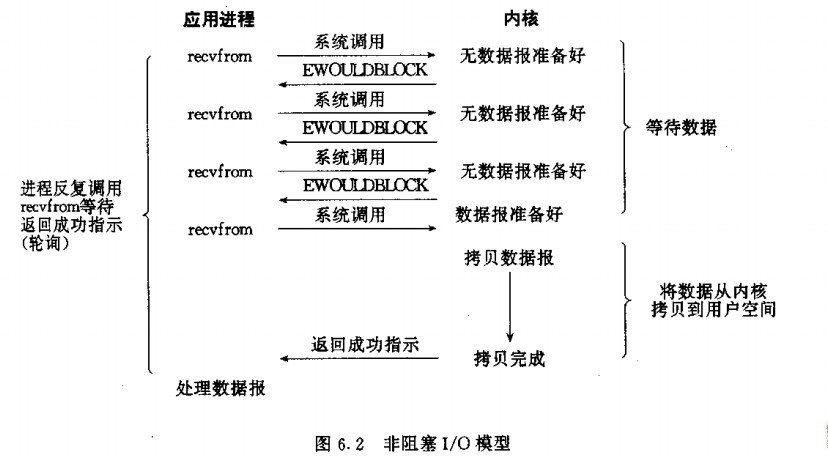
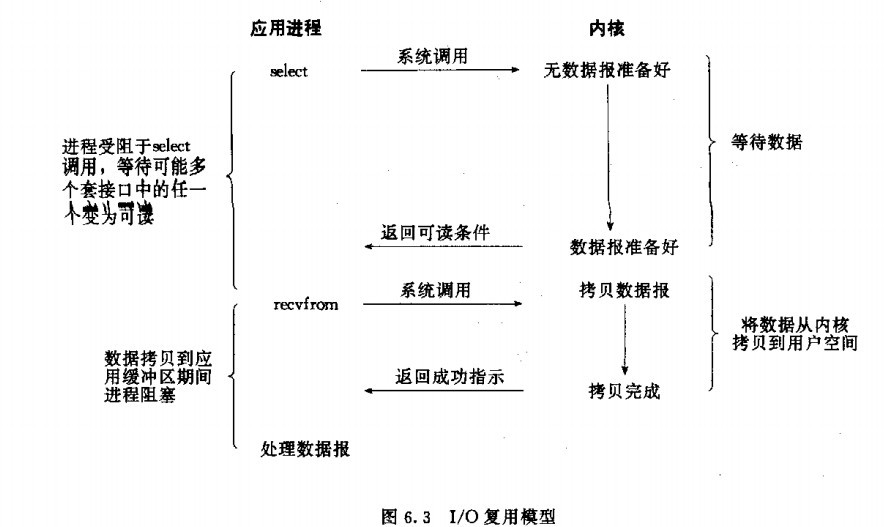
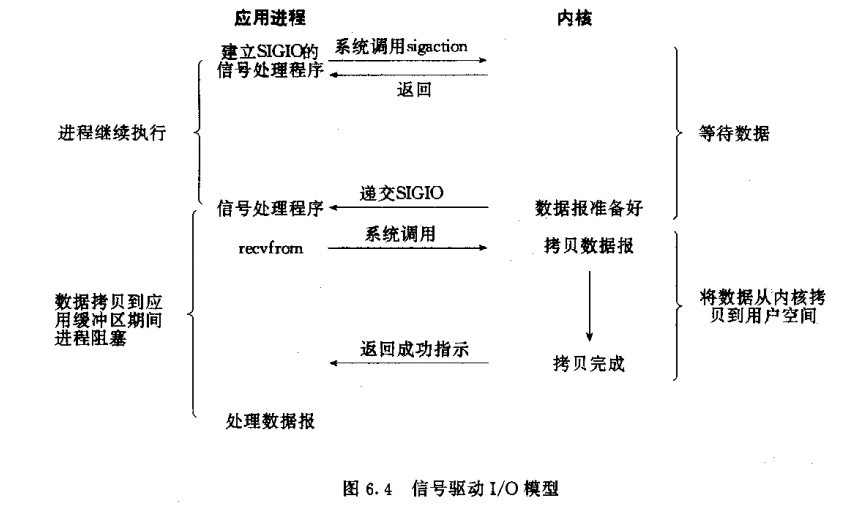
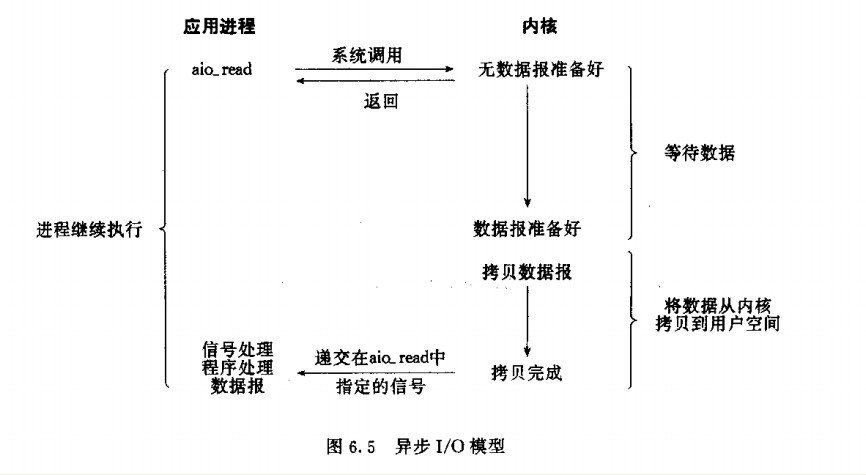
ByteArrayOutputStream、ByteArrayInputStream,是完全不依赖Java虚拟机的流对象,其完全是对一个 byte[]数组的抽象。因为byte[]数组也是一连串数据,byte[]数组支持读写功能,所以完全可以抽象为流对象,这可以从这两个类的源代码中看 出。 Unix的5种I/O模型:阻塞式I/O, 非阻塞式I/O,I/O复用模型,信号驱动式I/O和异步I/O。
I/O多路复用通过把多个I/O的阻塞复用到同一个select的阻塞上,从而使得系统在单线程的情况可以同时处理多个客户端请求。 目前支持I/O多路复用的系统调用有select,pselect,poll,epoll,在linux网络编程过程中,很长一段时间都是用select做轮询和网络事件通知,然而select的一些固有缺陷导致了它的应用受到了很大的限制,最终linux不得不载新的内核版本中寻找select的替代方案,最终选择了epoll。
# Stream&Reader

# Console
格式1:Scanner sc = new Scanner (new BufferedInputStream(System.in));


格式2:Scanner sc = new Scanner (System.in);


在读入数据量大的情况下,格式1的速度会快些。


读一个整数: int n = sc.nextInt(); 相当于 scanf("%d", &n); 或 cin >> n;


读一个字符串:String s = sc.next(); 相当于 scanf("%s", s); 或 cin >> s;


读一个浮点数:double t = sc.nextDouble(); 相当于 scanf("%lf", &t); 或 cin >> t;


读一整行: String s = sc.nextLine(); 相当于 gets(s); 或 cin.getline(...);


判断是否有下一个输入可以用sc.hasNext()或sc.hasNextInt()或sc.hasNextDouble()或sc.hasNextLine()
```## Input

Java的控制台输入由System.in完成。为了获得一个绑定到控制台的字符流,你可以把System.in包装在一个BufferedReader 对象中来创建一个字符流。

下面是创建BufferedReader的基本语法:

```
BufferedReader br = new BufferedReader(new
                      InputStreamReader(System.in));
### 多字符输入
从BufferedReader对象读取一个字符要使用read()方法,它的语法如下:
int read( ) throws IOException
每次调用read()方法,它从输入流读取一个字符并把该字符作为整数值返回。 当流结束的时候返回-1。该方法抛出IOException。
下面的程序示范了用read()方法从控制台不断读取字符直到用户输入"q"。
// 使用 BufferedReader 在控制台读取字符

import java.io.*;

public class BRRead {
   public static void main(String args[]) throws IOException
   {
      char c;
      // 使用 System.in 创建 BufferedReader
      BufferedReader br = new BufferedReader(new
                         InputStreamReader(System.in));
      System.out.println("Enter characters, 'q' to quit.");
      // 读取字符
      do {
         c = (char) br.read();
         System.out.println(c);
      } while(c != 'q');
   }
}
以上实例编译运行结果如下:
Enter characters, 'q' to quit.
123abcq
1
2
3
a
b
c
q
### 字符串输入
从标准输入读取一个字符串需要使用BufferedReader的readLine()方法。
它的一般格式是:
String readLine( ) throws IOException
下面的程序读取和显示字符行直到你输入了单词"end"。
// 使用 BufferedReader 在控制台读取字符
import java.io.*;
public class BRReadLines {
   public static void main(String args[]) throws IOException
   {
      // 使用 System.in 创建 BufferedReader
      BufferedReader br = new BufferedReader(new
                              InputStreamReader(System.in));
      String str;
      System.out.println("Enter lines of text.");
      System.out.println("Enter 'end' to quit.");
      do {
         str = br.readLine();
         System.out.println(str);
      } while(!str.equals("end"));
   }
}
以上实例编译运行结果如下:
Enter lines of text.
Enter 'end' to quit.
This is line one
This is line one
This is line two
This is line two
end
end
### 参数处理
- 调用函数
    Scanner scanner = new Scanner(System.in);
    System.out.println("Command me please!");
    String inputString = "";
    while (!inputString.equals("quit")) {
        inputString = scanner.nextLine();
        String[] commandTokens = inputString.split(" ");

        if (commandTokens.length == 0) {
            scanner.close();
            throw new InputMismatchException("please enter a command");
        } else {
            String command = commandTokens[0];
            if (command.equals("search")) {
                System.out.println("this is where we can call search with "
                        + makeArguments(commandTokens));
            }
        }
    }
    scanner.close();
- 封装好的处理函数: ``` java /** * a function that assembles all the arguments into a single string so that * we can call a method like search * * @param commandTokens * - a string array that corresponds to what the user entered * @return a string that can be passed on to functions like search, serve * etc */ public static String makeArguments(String[] commandTokens) { String completeStringArgument = ""; for (int i = 1; i < commandTokens.length - 1; i++) { completeStringArgument += commandTokens[i] + " "; } return completeStringArgument + commandTokens[commandTokens.length - 1]; }
## Out

在此前已经介绍过,控制台的输出由 print( ) 和println( )完成。这些方法都由类PrintStream 定义,System.out是该类对象的一个引用。

PrintStream 继承了OutputStream类,并且实现了方法write()。这样,write()也可以用来往控制台写操作。

PrintStream 定义write()的最简单格式如下所示:

```
void write(int byteval)
该方法将byteval的低八位字节写到流中。
### 实例
下面的例子用write()把字符"A"和紧跟着的换行符输出到屏幕:
import java.io.*;

// 演示 System.out.write().
public class WriteDemo {
   public static void main(String args[]) {
      int b;
      b = 'A';
      System.out.write(b);
      System.out.write('\n');
   }
}
运行以上实例在输出窗口输出"A"字符
A
**注意:**write()方法不经常使用,因为print()和println()方法用起来更为方便。
# FileIO
## Directory
### Path
### Create
File类中有两个方法可以用来创建文件夹:
- **mkdir( )**方法创建一个文件夹,成功则返回true,失败则返回false。失败表明File对象指定的路径已经存在,或者由于整个路径还不存在,该文件夹不能被创建。 - **mkdirs()**方法创建一个文件夹和它的所有父文件夹。
下面的例子创建 "/tmp/user/java/bin"文件夹:
import java.io.File;

public class CreateDir {
   public static void main(String args[]) {
      String dirname = "/tmp/user/java/bin";
      File d = new File(dirname);
      // 现在创建目录
      d.mkdirs();
  }
}
编译并执行上面代码来创建目录"/tmp/user/java/bin"。
**注意:**Java在UNIX和Windows自动按约定分辨文件路径分隔符。如果你在Windows版本的Java中使用分隔符(/) ,路径依然能够被正确解析。
### Read
一个目录其实就是一个File对象,它包含其他文件和文件夹。
如果创建一个File对象并且它是一个目录,那么调用isDirectory( )方法会返回true。
可以通过调用该对象上的list()方法,来提取它包含的文件和文件夹的列表。
下面展示的例子说明如何使用list()方法来检查一个文件夹中包含的内容:
import java.io.File;

public class DirList {
   public static void main(String args[]) {
      String dirname = "/tmp";
      File f1 = new File(dirname);
      if (f1.isDirectory()) {
         System.out.println( "Directory of " + dirname);
         String s[] = f1.list();
         for (int i=0; i < s.length; i++) {
            File f = new File(dirname + "/" + s[i]);
            if (f.isDirectory()) {
               System.out.println(s[i] + " is a directory");
            } else {
               System.out.println(s[i] + " is a file");
            }
         }
      } else {
         System.out.println(dirname + " is not a directory");
    }
  }
}
以上实例编译运行结果如下:
Directory of /tmp
bin is a directory
lib is a directory
demo is a directory
test.txt is a file
README is a file
index.html is a file
include is a directory
## File
### File Path(文件寻址) (1)如果要找resource目录下的某个文件
BufferedReader bufferedReaderB = new BufferedReader(new InputStreamReader(this.getClass().getResourceAsStream("/B/B1.txt")));
1. String url = this.getClass().getResource("/userFile.properties").getFile(); 2. userList.store(new FileOutputStream(url), "Users Info List");
(2)如果要找某个类
或者:
String[] classpathEntries = classpath.split(File.pathSeparator);
### 按行读取
package test
import java.io.File;
import java.io.FileReader;
import java.io.IOException;
import java.io.LineNumberReader;
public class ReadSelectedLine{
    // 读取文件指定行。
    static void readAppointedLineNumber(File sourceFile, int lineNumber)
            throws IOException {
        FileReader in = new FileReader(sourceFile);
        LineNumberReader reader = new LineNumberReader(in);
        String s = "";
        if (lineNumber <= 0 || lineNumber > getTotalLines(sourceFile)) {
            System.out.println("不在文件的行数范围(1至总行数)之内。");
            System.exit(0);
        }
        int lines = 0;
        while (s != null) {
            lines++;
            s = reader.readLine();
            if((lines - lineNumber) == 0) {
             System.out.println(s);
             System.exit(0);
            }
        }
        reader.close();
        in.close();
    }
    // 文件内容的总行数。
    static int getTotalLines(File file) throws IOException {
        FileReader in = new FileReader(file);
        LineNumberReader reader = new LineNumberReader(in);
        String s = reader.readLine();
        int lines = 0;
        while (s != null) {
            lines++;
            s = reader.readLine();
        }
        reader.close();
        in.close();
        return lines;
    }

    /**
     * 读取文件指定行。
     */
    public static void main(String[] args) throws IOException {
        // 指定读取的行号
        int lineNumber = 2;
        // 读取文件
        File sourceFile = new File("D:/java/test.txt");
        // 读取指定的行
        readAppointedLineNumber(sourceFile, lineNumber);
        // 获取文件的内容的总行数
        System.out.println(getTotalLines(sourceFile));
    }
}
## 字节流
## 字符流
## Performance Benchmark(效率分析)
| 读 | 写 | 耗用时间(秒) | | ------------------------------------- | --------------------------------------- | ------- | | RandomAccessFile | RandomAccessFile | 95.848 | | BufferedInputStream + DataInputStream | BufferedOutputStream + DataOutputStream | 2.935 |
# Okio
Okio是 java.io 和 java.nio的补充,使用它更容易访问、存储和处理数据。

Okio中有几个常用的概念:
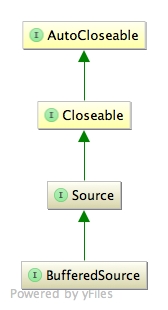
- ByteString:不可变的字节序列,类似String类,使用它更容易处理二进制数据。 - Buffer:可变的字节序列,类似ArrayList。 - Source:类似InputStream(输入流) - Sink:类似OutputStream(输出流)
## Source
Source相当于输入流(InputStream)。把硬盘中的数据输入到内存中。
try {
      File file = new File("test.txt");

      BufferedSource source = Okio.buffer(Okio.source(file));

      //byte[] data = source.readByteArray();
      //System.out.println(new String(data, Charset.forName("UTF-8")));

      BufferedSink sink = Okio.buffer(Okio.sink(new File("test2.txt")));
      source.readAll(sink);
      sink.close();

      source.close();
 } catch (IOException e) {
      e.printStackTrace();
 }
## Sink

try {
       File file = new File("test.txt"); //如果文件不存在,则自动创建
       BufferedSink sink = Okio.buffer(Okio.sink(file));
       sink.writeUtf8("Hello, World");
       sink.writeString("测试信息", Charset.forName("UTF-8"));
       sink.close();
 } catch (IOException e) {
       e.printStackTrace();
}