Repository navigation
Microsoft.DotNet.Props was not found #456
Description
Activity
Did you install VS2017, it installs .NET Core 1.1 with it, I believe this is part of the problem. Since the projects are still on 1.0.1, since 1.1 was released so recently.
Duplicate of #440 ?
I'll try removing .NET Core 1.1 SDK and installing v1.0.1
Duplicate of #440 ?
ProbablyYep, removing .NET Core 1.1 SDK and installing v1.0.1 fixed it (didn't uninstall VS2017)
The other fix is adding a global.json that tells the project to use your local 1.0.1 copy.
https://github.com/MarkPieszak/aspnetcore-angular2-universal/blob/master/global.json#L3Glad you got it fixed! @ManuelDeLeon
Reacted by Dan and Alexander SidorovI get the same error when I try to deploy to Azure App Services:
     1>Project "D:\home\site\repository\Jsservicesviewmodel.xproj" on node 1 (Publish target(s)).
     1>D:\home\site\repository\Jsservicesviewmodel.xproj(8,3): error MSB4019: The imported project "D:\Program Files (x86)\dotnet\sdk\1.0.0-preview3-004056\Extensions\Microsoft\VisualStudio\v14.0\DotNet\Microsoft.DotNet.Props" was not found. Confirm that the path in the <Import> declaration is correct, and that the file exists on disk.
     1>Done Building Project "D:\home\site\repository\Jsservicesviewmodel.xproj" (Publish target(s)) -- FAILED.

Build FAILED.
What can I do to deploy it on Azure App Services since it doesn't like the default .xproj?
Edit: Just to be clear, that error is in the Azure logs.
The error came up even after adding a global.json file?
I then get "path too long" =/
Command: "D:\home\site\deployments\tools\deploy.cmd" Handling ASP.NET Core Web Application deployment. Restoring packages for D:\home\site\repository\project.json... GET https://api.nuget.org/v3-flatcontainer/microsoft.aspnetcore.reactservices/index.json OK https://api.nuget.org/v3-flatcontainer/microsoft.aspnetcore.reactservices/index.json 160ms GET https://api.nuget.org/v3-flatcontainer/microsoft.aspnetcore.reactservices/1.0.0-beta-000019/microsoft.aspnetcore.reactservices.1.0.0-beta-000019.nupkg OK https://api.nuget.org/v3-flatcontainer/microsoft.aspnetcore.reactservices/1.0.0-beta-000019/microsoft.aspnetcore.reactservices.1.0.0-beta-000019.nupkg 141ms Restoring packages for tool 'Microsoft.AspNetCore.Razor.Tools' in D:\home\site\repository\project.json... Restoring packages for tool 'Microsoft.AspNetCore.Server.IISIntegration.Tools' in D:\home\site\repository\project.json... Restoring packages for tool 'Microsoft.DotNet.Watcher.Tools' in D:\home\site\repository\project.json... Committing restore... Lock file has not changed. Skipping lock file write. Path: D:\home\site\repository\project.lock.json D:\home\site\repository\project.json Restore completed in 6374ms. NuGet Config files used: C:\DWASFiles\Sites\#1jssviewmodel\AppData\NuGet\NuGet.Config Feeds used: https://api.nuget.org/v3/index.json Publishing repository for .NETCoreApp,Version=v1.0 npm WARN package.json jsservicesviewmodel@0.0.0 No repository field. npm WARN package.json jsservicesviewmodel@0.0.0 No license field. Hash: 14681ea815803bf8a9a8 Version: webpack 1.13.3 Time: 22721ms Asset Size Chunks Chunk Names vendor.js 437 kB 0 [emitted] vendor [0] dll vendor 12 bytes {0} [built] [1 error] + 285 hidden modules ERROR in Cannot find module 'caniuse-db/features-json/transforms2d.json' @ dll vendor Hash: 7152126a5b6cfc6a8d0d4870620e3462c6bfa961 Version: webpack 1.13.3 Child Hash: 7152126a5b6cfc6a8d0d Version: webpack 1.13.3 Time: 267ms + 1 hidden modules ERROR in Cannot find module 'core-js/library/fn/symbol/iterator' Child Hash: 4870620e3462c6bfa961 Version: webpack 1.13.3 Time: 251ms + 1 hidden modules ERROR in Cannot find module 'core-js/library/fn/symbol/iterator' Project repository (.NETCoreApp,Version=v1.0) will be compiled because expected outputs are missing Compiling repository for .NETCoreApp,Version=v1.0 Compilation succeeded. 0 Warning(s) 0 Error(s) Time elapsed 00:00:50.9344088 Configuring the following project for use with IIS: 'D:\local\Temp\8d41556b6683d27' Updating web.config at 'D:\local\Temp\8d41556b6683d27\web.config' Configuring project completed successfully publish: Published to D:\local\Temp\8d41556b6683d27 Published 1/1 projects successfully KuduSync.NET from: 'D:\local\Temp\8d41556b6683d27' to: 'D:\home\site\wwwroot' Deleting file: 'hostingstart.html' Copying file: 'appsettings.json' Copying file: 'Microsoft.AspNetCore.Antiforgery.dll' Copying file: 'Microsoft.AspNetCore.Authorization.dll' Copying file: 'Microsoft.AspNetCore.Cors.dll' Copying file: 'Microsoft.AspNetCore.Cryptography.Internal.dll' Copying file: 'Microsoft.AspNetCore.DataProtection.Abstractions.dll' Copying file: 'Microsoft.AspNetCore.DataProtection.dll' Copying file: 'Microsoft.AspNetCore.Diagnostics.Abstractions.dll' Copying file: 'Microsoft.AspNetCore.Diagnostics.dll' Copying file: 'Microsoft.AspNetCore.Hosting.Abstractions.dll' Copying file: 'Microsoft.AspNetCore.Hosting.dll' Copying file: 'Microsoft.AspNetCore.Hosting.Server.Abstractions.dll' Copying file: 'Microsoft.AspNetCore.Html.Abstractions.dll' Copying file: 'Microsoft.AspNetCore.Http.Abstractions.dll' Copying file: 'Microsoft.AspNetCore.Http.dll' Copying file: 'Microsoft.AspNetCore.Http.Extensions.dll' Copying file: 'Microsoft.AspNetCore.Http.Features.dll' Copying file: 'Microsoft.AspNetCore.HttpOverrides.dll' Copying file: 'Microsoft.AspNetCore.JsonPatch.dll' Copying file: 'Microsoft.AspNetCore.Localization.dll' Copying file: 'Microsoft.AspNetCore.Mvc.Abstractions.dll' Copying file: 'Microsoft.AspNetCore.Mvc.ApiExplorer.dll' Copying file: 'Microsoft.AspNetCore.Mvc.Core.dll' Copying file: 'Microsoft.AspNetCore.Mvc.Cors.dll' Copying file: 'Microsoft.AspNetCore.Mvc.DataAnnotations.dll' Copying file: 'Microsoft.AspNetCore.Mvc.dll' Copying file: 'Microsoft.AspNetCore.Mvc.Formatters.Json.dll' Copying file: 'Microsoft.AspNetCore.Mvc.Localization.dll' Copying file: 'Microsoft.AspNetCore.Mvc.Razor.dll' Copying file: 'Microsoft.AspNetCore.Mvc.Razor.Host.dll' Copying file: 'Microsoft.AspNetCore.Mvc.TagHelpers.dll' Copying file: 'Microsoft.AspNetCore.Mvc.ViewFeatures.dll' Copying file: 'Microsoft.AspNetCore.NodeServices.dll' Copying file: 'Microsoft.AspNetCore.Razor.dll' Copying file: 'Microsoft.AspNetCore.Razor.Runtime.dll' Copying file: 'Microsoft.AspNetCore.Routing.Abstractions.dll' Copying file: 'Microsoft.AspNetCore.Routing.dll' Copying file: 'Microsoft.AspNetCore.Server.IISIntegration.dll' Copying file: 'Microsoft.AspNetCore.Server.Kestrel.dll' Copying file: 'Microsoft.AspNetCore.SpaServices.dll' Copying file: 'Microsoft.AspNetCore.StaticFiles.dll' Copying file: 'Microsoft.AspNetCore.WebUtilities.dll' Copying file: 'Microsoft.DotNet.InternalAbstractions.dll' Copying file: 'Microsoft.Extensions.Caching.Abstractions.dll' Copying file: 'Microsoft.Extensions.Caching.Memory.dll' Copying file: 'Microsoft.Extensions.Configuration.Abstractions.dll' Copying file: 'Microsoft.Extensions.Configuration.Binder.dll' Copying file: 'Microsoft.Extensions.Configuration.CommandLine.dll' Omitting next output lines... Processed 2000 files... Processed 4260 files... Processed 6507 files... Error: The specified path, file name, or both are too long. The fully qualified file name must be less than 260 characters, and the directory name must be less than 248 characters. Failed exitCode=1, command="kudusync" -v 50 -f "D:\local\Temp\8d41556b6683d27" -t "D:\home\site\wwwroot" -n "D:\home\site\deployments\7d6a896e5d4affe6efc616b19b684b16ca392f1b\manifest" -p "D:\Program Files (x86)\SiteExtensions\Kudu\59.51122.2559\bin\Scripts\firstDeploymentManifest" -i ".git;.hg;.deployment;deploy.cmd" An error has occurred during web site deployment. npm WARN package.json jsservicesviewmodel@0.0.0 No repository field.\r\nnpm WARN package.json jsservicesviewmodel@0.0.0 No license field.\r\nError: The specified path, file name, or both are too long. The fully qualified file name must be less than 260 characters, and the directory name must be less than 248 characters.\r\nD:\Program Files (x86)\SiteExtensions\Kudu\59.51122.2559\bin\Scripts\starter.cmd "D:\home\site\deployments\tools\deploy.cmd"@SteveSandersonMS Any ideas what could be causing this one, we figured out the 1.1 Core issue, but now he's getting path too long etc when deploying to Azure.
It almost looks like some things didn't get installed properly through npm?
Did you remember to specify a Node version for Azure to use via
WEBSITE_NODE_DEFAULT_VERSIONon the Azure management portal? If you don't, it will use NPM 2.x which fails with path-too-long errors. See deployment steps at http://blog.stevensanderson.com/2016/10/04/angular2-template-for-visual-studio/#now-lets-deploy.It has the default:
WEBSITE_NODE_DEFAULT_VERSION:4.4.7(trying with 6.7.0)
4.4.7 is too old. It includes NPM version 2.15.8. You need NPM >=3.0 for it to work properly on Windows.
Let us know how you go with Node 6.7.0.
Different log but it still ends up with "path too long" plus there's
ERROR in Cannot find module 'core-js/library/fn/symbol/iterator'in the middle.Command: "D:\home\site\deployments\tools\deploy.cmd" Handling ASP.NET Core Web Application deployment. Restoring packages for D:\home\site\repository\project.json... GET https://api.nuget.org/v3-flatcontainer/microsoft.aspnetcore.reactservices/index.json OK https://api.nuget.org/v3-flatcontainer/microsoft.aspnetcore.reactservices/index.json 152ms GET https://api.nuget.org/v3-flatcontainer/microsoft.aspnetcore.reactservices/1.0.0-beta-000019/microsoft.aspnetcore.reactservices.1.0.0-beta-000019.nupkg OK https://api.nuget.org/v3-flatcontainer/microsoft.aspnetcore.reactservices/1.0.0-beta-000019/microsoft.aspnetcore.reactservices.1.0.0-beta-000019.nupkg 137ms Restoring packages for tool 'Microsoft.AspNetCore.Razor.Tools' in D:\home\site\repository\project.json... Restoring packages for tool 'Microsoft.AspNetCore.Server.IISIntegration.Tools' in D:\home\site\repository\project.json... Restoring packages for tool 'Microsoft.DotNet.Watcher.Tools' in D:\home\site\repository\project.json... Committing restore... Lock file has not changed. Skipping lock file write. Path: D:\home\site\repository\project.lock.json D:\home\site\repository\project.json Restore completed in 6155ms. NuGet Config files used: C:\DWASFiles\Sites\#1jssviewmodel\AppData\NuGet\NuGet.Config Feeds used: https://api.nuget.org/v3/index.json Publishing repository for .NETCoreApp,Version=v1.0 jsservicesviewmodel@0.0.0 D:\home\site\repository npm WARN optional Skipping failed optional dependency /webpack/watchpack/chokidar/fsevents: +-- babel-preset-es2015@6.18.0 npm WARN notsup Not compatible with your operating system or architecture: fsevents@1.0.15 | `-- babel-plugin-transform-es2015-computed-properties@6.8.0 npm WARN jsservicesviewmodel@0.0.0 No repository field. | +-- babel-helper-define-map@6.18.0 npm WARN jsservicesviewmodel@0.0.0 No license field. | | `-- babel-helper-function-name@6.18.0 | | `-- babel-traverse@6.19.0 | | +-- babel-code-frame@6.16.0 | | | +-- chalk@1.1.3 | | | | +-- ansi-styles@2.2.1 | | | | +-- escape-string-regexp@1.0.5 | | | | +-- has-ansi@2.0.0 | | | | +-- strip-ansi@3.0.1 | | | | `-- supports-color@2.0.0 | | | +-- esutils@2.0.2 | | | `-- js-tokens@2.0.0 | | +-- debug@2.3.3 | | | `-- ms@0.7.2 | | `-- invariant@2.2.2 | | `-- loose-envify@1.3.0 | `-- babel-template@6.16.0 | `-- babel-traverse@6.19.0 | `-- babel-code-frame@6.16.0 | `-- chalk@1.1.3 | `-- has-ansi@2.0.0 | `-- ansi-regex@2.0.0 `-- react-dom@15.4.1 `-- fbjs@0.8.6 +-- isomorphic-fetch@2.2.1 | `-- node-fetch@1.6.3 | +-- encoding@0.1.12 | | `-- iconv-lite@0.4.15 | `-- is-stream@1.1.0 `-- promise@7.1.1 `-- asap@2.0.5 Hash: e61cc3dc474d9ac688fa Version: webpack 1.13.3 Time: 27030ms Asset Size Chunks Chunk Names vendor.js 437 kB 0 [emitted] vendor [0] dll vendor 12 bytes {0} [built] [1 error] + 285 hidden modules ERROR in Cannot find module 'caniuse-db/features-json/transforms2d.json' @ dll vendor Hash: 7152126a5b6cfc6a8d0d4870620e3462c6bfa961 Version: webpack 1.13.3 Child Hash: 7152126a5b6cfc6a8d0d Version: webpack 1.13.3 Time: 314ms + 1 hidden modules ERROR in Cannot find module 'core-js/library/fn/symbol/iterator' Child Hash: 4870620e3462c6bfa961 Version: webpack 1.13.3 Time: 299ms + 1 hidden modules ERROR in Cannot find module 'core-js/library/fn/symbol/iterator' Project repository (.NETCoreApp,Version=v1.0) was previously compiled. Skipping compilation. Configuring the following project for use with IIS: 'D:\local\Temp\8d415675f51018c' Updating web.config at 'D:\local\Temp\8d415675f51018c\web.config' Configuring project completed successfully publish: Published to D:\local\Temp\8d415675f51018c Published 1/1 projects successfully KuduSync.NET from: 'D:\local\Temp\8d415675f51018c' to: 'D:\home\site\wwwroot' Copying file: 'repository.deps.json' Copying file: 'repository.runtimeconfig.json' Copying file: 'node_modules\.bin\loose-envify' Copying file: 'node_modules\.bin\loose-envify.cmd' Copying file: 'node_modules\ansi-regex\index.js' Copying file: 'node_modules\ansi-regex\license' Copying file: 'node_modules\ansi-regex\package.json' Copying file: 'node_modules\ansi-regex\readme.md' Copying file: 'node_modules\ansi-styles\index.js' Copying file: 'node_modules\ansi-styles\license' Copying file: 'node_modules\ansi-styles\package.json' Copying file: 'node_modules\ansi-styles\readme.md' Copying file: 'node_modules\asap\asap.js' Copying file: 'node_modules\asap\browser-asap.js' Copying file: 'node_modules\asap\browser-raw.js' Copying file: 'node_modules\asap\CHANGES.md' Copying file: 'node_modules\asap\LICENSE.md' Copying file: 'node_modules\asap\package.json' Copying file: 'node_modules\asap\raw.js' Copying file: 'node_modules\asap\README.md' Error: The specified path, file name, or both are too long. The fully qualified file name must be less than 260 characters, and the directory name must be less than 248 characters. Copying file: 'node_modules\babel-preset-es2015\node_modules\babel-plugin-transform-es2015-computed-properties\node_modules\babel-helper-define-map\node_modules\babel-helper-function-name\node_modules\babel-helper-get-function-arity\package.json' Failed exitCode=1, command="kudusync" -v 50 -f "D:\local\Temp\8d415675f51018c" -t "D:\home\site\wwwroot" -n "D:\home\site\deployments\7d6a896e5d4affe6efc616b19b684b16ca392f1b\manifest" -p "D:\Program Files (x86)\SiteExtensions\Kudu\59.51122.2559\bin\Scripts\firstDeploymentManifest" -i ".git;.hg;.deployment;deploy.cmd" An error has occurred during web site deployment. npm WARN optional Skipping failed optional dependency /webpack/watchpack/chokidar/fsevents:\r\nnpm WARN notsup Not compatible with your operating system or architecture: fsevents@1.0.15\r\nnpm WARN jsservicesviewmodel@0.0.0 No repository field.\r\nnpm WARN jsservicesviewmodel@0.0.0 No license field.\r\nError: The specified path, file name, or both are too long. The fully qualified file name must be less than 260 characters, and the directory name must be less than 248 characters.\r\nD:\Program Files (x86)\SiteExtensions\Kudu\59.51122.2559\bin\Scripts\starter.cmd "D:\home\site\deployments\tools\deploy.cmd"I'm afraid I don't know why you'd still be getting the path-too-long issue if it's now actually using NPM v3.x during deployment. It makes me suspicious that maybe it's actually still using NPM 2.x. Is there any other evidence in the log to confirm what NPM version it's using?
One bit of good news is that pretty soon, issues like this will no longer be a concern. The templates are changing so that you will no longer need to deploy
package.jsonornode_modulesto production at all. The server-side prerendering feature will be able to run from completely self-contained bundles that never invokerequireat runtime. So, deployments will be much faster, and won't involve NPM at all. This feature should be ready next week.I know that doesn't fix your immediate issue right now (since the new feature hasn't shipped yet). If you're able to repro the deployment issue in a simpler way (e.g., try just deploying a completely empty site that has nothing except your
package.json, and see if Kudu still fails to restore the dependencies even after confirming you're using NPM 3.x), then you might want to report that to the Azure/Kudu teams.Reacted by Charalampos Karypidis and Mark PieszakIs this a new upcoming feature to azure you're talking about, or to .NET Core and somehow caching node modules you want?
Sounds exciting either way!
Can't wait for it. What's the time frame we're talking about here? If it's a few weeks then I'll probably just wait. More than that and I'll probably keep banging my head against the wall.
About my issue, it's definitely using a new node/npm (confirmed via Azure's command line):
  "engines": {
    "node": "7.1.0",
    "npm": "3.10.9"
  },
But I'm still getting these two errors:
ERROR in ./ClientApp/boot-client.js
Module build failed: Error: Couldn't find preset "es2015" relative to directory "D:\\home\\site\\repository"
and further down:
Error: The specified path, file name, or both are too long. The fully qualified file name must be less than 260 characters, and the directory name must be less than 248 characters.Are either of these due to JS Services configuration? If not, how can I contact the Azure or Kudu people?
Thanks for all the help.
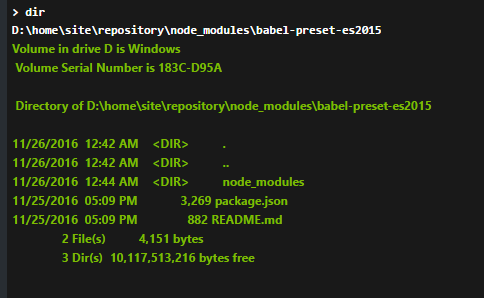
Interesting, the babel-preset-es2015 folder is empty:

Maybe it's a problem with the es2015 preset version. I'll keep looking.
I'm very sorry for the trouble. As it turns out updating the node version in Azure still leaves all the deeply nested files in node_modules. It works correctly if you use a new app service and create the global.json file + set the node version from the get go. In my case I didn't know how to reset it so I had to delete the app and create it again.
Thank you for your patience.
Reacted by Mark PieszakOh great so, just for clarity if anyone else runs into it:
- Deleted the app from Azure.
- Set the Azure Node version to 7 (since we require npm3+)
- Added the global.json file to pinpoint the version of .NET Core we need (1.0.1 at the moment)
- Git push the app back onto Azure
Glad you got it working!
Is this a new upcoming feature to azure you're talking about, or to .NET Core and somehow caching node modules you want?
It's just a change to the default Webpack config that prepares a completely standalone server-side prerendering bundle (like how the client-side bundle is completely self-contained). This means that at runtime, it never calls Node's
requireto load anything fromnode_modules, so you don't even have to deploy that dir to production.We need this because (1) people continue to struggle with deploying
node_modulescorrectly, especially because of NPM 2.x issues on Windows, and (2) publishing from VS is epically slow if you include 20,000+ files fromnode_modules. This change will mean you only have 1 or 2 (large).jsfiles that contain everything needed for server-side prerendering, so publishing/deployment will be just as quick and risk-free as with any other ASP.NET site.Reacted by Mark PieszakI love it, that's a great idea. Yeah it seems to be a reoccurring issue :)
That feature is published now (get the latest
generator-aspnetcore-spaversion 0.6.1 to see it - notice thatdotnet publishwon't emit anode_modulesdir any more, yet it still works). Let me know if you can think of any issues with this!Will do, thanks again Steve!


Windows 10 x64
node v6.7.0
npm v4.0.2
.NET Core 1.0.1 tools Preview 2
.NET Core 1.1 SDK
tsc v2.0.10 (same results with v1.8)
VS Code
VS2015
VS2017
I get the following error when I run the React generator (yarn v0.17.8):
By the way, with yarn v0.16.1 I get the following set of errors: