English | Русский
The antidetect browser your AI agent can drive.
Kernel-level fingerprint spoofing · unlimited local profiles, free · standard Playwright API · built-in MCP server.


Give your automation — or your AI agent — a real browser the web can't tell apart from a human. Real-device fingerprints spoofed at the kernel, driven by the Playwright API you already write.
Create unlimited browser profiles on your own machine — free, forever. No per-profile fees, no per-seat pricing. Every profile is a fully isolated identity — its own real-device fingerprint, cookies, storage and proxy — persisted on disk and restored byte-for-byte on the next launch. Name a profile and it exists; there's nothing to provision.
Ships as an MCP server — one line (npx -p anti-detect-browser -p @modelcontextprotocol/sdk anti-detect-browser --mcp) drops a fully fingerprinted browser into Claude or any MCP client, so your agent can navigate, click, type, read and screenshot the real web. Prefer code? launch() returns a standard Playwright BrowserContext and Page, so your existing scripts work unchanged — only the launch line differs.
Fingerprints are spoofed at the kernel level (a custom Chromium runtime), not with fragile JavaScript patches that anti-bot systems flag on sight. Signals stay coherent across Canvas, WebGL, WebGPU, fonts, audio, navigator, screen and timezone — nothing contradicts, because it's a real device profile, not randomized noise. Timezone and geolocation follow your proxy automatically.
Pass http://, https:// or socks5://user:pass@host:port and the credentials are answered inside the engine — HTTP/HTTPS 407 challenges in the network stack, SOCKS5 by RFC 1929 username/password negotiation. No helper extension is installed, so chrome://extensions stays empty; the proxy-auth extension most antidetect browsers still ship is enumerable from any page and is itself a tell. Credentials reach the network process only, never a renderer.
launch({ proxy: 'relay://user:secret@relay.yourdomain.com?key=<relay key>' }) swaps the transport for one the engine speaks natively: a single WebSocket carrying AEAD-sealed frames — HKDF-SHA256 per connection, AES-256-GCM per frame — so there is no plaintext CONNECT line, no SOCKS5 handshake and no fixed-length header on the wire, and the target hostname stays inside the sealed frame. Still no local forwarder and no extension. ?key= is the relay's 32-byte base64url pre-shared key: it selects the encrypted protocol for the browser and for the exit-IP lookup the SDK runs before launch, so timezone and WebRTC follow the relay's exit. Without it the URL means the older plaintext protocol, and a malformed key is refused rather than downgraded. The relay server is MIT-licensed and self-hostable on a domain you control (antibrow/relay); the frame format and threat model are in the whitepaper.
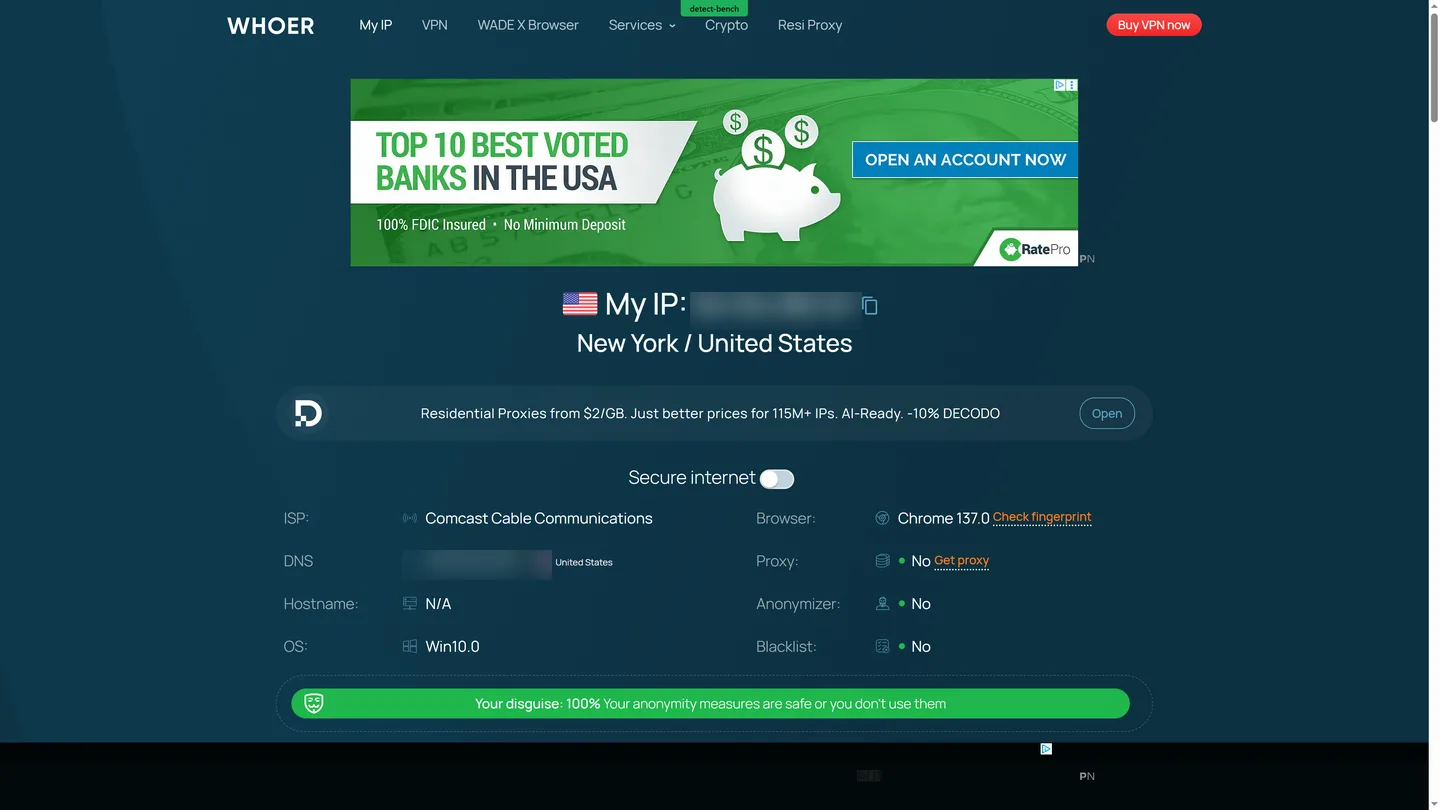
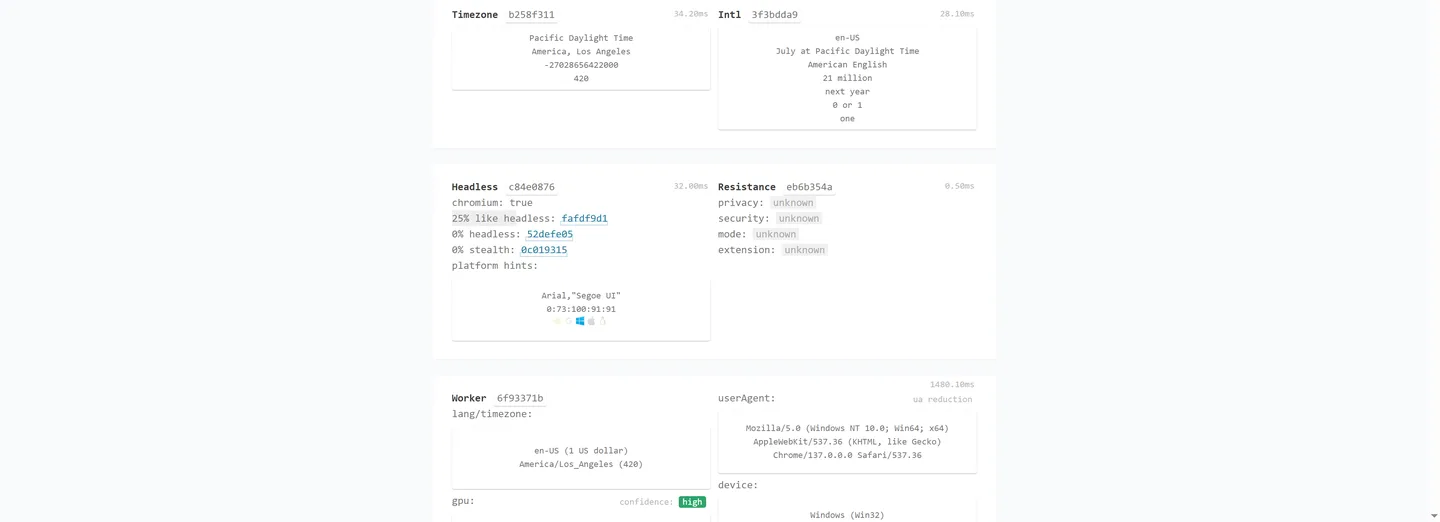
Real residential exit, Proxy: No, 90% disguise on whoer.net — and a clean run through CreepJS:
npm install anti-detect-browserGet an API key from the dashboard at antibrow.com, then:
import { profile } from 'anti-detect-browser'

const key = process.env.ANTI_DETECT_BROWSER_KEY

// Unlimited local profiles — just name one. It's created on disk on first use.
const p = await profile({ key, name: 'shopper-01' })
const { page, browser } = await p.launch()

await page.goto('https://whoer.net')      // standard Playwright from here on
console.log(await page.title())
await browser.close()
With a managed residential proxy (timezone & geo follow it) and a visual label:
const p = await profile({
  key,
  name: 'shopper-02',
  proxy: { kind: 'managed' },   // claimed from the managed pool on first use, reused after
})

const { page } = await p.launch({ label: 'acct@shop.com' })   // drawn by the kernel in front of the address bar
The proxy is written down the first time, so later runs need only the name:
const same = await profile({ key, name: 'shopper-02' })
await same.launch()                       // same exit IP, timezone and geo
p.launch() resolves to { browser, context, page, profileDir } — context and page are the real Playwright objects.
Ask for a phone and the profile becomes one - on the same Windows, macOS or Linux machine you already run:
const { page } = await ab.launch({
  profile: 'phone-01',
  deviceType: 'android',   // 'desktop' (default) | 'android'
})
This is a desktop-hosted simulation, not a device farm and not a remote phone. What changes is the identity the page sees, all of it answered in the kernel:
| Surface | Android profile reports |
|---|---|
| UA + client hints | Mobile Safari UA, Sec-CH-UA-Mobile: ?1, Sec-CH-UA-Platform: "Android", real model and platformVersion, formFactors: ["Mobile"], empty architecture / bitness |
navigator |
platform: "Linux armv81", maxTouchPoints, mobile core/memory counts, no plugins or mime types, pdfViewerEnabled: false |
| Touch & layout | ontouchstart, window.orientation, screen.orientation portrait, (pointer: coarse) / (hover: none), window sized to the device screen so innerWidth === screen.width on a viewport-meta page |
| GPU | mobile unmasked vendor/renderer plus the ETC/ASTC compressed-texture extensions a phone GPU actually exposes |
| Screen, audio, fonts, connection | taken from the same device as everything above |
Three real phones ship inside the package, so a free-plan profile can be Android with no network round-trip. Every field comes from one device - the package picks a whole row, never a field, because that is the only way the numbers agree with each other.
Two things to know:
- The device type is fixed at creation. It lives in the profile's persona, so passing
deviceTypeto an existing profile does nothing. Make a new profile to switch. - Android needs kernel
151or newer, the first one carrying the mobile support. The SDK picks the newest qualifying kernel for a new Android profile, installs it for you, and fails with an explicit message rather than launching a desktop kernel behind a phone's fingerprint. Check a version yourself withkernelSupportsAndroid(version), or list what qualifies withandroidCapableKernels().
Want the identity drawn from the fingerprint library on the server instead of the bundled table - a different real machine each time, Android or Windows?
await ab.launch({ profile: 'phone-02', deviceType: 'android', realFingerprint: true })realFingerprint is on the paid plans; free keys are rejected by the server rather than quietly downgraded to a generated persona. Like deviceType, it applies only when the profile is first created.
The fingerprint browser kernel ships new builds over time (fresh Chrome majors, spoofing fixes). Installed kernels are cached and never swapped under you — you decide when to update.
// Any installed kernel have a newer build published?
if (await ab.hasKernelUpdate()) {
  const updated = await ab.updateKernel()   // pull the newer build(s)
  console.log('updated kernels:', updated)  // → ['150']
}

// Or inspect per-version detail
const status = await ab.checkKernelUpdates()
// [{ version, label, installed, installedBuild, availableBuild, updateAvailable }]

// Update just one version, with progress
await ab.updateKernel('150', msg => console.log(msg))
Even without that, launch() quietly checks (once per process, in the background) and prints a one-line notice if a newer kernel build exists — so you'll know, without it ever updating behind your back or slowing the launch:
[anti-detect-browser] A newer browser kernel build is available for: Chrome 150. Run browser.updateKernel() to update now, or launch with { updateKernelBeforeLaunch: true }.
Prefer it hands-off? Let launch() check and update the profile's kernel before it starts — off by default:
await ab.launch({
  profile: 'shopper-01',
  updateKernelBeforeLaunch: true,   // default false — when true, updates then launches (no notice)
})
If the machine is offline the check is skipped silently and the browser launches with the installed kernel — updates never block a launch. (The notice goes to stdout; the MCP server routes it to stderr to keep the JSON-RPC channel clean.)
A profile's kernel is frozen when it is created, and the persona is what decides which kernel actually runs — so launch({ kernelVersion }) cannot move an existing one. This can:
import { setProfileKernelVersion } from 'anti-detect-browser'

await setProfileKernelVersion({ profileName: 'shopper-01', version: '151' })
Only the version-derived fields move. The seeds, GPU, screen and everything else stay put, so the site sees the same device on a newer Chrome rather than a brand new one behind the same cookies. It applies on the next launch, and refuses a version the kernel catalogue does not know instead of quietly leaving the profile where it was.
With cloud sync on, run it on the machine that used the profile last: persona.json travels in the archive, and a restore from the cloud brings back the version that archive was packed with.
MCP mode needs @modelcontextprotocol/sdk, an optional peer dependency — it is
not installed with this package, so that SDK-only users do not carry an HTTP
server stack they never run. The -p flags below let npx fetch both; if you
install locally instead, run npm install anti-detect-browser @modelcontextprotocol/sdk.
Add it to your MCP client config and your agent gets a stealth browser:
{
  "mcpServers": {
    "anti-detect-browser": {
      "command": "npx",
      "args": [
        "-p", "anti-detect-browser",
        "-p", "@modelcontextprotocol/sdk",
        "anti-detect-browser", "--mcp"
      ],
      "env": { "ANTI_DETECT_BROWSER_KEY": "your-api-key" }
    }
  }
}
Tools: launch_browser, navigate, click, fill, screenshot, evaluate, get_content, list_profiles, create_profile, list_proxies, claim_proxy, start_live_view, list_recipes, run_recipe, fanout_recipe, and more.
The three recipe tools are the shortcut: instead of driving a site click by
click, the agent asks for reddit/hot and gets JSON. All three take a jq
filter, so it can ask for two fields instead of a whole payload. See
Recipes.
launch_browser and create_profile both take deviceType ("desktop" / "android") and realFingerprint, so an agent can ask for a phone profile in the same call that starts it.
The first launch_browser on a machine downloads the browser kernel (a few hundred MB), which can take longer than a client's tool-call timeout. The launch keeps going in the background, and calling launch_browser again for the same profile joins it (or returns the session it produced) instead of starting a second browser. Clients that send a progress token get progress notifications while it runs. On Windows, a client that reports spawn npx ENOENT needs "command": "cmd" with "/c", "npx" in front of the other args.
A recipe is one file that turns one site into one command: ask for reddit/hot
and get JSON back instead of a browser handle and a scraping problem. Recipes
are published in their own repository
(antibrow/recipes) and shared with the
Python SDK, so the same recipe produces the same output from either.
anti-detect-browser recipe update                                # pull the registry
anti-detect-browser recipe list
anti-detect-browser recipe info reddit/hot                       # args, hosts, identity
anti-detect-browser recipe run reddit/hot --temporary --json
anti-detect-browser recipe run reddit/hot --profile shopper-01 --jq '.items[].title'
From code:
import { runRecipe, fanoutRecipe } from 'anti-detect-browser'

const { value } = await runRecipe({
  id: 'reddit/hot',
  key: process.env.ANTI_DETECT_BROWSER_KEY,
  temporary: true,
  args: { limit: 5 },
})
The part a single-browser tool cannot do: the same command on N isolated identities.
anti-detect-browser recipe fanout ipify/exit-ip --profiles 'shopper-*' --concurrency 4const { results } = await fanoutRecipe({
id: 'reddit/hot',
key: process.env.ANTI_DETECT_BROWSER_KEY,
profiles: ['shopper-01', 'shopper-02', 'shopper-03'],
concurrency: 3,
})Three profiles, three personas, three cookie jars, three exit IPs. Concurrency is capped by your plan's limit, and read before anything is queued rather than discovered by launching into a refusal.
run() executes inside the page the runtime opened, so a relative fetch carries
that profile's session for that site. meta.entry may interpolate the recipe's
arguments (…/search?q={query}) for a page that only exists per query - the
host stays literal, so it is still the declared one.
Two rules make community recipes safe to run in a profile that holds live logins:
meta.domainsis enforced at the network layer. A request to a host the recipe did not declare is blocked, so a Reddit recipe cannot reach your mail. Blocked hosts come back in the result.- Recipes are pinned by SHA-256, and only reviewed ones run by default.
--allow-unreviewedopts in, and only on a--temporaryprofile - a temporary profile is local-only, so nothing it collects travels anywhere.
--jq trims the output before you read it: .items[].title, .items[0],
.items[1:3], length, keys, joined with |.
anti-detect-browser recipe guide                      # the authoring guide
anti-detect-browser recipe scaffold mysite/list       # skeleton
anti-detect-browser recipe test mysite/list --args '{"limit":5}'
Explore the site from a throwaway profile, not your own account - that is what
--temporary is for.
Automation tends to mint a profile per task. Pass temporary: true so those
profiles land in their own directory tree, out of the way of the profiles you
actually manage:
import { AntiDetectBrowser } from 'anti-detect-browser'

const ab = new AntiDetectBrowser({ key: process.env.ANTI_DETECT_BROWSER_KEY, temporary: true })

for (const task of tasks) {
  const { page, browser } = await ab.launch({ profile: `task-${task.id}` })
  await page.goto(task.url)
  await browser.close()
}

// Temporary profiles are never deleted for you.
const removed = ab.clearTemporaryProfiles({ olderThanDays: 7 })
console.log(`removed ${removed.length} temporary profiles`)
Three things to know:
- They do not show up in the desktop app. The desktop app only reads the managed tree, so a temporary profile is invisible to it.
- The two trees are separate namespaces. A temporary
gmailand a managedgmailare two different profiles with their own identity and cookies. - Nothing is deleted automatically. A temporary profile keeps its identity
and its logins for as long as you leave it on disk, which is what makes it
reusable. Clear them yourself with
ab.clearTemporaryProfiles()ornpx anti-detect-browser --clear-temp --older-than=7.
Per launch, temporary: false puts one profile back in the managed tree.
The Linux kernel ships as two builds, x64 and arm64, and the SDK picks the one
that matches the CPU it is running on. There is nothing to configure: an arm64
Node process on Linux downloads the arm64 kernel, and the container sandbox
flags (--no-sandbox, --disable-dev-shm-usage and the rest) are applied for
you. An ARM instance is a normal target here, not a workaround, so a fleet that
already runs on ARM does not need an x86 machine kept around for the browser.
Headless is the one thing that changes on a server. Real headless Chromium has a fingerprint of its own, so the kernel runs headful against a virtual display instead:
FROM node:22-bookworm-slim
RUN apt-get update && apt-get install -y --no-install-recommends \
      xvfb libnss3 libatk1.0-0 libatk-bridge2.0-0 libcups2 libdrm2 \
      libxkbcommon0 libxcomposite1 libxdamage1 libxfixes3 libxrandr2 \
      libgbm1 libasound2 libpango-1.0-0 libcairo2 fonts-liberation ca-certificates \
    && rm -rf /var/lib/apt/lists/*
WORKDIR /app
COPY package*.json ./
RUN npm install --omit=dev
COPY . .
RUN printf '%s\n' \
      '#!/bin/sh' 'set -e' \
      'Xvfb :99 -screen 0 1920x1080x24 -nolisten tcp &' \
      'i=0; while [ ! -e /tmp/.X11-unix/X99 ] && [ $i -lt 100 ]; do i=$((i+1)); sleep 0.1; done' \
      'export DISPLAY=:99' 'exec "$@"' \
    > /usr/local/bin/with-xvfb && chmod +x /usr/local/bin/with-xvfb
ENTRYPOINT ["with-xvfb"]
CMD ["node", "index.js"]
xvfb-run is deliberately not used: it shells out to xauth, which the slim
images do not carry, and once that is installed it blocks waiting for Xvfb's
SIGUSR1 ready signal - a signal that never arrives under a container's PID 1, so
the process sits in rt_sigsuspend and nothing ever starts. Launching Xvfb and
waiting for its socket avoids both halves.
The same file builds under linux/amd64 and linux/arm64.
One thing to watch when you mount the cache as a volume: kernels are keyed by
version, not by architecture (~/.anti-detect-browser/kernels/<version>/).
Sharing one volume between an amd64 host and an arm64 host hands the wrong
binary to whichever one downloads second, so give each architecture its own
volume.
A launch takes focus, which is a problem when the automation is meant to run
beside your own work. focusWindow: false opens the browser behind whatever is
in front:
await ab.launch({ profile: 'task-01', focusWindow: false })The window is still there and still normally sized - this is not headless, so nothing about the fingerprint changes; it just does not come to the front.
Window stacking is decided in the kernel rather than in the SDK, so install the latest kernel for the profile before relying on it.
A launch never creates a cloud profile on its own. By default a profile syncs only when the server already knows the name, so an automation run cannot fill your sync quota with profiles you never meant to keep. To put a new profile in the cloud, ask for it:
await ab.launch({ profile: 'main-account', sync: true })   // create + sync
await ab.launch({ profile: 'main-account', sync: false })  // stay local
sync: true and temporary: true are mutually exclusive; passing both throws.
sync: true also throws when your plan does not include cloud sync.
launch() takes a profile name and forgets it the moment the call returns.
profile() gives you back a durable handle instead - it resolves (creating it
on first use) the profile once, then remembers the proxy, group and tags you
set on it, so a later profile({ name }) with none of those options passed
comes back exactly as it was left:
import { profile } from 'anti-detect-browser'

const p = await profile({
  key: process.env.ANTI_DETECT_BROWSER_KEY,
  name: 'shop-01',
  proxy: 'http://user:pass@host:8080',
})
const { page, browser } = await p.launch()
await browser.close()

// later, anywhere - the proxy comes back with the profile
const same = await profile({ key: process.env.ANTI_DETECT_BROWSER_KEY, name: 'shop-01' })
await same.launch()
profile() accepts everything the AntiDetectBrowser constructor does, plus
name (required), proxy, sync, temporary, tags, group,
userDataDir and, applying only the first time the profile is created (same
as on launch()), deviceType and realFingerprint. tags and group
follow the passed/omitted rule described below; userDataDir picks the
profile's directory on whichever call passes it. The handle exposes name,
id, synced, dir and proxy as read state, plus:
p.launch(options?)- starts the browser. Takes only session-shaped options (headless,label,focusWindow,liveView,updateKernelBeforeLaunch); passingproxy,tags,group,syncortemporaryhere throws - those live on the profile, not on one launch.p.setProxy(next)- rebinds the profile's proxy. A URL string binds that proxy directly.{ kind: 'managed' }claims one from the managed pool the first time it's used and reuses the same one on every call after that;{ kind: 'managed', managedProxyId }binds a specific managed proxy by id.nulldrops the binding and goes direct.p.swapProxy()- trades the currently bound managed proxy for a different exit. Throws if the profile isn't currently bound to a managed proxy.p.getGroup()/p.setGroup(group | null)andp.getTags()/p.setTags(tags)- read and write the profile's group and tags directly.setGroup(null)clears the group - it's the only way to remove one once set. Passinggrouportagstoprofile()follows the same rule asproxy: pass it once and it's remembered from then on; leave it out and whatever is already stored stays untouched.p.enableSync()- moves a local-only profile into the cloud, uploading its current on-disk state so another machine opening the same name gets a real browser, not an empty shell.p.dangerousDisconnectSync()- deletes the cloud copy and its archive. Irreversible. The local directory is untouched and stays launchable - its proxy, group and tags are pulled down into the local record first, so the profile keeps its identity once the cloud row is gone.p.export(filePath?)- packs the on-disk profile into a portable.fpprofilearchive (identity, cookies, storage, proxy binding). Reflects whatever is on disk right now, so launch the profile at least once first - a profile's identity isn't generated until its first launch, and exporting before that throws. If a proxy url is bound, it's written into the archive in full, password included - anyone you hand the file to gets that credential along with the profile. An encrypted profile is converted on a temporary copy first, so the archive opens without a key - that needs the profile's kernel installed, and the export aborts (writing nothing) rather than produce a file nobody can open.
| Feature | |
|---|---|
| Real-device fingerprints | Kernel-level spoofing, coherent across Canvas / WebGL / WebGPU / fonts / audio / timezone |
| Android profiles | deviceType: 'android' turns a profile into a real phone identity - touch, mobile client hints, mobile GPU - on your desktop |
| Unlimited local profiles | Free on every plan — isolated, persistent, no per-profile cost |
| Standard Playwright API | launch() returns real BrowserContext / Page — zero to learn |
| Self-updating kernel | Detect new browser-kernel builds and pull them on demand, or check-and-update before launch |
| Built-in MCP server | Drive it from Claude or any MCP agent, no glue code |
| Managed residential proxies | One proxyId; the exit IP, timezone and geo all line up |
| Authenticated HTTP/SOCKS5 | Credentials answered in the engine (407 / RFC 1929) — no proxy-auth extension to enumerate |
| Encrypted relay | relay://…?key= — AES-256-GCM per frame over one WebSocket, no proxy-protocol signature, self-hostable |
| Passkeys | Each profile keeps its own WebAuthn authenticator; enrolled passkeys replay on the next sign-in |
| Portable profiles | exportProfileArchive() / importProfileArchive() — identity, state and passkeys in one .fpprofile |
| Live View | Stream a running session to your dashboard in real time |
| Cloud profile sync | Roam a profile (identity + state) across machines |
| Concurrency by plan | Kernel-enforced simultaneous-browser cap |
Managed proxies, Live View and cloud sync are on the paid plans. Local profiles and the full fingerprint engine are free.
Local profiles are unlimited on every plan. How many browsers you run at once scales with your plan (enforced by the kernel):
| Plan | Local profiles | Concurrent browsers | Cloud sync | Proxies |
|---|---|---|---|---|
| Free | unlimited | 1 | no | no |
| Basic | unlimited | 5 | yes | yes |
| Pro | unlimited | 20 | yes | yes |
| Team | unlimited | 100 | yes | yes |
See antibrow.com/pricing.
Each launch reports its outcome to the API: success, or a failure category such as timeout, concurrency or network, plus the SDK version, OS and kernel version. No URLs, profile names, proxy details or error text are sent. Turn it off with new AntiDetectBrowser({ key, telemetry: false }) or ANTIBROW_TELEMETRY=0.
- Node.js >= 18
- Windows x64, macOS (universal) or Linux x64 / arm64
playwright-core(peer dependency)
- Docs — antibrow.com/docs/sdk
- Dashboard / API key — antibrow.com
- Pricing — antibrow.com/pricing
MIT