You signed in with another tab or window. Reload to refresh your session.You signed out in another tab or window. Reload to refresh your session.You switched accounts on another tab or window. Reload to refresh your session.Dismiss alert
ERROR in ./~/css-loader!./~/sass-loader/lib/loader.js!./app/styles/main.scss
Module build failed: Error: Cannot find module 'node-sass'
Require stack:
- C:\Users\--\NELSON\javascript\node_modules\sass-loader\lib\loader.js
- C:\Users\--\NELSON\javascript\node_modules\loader-runner\lib\loadLoader.js
- C:\Users\--\NELSON\javascript\node_modules\loader-runner\lib\LoaderRunner.js
- C:\Users\-\NELSON\javascript\node_modules\webpack\lib\NormalModule.js
- C:\Users\-\NELSON\javascript\node_modules\webpack\lib\NormalModuleFactory.js
- C:\Users\-\NELSON\javascript\node_modules\webpack\lib\Compiler.js
- C:\Users\-\NELSON\javascript\node_modules\webpack\lib\webpack.js
- C:\Users\-\NELSON\javascript\node_modules\webpack-dev-server\lib\Server.js
- C:\Users\-\NELSON\javascript\node_modules\webpack-dev-server\bin\webpack-dev-server.js
    at Function.Module._resolveFilename (internal/modules/cjs/loader.js:880:15)
    at Function.Module._load (internal/modules/cjs/loader.js:725:27)
    at Module.require (internal/modules/cjs/loader.js:952:19)
    at require (internal/modules/cjs/helpers.js:88:18)
    at Object.<anonymous> (C:\Users\-\NELSON\javascript\node_modules\sass-loader\lib\loader.js:3:14)
    at Module._compile (internal/modules/cjs/loader.js:1063:30)
    at Object.Module._extensions..js (internal/modules/cjs/loader.js:1092:10)
    at Module.load (internal/modules/cjs/loader.js:928:32)
    at Function.Module._load (internal/modules/cjs/loader.js:769:14)
    at Module.require (internal/modules/cjs/loader.js:952:19)
    at require (internal/modules/cjs/helpers.js:88:18)
    at loadLoader (C:\Users\-\NELSON\javascript\node_modules\loader-runner\lib\loadLoader.js:18:17)
    at iteratePitchingLoaders (C:\Users\-\NELSON\javascript\node_modules\loader-runner\lib\LoaderRunner.js:169:2)
    at iteratePitchingLoaders (C:\Users\-\NELSON\javascript\node_modules\loader-runner\lib\LoaderRunner.js:165:10)
    at C:\Users\-\NELSON\javascript\node_modules\loader-runner\lib\LoaderRunner.js:176:18
    at loadLoader (C:\Users\-\NELSON\javascript\node_modules\loader-runner\lib\loadLoader.js:47:3)
 @ ./app/styles/main.scss 4:14-122
 @ ./app/js/index.js
 @ multi (webpack)-dev-server/client?http://localhost:3000 babel-polyfill ./app/js
For those having issues making this work, try this.
First I downloaded Git and ran Git Bash. If you don't gitbash follow this tutorial https://www.youtube.com/watch?v=BMW7LiF_Oc4
I created a folder "code" on C://
With the Git Bash terminal I navigated (type in cd /c/code/ ) to the directory I wanted to install the data to. Then type in the following:
git clone https://github.com/amigoscode/javascript.git
cd javascript/
try running these in order:


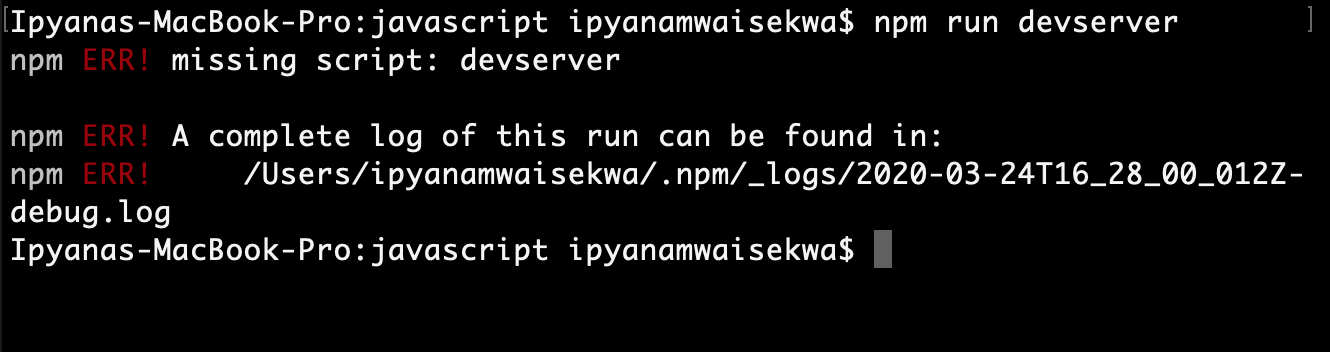

Activity
saleh-dot commentedon Sep 22, 2020
you have to kill port and then restart
you can do this in command prompt or using same terminal first have to change directory to /c
saleh-dot commentedon Sep 22, 2020
netstat -ano | findstr :3000
this will give you PID 4 digit number at end
saleh-dot commentedon Sep 22, 2020
taskkill /PID "PID" /F
"PID" will be from "netstat -ano | findstr :3000"
Savics407 commentedon Oct 9, 2020
I am also having similar problem, having cloned the repo, it doesn't display on web browser when I type in log as shown in the video tutorial
mmaio79 commentedon Feb 9, 2021
Same problem -
reccollo commentedon Feb 13, 2021
For those having issues making this work, try this.
First I downloaded Git and ran Git Bash. If you don't gitbash follow this tutorial https://www.youtube.com/watch?v=BMW7LiF_Oc4
I created a folder "code" on C://
With the Git Bash terminal I navigated (type in cd /c/code/ ) to the directory I wanted to install the data to. Then type in the following:
git clone https://github.com/amigoscode/javascript.git
cd javascript/
try running these in order:
npm install
npm cache clean --force
npm install -g npm
npm install
*optional
(npm unistall ~/.node-gyp then npm update)
npm run devserver
I hope this helps
nabzdeezy1 commentedon Mar 1, 2021
Remove the node_modules complete folder and remove the package-lock.json file
Clear npm cache by using command npm cache clean. you can force to clean if gives error
Install and then rebuild node-sass
npm install node-sass@latest
npm rebuild node-sass
This worked for me
dvdgao34 commentedon May 28, 2021
Didn't need to remove anything. Just do:
npm install node-sass@latest
npm rebuild node-sass
npm i
It worked for me