# SQLite
> Bun natively implements a high-performance SQLite3 driver.
Bun natively implements a high-performance [SQLite3](https://www.sqlite.org/) driver. To use it, import from the built-in `bun:sqlite` module.
```ts db.ts icon="/icons/typescript.svg"
import { Database } from "bun:sqlite";
const db = new Database(":memory:");
const query = db.query("select 'Hello world' as message;");
query.get();
```
```txt
{ message: "Hello world" }
```
The API is synchronous and fast. Credit to [better-sqlite3](https://github.com/JoshuaWise/better-sqlite3) and its contributors for inspiring the API of `bun:sqlite`.
Features include:
- Transactions
- Parameters (named & positional)
- Prepared statements
- Datatype conversions (`BLOB` becomes `Uint8Array`)
- Map query results to classes without an ORM - `query.as(MyClass)`
- The fastest performance of any SQLite driver for JavaScript
- `bigint` support
- Multi-query statements (for example `SELECT 1; SELECT 2;`) in a single call to `database.run(query)`
- SQL functions, aggregates and window functions written in JavaScript
- Hooks for inserted, updated and deleted rows
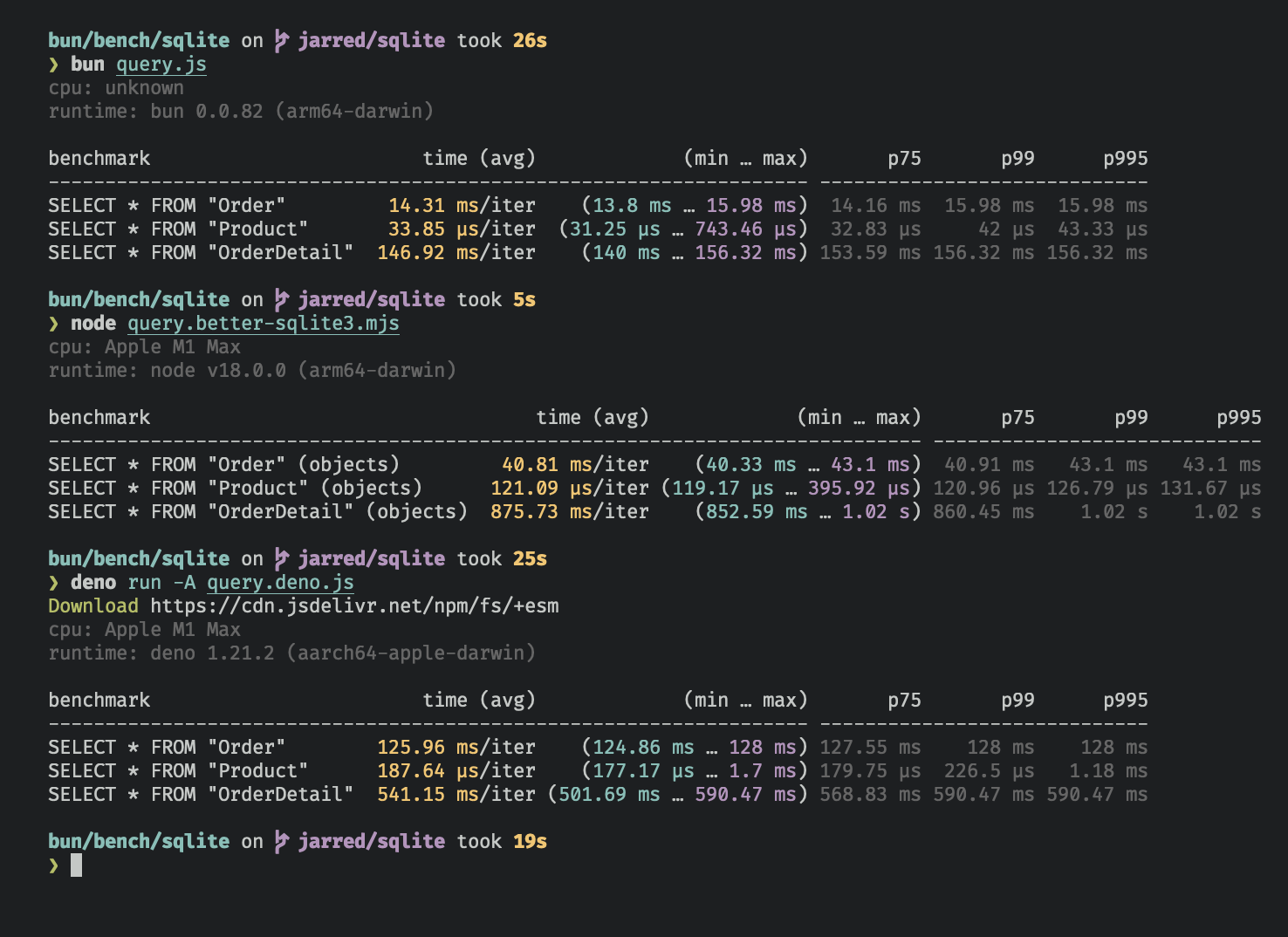
The `bun:sqlite` module is roughly 3-6x faster than `better-sqlite3` and 8-9x faster than `deno.land/x/sqlite` for read queries. Each driver was benchmarked against the [Northwind Traders](https://github.com/jpwhite3/northwind-SQLite3/blob/46d5f8a64f396f87cd374d1600dbf521523980e8/Northwind_large.sqlite.zip) dataset. View and run the [benchmark source](https://github.com/oven-sh/bun/tree/main/bench/sqlite).
---
## Database
To open or create a SQLite3 database:
```ts db.ts icon="/icons/typescript.svg"
import { Database } from "bun:sqlite";
const db = new Database("mydb.sqlite");
```
To open an in-memory database:
```ts db.ts icon="/icons/typescript.svg"
import { Database } from "bun:sqlite";
// all of these do the same thing
const db = new Database(":memory:");
const db = new Database();
const db = new Database("");
```
To open in `readonly` mode:
```ts db.ts icon="/icons/typescript.svg" highlight={2}
import { Database } from "bun:sqlite";
const db = new Database("mydb.sqlite", { readonly: true });
```
Bun creates the database file if it doesn't exist. To throw an error instead, set `create: false`:
```ts db.ts icon="/icons/typescript.svg" highlight={2}
import { Database } from "bun:sqlite";
const db = new Database("mydb.sqlite", { create: false });
```
Options that contradict each other, such as `{ readonly: true, create: true }`, throw a `TypeError`.
### Strict mode
By default, `bun:sqlite` does not throw an error if a parameter is missing: it binds `NULL`.
To instead throw an error when a parameter is missing, set `strict: true` on the `Database` constructor:
```ts db.ts icon="/icons/typescript.svg" highlight={3}
import { Database } from "bun:sqlite";
const strict = new Database(":memory:", { strict: true });
// throws error because of the typo:
const query = strict.query("SELECT $message;").all({ messag: "Hello world" });
const notStrict = new Database(":memory:");
// does not throw error:
notStrict.query("SELECT $message;").all({ messag: "Hello world" });
```
### Load via ES module import
You can also load a database with an import attribute.
```ts db.ts icon="/icons/typescript.svg" highlight={1}
import db from "./mydb.sqlite" with { type: "sqlite" };
console.log(db.query("select * from users LIMIT 1").get());
```
This is equivalent to the following:
```ts db.ts icon="/icons/typescript.svg"
import { Database } from "bun:sqlite";
const db = new Database("./mydb.sqlite");
```
### `.close(throwOnError: boolean = false)`
To close a database connection but let statements created with `.prepare()` keep working until they are finalized or garbage collected, call `.close(false)`:
```ts db.ts icon="/icons/typescript.svg" highlight={3}
const db = new Database();
// ... do stuff
db.close(false);
```
The `Database` owns statements created with `.query()` and finalizes them immediately either way. Bun releases the underlying connection (and the database file handle) once the last outstanding `.prepare()` statement is finalized.
To finalize **every** outstanding statement, release the connection immediately, and throw if SQLite reports an error while closing, call `.close(true)`:
```ts db.ts icon="/icons/typescript.svg" highlight={3}
const db = new Database();
// ... do stuff
db.close(true);
```
Using a statement that `close()` finalized throws `Database has closed`. Two exceptions: `toString()` returns an empty string, and `finalize()` stays safe to call.
`close()` is safe to call multiple times but has no effect after the first. One exception: `close(true)` after
`close(false)` still finalizes any remaining `.prepare()` statements. If a `Database` is garbage collected without
being closed, Bun releases the connection once every statement created from it has also been finalized or collected.
The `using` statement calls `close(true)`.
### `using` statement
The `using` statement closes the database connection when the block exits.
```ts db.ts icon="/icons/typescript.svg" highlight={4, 5}
import { Database } from "bun:sqlite";
{
using db = new Database("mydb.sqlite");
using query = db.query("select 'Hello world' as message;");
console.log(query.get());
}
```
```txt
{ message: "Hello world" }
```
### `.serialize()`
`bun:sqlite` supports SQLite's built-in mechanism for [serializing](https://www.sqlite.org/c3ref/serialize.html) and [deserializing](https://www.sqlite.org/c3ref/deserialize.html) databases to and from memory.
```ts db.ts icon="/icons/typescript.svg" highlight={2}
const olddb = new Database("mydb.sqlite");
const contents = olddb.serialize(); // => Uint8Array
const newdb = Database.deserialize(contents);
```
Internally, `.serialize()` calls [`sqlite3_serialize`](https://www.sqlite.org/c3ref/serialize.html).
### `.query()`
Use the `db.query()` method on your `Database` instance to [prepare](https://www.sqlite.org/c3ref/prepare.html) a SQL query. The result is a `Statement` instance that is cached on the `Database` instance. _The query is not executed._
```ts db.ts icon="/icons/typescript.svg"
const query = db.query(`select "Hello world" as message`);
```
**What does "cached" mean?**
The caching refers to the **compiled prepared statement** (the SQL bytecode), not the query results. When you call `db.query()` with the same SQL string multiple times, Bun returns the same cached `Statement` object instead of recompiling the SQL. The cache holds the `Database.MAX_QUERY_CACHE_SIZE` (default 20) most recently used SQL strings. Evicted statements keep working, but a later `db.query()` with the same string compiles a new one. SQL text over 64 KB is not cached.
It is safe to reuse a cached statement with different parameter values:
```ts
const query = db.query("SELECT * FROM users WHERE id = ?");
query.get(1); // ✓ Works
query.get(2); // ✓ Also works - parameters are bound fresh each time
query.get(3); // ✓ Still works
```
Use `.prepare()` instead of `.query()` when you want a fresh `Statement` instance that isn't cached, for example if you're dynamically generating SQL and don't want to fill the cache with one-off queries.
```ts
// compile the prepared statement without caching
const query = db.prepare("SELECT * FROM foo WHERE bar = ?");
```
---
## WAL mode
SQLite supports [write-ahead log mode](https://www.sqlite.org/wal.html) (WAL), which dramatically improves performance, especially with many concurrent readers and a single writer. We recommend enabling WAL mode for most applications.
To enable WAL mode, run this pragma query at the beginning of your application:
```ts db.ts icon="/icons/typescript.svg"
db.run("PRAGMA journal_mode = WAL;");
```
For faster commits, run `PRAGMA synchronous = NORMAL`. SQLite then syncs the WAL file at checkpoints instead of at every commit. A power loss can lose the last commits, but it cannot corrupt the database.
In WAL mode, writes to the database go directly to a separate file called the "WAL file" (`-wal`). SQLite also creates
a shared-memory index file (`-shm`) for read coordination. SQLite later integrates the WAL file into the main database
file. Think of the WAL file as a buffer for pending writes. Refer to the [SQLite
docs](https://www.sqlite.org/wal.html) for a more detailed overview.
### WAL sidecar file cleanup
When using WAL mode with a file-based database, SQLite creates two sidecar files alongside your database: a write-ahead log (`-wal`) and a shared-memory index (`-shm`). Whether SQLite removes these files automatically after `.close()` depends on your platform:
- **macOS**: Bun uses the system-provided SQLite, which Apple builds with persistent WAL enabled. The `-wal` and `-shm` files **persist** after close. This is not a bug — it is how Apple configured the system SQLite.
- **Linux** and **Windows**: Bun statically links its own SQLite build, which follows upstream defaults. SQLite **typically removes** the sidecar files after close when no other connections are open.
To ensure sidecar files are cleaned up on all platforms, disable WAL persistence and run a truncating checkpoint before closing:
```ts db.ts icon="/icons/typescript.svg"
import { Database, constants } from "bun:sqlite";
const db = new Database("mydb.sqlite");
db.run("PRAGMA journal_mode = WAL;");
// ... use the database ...
// Disable persistent WAL (needed on macOS)
db.fileControl(constants.SQLITE_FCNTL_PERSIST_WAL, 0);
// Checkpoint and truncate the WAL file
db.run("PRAGMA wal_checkpoint(TRUNCATE);");
db.close();
// Only mydb.sqlite remains — no -wal or -shm files
```
---
## Statements
A `Statement` is a _prepared query_, which means it's been parsed and compiled into an efficient binary form. It can be executed multiple times.
Create a statement with the `.query` method on your `Database` instance.
```ts db.ts icon="/icons/typescript.svg"
const query = db.query(`select "Hello world" as message`);
```
Queries can contain parameters. These can be numerical (`?1`) or named (`$param` or `:param` or `@param`).
```ts db.ts icon="/icons/typescript.svg"
const query = db.query(`SELECT ?1, ?2;`);
const query = db.query(`SELECT $param1, $param2;`);
```
A `Statement` is one SQL statement: `.query()` and `.prepare()` compile the first statement of the string and ignore the rest. To run a string of several statements, use `db.run()`.
You bind values to these parameters when you execute the query. You can execute a `Statement` with several different methods, each returning the results in a different form.
### Binding values
To bind values to a statement, pass an object to the `.all()`, `.get()`, `.run()`, or `.values()` method.
```ts db.ts icon="/icons/typescript.svg" highlight={2}
const query = db.query(`select $message;`);
query.all({ $message: "Hello world" });
```
You can bind using positional parameters too:
```ts db.ts icon="/icons/typescript.svg"
const query = db.query(`select ?1;`);
query.all("Hello world");
```
#### Names with and without the prefix
The key of a named parameter can include the `$`, `:`, or `@` prefix or leave it out.
```ts db.ts icon="/icons/typescript.svg"
const query = db.query(`select $message;`);
query.all({ $message: "Hello world" });
query.all({ message: "Hello world" });
```
If the object has both keys, the key with the prefix wins. With `strict: true`, the key without the prefix wins.
### `.all()`
Use `.all()` to run a query and get back the results as an array of objects.
```ts db.ts icon="/icons/typescript.svg" highlight={2}
const query = db.query(`select $message;`);
query.all({ $message: "Hello world" });
```
```txt
[{ $message: "Hello world" }]
```
Internally, this calls [`sqlite3_reset`](https://www.sqlite.org/capi3ref.html#sqlite3_reset) and repeatedly calls [`sqlite3_step`](https://www.sqlite.org/capi3ref.html#sqlite3_step) until it returns `SQLITE_DONE`.
### `.get()`
Use `.get()` to run a query and get back the first result as an object.
```ts db.ts icon="/icons/typescript.svg" highlight={2}
const query = db.query(`select $message;`);
query.get({ $message: "Hello world" });
```
```txt
{ $message: "Hello world" }
```
Internally, this calls [`sqlite3_reset`](https://www.sqlite.org/capi3ref.html#sqlite3_reset) followed by one [`sqlite3_step`](https://www.sqlite.org/capi3ref.html#sqlite3_step) and another `sqlite3_reset`: the rows after the first are not read. If the query returns no rows, the result is `null`.
### `.run()`
Use `.run()` to run a query and get back an object with execution metadata. This is useful for schema-modifying queries (such as `CREATE TABLE`) or bulk write operations.
```ts db.ts icon="/icons/typescript.svg" highlight={2}
const query = db.query(`create table foo (bar text);`);
query.run();
```
```txt
{
lastInsertRowid: 0,
changes: 0,
}
```
Internally, this calls [`sqlite3_reset`](https://www.sqlite.org/capi3ref.html#sqlite3_reset) and repeatedly calls [`sqlite3_step`](https://www.sqlite.org/capi3ref.html#sqlite3_step) until it returns `SQLITE_DONE`. It builds no rows.
The `lastInsertRowid` property is the ID of the last row inserted into the database. The `changes` property is the number of rows that the query inserts, updates, or deletes itself. Rows that a trigger or a foreign key action such as `ON DELETE CASCADE` changes do not count.
### `.as(Class)` - Map query results to a class
Use `.as(Class)` to run a query and get back the results as instances of a class. The class's methods, getters, and setters are available on each row.
```ts db.ts icon="/icons/typescript.svg" highlight={10}
class Movie {
title: string;
year: number;
get isMarvel() {
return this.title.includes("Marvel");
}
}
const query = db.query("SELECT title, year FROM movies").as(Movie);
const movies = query.all();
const first = query.get();
console.log(movies[0].isMarvel);
console.log(first.isMarvel);
```
```txt
true
true
```
As a performance optimization, Bun does not call the class constructor or run default initializers, and private fields are not accessible. This is more like `Object.create` than `new`: Bun assigns the class's prototype to the object, so its methods, getters, and setters work.
Bun sets the database columns as properties on the class instance.
### `.iterate()` (`@@iterator`)
Use `.iterate()` to run a query and incrementally return results. This is useful for large result sets that you want to process one row at a time without loading all the results into memory.
```ts db.ts icon="/icons/typescript.svg" highlight={2}
const query = db.query("SELECT * FROM foo");
for (const row of query.iterate()) {
console.log(row);
}
```
You can also use the `@@iterator` protocol:
```ts db.ts icon="/icons/typescript.svg" highlight={2}
const query = db.query("SELECT * FROM foo");
for (const row of query) {
console.log(row);
}
```
A `Statement` has one cursor, and its newest run owns it. If you run the same `Statement` again inside the loop, the call works and the loop throws at its next row. `db.query()` returns the same `Statement` for the same SQL, so use `db.prepare()` to run the same SQL inside the loop.
### `.values()`
Use `values()` to run a query and get back all results as an array of arrays.
```ts db.ts icon="/icons/typescript.svg" highlight={3, 4}
const query = db.query(`select $message;`);
query.values({ $message: "Hello world" });
query.values(2);
```
```txt
[ [ "Hello world" ] ]
[ [ 2 ] ]
```
Internally, this calls [`sqlite3_reset`](https://www.sqlite.org/capi3ref.html#sqlite3_reset) and repeatedly calls [`sqlite3_step`](https://www.sqlite.org/capi3ref.html#sqlite3_step) until it returns `SQLITE_DONE`.
### `.finalize()`
Use `.finalize()` to destroy a `Statement` and free any resources associated with it. Once finalized, a `Statement` cannot be executed again. Typically, the garbage collector does this for you, but explicit finalization may be useful in performance-sensitive applications.
```ts db.ts icon="/icons/typescript.svg" highlight={3}
const query = db.query("SELECT title, year FROM movies");
const movies = query.all();
query.finalize();
```
### `.toString()`
Calling `toString()` on a `Statement` instance prints the expanded SQL query. This is useful for debugging.
```ts db.ts icon="/icons/typescript.svg" highlight={6, 9, 12}
import { Database } from "bun:sqlite";
// setup
const query = db.query("SELECT $param;");
console.log(query.toString()); // => "SELECT NULL"
query.run(42);
console.log(query.toString()); // => "SELECT 42"
query.run(365);
console.log(query.toString()); // => "SELECT 365"
```
Internally, this calls [`sqlite3_expanded_sql`](https://www.sqlite.org/capi3ref.html#sqlite3_expanded_sql). The parameters are expanded using the most recently bound values.
## Parameters
Queries can contain parameters. These can be numerical (`?1`) or named (`$param` or `:param` or `@param`). Bind values to these parameters when executing the query:
```ts title="query.ts" icon="/icons/typescript.svg"
const query = db.query("SELECT * FROM foo WHERE bar = $bar");
const results = query.all({
$bar: "bar",
});
```
```txt
[{ "bar": "bar" }]
```
Numbered (positional) parameters work too:
```ts db.ts icon="/icons/typescript.svg"
const query = db.query("SELECT ?1, ?2");
const results = query.all("hello", "goodbye");
```
```txt
[
{
"?1": "hello",
"?2": "goodbye",
},
];
```
---
## Integers
SQLite supports signed 64-bit integers, but JavaScript only supports signed 53-bit integers or arbitrary-precision integers with `bigint`.
`bigint` input is supported everywhere, but by default `bun:sqlite` returns integers as `number` types. If you need to handle integers larger than 2^53, set the `safeIntegers` option to `true` when creating a `Database` instance. The option also validates that `bigint` values passed to `bun:sqlite` do not exceed 64 bits.
`bun:sqlite` binds a `number` as `INTEGER` when `Number.isSafeInteger()` is true, and as `REAL` otherwise (also `-0`).
### `safeIntegers: true`
When `safeIntegers` is `true`, `bun:sqlite` returns integers as `bigint` types:
```ts db.ts icon="/icons/typescript.svg" highlight={3}
import { Database } from "bun:sqlite";
const db = new Database(":memory:", { safeIntegers: true });
const query = db.query(`SELECT ${BigInt(Number.MAX_SAFE_INTEGER) + 102n} as max_int`);
const result = query.get();
console.log(result.max_int);
```
```txt
9007199254741093n
```
When `safeIntegers` is `true`, `bun:sqlite` throws a `RangeError` if a `bigint` value in a bound parameter does not fit in a signed 64-bit integer:
```ts db.ts icon="/icons/typescript.svg" highlight={3}
import { Database } from "bun:sqlite";
const db = new Database(":memory:", { safeIntegers: true });
db.run("CREATE TABLE test (id INTEGER PRIMARY KEY, value INTEGER)");
const query = db.query("INSERT INTO test (value) VALUES ($value)");
try {
query.run({ $value: BigInt(Number.MAX_SAFE_INTEGER) ** 2n });
} catch (e) {
console.log(e.message);
}
```
```txt
BigInt value '81129638414606663681390495662081' is out of range
```
### `safeIntegers: false` (default)
When `safeIntegers` is `false`, `bun:sqlite` returns integers as `number` types and rounds integers beyond 53 bits to the nearest representable `number`:
```ts db.ts icon="/icons/typescript.svg" highlight={3}
import { Database } from "bun:sqlite";
const db = new Database(":memory:", { safeIntegers: false });
const query = db.query(`SELECT ${BigInt(Number.MAX_SAFE_INTEGER) + 102n} as max_int`);
const result = query.get();
console.log(result.max_int);
```
```txt
9007199254741092
```
A `bigint` parameter that does not fit in a signed 64-bit integer keeps its low 64 bits. For example, `2n ** 64n - 1n` is stored as `-1`.
### `.safeIntegers()`
To change the setting for one `Statement`, call `.safeIntegers(true)` or `.safeIntegers(false)`. It returns the statement. Without an argument it returns the current setting.
```ts db.ts icon="/icons/typescript.svg" highlight={2}
const query = db.prepare("SELECT 9007199254741093 AS max_int");
query.safeIntegers(true).get(); // => { max_int: 9007199254741093n }
query.safeIntegers(); // => true
```
`db.query()` returns the same `Statement` for the same SQL, so the setting stays for its next caller.
---
## Transactions
A transaction executes multiple queries _atomically_: either all of them succeed or none do. Create a transaction with the `db.transaction()` method:
```ts db.ts icon="/icons/typescript.svg" highlight={2}
const insertCat = db.prepare("INSERT INTO cats (name) VALUES ($name)");
const insertCats = db.transaction(cats => {
for (const cat of cats) insertCat.run(cat);
});
```
No cats have been inserted yet. `db.transaction()` returns a new function (`insertCats`) that _wraps_ the function that executes the queries.
To execute the transaction, call this function. The transaction function passes its arguments through to the wrapped function and returns the wrapped function's return value. The wrapped function also has access to the `this` context as defined where the transaction is executed.
```ts db.ts icon="/icons/typescript.svg" highlight={3}
const insert = db.prepare("INSERT INTO cats (name) VALUES ($name)");
const insertCats = db.transaction(cats => {
for (const cat of cats) insert.run(cat);
return cats.length;
});
const count = insertCats([{ $name: "Keanu" }, { $name: "Salem" }, { $name: "Crookshanks" }]);
console.log(`Inserted ${count} cats`);
```
The driver automatically [begins](https://www.sqlite.org/lang_transaction.html) a transaction when you call `insertCats` and commits it when the wrapped function returns. If an exception is thrown, the driver rolls back the transaction. The exception propagates as usual; the driver does not catch it.
The wrapped function must be synchronous. The driver commits when the function returns, and an `async` function
returns at its first `await`. Everything after that `await` runs outside the transaction, and an error thrown there
does not roll anything back. Do the awaited work first and pass the results in.
If the function returns a promise that is already rejected, as an `async` function does when it throws before its first `await`, the driver rolls back the transaction and returns the promise.
**Nested transactions** — You can call transaction functions from inside other transaction functions. When you do, the inner transaction becomes a [savepoint](https://www.sqlite.org/lang_savepoint.html).
```ts db.ts icon="/icons/typescript.svg"
// setup
import { Database } from "bun:sqlite";
const db = Database.open(":memory:");
db.run("CREATE TABLE expenses (id INTEGER PRIMARY KEY AUTOINCREMENT, note TEXT, dollars INTEGER);");
db.run("CREATE TABLE cats (id INTEGER PRIMARY KEY AUTOINCREMENT, name TEXT UNIQUE, age INTEGER)");
const insertExpense = db.prepare("INSERT INTO expenses (note, dollars) VALUES (?, ?)");
const insert = db.prepare("INSERT INTO cats (name, age) VALUES ($name, $age)");
const insertCats = db.transaction(cats => {
for (const cat of cats) insert.run(cat);
});
const adopt = db.transaction(cats => {
insertExpense.run("adoption fees", 20);
insertCats(cats); // nested transaction
});
adopt([
{ $name: "Joey", $age: 2 },
{ $name: "Sally", $age: 4 },
{ $name: "Junior", $age: 1 },
]);
```
Transactions also come with `deferred`, `immediate`, and `exclusive` versions.
```ts
insertCats(cats); // uses "BEGIN"
insertCats.deferred(cats); // uses "BEGIN DEFERRED"
insertCats.immediate(cats); // uses "BEGIN IMMEDIATE"
insertCats.exclusive(cats); // uses "BEGIN EXCLUSIVE"
```
### `.loadExtension()`
To load a [SQLite extension](https://www.sqlite.org/loadext.html), call `.loadExtension(name)` on your `Database` instance:
```ts db.ts icon="/icons/typescript.svg" highlight={4}
import { Database } from "bun:sqlite";
const db = new Database();
db.loadExtension("myext");
```
**macOS users** By default, macOS ships with Apple's proprietary build of SQLite, which doesn't support extensions. Bun uses it, so `sqlite_version()` and `PRAGMA compile_options` report Apple's version and options there. To use extensions, install a vanilla build of SQLite.
```bash terminal icon="terminal"
brew install sqlite
which sqlite # get path to binary
```
To point `bun:sqlite` to the new build, call `Database.setCustomSQLite(path)` before creating any `Database` instances. (On other operating systems, SQLite is statically linked: the call does nothing and returns `false`.) Pass a path to the SQLite `.dylib` file, _not_ the executable. With recent versions of Homebrew this is something like `/opt/homebrew/Cellar/sqlite//libsqlite3.dylib`.
```ts db.ts icon="/icons/typescript.svg" highlight={3}
import { Database } from "bun:sqlite";
Database.setCustomSQLite("/path/to/libsqlite.dylib");
const db = new Database();
db.loadExtension("myext");
```
Workers can repeat `setCustomSQLite()` with the exact same path. Bun rejects a different path after SQLite loads.
### `.fileControl(cmd: number, value?: number | TypedArray | null)`
To use the advanced `sqlite3_file_control` API, call `.fileControl(cmd, value)` on your `Database` instance. See [WAL sidecar file cleanup](#wal-sidecar-file-cleanup) for a practical example.
```ts db.ts icon="/icons/typescript.svg" highlight={6}
import { Database, constants } from "bun:sqlite";
const db = new Database("mydb.sqlite");
// Ensure WAL mode is NOT persistent
// this prevents WAL files from lingering after the database is closed
db.fileControl(constants.SQLITE_FCNTL_PERSIST_WAL, 0);
```
SQLite reads the input of `cmd` from `value` and writes its output there. `value` can be:
- `number`: passed as a 32-bit integer. What SQLite writes back is not returned.
- `TypedArray` or `DataView` of at least 8 bytes: passed as is. Use it to read what SQLite writes back.
- `undefined` or `null`: for a `cmd` that takes no argument, such as `SQLITE_FCNTL_RESET_CACHE`. A `cmd` that reads its argument reads `-1`.
The return value is the SQLite status code: `0` is `SQLITE_OK`, `12` is `SQLITE_NOTFOUND` (the VFS does not implement `cmd`, or the database is in memory).
---
## User-defined functions
### `.function()`
`db.function(name, fn)` defines a SQL function that calls a JavaScript function. It returns the `Database`.
```ts db.ts icon="/icons/typescript.svg" highlight={4}
import { Database } from "bun:sqlite";
const db = new Database(":memory:");
db.function("add2", (a, b) => a + b);
db.query("SELECT add2(12, 4) AS sum").get();
```
```txt
{ sum: 16 }
```
The SQL function takes as many arguments as `fn` has parameters (`fn.length`). Functions with the same name and different numbers of arguments exist side by side. A function with the same name and the same number of arguments replaces the earlier one. That includes the functions that are built into SQLite.
Pass options as the second argument:
```ts db.ts icon="/icons/typescript.svg"
db.function("count_args", { varargs: true }, (...args) => args.length);
db.query("SELECT count_args(1, 2, 3) AS n").get(); // { n: 3 }
```
| Option | Default | Description |
| --------------- | ----------------------- | ------------------------------------------------------------------------------------------------------------------------------------------------------------------------------------ |
| `varargs` | `false` | The SQL function takes any number of arguments. |
| `deterministic` | `false` | You promise that the same arguments give the same result. SQLite then allows the function in an index and in a generated column. |
| `directOnly` | `false` | Only SQL that you pass to the `Database` can call the function. A view or a trigger cannot. Use it for a function with side effects when the database file comes from somebody else. |
| `safeIntegers` | the `Database`'s option | An `INTEGER` argument is a `bigint` instead of a `number`, and a `bigint` result outside 64 bits throws. |
**Values.** An argument has the type that a column of a result row has, so a `BLOB` is a `Uint8Array`. Bun stores the return value like a [bound parameter](#datatypes), and `undefined` is `NULL`. Any other return value, such as an object or a promise, makes the query throw a `TypeError`.
**Errors.** What the function throws ends the query. The call that ran the query throws the same value.
```ts db.ts icon="/icons/typescript.svg"
db.function("fail", () => {
throw new RangeError("not today");
});
db.query("SELECT fail()").get(); // throws RangeError: not today
```
**No queries inside a function.** While the function runs, SQLite is in the middle of a statement. Every other use of the same `Database` and of its statements throws `TypeError: This database connection is busy executing a query`. A second `Database` works.
### `.aggregate()`
`db.aggregate(name, options)` defines an aggregate function such as `sum()`. Bun calls `step` for each row of a group with the accumulator and the arguments. What `step` returns is the new accumulator.
```ts db.ts icon="/icons/typescript.svg" highlight={2-5}
db.run("CREATE TABLE expenses (category TEXT, dollars INTEGER)");
db.aggregate("add_all", {
start: 0,
step: (total, value) => total + value,
});
db.run("INSERT INTO expenses VALUES ('rent', 80), ('food', 7), ('food', 5)");
db.query("SELECT category, add_all(dollars) AS total FROM expenses GROUP BY category").all();
```
```txt
[ { category: "food", total: 12 }, { category: "rent", total: 80 } ]
```
| Option | Description |
| --------- | ----------------------------------------------------------------------------------------------------------------------------------------------------------------------------- |
| `start` | The accumulator that each group starts with. Defaults to `null`. Bun calls a function once for each group. Use one for an array or an object, so that groups do not share it. |
| `step` | Required. Called with the accumulator and the arguments. When it returns `undefined`, the accumulator stays. |
| `result` | Makes the result from the accumulator. Without it, the accumulator is the result. |
| `inverse` | Undoes `step` for a row that leaves the window. It makes the function usable as a [window function](https://www.sqlite.org/windowfunctions.html). |
`.aggregate()` also takes the four options of [`.function()`](#function). The SQL function takes as many arguments as `step` has parameters after the accumulator.
```ts db.ts icon="/icons/typescript.svg"
db.aggregate("list", {
start: () => [],
step: (items, value) => {
items.push(value);
},
inverse: items => {
items.shift();
},
result: items => items.join("+"),
});
db.query("SELECT list(dollars) OVER (ROWS 1 PRECEDING) AS pair FROM expenses").values();
```
```txt
[ [ "80" ], [ "80+7" ], [ "7+5" ] ]
```
For a window function, Bun calls `result` once for each row. `result` must leave the accumulator as it is.
---
## Update hooks
Set `db.onInsert`, `db.onUpdate` or `db.onDelete` to a function. SQLite calls it for each row that a statement of this `Database` inserts, updates or deletes.
```ts db.ts icon="/icons/typescript.svg" highlight={5-7}
import { Database } from "bun:sqlite";
const db = new Database(":memory:");
db.run("CREATE TABLE cats (id INTEGER PRIMARY KEY, name TEXT)");
db.onInsert = (db, tableName, rowid) => {
console.log(`inserted ${tableName} ${rowid}`);
};
db.run("INSERT INTO cats (name) VALUES ('Salem'), ('Keanu')");
```
```txt
inserted cats 1
inserted cats 2
```
The arguments are:
- `database`: the `Database`. It is also `this`.
- `tableName`: the table of the row.
- `rowid`: the [rowid](https://www.sqlite.org/rowidtable.html) of the row, which is also the value of an `INTEGER PRIMARY KEY` column. After an update that changes the rowid, it is the new one. It is a `bigint` if the `Database` has `safeIntegers: true`.
- `schemaName`: `"main"`, `"temp"`, or the name of an attached database.
To remove a hook, set it to `null`.
The three properties are one [`sqlite3_update_hook`](https://www.sqlite.org/c3ref/update_hook.html). Its rules apply:
- SQLite calls the hook while the statement runs, before the transaction commits. A change that you roll back later has been reported.
- The hook cannot use its `Database`. Every call on the `Database` and on its statements throws `TypeError: This database connection is busy executing a query`. To read the new row, wait until the statement has ended, for example with `queueMicrotask()`.
- The hook cannot stop the statement. Bun reports what it throws as an [uncaught exception](https://nodejs.org/api/process.html#event-uncaughtexception), and the statement goes on.
- SQLite does not report changes to a `WITHOUT ROWID` table, a row that `INSERT OR REPLACE` removes, and changes by another connection or process. A `DELETE` without `WHERE` on a table without triggers empties the table in one step, and SQLite does not report its rows.
- For a virtual table such as FTS5, SQLite reports the rows of the tables that store its data (`docs_content`, `docs_data`), not the rows of the virtual table.
---
## Reference
```ts Type Reference icon="/icons/typescript.svg" expandable
class Database {
constructor(
filename: string,
options?:
| number
| {
readonly?: boolean;
create?: boolean;
readwrite?: boolean;
safeIntegers?: boolean;
strict?: boolean;
},
);
query(sql: string): Statement;
prepare(sql: string, params?: ParamsType): Statement;
run(sql: string, params?: SQLQueryBindings): { lastInsertRowid: number | bigint; changes: number };
exec = this.run;
clearQueryCache(): void;
transaction(insideTransaction: (...args: any) => void): CallableFunction & {
deferred: (...args: any) => void;
immediate: (...args: any) => void;
exclusive: (...args: any) => void;
};
function(name: string, fn: (...args: any[]) => SQLFunctionResult): this;
function(name: string, options: FunctionOptions, fn: (...args: any[]) => SQLFunctionResult): this;
aggregate(
name: string,
options: FunctionOptions & {
start?: T | (() => T);
step: (accumulator: T, ...args: any[]) => T | void;
inverse?: (accumulator: T, ...args: any[]) => T | void;
result?: (accumulator: T) => SQLFunctionResult;
},
): this;
onInsert: UpdateHook | null;
onUpdate: UpdateHook | null;
onDelete: UpdateHook | null;
readonly inTransaction: boolean;
readonly filename: string;
serialize(name?: string): Buffer;
static deserialize(
serialized: TypedArray | ArrayBufferLike,
options?: boolean | { readonly?: boolean; strict?: boolean; safeIntegers?: boolean },
): Database;
loadExtension(extension: string, entryPoint?: string): void;
static setCustomSQLite(path: string): boolean;
fileControl(op: number, arg?: ArrayBufferView | number | null): number;
fileControl(zDbName: string, op: number, arg?: ArrayBufferView | number | null): number;
close(throwOnError?: boolean): void;
}
class Statement {
all(...params: ParamsType[]): ReturnType[];
get(...params: ParamsType[]): ReturnType | null;
run(...params: ParamsType[]): {
lastInsertRowid: number | bigint;
changes: number;
};
values(...params: ParamsType[]): unknown[][];
raw(...params: ParamsType[]): (Uint8Array | null)[][];
iterate(...params: ParamsType[]): IterableIterator;
[Symbol.iterator](): IterableIterator;
safeIntegers(enabled: boolean): this; // return integers as bigint
safeIntegers(): boolean;
finalize(): void; // destroy statement and clean up resources
toString(): string; // serialize to SQL
columnNames: string[]; // the column names of the result set
columnTypes: string[]; // types based on actual values in first row (runs the statement; read-only statements only)
declaredTypes: (string | null)[]; // types from CREATE TABLE schema
paramsCount: number; // the number of parameters expected by the statement
reader: boolean; // whether the statement returns rows
readonly: boolean; // whether the statement makes no direct change to the database
isFinalized: boolean;
native: any; // the native object representing the statement
as(Class: new (...args: any[]) => T): Statement;
}
type SQLQueryBindings =
| string
| bigint
| TypedArray
| ArrayBufferLike
| number
| boolean
| null
| Record;
type SQLFunctionResult = string | bigint | TypedArray | ArrayBufferLike | number | boolean | null | undefined | void;
type FunctionOptions = {
varargs?: boolean;
deterministic?: boolean;
directOnly?: boolean;
safeIntegers?: boolean;
};
type UpdateHook = (
this: Database,
database: Database,
tableName: string,
rowid: number | bigint,
schemaName: string,
) => void;
```
A library that accepts a database from several runtimes can tell them apart: `db[Symbol.for("sqlite-type")]` is `"bun:sqlite"` for a `Database` and `"node:sqlite"` for a `DatabaseSync`.
### Datatypes
| JavaScript type | SQLite type |
| --------------- | ------------------- |
| `string` | `TEXT` |
| `number` | `INTEGER` or `REAL` |
| `boolean` | `INTEGER` (1 or 0) |
| `Uint8Array` | `BLOB` |
| `Buffer` | `BLOB` |
| `ArrayBuffer` | `BLOB` |
| `bigint` | `INTEGER` |
| `null` | `NULL` |