Skip to content
Biz & IT

Game patches boost performance on Ryzen, showing just what can and can’t be done

Optimization for Ryzen is happening, and it’s helping, a bit.

Ars Staff – | 150
What's all this gaming blather about Ryzen? Let us explain. Credit: Mark Walton
Story text

While AMD’s new Ryzen processors offer impressive performance to workloads such as software compilation, media encoding, 3D rendering, and indeed, anything that can take advantage of the 8 cores and 16 simultaneous threads, certain aspects of its gaming performance were uneven.

It’s still a very strong performer in games, especially for those who like to stream their gameplay to Twitch, but not consistently so. Some games that were expected to perform well on Ryzen didn’t. Testers also observed that there were some troublesome interactions with both power management and Ryzen’s simultaneous multithreading (SMT), with certain titles showing unexpectedly high performance drop-offs from having these features enabled. There was widespread hope that some combination of game patches and perhaps even operating system changes would go some way toward boosting Ryzen’s gaming performance, or at least, making Ryzen perform in a more consistent way.

The last few weeks have seen the release of a couple of game patches designed to address certain Ryzen issues. AMD has also released guidance to game developers on how best to use its processor, as well as a new power management profile for Windows 10. Together, we can gain some insight into some of the complexities of developing game software for modern processors and get some understanding of what kind of performance gains gamers might hope to see.

Patches make everything better

The first big Ryzen patch was for Ashes of the Singularity. Ryzen’s performance in Ashes was arguably one of the more surprising findings in the initial benchmarking. The game has been widely used as a kind of showcase for the advantages of DirectX 12 and the multithreaded scaling that it shows. We spoke to the game’s developers, and they told us that its engine splits up the work it has to do between multiple cores automatically.

In general, the Ryzen 1800X performed at about the same level as Intel’s Broadwell-E 6900K. Both parts are 8-core, 16-thread chips, and while Broadwell-E has a modest instructions-per-cycle advantage in most workloads, Ryzen’s higher clock speed is enough to make up for that deficit. But in Ashes of the Singularity under DirectX 12, the 6900K had average frame rates about 25 percent better than the AMD chip.

In late March, Oxide/Stardock released a Ryzen performance update for Ashes, and it has gone a long way toward closing that gap. PC Perspective tested the update, and depending on graphics settings and memory clock speeds, Ryzen’s average frame rate went up by between 17 and 31 percent. The 1800X still trails the 6900K, but now the gap is about 9 percent, or even less with overclocked memory (but we’ll talk more about memory later on).

PC Perspective tested Ashes of the Singularity before and after the patch. Credit: PC Perspective

It’s not entirely known what Oxide and Stardock changed in the patch (we’ve asked but are still waiting on an answer), but there is some credible speculation that there were two issues (possibly intertwined) at play, both related to how data is loaded and stored in memory.

Out-of-order execution is a complicated thing

While much has been made of Ryzen’s cache layout, and in particular its large, split level 3 cache, the Ashes changes aren’t believed to be around cache, but instead relate to a processor’s load and store queues. The processor does not simply read and write directly from and to cache or memory. Instead, reads (loads) and writes (stores) are buffered. The reason for this is that the processor executes instructions speculatively and out of order, but the results of that execution—the actual reads and writes to memory—need to occur in the order that the program specifies, and speculative writes that don’t actually occur need to be cancelled. The buffers are where this all happens.

For example, branch prediction means that the processor might start executing a set of instructions without knowing for certain if it should skip over them instead. If those instructions perform writes to memory, the write is put into the store buffer. If the processor subsequently determines that the branch predictor was correct, the store can be retired and written to memory. But if it discovers that the branch predictor was wrong, and the instructions should never have been executed at all, it can invalidate the store in the store buffer, canceling the write to memory before any other core can see it.

The processor can use the store buffer to fulfill load requests, too; if a store in the buffer should come before a load, the buffered store can be used to provide the value that would otherwise be read from memory, a process called store forwarding.

Managing these buffers and their interactions with out-of-order execution is complex. The processor has to make sure that, for example, writes to the same location are handled properly and that the writes show up in the correct order.

Certain sequences of instructions can cause performance problems. Intel’s optimization guides contain tables showing which combinations can forward and which cannot; the exact results depend not just on the architecture of the chip but on the size of the store and the memory addresses being used. The patterns are not always simple. For example, with a 32-byte store, a 4-byte load can be forwarded if the memory address divided by 32 has a remainder of 0 to 4, 8 to 12, 16 to 20, or 24 to 28. But if the remainder is 5 to 7, 13 to 15, 21 to 23, or 29 to 31, the load won’t be forwarded.

Optimizing compilers should know the rules about things like store forwarding and should strive to produce code that follows the rules as best it can. If it gets things wrong, the result can be bad performance. Sometimes this can be unavoidable, but often the compiler has several options for how it could generate equivalent code, and it needs to figure out which one is best.

Reportedly, the Visual C++ compiler from Visual C++ 2015 could produce sequences of two stores followed by a load in such a way as to stall the store queue, blocking writes to memory until the processor can flush its outstanding instructions. Visual C++ 2017 has a new optimizer, and that apparently avoids the bad sequence of instructions, and hence the performance problem.

Bypassing the cache; sometimes it’s good, sometimes it’s awful

The other suggestion about the Ashes patch is about the use of a set of instructions called non-temporal instructions. These are a series of load and store instructions that are designed to bypass the cache.

For most data, the cache is a wonderful thing, because the cache is so much faster than main memory. But sometimes, the programmer knows that after reading to or writing from a particular memory address, the data won’t be used any time soon, and so there’s no point in caching it. In fact, caching the data would be a waste of cache space; caching that data will simply mean displacing something else from the cache, something else that might actually be needed.

The non-temporal instructions allow the processor to store data to main memory bypassing the cache on the way out. They also have some other properties. Non-temporal stores are write combining: multiple writes to the same 64 bytes of memory are combined into a single 64 byte write operation. They’re write collapsing: multiple writes to the same byte are collapsed into a single write (so only the last value written is ever visible to other applications). They’re also weakly ordered: non-temporal writes don’t interact with the normal store and load buffers and so may appear in memory in an order that doesn’t correspond with the program’s write order.

Used correctly, these can provide some of the fastest writes to memory, 64 bytes at a time, without disturbing any valuable cached data. But if you use them incorrectly, performance can drop off a cliff. The non-temporal writes are buffered in buffers the size of a cache line, and there’s a limited number of these buffers. If a program tries to perform non-temporal writes to too many different cache lines simultaneously, the processor ends up having to perform a bunch of partial cache line writes instead of nice big 64-byte writes, and performance drops. If a program mixes regular and non-temporal stores to the same cache line, the performance drops. If the program mixes loads with non-temporal stores to the same cache line, the performance drops. Although the writes are meant to be collapsed, on at least some processors, if a byte on a cache line is written more than once, performance drops.

The nature of the performance hit will also tend to vary on a processor-by-processor basis. A penalty that may be negligible on one chip could be substantial on another; some processors appear to flush their caches entirely when non-temporal instructions are used “badly,” which is, unsurprisingly, debilitating to performance. The belief is that Ashes of the Singularity did something with non-temporal instructions that was harmless, or perhaps even desirable, on other chips but particularly detrimental on Ryzen. The performance update changes how the instructions are used to avoid the problem.

Most non-temporal instructions control stores, but there’s also a non-temporal load instruction and a set of prefetching instructions that include a non-temporal variant. These are supposed to load data into some levels of cache, without requiring it to be loaded into other levels of cache. The precise meaning of the prefetch instructions varies from processor to processor—at best it is a hint rather than well-defined instruction. Placing the prefetch instructions in the right place is tricky; do it too early, and the prefetched data will be discarded by the time it’s needed anyway. Do it too late, and the prefetched data still won’t have been loaded by the time you need it. Worse, prefetched data can displace data that would be used from cache, causing performance degradation.

Sensible guidance, but nothing revolutionary

AMD’s recent guidance to developers, delivered at the Game Developers’ Conference in San Francisco, in fact recommended that developers should remove most prefetch instructions. The processor hardware already performs prefetching, and the use of the software prefetch instructions can prevent other compiler optimizations; as a result, performance can be improved by not doing any kind of software prefetching at all.

What else did AMD suggest? For the most part, things that sensible developers should be doing already. For example, there’s generic guidance on arranging data so that it uses cache more effectively, using a standard optimization technique called “structure of arrays.”

It’s natural, when programming, to create structures representing different objects within the game. For example, 3D programs will often have a point structure representing the three coordinates (x, y, and z) of a point in 3D space. Each entity (an enemy, or a bullet, or whatever else, will have a point denoting its location, along with all the other information that defines that entity; the direction it’s facing, the type of entity it is, the player’s current level or experience, or whatever else a game might need.

Game engines will perform lots of operations on, for example, the positions and vertices of the 3D objects. They’ll load the 3D position of every single entity in turn and perform their operation. The entities themselves will typically be packed into arrays of entity structures, laid out sequentially in contiguous memory and iterating through them one by one.

However, this style of programming can be quite inefficient with its cache usage. A given algorithm may only care about those point coordinates, but the array of entities will mingle the coordinates with all the other entity data. Instead of being able to load all the data with nice contiguous reads, the processor will have to read the x, y, and z values from one entity, then skip ahead to the next entity to read its coordinates. This wastes cache space (since some cache space will be used for the data that’s skipped anyway), and makes it harder to use vector instruction sets like SSE and AVX that prefer to operate on contiguous data.

While this layout using an array of structures is convenient for programmers, the performance concerns mean that an alternative layout, called structure of arrays, is sometimes used. With this style, all the entity x coordinates are placed in one contiguous array; all their y coordinates are placed in one contiguous array; all their z coordinates are placed in one contiguous array; and so on and so forth for every piece of information that an entity needs.

This is much less convenient to manipulate, but it can have big performance advantages. It tends to be much more efficient in terms of cache usage, because all of the unimportant data never gets loaded; reading an entity’s x coordinate will fill the whole cache line with the x coordinates of that entity and the ones adjacent. This tends to be a much better fit for vector instructions, too.

Packing data into arrays in this way isn’t new or unusual, and it’s a well-known tool in the high performance programmer’s toolkit. AMD’s guidance isn’t wrong, but it’s unlikely that the developers of major game engines are unaware of the technique, even if they’re sparing in its use due to it being less convenient to use. As such, it’s unlikely that we’re going to see big performance wins from developers adopting this technique.

High thread counts: Good for your sheets, sometimes bad for your games

Much of the other guidance is similarly generic and well-known; AMD recommends using current compiler versions (because their code optimization tends to be better) and says that games should try to avoid compiling their GPU shader programs during gameplay if they can.

The other recommendation that the company makes concerns the use of multiple threads. Again, AMD’s recommendations are pretty generic and apply just as well to Intel chips as they do Zen. The company offers two related rules for multithreaded rendering using DirectX 12 or Vulkan. Both rules are guidelines on how many different graphics threads a game should use on these processors.

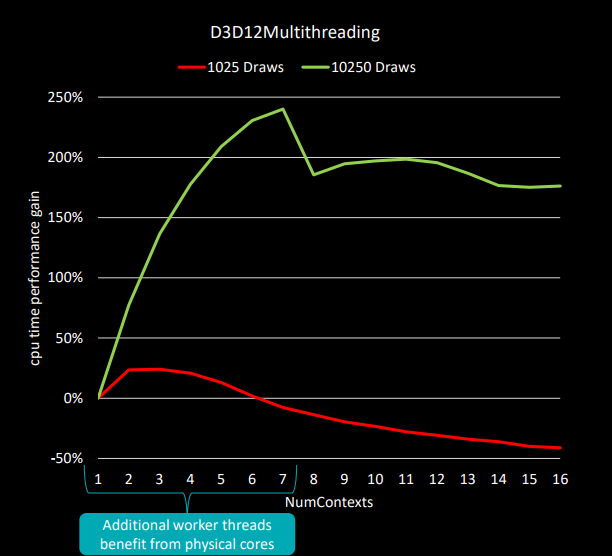
Microsoft’s multithreaded DirectX 12 sample shows a definite decline in performance when going from 8 to 9 total threads. Credit: AMD

First, game developers should profile their games to see if the simultaneous multithreading (SMT) on Zen hurts or helps. This appears to be quite workload dependent. Some workloads see a drop off as they move from seven graphics threads (for eight threads total, as there’s a main non-graphics thread, too) to eight graphics threads (for nine threads total). With seven working threads, each of the program’s threads can run on its own physical core, avoiding the resource sharing that SMT imposes. Adding the eighth thread forces one of the physical cores to double up and run a thread on each of its logical cores. That core sharing can hurt overall performance.

Ashes of the Singularity can drive all the logical cores almost all of the time.
Ashes of the Singularity can drive all the logical cores almost all of the time. Credit: AMD

The impact this has will vary from game to game. AMD cites Ashes of the Singularity as a game that benefits from SMT in spite of the sharing.

Second, developers should create the smaller of either one working thread per 300 draw calls or one fewer working threads than there are logical (for games that are better with SMT) or physical (for those that are not) cores.

More patchwork

How much difference can this make? Total War: Warhammer received a patch last week with Ryzen performance updates, and it appears that the patch makes this kind of thread-related alteration. With the previous version of the game, it was observed that disabling SMT in the system firmware boosted performance by around 11 percent. That kind of discrepancy is suggestive that the game is creating too many threads and that the resource sharing is hurting performance.

Hardware.fr tested the new patch and found that this performance difference no longer exists. The game has been updated to recognize the difference between logical and physical cores and appears to now scale the number of threads it uses according to the number of physical cores, rather than logical. Although the game’s overall performance is unchanged, it no longer requires SMT to be manually disabled, meaning that you can leave it on without having to worry that in this particular game you’re reducing performance by doing so.

Treating logical and physical cores differently isn’t actually a new thing. Windows offers APIs that allow programs to query the hardware’s processor topology, and there are low-level CPU instructions that allow software to similarly learn the topology without needing to query the operating system. However, it’s possible that games are assuming that AMD chips still use the unusual design of the Bulldozer family (where logical cores don’t share integer execution resources at all). It’s also possible that it might be worth using SMT on Intel chips but not AMD ones, or vice versa.

Either way, the fix to the games themselves should be fairly simple to make, they just require developers to test the SMT versus non-SMT configurations and see which one works better.

No free parking

Hardware.fr’s testing of Total War also showed another source of performance variation, due to the system power profile. AMD’s guidance to reviewers was to use Windows’ High Performance profile. This keeps each processor core in its highest power state, and it disables “core parking,” wherein a core is put into a particularly low power mode. The problem with core parking is that it is relatively slow to get the core unparked, introducing latency.

Windows, however, defaults to its “Balanced” profile. This switches cores to lower power states and requires relatively long periods of activity before it boosts them to higher power states. The Balanced plan also enables core parking.

In benchmarks, the latest Total War version performed 11 percent better with parking disabled than with it enabled. The performance overhead from this greater level of power management is non-negligible.

AMD’s new power management profile offers something of a hybrid of “Balanced” and “High Performance.” Like the Windows High Performance profile, the new plan disables parking entirely, but like the Balanced plan, it still allows cores to be put into lower power modes. AMD has also tuned the thresholds between power modes, and as such it switches into high power mode more quickly than Balanced does.

The new power plan gives almost identical performance to the High Performance plan, but when the machine is idle, it offers some, if not all, of the power saving that the Balanced setting provides.

AMD should also be addressing some problems on its side. Ryzen shows a significant dependence on the speed of its memory. Faster memory obviously means that there is more bandwidth, but there’s a less obvious advantage on Zen chips: internally, the chip is organized as two blocks of four cores, and the communication between these blocks of four cores runs at the memory clock speed. Make the memory clock faster by going from, say, 2400MHz RAM (on a 1200MHz clock) to 3200MHz RAM (on a 1600MHz clock) and not only does the memory bandwidth go up by fifty percent, but so too does the bandwidth between the two blocks of cores.

Unfortunately, getting Ryzen to run consistently and reliably with high-speed memory has proven challenging, with different motherboards, firmwares, and memory manufacturers showing very different results.

AMD has a microcode update that it says should reduce memory latency across the board, and as the processor and motherboard firmware matures, getting high memory speeds should be more reliable. With Zen’s unusually high dependence on the memory speed, enabling those high speeds consistently can only be a good thing.

A taste of things to come, which is both good and bad

The changes made in Total War appear to be straightforward. Those made to Ashes of the Singularity may be a little more complex but are still a long way short of radical rewriting of the engine. The gains that this work can offer are relatively modest, but equally, the work should not be too onerous for developers to make equivalent updates to other game titles, providing a desirable, if limited, boost to Ryzen performance.

For titles that are still actively maintained, we’d expect similar patches, with similar performance improvements, over the coming months. Ryzen’s effective performance is going to improve. But there’s no magic here; these gains are going to tend to be incremental, not revolutionary. And not every game will need patching; some games may very well be doing the right things already. Ryzen will go from being a good gaming chip to being an even better one, but, for those disappointed that Intel still holds the absolute lead, that’s not going to change. There’s only so much difference that optimization can make.

Listing image: Mark Walton

150 Comments